l2tp ipsec centos7
PPTP、L2TP和IPsec的区别及优缺点
1、PPTP协议是点对点隧道协议:
其将控制包与数据包分开,控制包采用TCP控制,用于严格的状态查询及信令信息;数据包部分先封装在PPP协议中,然后封装到GRE V2协议中。
2、L2TP是国际标准隧道协议:
它结合了PPTP协议以及第二层转发L2F协议的优点,能以隧道方式使PPP包通过各种网络协议,包括ATM、SONET和帧中继。但是 L2TP没有任何加密措施,更多是和IPSec协议结合使用,提供隧道验证。
3、两者的联系与区别:
联系:PPTP和L2TP都使用PPP协议对数据进行封装,然后添加附加包头用于数据在互联网络上的传输。尽管两个协议非常相似,但是仍存在以 下几方面的不同
区别:
1)PPTP要求互联网络为IP网络。L2TP只要求隧道媒介提供面向数据包的点对点的连接。L2TP可以在IP(使用UDP),桢中继永久虚 拟电路(PVCs),X.25虚拟电路(VCs)或ATM VCs网络上使用。
2)PPTP只能在两端点间建立单一隧道。L2TP支持在两端点间使用多隧道。使用L2TP,用户可以针对不同的服务质量创建不同的隧道。
3)L2TP可以提供包头压缩。当压缩包头时,系统开销(overhead)占用4个字节,而PPTP协议下要占用6个字节。
4)L2TP可以提供隧道验证,而PPTP不支持隧道验证。但当L2TP或PPTP与IPSEC共同使用时,可由IPSEC提供隧道验证,不需 在第2层协议上验证隧道。
IPSec的优点
如果在路由器或防火墙上执行了IPSec,它就会为周边的通信提供强有力的安全保障。一个公司或工作组内部的通信将不涉及与安全相关的费用。下文叙 述了IPSec的一些优点:
IPSec在传输层之下,对于应用程序来说是透明的。当在路由器或防火墙上安装IPSec时,无需更改用户或服务器系统中的软件设置。即使在终端系 统中执行IPSec,应用程序一类的上层软件也不会被影响。
IPSec对终端用户来说是透明的,因此不必对用户进行安全机制的培训。
如果需要的话,IPSec可以为个体用户提供安全保障,这样做就可以保护企业内部的敏感信息。
IPSec正向Internet靠拢。已经有一些机构部分或全部执行了IPSec。IAB的前任总裁Christian Huitema认为,关于如何保证Internet安全的讨论是他所见过的最激烈的讨论之一。讨论的话题之一就是安全是否在恰当的协议层上被使用。想要提 供IP级的安全,IPSec必须成为配置在所有相关平台(包括Windows NT,Unix和Macintosh系统)的网络代码中的一部分。
实际上,现在发行的许多Internet应用软件中已包含了安全特征。例如,Netscape Navigator和Microsoft Internet Explorer支持保护互联网通信的安全套层协议(SSL),还有一部分产品支持保护Internet上信用卡交易的安全电子交易协议(SET)。然 而,VPN需要的是网络级的功能,这也正是IPSec所提供的。
本文部署基于ipsec 的l2tp
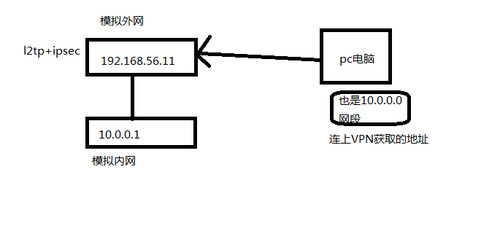
1.基础环境
| 1 2 3 4 5 6 7 8 9 10 11 12 13 14 15 16 17 18 19 20 21 22 23 24 25 26 27 28 29 30 31 | [root@bogon tmp] # cat /etc/redhat-release CentOS Linux release 7.3.1611 (Core) [root@bogon tmp] # ifconfig eth0: flags=4163 inet 192.168.56.11 netmask 255.255.255.0 broadcast 192.168.56.255 inet6 fe80::20c:29ff:fe19:7f25 prefixlen 64 scopeid 0x20 ether 00:0c:29:19:7f:25 txqueuelen 1000 (Ethernet) RX packets 655392 bytes 86779661 (82.7 MiB) RX errors 0 dropped 0 overruns 0 frame 0 TX packets 853465 bytes 156410883 (149.1 MiB) TX errors 0 dropped 0 overruns 0 carrier 0 collisions 0 eth1: flags=4163 inet 10.0.0.1 netmask 255.0.0.0 broadcast 10.255.255.255 inet6 fe80::20c:29ff:fe19:7f2f prefixlen 64 scopeid 0x20 ether 00:0c:29:19:7f:2f txqueuelen 1000 (Ethernet) RX packets 222 bytes 22794 (22.2 KiB) RX errors 0 dropped 0 overruns 0 frame 0 TX packets 215 bytes 26245 (25.6 KiB) TX errors 0 dropped 0 overruns 0 carrier 0 collisions 0 lo: flags=73 inet 127.0.0.1 netmask 255.0.0.0 inet6 ::1 prefixlen 128 scopeid 0x10 loop txqueuelen 1 (Local Loopback) RX packets 0 bytes 0 (0.0 B) RX errors 0 dropped 0 overruns 0 frame 0 TX packets 0 bytes 0 (0.0 B) TX errors 0 dropped 0 overruns 0 carrier 0 collisions 0 [root@bogon tmp] # |
2.安装软件
在centos7 版本后, 提供ipsec 服务包由libreswan替代了openswan
| 1 2 | yum install xl2tpd yum install libreswan |
3.修改ipsec的配置文件(在配置文件里加入这一行,充许传透nat建立l2tp连接)
| 1 2 3 4 | [root@bogon tmp] # vim /etc/ipsec.conf #其余的不变 nat_traversal= yes #新加的 virtual_private=%v4:10.0.0.0 /8 ,%v4:192.168.0.0 /16 ,%v4:172.16.0.0 /12 ,%v4:25.0.0.0 /8 ,%v4:100.64.0.0 /10 , %v6:fd00:: /8 ,%v6:fe80:: /10 |
4.建立ipsec 与 l2tp 服务关联的配置文件
| 1 2 3 4 5 6 7 8 9 10 11 12 13 14 15 16 17 18 19 20 21 22 | cd /etc/ipsec .d/ [root@bogon ipsec.d] # cat l2tp_psk.conf #此文件不存在 需要手动创建 conn L2TP-PSK-NAT rightsubnet=vhost:%priv also=L2TP-PSK-noNAT conn L2TP-PSK-noNAT authby=secret pfs=no auto=add keyingtries=3 dpddelay=30 dpdtimeout=120 dpdaction= clear rekey=no ikelifetime=8h keylife=1h type =transport left=192.168.56.11 leftprotoport=17 /1701 right=%any rightprotoport=17/%any [root@bogon ipsec.d] # |
5.当建立l2tp连接时,需要输入预共享密匙,以下为预共享密匙的配置文件
| 1 2 3 4 5 6 7 8 9 10 11 12 13 14 15 | [root@bogon ipsec.d] # cat /etc/ipsec.secrets include /etc/ipsec .d/*.secrets [root@bogon ipsec.d] # cd /etc/ipsec.d/ [root@bogon ipsec.d] # ll total 40 -rw------- 1 root root 9216 Apr 11 01:50 cert9.db -rw------- 1 root root 11264 Apr 11 01:50 key4.db -rw-r--r-- 1 root root 362 Apr 11 01:47 l2tp_psk.conf -rw-r--r-- 1 root root 33 Apr 11 01:49 linuxcc_l2tp.secrets -rw------- 1 root root 419 Apr 11 01:50 pkcs11.txt drwx------ 2 root root 90 Apr 11 01:44 policies -rw-r--r-- 1 root root 1338 Nov 12 09:58 v6neighbor-hole.conf [root@bogon ipsec.d] # cat linuxcc_l2tp.secrets #没有的话自己创建 192.168.56.11 %any: PSK "123456" [root@bogon ipsec.d] # |
6.修改内核支持,可以对照以下配置修改,或者直接复制,修改完后运行sysctl -p 使配置生效
| 1 2 3 4 5 6 7 8 9 10 11 12 13 14 15 16 | vim /etc/sysctl .conf 添加进去 sysctl -p 生效 vm.swappiness = 0 net.ipv4.neigh.default.gc_stale_time=120 net.ipv4.conf.all.rp_filter=0 net.ipv4.conf.default.rp_filter=0 net.ipv4.conf.default.arp_announce = 2 net.ipv4.conf.all.arp_announce=2 net.ipv4.tcp_max_tw_buckets = 5000 net.ipv4.tcp_syncookies = 1 net.ipv4.tcp_max_syn_backlog = 1024 net.ipv4.tcp_synack_retries = 2 net.ipv4.conf.lo.arp_announce=2 net.ipv4.ip_forward = 1 net.ipv4.conf.default.accept_redirects = 0 net.ipv4.conf.default.send_redirects = 0 net.ipv4.conf.default.accept_source_route = 0 |
7.检验ipsec服务配置:
ipsec setup start
ipsec verify 此处出错 以及解决办法
| 1 2 3 4 5 6 7 8 9 10 11 12 13 14 15 16 17 18 19 20 21 22 23 24 25 26 27 28 29 30 31 32 33 34 35 36 37 38 39 40 41 42 43 44 45 46 47 48 49 50 | [root@bogon ipsec.d] # ipsec verify Verifying installed system and configuration files Version check and ipsec on-path [OK] Libreswan 3.15 (netkey) on 3.10.0-514.10.2.el7.x86_64 Checking for IPsec support in kernel [OK] NETKEY: Testing XFRM related proc values ICMP default /send_redirects [OK] ICMP default /accept_redirects [OK] XFRM larval drop [OK] Pluto ipsec.conf syntax [OK] Hardware random device [N /A ] Two or more interfaces found, checking IP forwarding [OK] Checking rp_filter [ENABLED] /proc/sys/net/ipv4/conf/eth0/rp_filter [ENABLED] rp_filter is not fully aware of IPsec and should be disabled Checking that pluto is running [OK] Pluto listening for IKE on udp 500 [OK] Pluto listening for IKE /NAT-T on udp 4500 [OK] Pluto ipsec.secret syntax [OK] Checking 'ip' command [OK] Checking 'iptables' command [OK] Checking 'prelink' command does not interfere with FIPSChecking for obsolete ipsec.conf options [OK] Opportunistic Encryption [DISABLED] ipsec verify: encountered 3 errors - see 'man ipsec_verify' for help [root@bogon ipsec.d] # echo 0 >/proc/sys/net/ipv4/conf/eth0/rp_filter #解决办法 [root@bogon ipsec.d] # ipsec verify Verifying installed system and configuration files Version check and ipsec on-path [OK] Libreswan 3.15 (netkey) on 3.10.0-514.10.2.el7.x86_64 Checking for IPsec support in kernel [OK] NETKEY: Testing XFRM related proc values ICMP default /send_redirects [OK] ICMP default /accept_redirects [OK] XFRM larval drop [OK] Pluto ipsec.conf syntax [OK] Hardware random device [N /A ] Two or more interfaces found, checking IP forwarding [OK] Checking rp_filter [OK] Checking that pluto is running [OK] Pluto listening for IKE on udp 500 [OK] Pluto listening for IKE /NAT-T on udp 4500 [OK] Pluto ipsec.secret syntax [OK] Checking 'ip' command [OK] Checking 'iptables' command [OK] Checking 'prelink' command does not interfere with FIPSChecking for obsolete ipsec.conf options [OK] Opportunistic Encryption [DISABLED] [root@bogon ipsec.d] # |
8.启动服务
| 1 2 | systemctl start ipsec systemctl enable ipsec |
9.安装配置xl2tpd服务
| 1 2 3 4 5 6 7 8 9 10 11 12 13 14 15 16 17 18 19 20 21 22 23 24 25 26 27 28 29 30 31 32 33 34 35 36 37 38 39 40 41 42 43 | yum install xl2tpd vi /etc/xl2tpd/xl2tpd .conf #修改l2tp的配置文件 [root@bogon xl2tpd] # cat xl2tpd.conf ; ; This is a minimal sample xl2tpd configuration file for use ; with L2TP over IPsec. ; ; The idea is to provide an L2TP daemon to which remote Windows L2TP /IPsec ; clients connect. In this example, the internal (protected) network ; is 192.168.1.0 /24 . A special IP range within this network is reserved ; for the remote clients: 192.168.1.128 /25 ; (i.e. 192.168.1.128 ... 192.168.1.254) ; ; The listen-addr parameter can be used if you want to bind the L2TP daemon ; to a specific IP address instead of to all interfaces. For instance, ; you could bind it to the interface of the internal LAN (e.g. 192.168.1.98 ; in the example below). Yet another IP address ( local ip, e.g. 192.168.1.99) ; will be used by xl2tpd as its address on pppX interfaces. [global] ipsec saref = yes #此处添加上去 listen-addr = 192.168.56.11 #外网 ; ; requires openswan-2.5.18 or higher - Also does not yet work in combination ; with kernel mode l2tp as present in linux 2.6.23+ ; ipsec saref = yes ; Use refinfo of 22 if using an SAref kernel patch based on openswan 2.6.35 or ; when using any of the SAref kernel patches for kernels up to 2.6.35. ; saref refinfo = 30 ; ; force userspace = yes ; ; debug tunnel = yes [lns default] ip range = 10.0.0.100-10.0.0.200 #要和自己的内网一直 分配给客户端的IP地址 local ip = 192.168.56.11 require chap = yes refuse pap = yes require authentication = yes name = LinuxVPNserver ppp debug = yes pppoptfile = /etc/ppp/options .xl2tpd length bit = yes |
10.修改xl2tpd属性配置文件
vi /etc/ppp/options.xl2tpd
| 1 2 3 4 5 6 7 8 9 10 11 12 13 14 15 16 17 18 19 20 21 22 23 24 25 26 27 28 | [root@bogon xl2tpd] # cat /etc/ppp/options.xl2tpd ipcp-accept- local ipcp-accept-remote ms-dns 8.8.8.8 #只修改DNS 建议改成网关的IP # ms-dns 192.168.1.1 # ms-dns 192.168.1.3 # ms-wins 192.168.1.2 # ms-wins 192.168.1.4 noccp auth crtscts idle 1800 mtu 1410 mru 1410 nodefaultroute debug lock proxyarp connect-delay 5000 # To allow authentication against a Windows domain EXAMPLE, and require the # user to be in a group "VPN Users". Requires the samba-winbind package require-mschap-v2 # plugin winbind.so # ntlm_auth-helper '/usr/bin/ntlm_auth --helper-protocol=ntlm-server-1 --require-membership-of="EXAMPLE\\VPN Users"' # You need to join the domain on the server, for example using samba: # http://rootmanager.com/ubuntu-ipsec-l2tp-windows-domain-auth/setting-up-openswan-xl2tpd-with-native-windows-clients-lucid.html [root@bogon xl2tpd] # |
11.添加用户名密码
| 1 2 3 4 5 | [root@bogon xl2tpd] # cat /etc/ppp/chap-secrets # Secrets for authentication using CHAP # client server secret IP addresses vpn12345 * 123456 * [root@bogon xl2tpd] # |
12.启动l2tp服务
| 1 2 3 | systemctl start xl2tpd systemctl enable xl2tpd systemctl status xl2tpd |
13.客户端连接windows
windows+R
输入 regedit 找到此路径
| 1 | HKEY_LOCAL_MACHINE\System\CurrentControlSet\Services\Rasman\ |
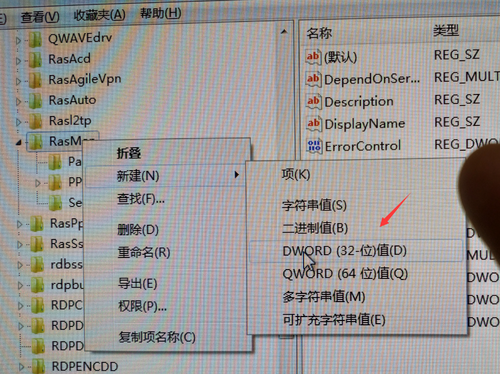
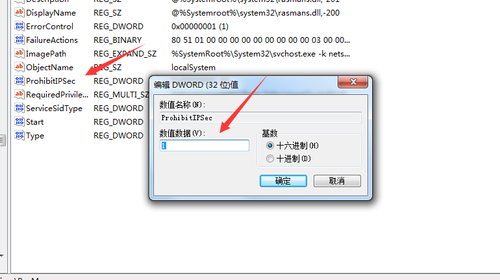
| 1 | 然后重启电脑 |
14.开启连接 切记按照顺序
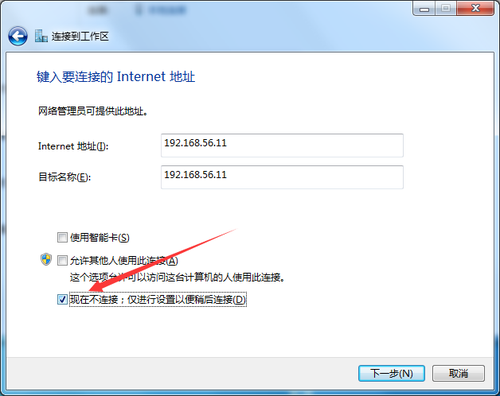
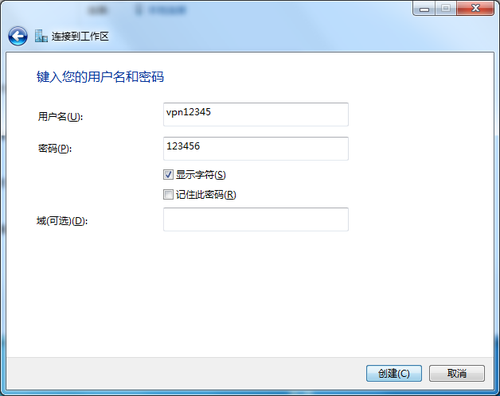
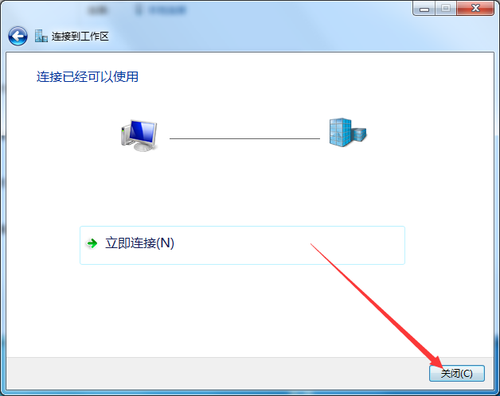
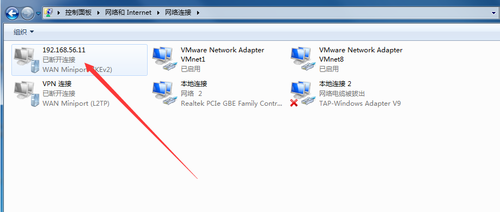
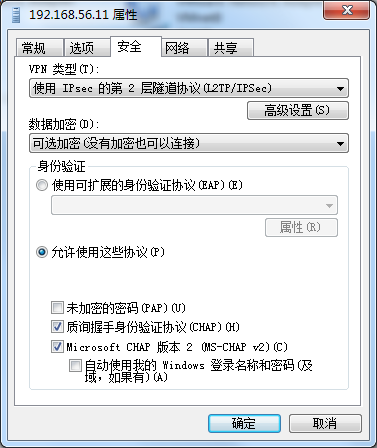
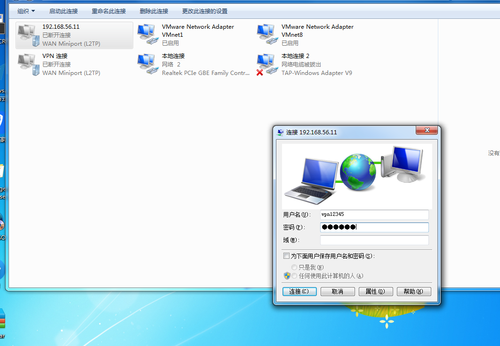
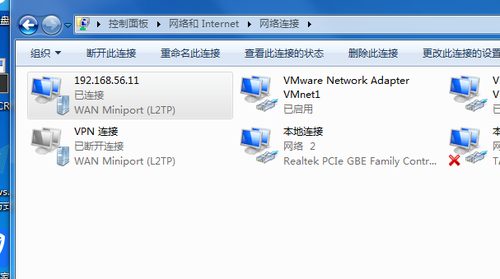
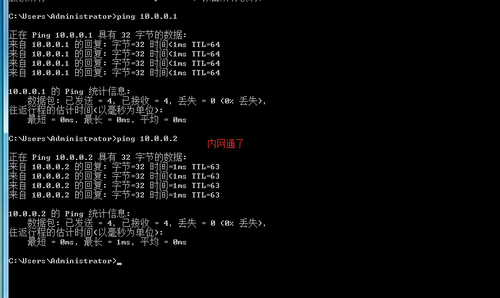
到此完毕
错误:手机连接不了 电脑可以连接
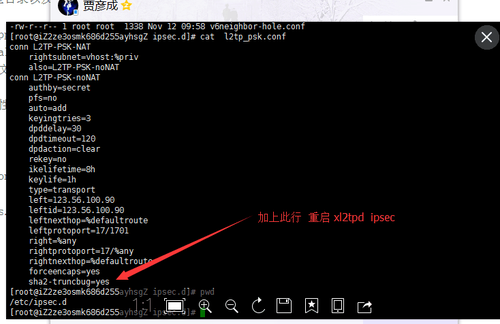
本文转自 小小三郎1 51CTO博客,原文链接:http://blog.51cto.com/wsxxsl/1914678,如需转载请自行联系原作者
本文来自互联网用户投稿,文章观点仅代表作者本人,不代表本站立场,不承担相关法律责任。如若转载,请注明出处。 如若内容造成侵权/违法违规/事实不符,请点击【内容举报】进行投诉反馈!