matlab中filter滤波器fdatool转换为C语言
在命令区中输入fdatool,按enter键,出现下图Filter Design&Analysis Tool界面:
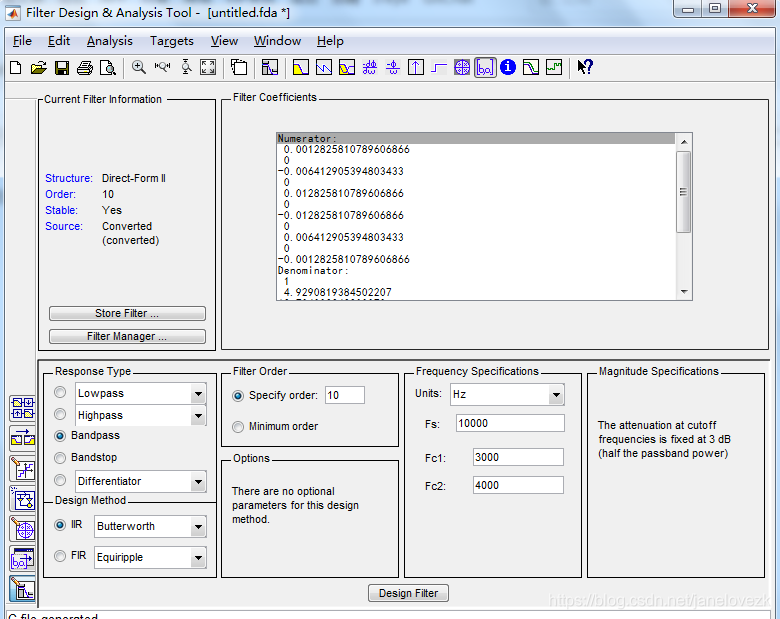
在其中选择滤波器类型(低通,带通,高通),选择IIR,设置好采样频率及通频之后,点击Design Filter.
点击Edit中Convert to Single Section,即得到filter函数中的b,a参数:

点击Targets中的Generate C header...即可得到b,a参数的一维数组,下面即是C语言代码
#include
#include
#include
#include
#define EPS 0.000001
double filter(const double* x, double* y, int xlen, double* a, double* b, int nfilt)//nfilt为系数数组长度
{
double tmp;
int i, j;
//normalization
if ((*a - 1.0>EPS) || (*a - 1.0<-EPS))
{
tmp = *a;
for (i = 0; i
b[i] /= tmp;
a[i] /= tmp;
}
}
memset(y, 0, xlen * sizeof(double));//将y清零,以双浮点为单位
a[0] = 0.0;
for (i = 0; i
for (j = 0; i >= j&&j
y[i] += (b[j] * x[i - j] - a[j] * y[i - j]);
}
}
a[0] = 1.0;
return *y;
}
int main(){
#define N 11;//N为b,a数组的长度
#define leth 500;//leth为滤波前信号个数
//下面是0-1000Hz低通滤波器,X1为通道1滤波前信号,Y1为通道1滤波后信号
double x1[leth];//输入:通道1滤波前信号
const double b[N] = {
1.683581407233e-06,1.683581407233e-05,7.576116332548e-05, 0.000202029768868,
0.0003535520955189,0.0004242625146227,0.0003535520955189, 0.000202029768868,
7.576116332548e-05,1.683581407233e-05,1.683581407233e-06
};
const double a[N] = {
1, -5.987589629817, 16.672193323, -28.2587879002,
32.15975648769, -25.60174959705, 14.40568742621, -5.647074344132,
1.473727936974, -0.230919345862, 0.01647963054713
};
double y1[500];//输出:通道1滤波后信号
filter(x1, y1, 500, A1000, B1000, 11);
本文来自互联网用户投稿,文章观点仅代表作者本人,不代表本站立场,不承担相关法律责任。如若转载,请注明出处。 如若内容造成侵权/违法违规/事实不符,请点击【内容举报】进行投诉反馈!