纯css实现百分比环形图
一、原型图

二、思路
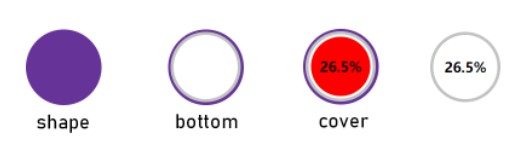
第1层,绘制饼图(shape)和灰色细环部分(bottom),其中shape是根元素,所有元素都将相对shape做绝对定位。根据原型图的显示效果,对bottom的定位做一定的调整如图所示:
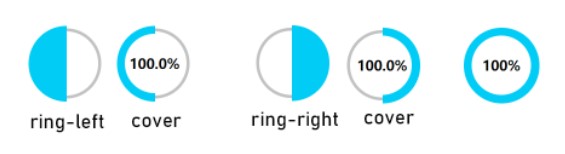
第2层,绘制左环(ring-left)和右环(ring-right)如图所示:
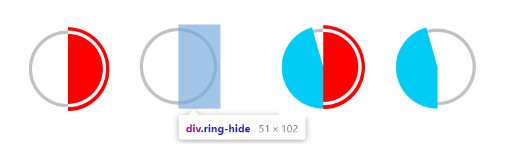
第3层,绘制遮罩环(.ring-hide),调整与第1层的环吻合,用于遮住右环和转动到右边区域的左环部分,制作出扇形图的效果,如图所示:
第4层,显示百分比值的圆(.cover),层级最高,放在中间做遮罩,制作出环状效果。如图所示:
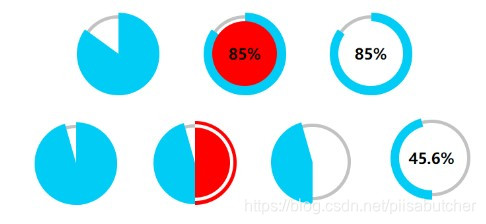
从以上几个图可以看出两种情况:
- 当百分比值大于50时,遮罩层不显示,右环显示,转动左环,左环跟右环部分重叠。
- 当百分比值小于50时,遮罩层显示,转动左环,遮罩层遮住全部的右环和部分左环,显示出扇形环的效果。
三、代码
<div class="shape"><div class="bottom">div><div class="cover">100%div><div class="ring-left">div><div class="ring-right">div><div class="ring-hide"><div>div>div>
div>
.shape{width: 100px;height: 100px;text-align: center;line-height: 100px;border-radius: 50%;font-weight: bold;color: #fff;position: relative;
}
.shape>div{position: absolute;
}
.shape>.bottom{width: 85px;height: 85px;border-radius: 50%;background-color: #fff;border: 4px solid #c0c3c2;top: 3px;left: 3px;
}
.shape>.cover{border-radius: 50%;width: 79px;height: 79px;background-color: #FFF;z-index: 10;top: 10px;left: 10px;color: #000;line-height: 79px;font-size: 18px;
}
.shape>.ring-left{width: 50px;height: 100px;border-radius: 50px 0 0 50px;background-color: #00ccf6;transform-origin: right center;transform: rotate(0deg);
}
.shape>.ring-right{width: 50px;height: 100px;border-radius: 0 50px 50px 0;background-color: #00ccf6;left: 50px;transform-origin: left center;transform: rotate(0deg);
}
.shape>.ring-hide{z-index: 9;border-radius: 0 51px 51px 0;width: 52px;height: 102px;background-color: #fff;top: -1px;left: 49px;transform-origin: left center;display: none;transform: rotate(0deg);
}
.shape>.ring-hide>div{z-index: 10;border-radius: 0 50px 50px 0;width: 43px;height: 85px;background-color: transparent;top: 4px;left: 0px;color: #000;line-height: 85px;position: absolute;border: 4px solid #c0c3c2;border-left: 0;
}
function setPercentValue(value) {let cover = document.querySelector('.shape>.cover'),left = document.querySelector('.shape>.ring-left'),hide = document.querySelector('.shape>.ring-hide');let deg;//左环转动角度if (Number.isNaN(value) || value < 0) value = 0;if (value > 100) value = 100;if(value % 1 !== 0){  //若value为小数,保留一位小数value = value.toFixed(1);}cover.innerText = value + "%";if (value < 50) {  //值小于50,显示遮罩hide.style.display = "inherit";deg = (50 - value)/50 * 180;} else {  //值大于或等于50,不显示遮罩hide.style.display = "none";deg =  (50 - (value - 50))/50 * 180;}left.style.transform = "rotate("+ (-deg) +"deg)";
}
四、效果
//调用
setPercentValue(-45);
setPercentValue(0);
setPercentValue(45.624);
setPercentValue(50.0);
setPercentValue(78.4);
setPercentValue(98);
setPercentValue(100);
setPercentValue(150);
setPercentValue("hahaha");

本文来自互联网用户投稿,文章观点仅代表作者本人,不代表本站立场,不承担相关法律责任。如若转载,请注明出处。 如若内容造成侵权/违法违规/事实不符,请点击【内容举报】进行投诉反馈!