软件测试框架之——unittest
通过unittest创建测试
1必须继承与unittest.TestCase类
2可以定义setUp和tearDown方法,也可以定义setUpClass、tearDownClass的类方法
3所有的测试方法必须以test开头。测试方法会在运行时自动被调用
4可用pycharm自带的unittest框架运行,也可以以普通方式运行
Python复制代码
import unittestclass Demo(unittest.TestCase):@classmethoddef setUpClass(cls):print("setUpClass方法只运行一次")@classmethoddef tearDownClass(cls):print("tearDownClass方法只运行一次")def setUp(self):print("setUp在每个test方法执行之前执行")def tearDown(self):print("tearDown在每个test方法执行之后执行")def testFunc(self):print("这是一个测试方法")def testLogin(self):print("这是一个测试登录的方法")if __name__ == '__main__':print("普通的测试入口")unittest.main()
运行方式的设置
●pycharm自带的unittest框架测试
●从main方法的入口开启的unittest测试
Python复制代码
if __name__ == '__main__':print("普通的测试入口")# main方法的入口开启测试unittest.main()
Run/DebugConfigurations
Name:
Allowparallelrun
unittest-demo-01
Storeasprojectfile
mAN方法作为入口开启测试的配置
Python
Configuration
Logs
时STPythondocs
E:python-studylautotestunittest-demopy
Docutilstask
Scriptpath.:
ASTSphinxtask
Parameters
Pythontests
Autodetect
Environment
-demo.py
Doctests
st-demo.D
PYTHONUNBUFFERED-1
Environmentvariables
Nosetests
pytest
不走main方法,使用自带的unittest进行测试
Twisted
Unittests
lnterpreteroptions
ShellScript
的配置,默认是这种配置
SpaceTask
cipython-studyautotest
tOx
AddcontentrootstoPYTHONPATH
AddsourcerootstoPYTHONPATH
Execution
Emulateterminalinoutputconsole
RunwithPythonConsole
Redirectinputfrom:
Editconfigurationtemplates..
OK
Apply
Cancel
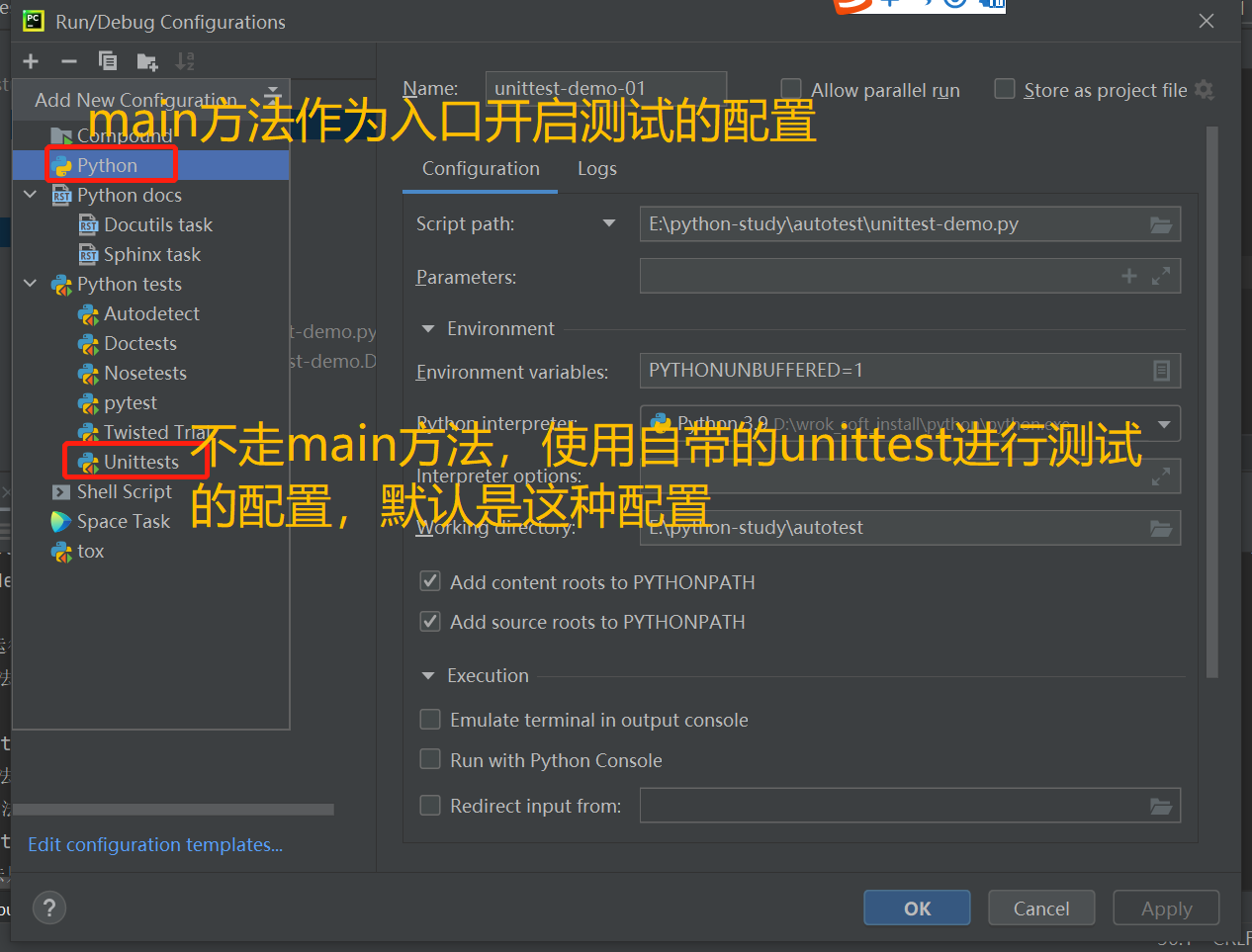
pycharm自带的unittest框架测试
这种运行测试,main方法就不会生效。
上面的代码输出结果为:
Plain Text复制代码
setUpClass方法只运行一次
setUp在每个test方法执行之前执行
这是一个测试方法
tearDown在每个test方法执行之后执行
setUp在每个test方法执行之前执行
这是一个测试登录的方法
tearDown在每个test方法执行之后执行
tearDownClass方法只运行一次
..
----------------------------------------------------------------------
Ran 2 tests in 0.000sOK
设置从main方法的入口开启unittest测试
上面的输出结果为,这个就会走if __name__ == '__main__':中的代码
Plain Text复制代码
普通的测试入口
setUpClass方法只运行一次
setUp在每个test方法执行之前执行
这是一个测试方法
tearDown在每个test方法执行之后执行
setUp在每个test方法执行之前执行
这是一个测试登录的方法
tearDown在每个test方法执行之后执行
tearDownClass方法只运行一次
..
----------------------------------------------------------------------
Ran 2 tests in 0.000sOK
断言
断言一旦失败了,后面的代码就不会执行
常用的断言有:
●self.assertEqual()
●self.assertNotEqual()
●self.assertIn()
●self.assertNotIn()
●self.assertTrue()
●self.assertFalse()
断言的结果表示
●点.代表断言正确
●F代表断言失败
●E代表代码有错误
实现断言失败后再截图功能
●通过异常处理的方式实现
●通过装饰器的方式实现
通过异常处理的方式
Python复制代码
import time
import unittest
from selenium import webdriverfrom ddt import ddt, data, unpack
from util import Util@ddt
class
本文来自互联网用户投稿,文章观点仅代表作者本人,不代表本站立场,不承担相关法律责任。如若转载,请注明出处。 如若内容造成侵权/违法违规/事实不符,请点击【内容举报】进行投诉反馈!