导入阿里源maven库证书
在在maven -> reimport 时出现如下的错误
Could not transfer artifact org.springframework.boot:spring-boot-starter-parent:pom:1.3.8.RELEASE from/to alimaven (https://maven.aliyun.com/nexus/content/groups/public/): sun.security.validator.ValidatorException: PKIX path building failed: sun.security.provider.certpath.SunCertPathBuilderException: unable to find valid certification path to requested target
出现这个问题需要使用https,并且导出证书
<mirrors> <mirror> <id>alimavenid> <name>阿里云 mavenname><url>https://maven.aliyun.com/repository/centralurl> <mirrorOf>centralmirrorOf> mirror> mirrors>
-
url中使用https
-
下载阿里镜像库的证书到证书库里
-
打开阿里源网址
-
https://maven.aliyun.com/nexus/content/groups/public/
-
使用谷歌浏览器下载到本地
-
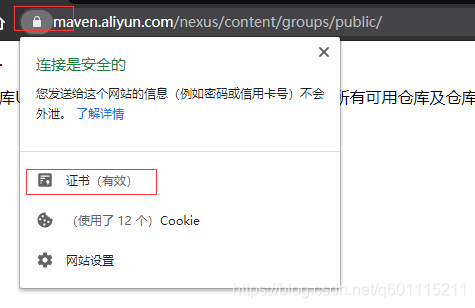
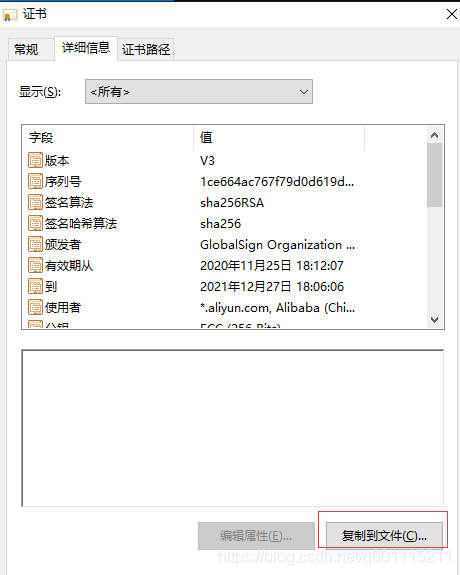
-
下点右侧下一步
-
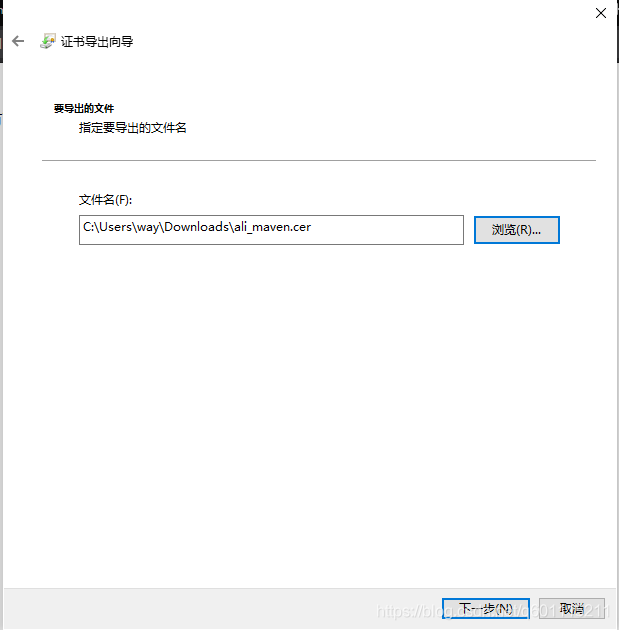
-
添加到Java信任证书库 D:\Program Files\Java\jre1.8.0_192\lib\security(自己的java安装目录)
-
-
执行命令
keytool -import -alias cacerts -keystore cacerts -file C:\Users\way\Downloads\ali_maven.cer
- 默认密钥库口令:changeit
- 是否信任此证书?[否]: Y
- 显示证书已添加到密钥库中即表示添加成功
本文来自互联网用户投稿,文章观点仅代表作者本人,不代表本站立场,不承担相关法律责任。如若转载,请注明出处。 如若内容造成侵权/违法违规/事实不符,请点击【内容举报】进行投诉反馈!