单出口双防火墙双核心冗余_CISCO ASA防护墙详细AS/双出口配置切换---By 年糕泰迪...
一.实验概述
实验目的:
1/开机零配置中性企业网络骨干架构。
2/部署出口防火墙HA(Active/Standby)并验证测试。
3/部署双出口自动冗余切换并验证测试。
实验材料:
EVE-NG ,ASAv(v9.8) ,路由器,L3交换机。
实验前提
此次实验防火墙为routed模式,并且为single模式
实验拓扑:
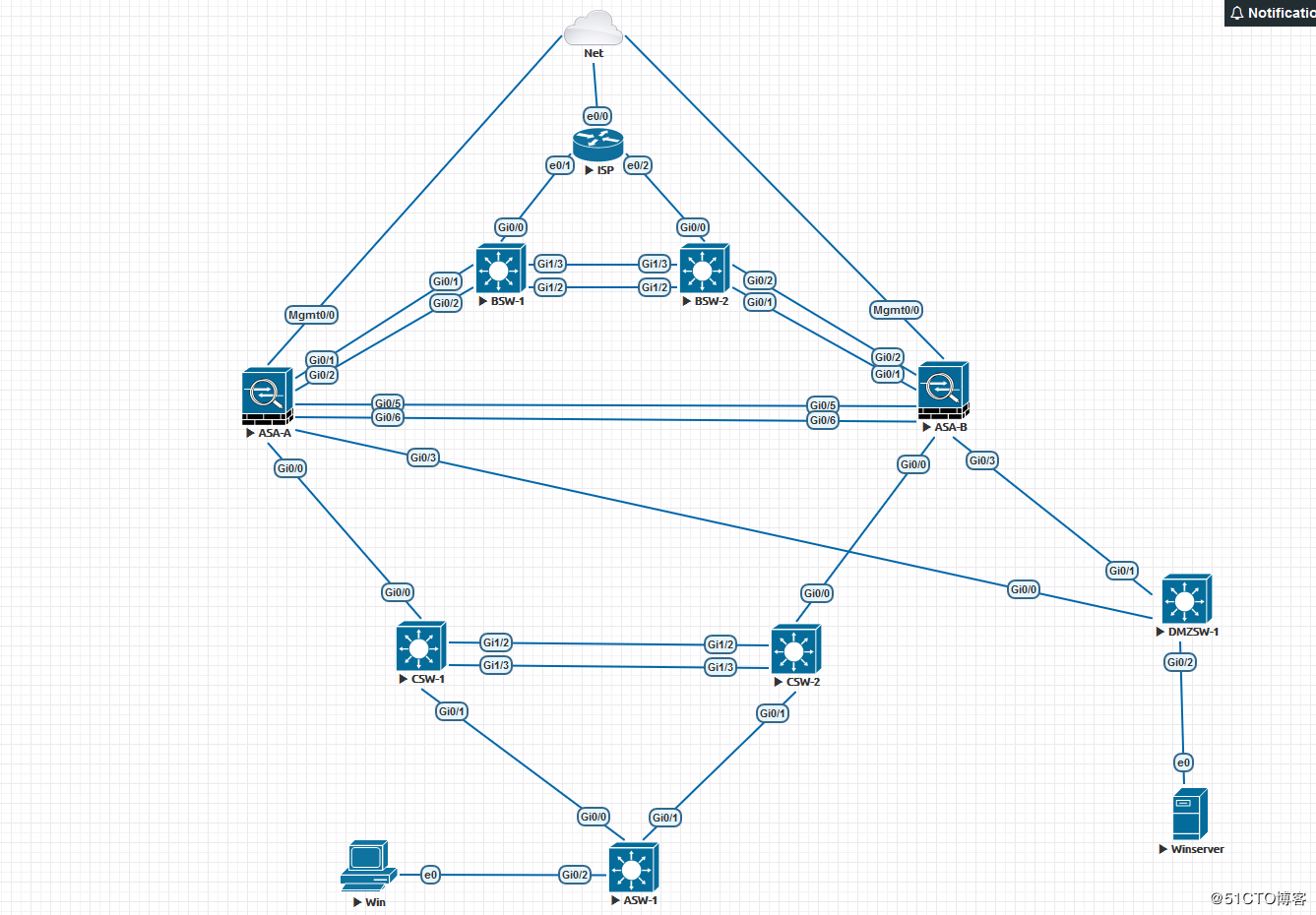
拓扑说明:
1/名称说明:
Net云为通EVE-NG模拟器主机桥接的NAT网卡,负责该网络拓扑向外通信;ISP指代为运营商设备,BSW为边界交换机用于透传vlan和扩展接口,ASA为出口防火墙,CSW为核心交换机,ASW为介入交换机,DMZSW为DMZ网关交换机。
2/网段说明:
ISP1:100.100.100.x/30 ISP2:200.200.200.x/30 DMZ PAT地址为100.100.101.x/24 ,核心上联网段为10.10.10.x/24 ,核心下联网段为10.10.20.0/24和10.10.21.0/24,用户端为10.10.30.0/24,DMZ上联网段为172.16.10.0/24 ,服务器网段为172.16.20.0/24
3/关键功能点说明
①出口双线冗余自动切换,采用静态浮动路由的方式(默认ISP1为主)。
②防火墙双击冗余,采用failover Active/Standby 机制(默认ASA-A为主)。
③关键难点,在防火墙配置了AS模式后,主备防火墙配置是一模一样的,包括接口配置/路由配置/ACL/NAT等基础策略,当主防火墙在故障(宕机或者监控接口down )在切换到备墙后上下联设备配置如何自动适应墙的主备切换。上联防火墙通过交换机vlan将2个墙的出口和对应线路的ISP网关组到了一个广播域中,无论是哪台墙工作都可以自动通ISP网关自适应,另外ISP提供的IP是极其有限的,我们不能在上联进行HSRP这样的冗余切换配置,只能是通过二层vlan通ISP网关打通(土豪无所谓)。对于下联我们就可以用HSRP的方式实现通墙切换的联动。注意这里有个小细节因为防火墙上联至二层和ISP 网关打通的所以切换过程中不涉及路由的切换,而下联是通过三层联动,这里会涉及路由的切换,如果同样也在墙中启用了动态路由协议那就不用考虑这个问题,但大多数情况下生产环境墙内是不会去跑路由协议的(墙主要职能是安全规则不是控制路由,静态完全游刃有余,而且清晰明了)。从核心层到用户网关层之间我们启用OSFP,核心到上联使用静态路由,所以这里上联的静态路由也需要加track,否则即使防火墙从A切换到B核心层上来的路由依旧会在CSW-1,然后再转发到CSW-2,在CSW-1静态路由中加入track ,引入OSPF时不添加always 参数,当ASA-A异常切换到ASA-B时,CSW-1中的track被触发,静态路由消失,CSW-1的OSPF中就不会向下发布默认路由,而CSW-2中的静态路由和CSW-1中的时一样的加track和相同的OSPF路由引入配置,这样就不会存在墙且到备以后,路由的横向折返,直接有主防火墙下联交换机下发默认路由,下联交换机直接转发数据包到对于的下一条。
二.设备核心配置
所有设备配置中均不包含二层/三层安全及调优/管理配置
ISP
interface Ethernet0/0
ip address dhcp
!
interface Ethernet0/1
ip address 100.100.100.2 255.255.255.252
!
interface Ethernet0/2
ip address 200.200.200.2 255.255.255.252
ip route 100.100.101.0 255.255.255.0 100.100.100.1
ip route 200.200.201.0 255.255.255.0 200.200.200.1
//以上配置为ISP中配置,路由为DMZ中做PAT pool的public IP
BSW
interface Port-channel10
switchport trunk encapsulation dot1q
switchport mode trunk
!
interface GigabitEthernet0/0
switchport access vlan 100
switchport mode access
media-type rj45
negotiation auto
!
interface GigabitEthernet0/1
switchport access vlan 100
switchport mode access
media-type rj45
negotiation auto
!
interface GigabitEthernet0/2
switchport access vlan 200
switchport mode access
media-type rj45
negotiation auto
!
interface GigabitEthernet1/2
switchport trunk encapsulation dot1q
switchport mode trunk
media-type rj45
negotiation auto
channel-group 10 mode active
!
interface GigabitEthernet1/3
switchport trunk encapsulation dot1q
switchport mode trunk
media-type rj45
negotiation auto
channel-group 10 mode active
!
ASA-A
!
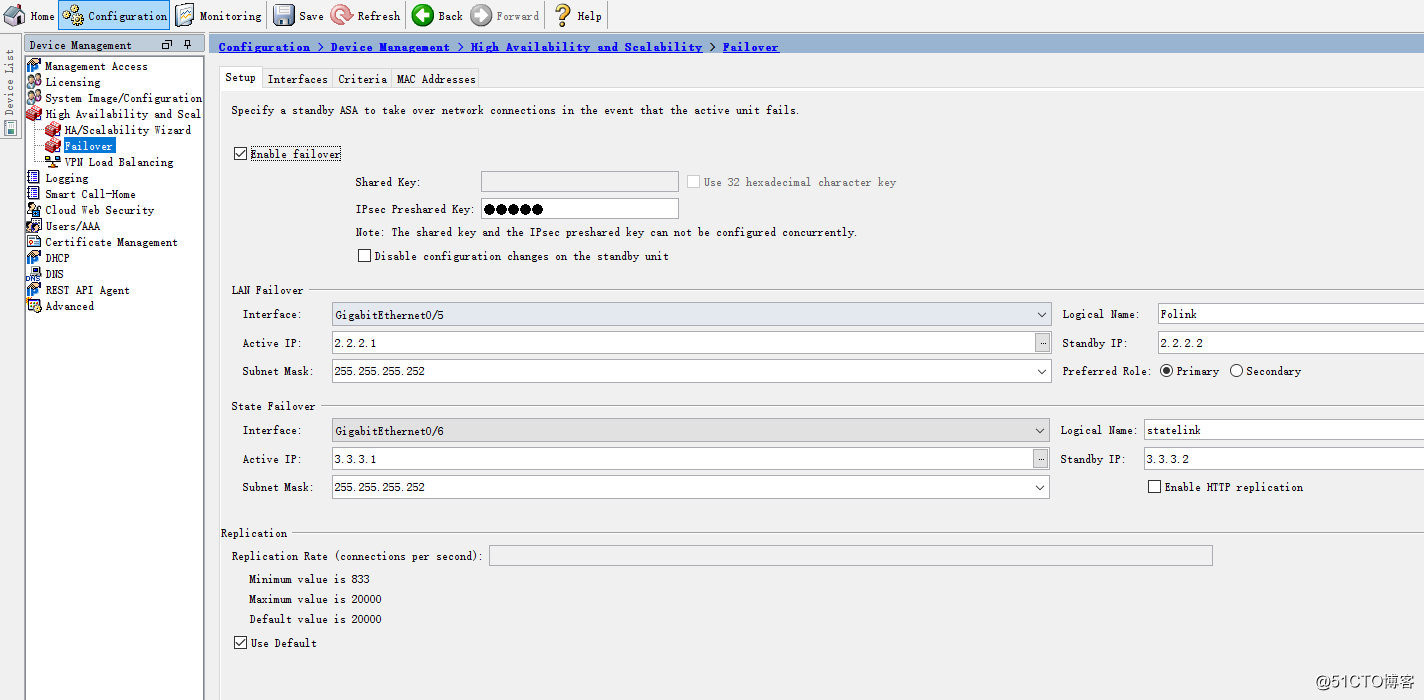
failover
failover lan unit primary
failover lan interface Folink GigabitEthernet0/5
failover polltime unit 1 holdtime 5
failover polltime interface msec 500 holdtime 25
failover polltime link-state msec 500
failover standby config-lock
failover link statelink GigabitEthernet0/6
failover interface ip Folink 2.2.2.1 255.255.255.252 standby 2.2.2.2
failover interface ip statelink 3.3.3.1 255.255.255.252 standby 3.3.3.2
failover ipsec pre-shared-key *****
!
interface GigabitEthernet0/0
nameif inside
security-level 100
ip address 10.10.10.1 255.255.255.0
!
interface GigabitEthernet0/1
nameif outside1
security-level 0
ip address 100.100.100.1 255.255.255.252
!
interface GigabitEthernet0/2
nameif outside2
security-level 0
ip address 200.200.200.1 255.255.255.252
!
interface GigabitEthernet0/3
nameif DMZ
security-level 80
ip address 172.16.10.1 255.255.255.252
!
interface GigabitEthernet0/5
description LAN Failover Interface
!
interface GigabitEthernet0/6
description STATE Failover Interface
!
!
object network InUsers
subnet 10.0.0.0 255.0.0.0
object network DMZ
subnet 172.16.0.0 255.255.0.0
object network Pub_DMZ
host 100.100.101.200
object service TCP_8080
service tcp destination eq 8080
object service TCP_80
service tcp destination eq www
object network DMZ_172.16.20.200
host 172.16.20.200
access-list inside_in extended permit icmp any any
access-list inside_in extended permit ip 10.0.0.0 255.0.0.0 any
access-list outside1_in extended permit icmp any any
access-list outside1_in extended permit ip any host 172.16.20.200
access-list outside2_in extended permit icmp any any
access-list outside2_in extended permit ip any host 172.16.20.200
access-list dmz_in extended permit icmp any any
access-list dmz_in extended permit ip object DMZ any
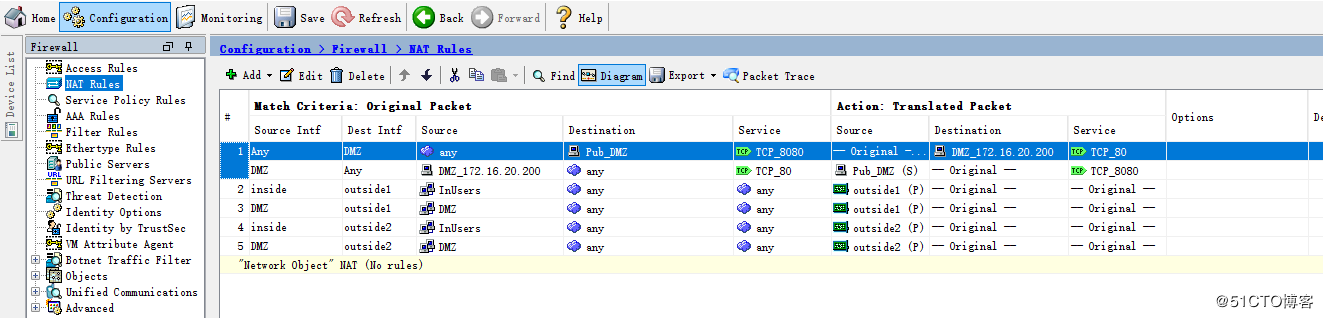
nat (any,DMZ) source static any any destination static Pub_DMZ DMZ_172.16.20.200 service TCP_8080 TCP_80
nat (inside,outside1) source dynamic InUsers interface
nat (DMZ,outside1) source dynamic DMZ interface
nat (inside,outside2) source dynamic InUsers interface
nat (DMZ,outside2) source dynamic DMZ interface
access-group inside_in in interface inside
access-group outside1_in in interface outside1
access-group outside2_in in interface outside2
access-group dmz_in in interface DMZ
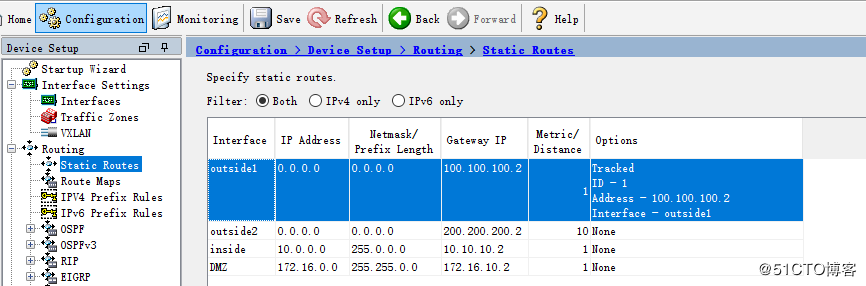
route outside1 0.0.0.0 0.0.0.0 100.100.100.2 1 track 1
route outside2 0.0.0.0 0.0.0.0 200.200.200.2 10
route inside 10.0.0.0 255.0.0.0 10.10.10.2 1
route DMZ 172.16.0.0 255.255.0.0 172.16.10.2 1
!
!
sla monitor 1
type echo protocol ipIcmpEcho 100.100.100.2 interface outside1
timeout 1000
sla monitor schedule 1 life forever start-time now
!
!
track 1 rtr 1 reachability
!
ASA-B中只有failover配置略有不同,其他配置全部同步子ASA-A完全一致。
failover
failover lan unit secondary
failover lan interface Folink GigabitEthernet0/5
failover polltime unit 1 holdtime 5
failover polltime interface msec 500 holdtime 25
failover polltime link-state msec 500
failover standby config-lock
failover link statelink GigabitEthernet0/6
failover interface ip Folink 2.2.2.1 255.255.255.252 standby 2.2.2.2
failover interface ip statelink 3.3.3.1 255.255.255.252 standby 3.3.3.2
failover ipsec pre-shared-key *****
PS:在防火墙的部署中,在开机零配置的情况下最后保证2台设备完全一致,首先分别配置failover,之后所有配置只需在主墙中配置即可。
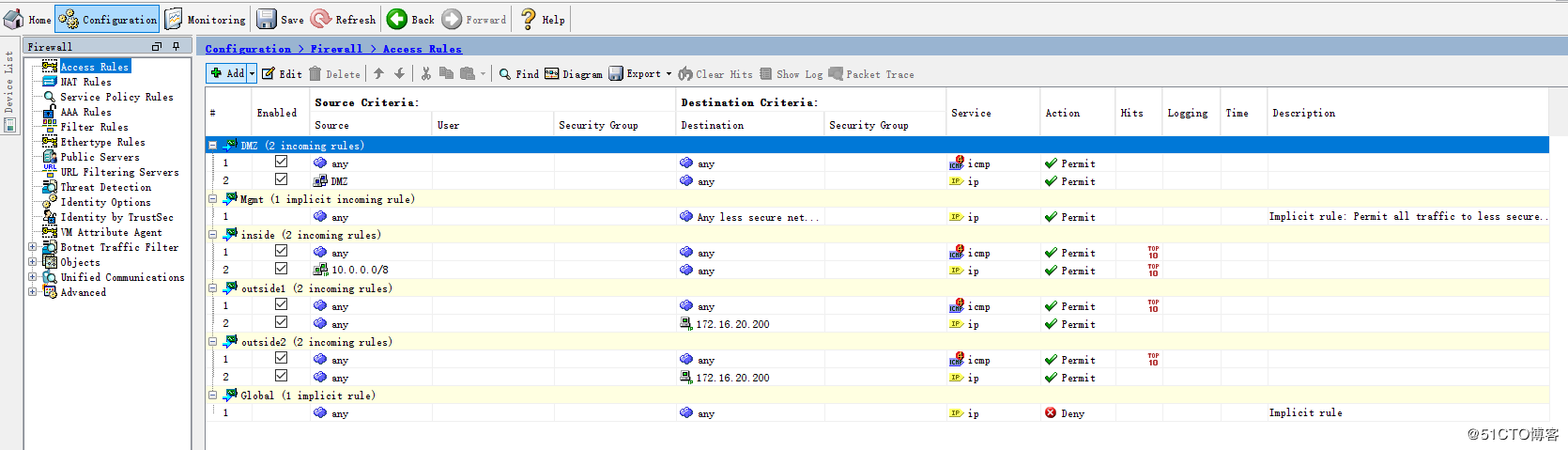
ASDM配置

CSW-1
!
interface Port-channel10
switchport trunk encapsulation dot1q
switchport mode trunk
!
interface GigabitEthernet0/0
switchport access vlan 1000
switchport mode access
media-type rj45
negotiation auto
!
!
interface GigabitEthernet0/1
no switchport
ip address 10.10.20.1 255.255.255.252
negotiation auto
!
!
interface GigabitEthernet1/2
switchport trunk encapsulation dot1q
switchport mode trunk
media-type rj45
negotiation auto
channel-group 10 mode on
!
interface GigabitEthernet1/3
switchport trunk encapsulation dot1q
switchport mode trunk
media-type rj45
negotiation auto
channel-group 10 mode on
!
!
interface Vlan1000
ip address 10.10.10.3 255.255.255.0
standby 10 ip 10.10.10.2
standby 10 priority 200
standby 10 preempt
standby 10 track 1 decrement 50
!
!
router ospf 1
router-id 10.10.10.3
network 10.10.10.0 0.0.0.255 area 0
network 10.10.20.0 0.0.0.255 area 0
default-information originate metric-type 1
!
!
ip route 0.0.0.0 0.0.0.0 10.10.10.1 track 1
!
!
ip sla 1
icmp-echo 10.10.10.1 source-ip 10.10.10.3
frequency 5
ip sla schedule 1 life forever start-time now
!
!
track 1 ip sla 1 reachability
!
CSW-B
!
interface Port-channel10
switchport trunk encapsulation dot1q
switchport mode trunk
!
interface GigabitEthernet0/0
switchport access vlan 1000
switchport mode access
media-type rj45
negotiation auto
!
!
interface GigabitEthernet0/1
no switchport
ip address 10.10.21.1 255.255.255.252
negotiation auto
!
!
interface GigabitEthernet1/2
switchport trunk encapsulation dot1q
switchport mode trunk
media-type rj45
negotiation auto
channel-group 10 mode on
!
interface GigabitEthernet1/3
switchport trunk encapsulation dot1q
switchport mode trunk
media-type rj45
negotiation auto
channel-group 10 mode on
!
!
interface Vlan1000
ip address 10.10.10.4 255.255.255.0
standby 10 ip 10.10.10.2
standby 10 priority 180
!
!
router ospf 1
router-id 10.10.10.4
network 10.10.10.0 0.0.0.255 area 0
network 10.10.21.0 0.0.0.255 area 0
default-information originate metric 1 metric-type 1
!
!
ip route 0.0.0.0 0.0.0.0 10.10.10.1 track 1
!
!
ip sla 1
icmp-echo 10.10.10.1 source-ip 10.10.10.4
frequency 5
ip sla schedule 1 life forever start-time now
!
!
track 1 ip sla 1 reachability
!
ASW-1
!
ip dhcp pool users
network 10.10.30.0 255.255.255.0
dns-server 223.5.5.5 114.114.114.114
default-router 10.10.30.254
!
!
interface GigabitEthernet0/2
switchport access vlan 30
switchport mode access
media-type rj45
negotiation auto
spanning-tree portfast edge
!
!
interface GigabitEthernet0/0
no switchport
ip address 10.10.20.2 255.255.255.252
negotiation auto
!
interface GigabitEthernet0/1
no switchport
ip address 10.10.21.2 255.255.255.252
negotiation auto
!
!
router ospf 1
router-id 10.10.20.2
network 10.10.20.0 0.0.0.255 area 0
network 10.10.21.0 0.0.0.255 area 0
network 10.10.30.0 0.0.0.255 area 0
!
DMZSW-1
!
interface GigabitEthernet0/0
switchport access vlan 10
switchport mode access
media-type rj45
negotiation auto
!
interface GigabitEthernet0/1
switchport access vlan 10
switchport mode access
media-type rj45
negotiation auto
!
interface GigabitEthernet0/2
switchport access vlan 20
switchport mode access
media-type rj45
negotiation auto
spanning-tree portfast edge
!
!
interface Vlan10
ip address 172.16.10.2 255.255.255.252
!
interface Vlan20
ip address 172.16.20.254 255.255.255.0
!
!
ip route 0.0.0.0 0.0.0.0 172.16.10.1
!
三.切换验证
1.出口切换
切换前:
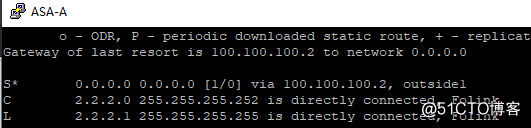

再ISP中关闭线路1接口切换后:
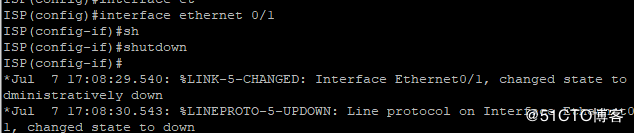
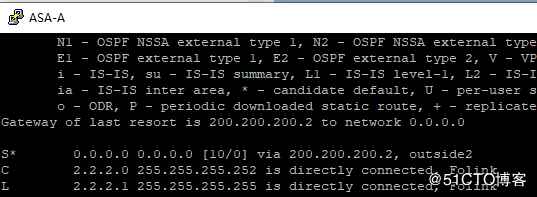
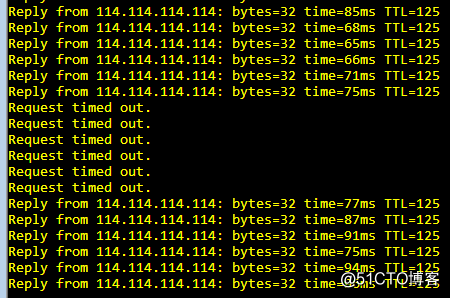
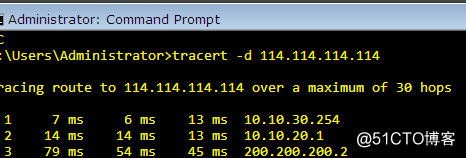
在线路切换中正常业务丢包大约在4-8个包左右。
2.防火墙HA
切换前:

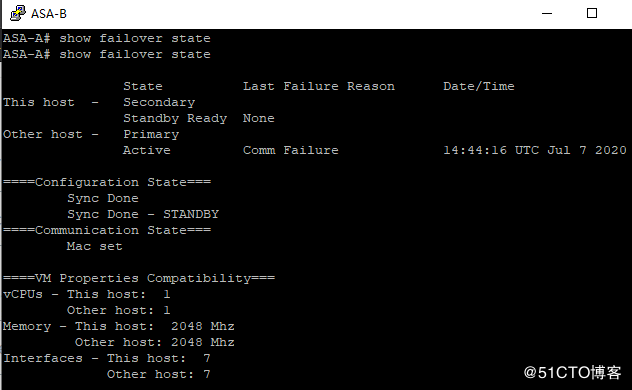
重启ASA-A切换后:
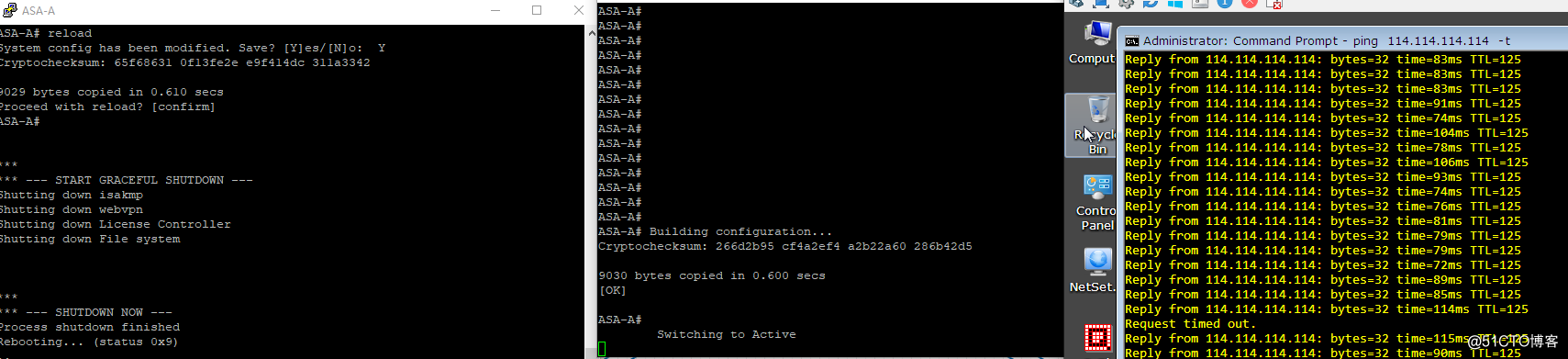
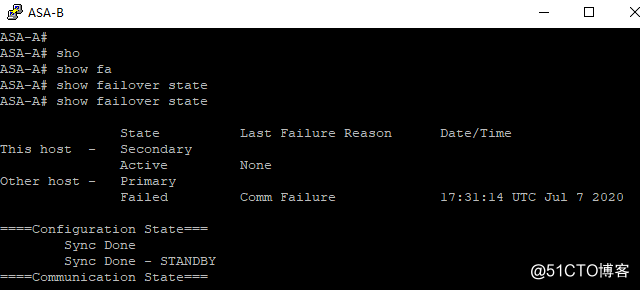
切换只丢1个包。
PS:这里在做验证的时候又发现了一个小问题,就是在已经做完上面线路出口切换的情况下不会退,再来进行HA的切换演练,会存在一个问题,但HA切换以后ASA-B中的默认路由依旧还是线路1的,而线路1在实验室已经down了,这就会导致切换后出现问题,解决办法就是清理路由表缓存 clear route all (或者指定下一条,生产中最后最小清除),这时候就会切换到线路2 ,同样在做线路切换模拟时,ASA-A 中的路由刷新等待时间时比较久的,这时候也可以手动刷新加快收敛速度。
四.遗留问题
1.上面虽然用手动刷新了路由表解决了这个缓存的问题,但在实际环境中这种切换时随机发生,我们不可能立马发现并受到刷新,所以如何避免因为路由缓存而影响HA切换故障时效时后面考虑的一个点。
2.在上面的拓扑中存在一个缺陷即核心时单上联防火墙,所以当主核心宕机而防火墙正常的情况下,数据是没有办法上行的,这里必须要进行双上联,否则双核心没有任何意义。
3.对于DMZ区域的NAT,在配置PAT的时候要注意PAT配置的顺序要优于DMZ NAT的顺序,否则PAT无法生效,具体参考另一篇文章https://blog.51cto.com/pinglife/2507602
由于时间有限,行文潦草,还缺少很多细节,后续再做完善。
本文来自互联网用户投稿,文章观点仅代表作者本人,不代表本站立场,不承担相关法律责任。如若转载,请注明出处。 如若内容造成侵权/违法违规/事实不符,请点击【内容举报】进行投诉反馈!