为jupyter添加目录
为jupyter_notebook增加目录
1.配置目录环境
(1)打开Anaconda Prom(或者直接Win+R)打开命令窗口
(2)输入安装命令
pip install jupyter_contrib_nbextensions
(3)等待程序运行,中途会出来y/n的选项,输入y,然后回车,直到出现Successfully installed标志。但是我安装的时候没有出现这一步提示,出现Successfully就行

(4)用户配置
(base) C:\Users\dell>jupyter contrib nbextension install --user
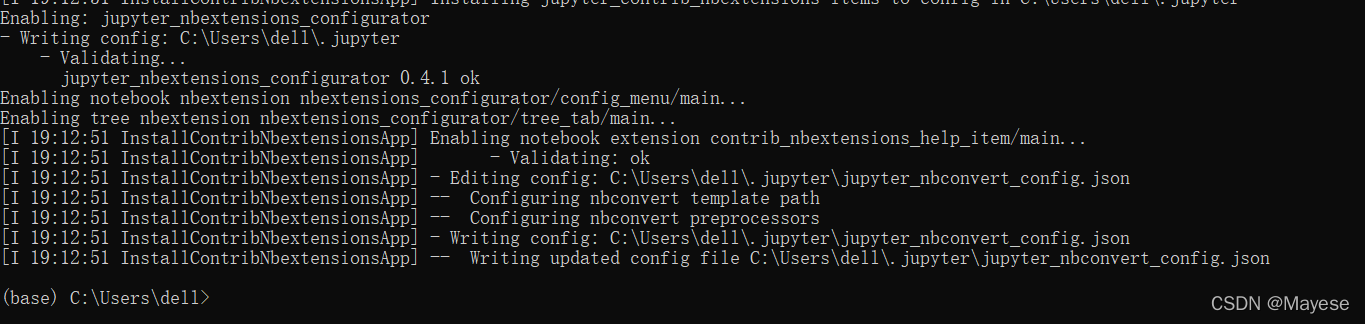
(5)启动Jupyter Notebook ,点选nbextensions,勾选Table of Contents
发现增加一项Nbextensions

勾选

往下拉有使用教程
Table of Contents (2)
The toc2 extension enables to collect all running headers and display them in a floating window, as a sidebar or with a navigation menu. The extension is also draggable, resizable, collapsable, dockable and features automatic numerotation with unique links ids, and an optional toc cell.
而且可以拖动目录,最小化目录
2.如何新建带有目录的文件
类似于R语言
本文来自互联网用户投稿,文章观点仅代表作者本人,不代表本站立场,不承担相关法律责任。如若转载,请注明出处。 如若内容造成侵权/违法违规/事实不符,请点击【内容举报】进行投诉反馈!