深入理解Android音视频同步机制(五)如何从零开始写一个音视频同步的播放器
- 深入理解Android音视频同步机制(一)概述
- 深入理解Android音视频同步机制(二)ExoPlayer的avsync逻辑
- 深入理解Android音视频同步机制(三)NuPlayer的avsync逻辑
- 深入理解Android音视频同步机制(四)MediaSync的使用与原理
- 深入理解Android音视频同步机制(五)如何从零开始写一个音视频同步的播放器
前面我们分析了三个播放器的av sync逻辑,可以看到他们都各有不同,那么究竟哪种方法可以达到最好的avsync结果?哪些逻辑是必要的?如果我们想自己从零开始写一个av同步的播放器,都需要做哪些工作?
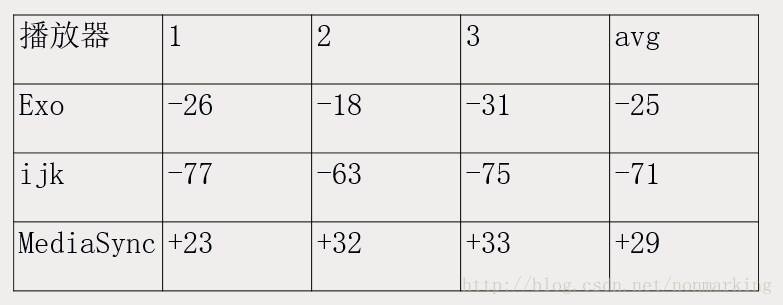
首先我们测试了几个播放器的音视频同步表现,使用的是syncOne官网的1080p 24fps H264 AAC测试片源,只测试speaker下的结果,测试结果如下
下面我们参考cts中的mediacodec使用示例,尝试着写出一个avsync结果与上面结果接近的播放器
MediaCodecPlayer Demo
demo的地址关注文末公众号查看。
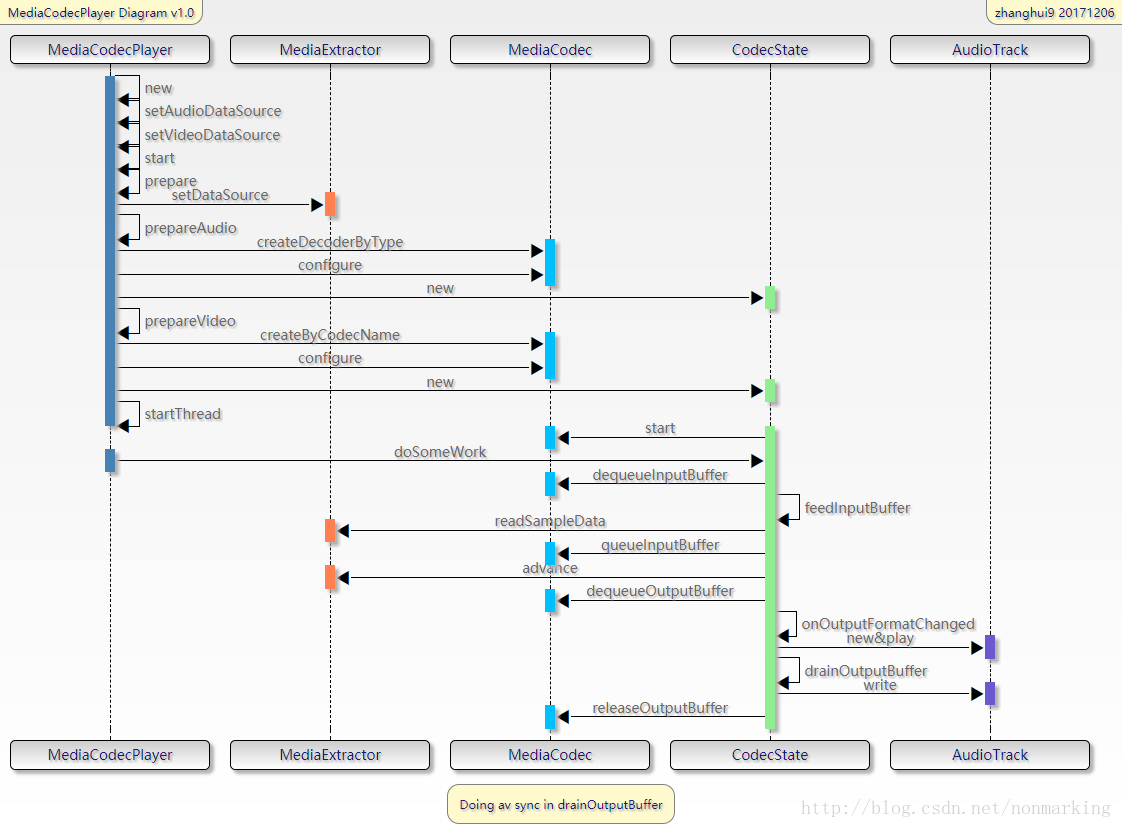
首先来看一下整体流程,如下图所示
总体流程和ExoPlayer基本相似。图中的doSomeWork是核心大loop,同步地调用MediaCodc接口,关键的avsync逻辑在drainOutputBuffer方法中实现。
最朴素简单的同步逻辑
先来总体说一下同步逻辑,然后再详细看看代码
Video部分
1.对实际送显时间的计算
private boolean drainOutputBuffer()//传入参数为pts,返回的realTimeUs其实就是pts,并没有做什么调整long realTimeUs =mMediaTimeProvider.getRealTimeUsForMediaTime(info.presentationTimeUs);//这里的nowUs代表audio播放的时间long nowUs = mMediaTimeProvider.getNowUs(); //audio play time//nowUs - realTimeUs代表还有多久该播放这一帧long lateUs = nowUs - realTimeUs;
…//这里调用的是没有timestamp参数的releaseOutputBuffer方法mCodec.releaseOutputBuffer(index, render);
Audio部分
1、current play time的计算
public long getAudioTimeUs()//这里返回audio的播放时间,就是利用的getPlaybackHeadPosition方法int numFramesPlayed = mAudioTrack.getPlaybackHeadPosition();return (numFramesPlayed * 1000000L) / mSampleRate;小结
就是拿video的pts与audioTrack.getPlaybackHeadPosition方法返回的播放时间进行对比,然后直接调用没有timestamp参数的releaseOutputBuffer的方法进行显示
详细的代码如下
private boolean drainOutputBuffer() {
...int index = mAvailableOutputBufferIndices.peekFirst().intValue();MediaCodec.BufferInfo info = mAvailableOutputBufferInfos.peekFirst();
…//传入参数为pts,返回的realTimeUs其实就是pts,并没有做什么调整,参见1.1long realTimeUs =mMediaTimeProvider.getRealTimeUsForMediaTime(info.presentationTimeUs);//这里的nowUs代表audio播放的时间,参见1.1long nowUs = mMediaTimeProvider.getNowUs(); //audio play time//nowUs - realTimeUs代表还有多久该播放这一帧long lateUs = nowUs - realTimeUs;if (mAudioTrack != null) {...} else {// videoboolean render;if (lateUs < -45000) {// too early;如果video来早了45ms,则等待下一次loopreturn false;} else if (lateUs > 30000) {//默认的丢帧门限是30msLog.d(TAG, "video late by " + lateUs + " us.");render = false;} else {render = true;mPresentationTimeUs = info.presentationTimeUs;}//这里调用的是没有timestamp参数的releaseOutputBuffer方法mCodec.releaseOutputBuffer(index, render);mAvailableOutputBufferIndices.removeFirst();mAvailableOutputBufferInfos.removeFirst();return true;}
}public long getRealTimeUsForMediaTime(long mediaTimeUs) {if (mDeltaTimeUs == -1) {//第一次调用的时候会走进这个分支,mDeltaTimeUs代表初始pts的偏差,正常情况下它是0long nowUs = getNowUs();mDeltaTimeUs = nowUs - mediaTimeUs;}//所以getRealTimeUsForMediaTime返回的就是ptsreturn mDeltaTimeUs + mediaTimeUs;
}public long getNowUs() {//如果是video only的流,则返回系统时间,否则返回audio播放的时间if (mAudioTrackState == null) {return System.currentTimeMillis() * 1000;}return mAudioTrackState.getAudioTimeUs();
}public long getAudioTimeUs() {//这里返回audio的播放时间,就是利用的getPlaybackHeadPosition方法int numFramesPlayed = mAudioTrack.getPlaybackHeadPosition();return (numFramesPlayed * 1000000L) / mSampleRate;
}
测试一下这个最简单avsync逻辑的结果 : -173ms,果然惨不忍睹
第一步改造
改造audio time的获取,加上latency
public long getAudioTimeUs() {int numFramesPlayed = mAudioTrack.getPlaybackHeadPosition();if (getLatencyMethod != null) {try {latencyUs = (Integer) getLatencyMethod.invoke(mAudioTrack, (Object[]) null) * 1000L /2;latencyUs = Math.max(latencyUs, 0);} catch (Exception e){getLatencyMethod = null;}}return (numFramesPlayed * 1000000L) / mSampleRate - latencyUs;
}
此时的测试结果是:-128ms, 好了一些,但还不够
第二步改造
考虑到getLatency方法是一个被google自己吐槽的接口,我们再来下一步改造,用上getTimeStamp方法,如下
public long getAudioTimeUs() {long systemClockUs = System.nanoTime() / 1000;int numFramesPlayed = mAudioTrack.getPlaybackHeadPosition();if (systemClockUs - lastTimestampSampleTimeUs >= MIN_TIMESTAMP_SAMPLE_INTERVAL_US) {audioTimestampSet = mAudioTrack.getTimestamp(audioTimestamp);if (getLatencyMethod != null) {try {latencyUs = (Integer) getLatencyMethod.invoke(mAudioTrack, (Object[]) null) * 1000L / 2;latencyUs = Math.max(latencyUs, 0);} catch (Exception e) {getLatencyMethod = null;}}lastTimestampSampleTimeUs = systemClockUs;}if (audioTimestampSet) {// Calculate the speed-adjusted position using the timestamp (which may be in the future).long elapsedSinceTimestampUs = System.nanoTime() / 1000 - (audioTimestamp.nanoTime / 1000);long elapsedSinceTimestampFrames = elapsedSinceTimestampUs * mSampleRate / 1000000L;long elapsedFrames = audioTimestamp.framePosition + elapsedSinceTimestampFrames;long durationUs = (elapsedFrames * 1000000L) / mSampleRate;return durationUs;} else {long durationUs = (numFramesPlayed * 1000000L) / mSampleRate - latencyUs;//durationUs = Math.max(durationUs, 0);return durationUs;}
}
当我们对比getTimeStamp和getPosition返回的结果,就能发现两者的精度差距
1.getPosition, 最后的nowUs代表audio播放的duration
12-06 16:11:47.695 20194-20657/com.example.zhanghui.avplayer D/avsync: video: presentationUs is 166667,realTimeUs is 46667,nowUs is 40000
12-06 16:11:47.696 20194-20657/com.example.zhanghui.avplayer D/avsync: video: presentationUs is 208333,realTimeUs is 88333,nowUs is 40000
12-06 16:11:47.700 20194-20657/com.example.zhanghui.avplayer D/avsync: audio: presentationUs is 362666,realTimeUs is 242666,nowUs is 40000
12-06 16:11:47.706 20194-20657/com.example.zhanghui.avplayer D/avsync: video: presentationUs is 208333,realTimeUs is 88333,nowUs is 40000
12-06 16:11:47.707 20194-20657/com.example.zhanghui.avplayer D/avsync: audio: presentationUs is 384000,realTimeUs is 264000,nowUs is 40000
12-06 16:11:47.714 20194-20657/com.example.zhanghui.avplayer D/avsync: video: presentationUs is 208333,realTimeUs is 88333,nowUs is 80000
12-06 16:11:47.716 20194-20657/com.example.zhanghui.avplayer D/avsync: video: presentationUs is 250000,realTimeUs is 130000,nowUs is 80000
12-06 16:11:47.720 20194-20657/com.example.zhanghui.avplayer D/avsync: audio: presentationUs is 405333,realTimeUs is 285333,nowUs is 80000
12-06 16:11:47.726 20194-20657/com.example.zhanghui.avplayer D/avsync: video: presentationUs is 250000,realTimeUs is 130000,nowUs is 80000
12-06 16:11:47.728 20194-20657/com.example.zhanghui.avplayer D/avsync: audio: presentationUs is 426666,realTimeUs is 306666,nowUs is 80000
12-06 16:11:47.734 20194-20657/com.example.zhanghui.avplayer D/avsync: video: presentationUs is 250000,realTimeUs is 130000,nowUs is 80000
12-06 16:11:47.736 20194-20657/com.example.zhanghui.avplayer D/avsync: audio: presentationUs is 448000,realTimeUs is 328000,nowUs is 120000
12-06 16:11:47.742 20194-20657/com.example.zhanghui.avplayer D/avsync: video: presentationUs is 250000,realTimeUs is 130000,nowUs is 120000
12-06 16:11:47.743 20194-20657/com.example.zhanghui.avplayer D/avsync: video: presentationUs is 291667,realTimeUs is 171667,nowUs is 120000
12-06 16:11:47.746 20194-20657/com.example.zhanghui.avplayer D/avsync: audio: presentationUs is 469333,realTimeUs is 349333,nowUs is 120000
12-06 16:11:47.753 20194-20657/com.example.zhanghui.avplayer D/avsync: video: presentationUs is 291667,realTimeUs is 171667,nowUs is 120000
12-06 16:11:47.756 20194-20657/com.example.zhanghui.avplayer D/avsync: audio: presentationUs is 490666,realTimeUs is 370666,nowUs is 120000
12-06 16:11:47.764 20194-20657/com.example.zhanghui.avplayer D/avsync: video: presentationUs is 291667,realTimeUs is 171667,nowUs is 160000
12-06 16:11:47.764 20194-20657/com.example.zhanghui.avplayer D/avsync: video: presentationUs is 333333,realTimeUs is 213333,nowUs is 160000
12-06 16:11:47.767 20194-20657/com.example.zhanghui.avplayer D/avsync: audio: presentationUs is 512000,realTimeUs is 392000,nowUs is 160000
12-06 16:11:47.774 20194-20657/com.example.zhanghui.avplayer D/avsync: video: presentationUs is 333333,realTimeUs is 213333,nowUs is 160000
12-06 16:11:47.776 20194-20657/com.example.zhanghui.avplayer D/avsync: audio: presentationUs is 533333,realTimeUs is 413333,nowUs is 160000
12-06 16:11:47.782 20194-20657/com.example.zhanghui.avplayer D/avsync: video: presentationUs is 333333,realTimeUs is 213333,nowUs is 160000
12-06 16:11:47.783 20194-20657/com.example.zhanghui.avplayer D/avsync: audio: presentationUs is 554666,realTimeUs is 434666,nowUs is 160000
12-06 16:11:47.790 20194-20657/com.example.zhanghui.avplayer D/avsync: video: presentationUs is 333333,realTimeUs is 213333,nowUs is 160000
12-06 16:11:47.791 20194-20657/com.example.zhanghui.avplayer D/avsync: audio: presentationUs is 576000,realTimeUs is 456000,nowUs is 160000
12-06 16:11:47.798 20194-20657/com.example.zhanghui.avplayer D/avsync: video: presentationUs is 333333,realTimeUs is 213333,nowUs is 160000
12-06 16:11:47.806 20194-20657/com.example.zhanghui.avplayer D/avsync: audio: presentationUs is 597333,realTimeUs is 477333,nowUs is 200000
12-06 16:11:47.813 20194-20657/com.example.zhanghui.avplayer D/avsync: video: presentationUs is 333333,realTimeUs is 213333,nowUs is 200000
12-06 16:11:47.814 20194-20657/com.example.zhanghui.avplayer D/avsync: video: presentationUs is 375000,realTimeUs is 255000,nowUs is 200000
12-06 16:11:47.817 20194-20657/com.example.zhanghui.avplayer D/avsync: audio: presentationUs is 618666,realTimeUs is 498666,nowUs is 200000
12-06 16:11:47.825 20194-20657/com.example.zhanghui.avplayer D/avsync: video: presentationUs is 375000,realTimeUs is 255000,nowUs is 200000
12-06 16:11:47.827 20194-20657/com.example.zhanghui.avplayer D/avsync: audio: presentationUs is 640000,realTimeUs is 520000,nowUs is 200000
12-06 16:11:47.836 20194-20657/com.example.zhanghui.avplayer D/avsync: video: presentationUs is 375000,realTimeUs is 255000,nowUs is 200000
12-06 16:11:47.840 20194-20657/com.example.zhanghui.avplayer D/avsync: audio: presentationUs is 661333,realTimeUs is 541333,nowUs is 2000002.getTimeStamp,同样的,最后的nowUs代表audio播放的duration,其实这其中的一大部分功劳也是因为系统时间参与了计算
12-06 16:17:22.122 30072-30257/com.example.zhanghui.avplayer D/avsync: video: presentationUs is 333333,realTimeUs is 213333,nowUs is 161312
12-06 16:17:22.124 30072-30257/com.example.zhanghui.avplayer D/avsync: audio: presentationUs is 554666,realTimeUs is 434666,nowUs is 163250
12-06 16:17:22.131 30072-30257/com.example.zhanghui.avplayer D/avsync: video: presentationUs is 333333,realTimeUs is 213333,nowUs is 170125
12-06 16:17:22.131 30072-30257/com.example.zhanghui.avplayer D/avsync: video: presentationUs is 375000,realTimeUs is 255000,nowUs is 170562
12-06 16:17:22.133 30072-30257/com.example.zhanghui.avplayer D/avsync: audio: presentationUs is 576000,realTimeUs is 456000,nowUs is 172666
12-06 16:17:22.141 30072-30257/com.example.zhanghui.avplayer D/avsync: video: presentationUs is 375000,realTimeUs is 255000,nowUs is 180604
12-06 16:17:22.142 30072-30257/com.example.zhanghui.avplayer D/avsync: audio: presentationUs is 597333,realTimeUs is 477333,nowUs is 181666
12-06 16:17:22.150 30072-30257/com.example.zhanghui.avplayer D/avsync: video: presentationUs is 375000,realTimeUs is 255000,nowUs is 189937
12-06 16:17:22.153 30072-30257/com.example.zhanghui.avplayer D/avsync: audio: presentationUs is 618666,realTimeUs is 498666,nowUs is 192145
12-06 16:17:22.159 30072-30257/com.example.zhanghui.avplayer D/avsync: video: presentationUs is 375000,realTimeUs is 255000,nowUs is 198458
12-06 16:17:22.160 30072-30257/com.example.zhanghui.avplayer D/avsync: audio: presentationUs is 640000,realTimeUs is 520000,nowUs is 199687
12-06 16:17:22.166 30072-30257/com.example.zhanghui.avplayer D/avsync: video: presentationUs is 375000,realTimeUs is 255000,nowUs is 205520
12-06 16:17:22.167 30072-30257/com.example.zhanghui.avplayer D/avsync: audio: presentationUs is 661333,realTimeUs is 541333,nowUs is 206812
12-06 16:17:22.173 30072-30257/com.example.zhanghui.avplayer D/avsync: video: presentationUs is 375000,realTimeUs is 255000,nowUs is 212895
12-06 16:17:22.174 30072-30257/com.example.zhanghui.avplayer D/avsync: video: presentationUs is 416667,realTimeUs is 296667,nowUs is 213104
12-06 16:17:22.176 30072-30257/com.example.zhanghui.avplayer D/avsync: audio: presentationUs is 682666,realTimeUs is 562666,nowUs is 215125
12-06 16:17:22.182 30072-30257/com.example.zhanghui.avplayer D/avsync: video: presentationUs is 416667,realTimeUs is 296667,nowUs is 221479
此时的测试结果是:-87.5ms, 好了一些,已经达到和ijkPlayer差不多的水平了,是否还能更好呢?
第三步改造
基于vsync调整送显时间
audio部分似乎已经没什么可以改的了,下面我们来看看video部分加上基于vsync的调整后会怎么样,前面我们看到在最朴素的逻辑中,使用的是不带timestamp参数的releaseOutputBuffer方法,实际上,这时在framework中会把pts作为timestamp传进去,如下
status_t MediaCodec::onReleaseOutputBuffer(const sp &msg) {
...BufferInfo *info = &mPortBuffers[kPortIndexOutput].editItemAt(index);
...if (render && info->mData != NULL && info->mData->size() != 0) {info->mNotify->setInt32("render", true);int64_t mediaTimeUs = -1;info->mData->meta()->findInt64("timeUs", &mediaTimeUs);int64_t renderTimeNs = 0;if (!msg->findInt64("timestampNs", &renderTimeNs)) {// use media timestamp if client did not request a specific render timestampALOGV("using buffer PTS of %lld", (long long)mediaTimeUs);renderTimeNs = mediaTimeUs * 1000;}
...
简单起见,我们直接复用exoplayer中基于vsync调整的逻辑,做如下修改
这个方法以前是直接返回pts,现在我们让他返回经过vsync调整后的release时间
public long getRealTimeUsForMediaTime(long mediaTimeUs) {if (mDeltaTimeUs == -1) {long nowUs = getNowUs();mDeltaTimeUs = nowUs - mediaTimeUs; //-32000}long earlyUs = mDeltaTimeUs + mediaTimeUs - getNowUs();long unadjustedFrameReleaseTimeNs = System.nanoTime() + (earlyUs * 1000);long adjustedReleaseTimeNs = frameReleaseTimeHelper.adjustReleaseTime(mediaTimeUs, unadjustedFrameReleaseTimeNs);return adjustedReleaseTimeNs / 1000;
}相应的,在drainOutputBuffer中也要改一下
private boolean drainOutputBuffer() {...long realTimeUs =mMediaTimeProvider.getRealTimeUsForMediaTime(info.presentationTimeUs); //返回调整后的releaseTimelong nowUs = mMediaTimeProvider.getNowUs(); //audio play timelong lateUs = System.nanoTime()/1000 - realTimeUs;if (mAudioTrack != null) {...return true;} else {// video….//mCodec.releaseOutputBuffer(index, render);mCodec.releaseOutputBuffer(index, realTimeUs*1000);mAvailableOutputBufferIndices.removeFirst();mAvailableOutputBufferInfos.removeFirst();return true;}
}
此时的测试结果是-76ms,又好了一些,但是已经不甚明显了,能不能再做进一步的优化呢?
第四步改造
提前两倍vsync时间调用releaseOutputBuffer
我们想到之前在NuPlayer和MediaSync中都有提前两倍vsync duration时间调用releaseOutputBuffer方法的逻辑,加上试试看,如下
private boolean drainOutputBuffer() {...long lateUs = System.nanoTime()/1000 - realTimeUs;if (mAudioTrack != null) {…} else {// videoboolean render;//这里改为如果video比预期release时间来的早了2*vsyncduration时间以上,则跳过并且进入下次循环,否则予以显示long twiceVsyncDurationUs = 2 * mMediaTimeProvider.getVsyncDurationNs()/1000;if (lateUs < -twiceVsyncDurationUs) {// too early;return false;} else if (lateUs > 30000) {Log.d(TAG, "video late by " + lateUs + " us.");render = false;} else {render = true;mPresentationTimeUs = info.presentationTimeUs;}//mCodec.releaseOutputBuffer(index, render);mCodec.releaseOutputBuffer(index, realTimeUs*1000);
...}
}
此时的测试结果是-66ms,又好了一点点,但是同样已经不甚明显了
第五步改造
再做一些微调
比如在解码audio时也做了一轮vsync调整,这显然是多余的,去掉它
private boolean drainOutputBuffer() {if (mAudioTrack != null) {} else {// videoboolean render;long twiceVsyncDurationUs = 2 * mMediaTimeProvider.getVsyncDurationNs()/1000;long realTimeUs =mMediaTimeProvider.getRealTimeUsForMediaTime(info.presentationTimeUs); long nowUs = mMediaTimeProvider.getNowUs(); //audio play timelong lateUs = System.nanoTime()/1000 - realTimeUs;...mCodec.releaseOutputBuffer(index, realTimeUs*1000);mAvailableOutputBufferIndices.removeFirst();mAvailableOutputBufferInfos.removeFirst();return true;}
}
此时测试的结果是-56ms,看似是和avsync无关的调整,却也产生了一定的效果,也从侧面证明了根据vsync调整releaseTime是一个很耗时的操作
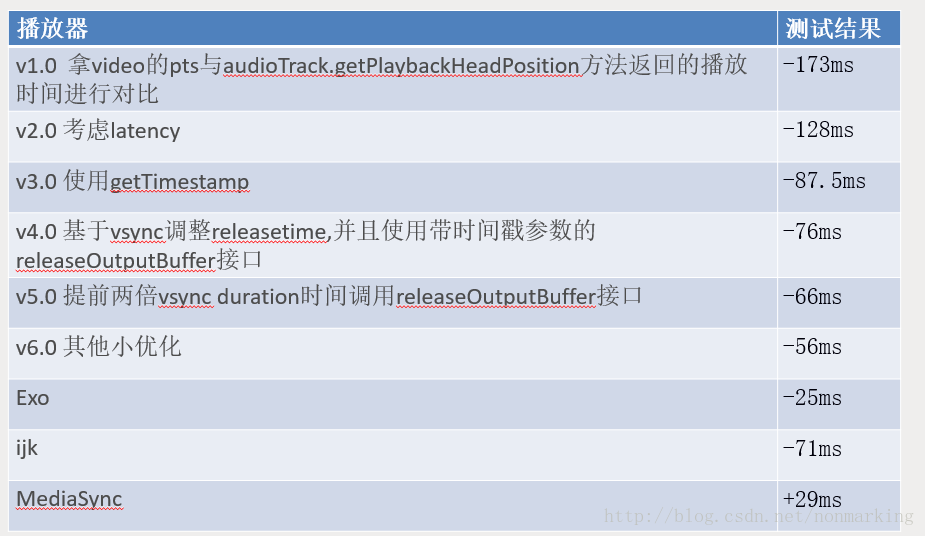
总结一下我们每一步所做的事情和avsync优化的结果,如此,我们可以更好地理解avsync逻辑中各个环节的必要性和所产生的影响了
关注公众号,回复“avsync”,查看源码地址,掌握更多多媒体领域知识与资讯

文章帮到你了?可以扫描如下二维码进行打赏,打赏多少您随意~
本文来自互联网用户投稿,文章观点仅代表作者本人,不代表本站立场,不承担相关法律责任。如若转载,请注明出处。 如若内容造成侵权/违法违规/事实不符,请点击【内容举报】进行投诉反馈!