基于WEB的流程设计组件andflow_js
1.框架介绍
andflow_js是一个H5流程设计前端组件。可以快速实现各类流程设计,也可以根据业务和外观需要自定义界面渲染以及显示风格。
2.DEMO
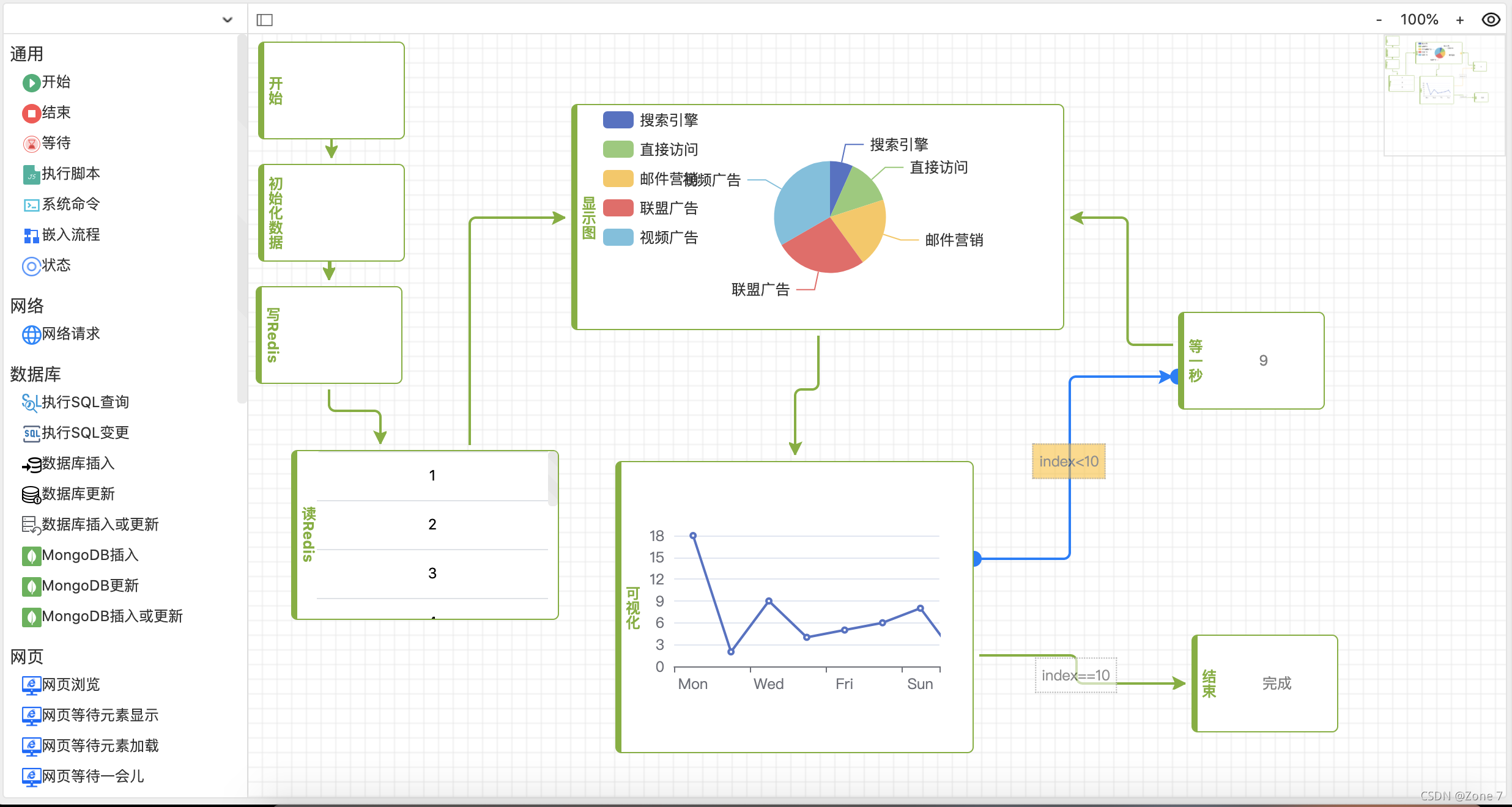
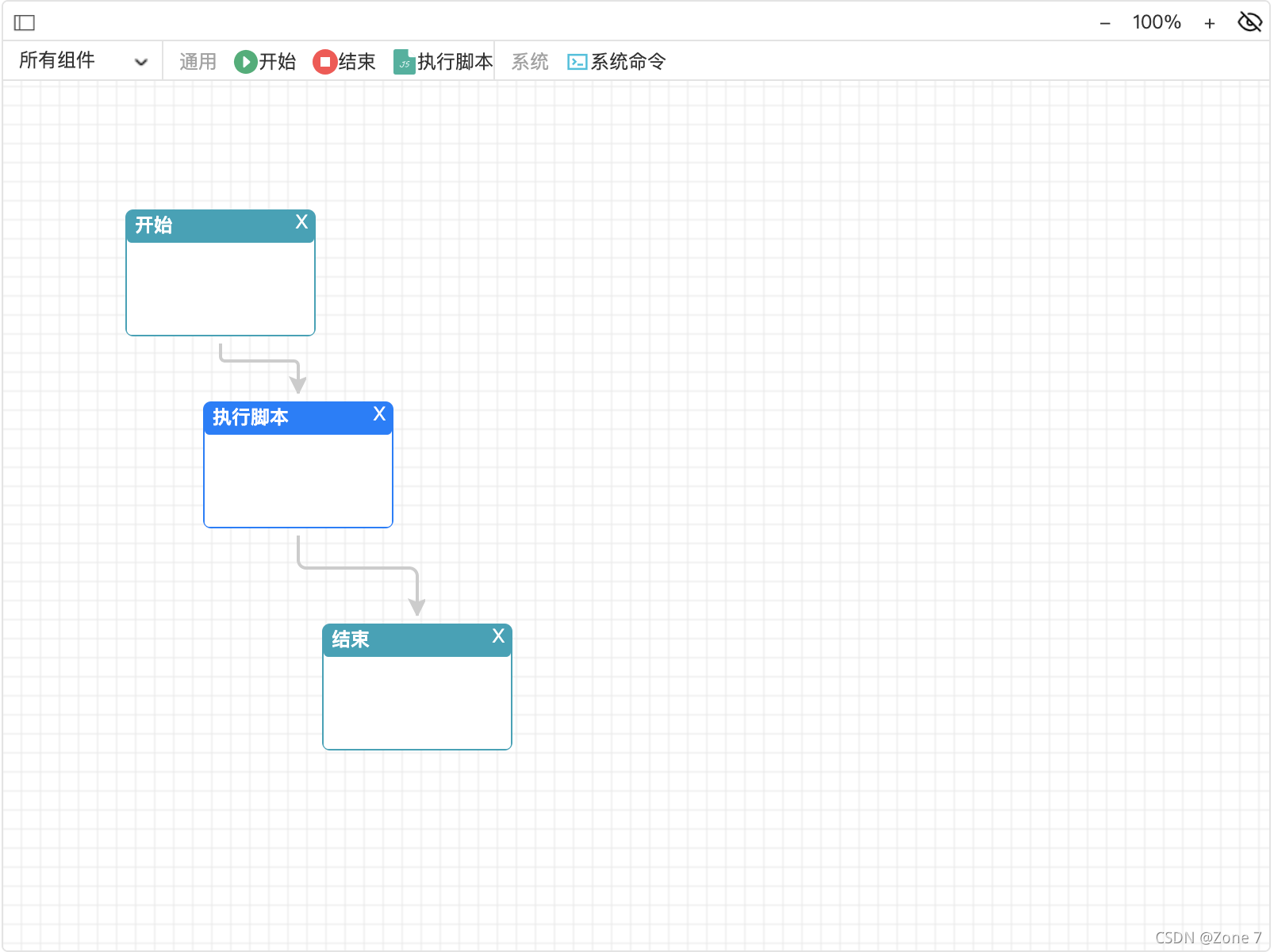
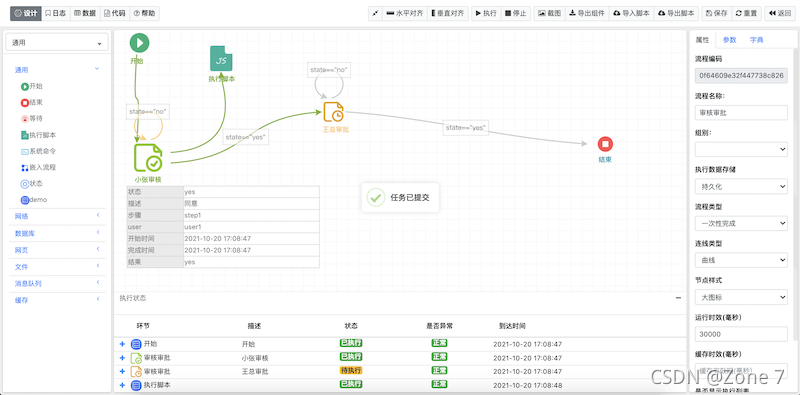
3.开发说明
3.1 相关js依赖
- jquery
- jquery.ui
- jsplumb
- canvg.js
- html2canvas.min.js
3.2 开发
3.2.1引用依赖js
<script src="/static/plugins/jquery/jquery.min.js">script>
<script src="/static/plugins/jquery-ui/jquery-ui.min.js">script>
<script src="/static/plugins/jsplumb/js/jsplumb.min.js">script>
<script src="/static/plugins/html2canvas/html2canvas.js">script>
<script src="/static/plugins/canvg/canvg.js">script>
3.2.2引用andflow_js相关css、js
<link rel="stylesheet" href="/static/flow/css/andflow.css"><link rel="stylesheet" href="/static/flow/css/andflow_themes.css"><script src="/static/flow/js/andflow.js">script><script src="/static/flow/js/andflow_themes.js">script>3.2.3定义流程设计器的DOM
<div id="andflow" style="width: 800px;height: 600px;padding:0px;">
div>
3.2.4初始化流程设计器
//流程组件过滤标签
var tags=['通用', '系统'];//流程组件定义
var metadata=[{"name": "begin","title": "开始","des": "开始","group": "通用","tag": "通用","css": "begin","icon": "/static/flow/img/begin.png","flow_code": "57edec62af8a42628714da6d1a045928","params": [],"params_html": "","params_script": ""},{"name": "end","title": "结束","des": "结束","group": "通用","tag": "通用","css": "end","icon": "/static/flow/img/end.png","flow_code": "57edec62af8a42628714da6d1a045928","params": [],"params_html": "","params_script": ""},{"name": "script","title": "执行脚本","des": "","group": "通用","tag": "通用","css": "","icon": "/static/flow/img/script.png","flow_code": "57edec62af8a42628714da6d1a045928","params": [],"params_html": "","params_script": ""},{"name": "cmd","title": "系统命令","des": "","group": "系统","tag": "系统","css": "","icon": "/static/flow/img/cmd.png","flow_code": "57edec62af8a42628714da6d1a045928","params": [{"name": "command","title": "命令","placeholder": "操作系统指令","element": "textarea","default": "","attrs": {"rows": "4"},"options": null,"option_mode": ""},{"name": "timeout","title": "超时(毫秒)","placeholder": "超时毫秒","element": "input","default": "10000","attrs": {"type": "number"},"options": null,"option_mode": ""},{"name": "cache","title": "执行结果参数名","placeholder": "执行结果存储到哪个参数变量","element": "","default": "","attrs": null,"options": null,"option_mode": ""}],"params_html": "","params_script": ""}] ;var flowModel= {"code":"","name":"","show_action_body":"false",       //是否显示Body,默认true, flow_theme_icon比较有用"show_action_content":"true",     //是否显示节点内容,默认true"show_action_state_list":"false", //是否显示列表,默认false"theme":"flow_theme_default",     //节点风格,默认flow_theme_default"link_type":"Flowchart",          //连接线风格,默认Flowchart};var options={//组件过滤标签列表tags:tags,            //组件元素metadata:metadata,    //流程模型flowModel:flowModel,  //是否可编辑,默认trueeditable:true,        //是否显示工具栏,默认true show_toolbar:true,    //组件栏样式,可选项:固定左边metadata_fix_left、浮在左边metadata_float_left、浮在顶部metadata_float_topmetadata_style:"",render_action:function(metadata,action,html){ return html; },//节点渲染render_action_helper: function(metadata,html){return null},  //节点拖拉渲染render_state_list: function(datas){return null},             //流程状态列表渲染render_link:function(conn,linktype,linkdata){return null},   //连接线渲染//节点单击事件event_action_click:function(metadata,action){var oldid=$("#current_action_id").val();andflow.setActionSelected(oldid,false);$("#current_action_id").val(action.id);andflow.setActionSelected(action.id,true);},//节点双击事件event_action_dblclick:function(metadata,action){var content = prompt("set action content ");andflow.setActionContent(action.id,content);},//连线单击事件event_link_click: function (link) {alert("link  click");},//连线双击事件event_link_dblclick: function (link) {var label = prompt("set link label ");link.title=label;andflow.setLinkInfo(link);},//画图板单击事件event_canvas_click: function(e){var oldid=$("#current_action_id").val();andflow.setActionSelected(oldid,false);$("#current_action_id").val("");}
}//初始化流程设计器实例
andflow.newInstance("andflow",options);
//显示流程设计器
andflow.showFlow();
4.参数
4.1.设计器选项options
| 名称 | 描述 | 值 | 默认值 |
| tags | 组件标签列表 | 数组 | null |
| metadata | 组件定义元数据 | 数组 | null |
| editable | 是否可设计 | true/false | true |
| flowModel | 流程模型 | object | null |
| render_action | 组件节点渲染函数 | function(metadata,action,html){ return null; } | null |
| render_action_helper | 组件节点拖拉过程渲染函数 | function(metadata,html){ return null; } | null |
| render_endpoint | 组件节点拖拉点渲染函数 | function(metadata,action,html){ return null; } | null |
| render_removebtn | 组件节点拖拉点渲染函数 | function(metadata,action,html){ return null; } | null |
| render_link | 组件节点连线渲染函数 | function(conn,linktype,linkdata){return null} | null |
4.1.1组件元数据定义metadata
metadata 参数用于定义流程设计器的组件列表
var metadata=[{"name": "begin","title": "开始","des": "开始","group": "通用","tag": "通用", "icon": "/static/flow/img/begin.png", "params": [{"name": "command","title": "命令","placeholder": "操作系统指令","element": "textarea","default": "","attrs": {"rows": "4"},"options": null,"option_mode": ""},],"params_html": "","params_script": ""},
]| 名称 | 描述 | 取值 |
| name | 组件名称 | 唯一字符串 |
| title | 组件标题 | 中英文标题 |
| group | 组件所属组别 | 中英文名称 |
| tag | 组件标签,用于过滤 | 中英文名称 |
| css | 组件样式 | CSS样式名称 |
4.1.2流程模型参数flowModel
用于默认显示的流程模型,也可以放空。
例如:
var flowModel= {"code":"","name":"","show_action_body":"false", //是否显示Body,默认true, flow_theme_icon比较有用"show_action_content":"true", //是否显示节点内容,默认true"show_action_state_list":"false", //是否显示列表,默认false"theme":"flow_theme_default", //节点风格,默认flow_theme_default"link_type":"Flowchart", //连接线风格,默认Flowchart"params":[],// "actions":[{"id":"f7a6ec0031784f5a80d8633a6418fd52","left":"77px","top":"101px","name":"begin","params":{},"title":"开始","icon":"/static/flow/img/begin.png","width":"120px","height":"80px"},{"id":"793a2a11cf8b40e9afd8bd8f04405e64","left":"126px","top":"222px","name":"script","params":{},"title":"执行脚本","icon":"/static/flow/img/script.png","width":"120px","height":"80px"},{"id":"f558687ca5f34a6c89732eb50749a15a","left":"201px","top":"362px","name":"end","params":{},"title":"结束","icon":"/static/flow/img/end.png","width":"120px","height":"80px"}],// "links":[{"source_id":"f7a6ec0031784f5a80d8633a6418fd52","target_id":"793a2a11cf8b40e9afd8bd8f04405e64"},{"source_id":"793a2a11cf8b40e9afd8bd8f04405e64","target_id":"f558687ca5f34a6c89732eb50749a15a"}]};
流程模型对象内的相关参数为:
| 名称 | 描述 | 取值 | 默认 |
| code | 流程唯一编码 | 字符串 | null |
| name | 流程名称 | 字符串 | null |
| theme | 组件节点样式 | flow_theme_default、flow_theme_icon、flow_theme_zone、也可以自定义 | flow_theme_default |
| link_type | 连线样式 | Flowchart、Straight、Bezier、StateMachine | Flowchart |
| show_action_body | 是否显示组件节点中的Body部分 | “true"、“false" | "true" |
| show_action_content | 是否显示组件节点中的内容 | “true"、“false" | "true" |
| show_action_state_list | 是否显示流程状态列表 | “true"、“false" | "false" |
| actions | 节点列表:可以在设计后自动生成 | object | null |
| actions | 连线列表:可以设计后自动生成 | object | null |
4.2 方法
| 名称 | 描述 | 参数 | 返回值 | DEMO |
| andflow.showFlow(); | 显示流程模型 | flowModel,可以为空 | null | |
| andflow.getFlow(); | 获取流程模型对象 | null | flowModel | |
| andflow.snap("流程"); | 截图 | 截图导出的文件名称 | null | |
| andflow.setTheme(theme); | 设置组件节点样式名称 | flow_theme_default、flow_theme_icon、flow_theme_zone、或者其他自定义 | null | andflow.setTheme(theme); andflow.reflow(); |
| andflow.setLinkType(link_type); | 设置连接线样式名称 | Flowchart、Straight、Bezier、StateMachine | null | andflow.setLinkType(link_type); andflow.reflow(); |
| andflow.setEditable(false); | 设置是否可设计 | true、false | null | |
| andflow.setActionContentVisible(true); | 设置内容是否可见 | true、false | null | |
| andflow.reflow(); | 重新渲染设计器,在改变样式、风格之后需要执行这个函数。 | null | null |
添加公众号,回复andflow,获取源代码

本文来自互联网用户投稿,文章观点仅代表作者本人,不代表本站立场,不承担相关法律责任。如若转载,请注明出处。 如若内容造成侵权/违法违规/事实不符,请点击【内容举报】进行投诉反馈!