uniapp实现商品详情锚点定位效果
1、直接复制粘贴引入uniapp页面
如果缺少什么css 自己补充就好了,做个笔记,内容过少的情况,tab选项不是百分百的切换到最后一个,没想好怎么优化
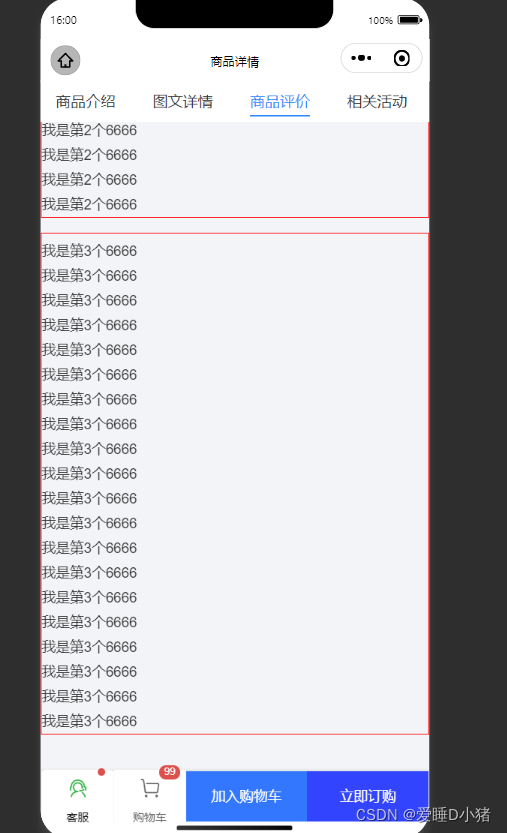
<template><view class="page"><!-- 顶部选卡 --><view class="scroll-row d-flex justify-between border-top position-fixed top-0" style="height: 80rpx;background-color: #FFFFFF;z-index: 1000;"><view @tap="changeTab(index)":class="tabIndex === index ? 'main-text-color ' : ''"class="scroll-row-item px-3 flex-1"style="height: 80rpx; line-height: 80rpx;"v-for="(i, index) in tabbars":key="index"><text class="font-md pb-1" :style="tabIndex === index ? 'border-bottom: 5rpx solid #3088ff; ' : ''">{{ i.name }}</text></view></view><!-- 填充 --><view style="height: 80rpx;" class="w-100"></view><!-- 列表 --><scroll-view scroll-y="true" @scroll="tabScoll" :scroll-top="scrollInto" scroll-with-animation :scroll-into-view="scrollinto" :style="'height:' + scrollH + 'px;'" @scrolltolower="loadmore(index)"><view class="scroll-box"><view class="box1" :id="'tab'+index" v-for="(item,index) in conentist" :key="index"><view>我是第{{index}}个6666</view><view>我是第{{index}}个6666</view><view>我是第{{index}}个6666</view><view>我是第{{index}}个6666</view><view>我是第{{index}}个6666</view><view>我是第{{index}}个6666</view><view>我是第{{index}}个6666</view><view>我是第{{index}}个6666</view><view>我是第{{index}}个6666</view><view>我是第{{index}}个6666</view><view>我是第{{index}}个6666</view><view>我是第{{index}}个6666</view><view>我是第{{index}}个6666</view></view></view><!-- 上拉加载更多 --> <!-- <view class="d-flex j-center a-center text-light-muted py-3">{{item.loadText}}</view> --></scroll-view><!-- 底部栏 --><view class="cu-bar bg-white tabbar border shop foot" id="cubar"><button class="action" open-type="contact"><view class="cuIcon-service text-green"><view class="cu-tag badge"></view></view>客服</button><view class="action"><view class="cuIcon-cart"><view class="cu-tag badge">99</view></view>购物车</view><view class="bg-add submit">加入购物车</view><view class="bg-send submit">立即订购</view></view></view>
</template><script>export default {data() {return {// 滚动条子元素idscrollinto: '',scrollInto:0,scrollTopHeight:0,//滚动距离warpTop:[],// 滚动条高度scrollH: 500,// 当前选项索引tabIndex: 0,// 顶部选卡tabbars: [{ name: '商品介绍' ,id:0}, { name: '图文详情',id:1 }, { name: '商品评价',id:2 }, { name: '相关活动',id:3 }],// 模板内容conentist:[null,null,null,null],load: true}},onReady() {// 获取可视区域的高度uni.getSystemInfo({success: res => {let tabheight = 0;this.GetRect('#cubar').then((res2)=>{tabheight= res2.height// 因为获取的高度是px,设置的是upx ,需要转换this.scrollH = res.windowHeight - tabheight- uni.upx2px(82);})}});// 初始化事件this.__init()this.$nextTick(async function(){this.barInit();}) },methods: {// 初始化事件__init(){},// 顶部选卡 选择changeTab(index) {this.tabIndex = index;this.scrollinto= 'tab'+index// if(index==0){// this.scrollInto =this.warpTop[index]-44;// }else{// this.scrollInto =this.warpTop[index]-88;// }},// 加载数据- 根据轮播图触发索引获取数据-触底事件addSetData(){let index = this.tabIndex;// this.newsitem[index].list = demo2;},//触底loadmore(e){this.$nextTick(()=>{setTimeout(()=>{this.tabIndex =3;//触底事件比滚动事件先触发,用定时器解决,反正是浏览到最后,直接强制显示为最后一个tab},200)})},//scroll滚动async tabScoll(e){//48为兼容值 第一种计算// let scrollTop = e.detail.scrollTop;// this.scrollTopHeight = scrollTop;// let scrollTop1 = scrollTop;// if(scrollTop1<=this.warpTop[1] - 48){// this.tabIndex = 0;// }// if(scrollTop1>this.warpTop[1]-48 && scrollTop1本文来自互联网用户投稿,文章观点仅代表作者本人,不代表本站立场,不承担相关法律责任。如若转载,请注明出处。 如若内容造成侵权/违法违规/事实不符,请点击【内容举报】进行投诉反馈!