AC和AP和STA信息查询
AC和AP和STA信息查询
- 1、AC的运行统计信息
- 1.1、查看设备的部件类型及状态信息
- 2、AP的运行统计信息
- 2.1、AP的运行信息 / 查看RU的运行信息
- 2.2、AP性能统计信息
- 2.3、AP的射频信息
- 2.4、AP重启失败的记录
- 2.5、非法AP的存在情况
- 2.6、设备信道切换的记录信息
- 2.7、查看指定AP射频上的报文统计信息
- 2.8、查看指定AP的电子标签信息
- 2.9、查看指定AP上的ACL配置信息
- 2.10、查看AP的端口状态和流量信息
- 2.11、查看RU的信息
- 2.12、查看添加到AC上的AP的AP类型统计信息
- 3、STA相关信息
- 3.1、查看STA的接入信息
- 3.2、查看STA的统计信息
- 3.3、查看指定AP上STA的平均信号强度
1、AC的运行统计信息
华为链接: https://support.huawei.com/enterprise/zh/doc/EDOC1100156648/ecd73b04
1.1、查看设备的部件类型及状态信息
display device

2、AP的运行统计信息
在完成AP上线和管理AP的配置之后,可以在任意视图下选择执行如下命令,查看AP的运行统计信息。
华为链接: https://support.huawei.com/enterprise/zh/doc/EDOC1100096333/af82aac5
华为链接: https://support.huawei.com/enterprise/zh/doc/EDOC1100284730?section=j193
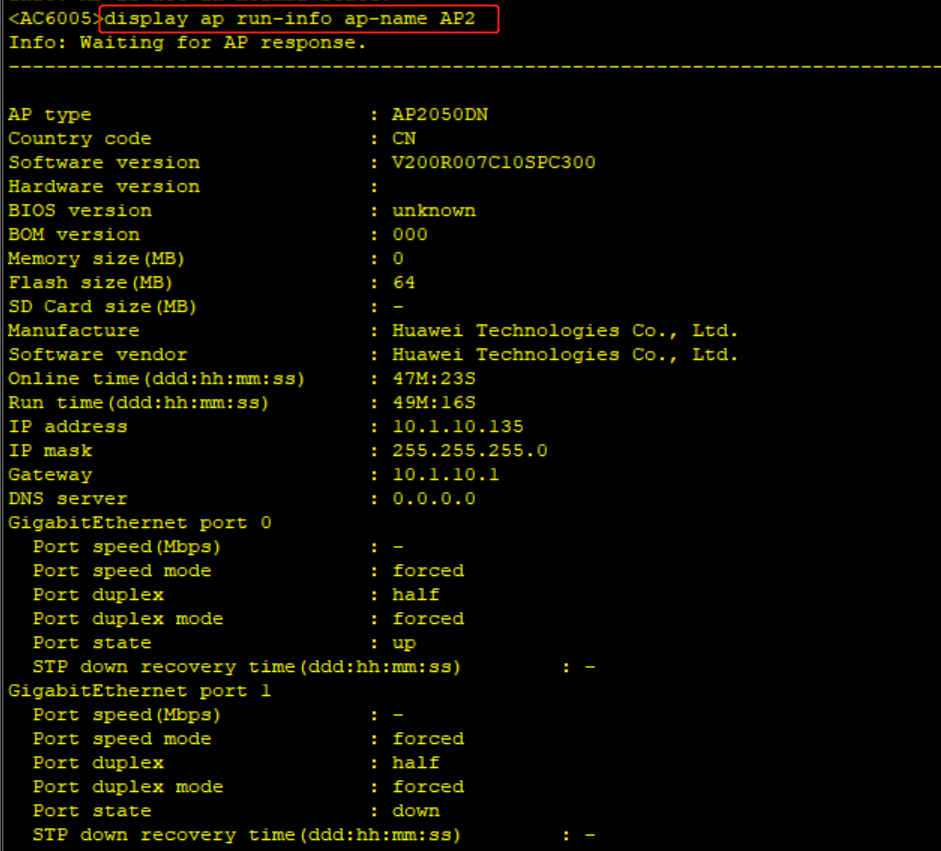
2.1、AP的运行信息 / 查看RU的运行信息
display ap run-info ap-name ApNameXXX
display ap run-info ap-id ApIdXXX
RU 是华为 AC 中的一个术语,它的全称是 Radio Unit,中文译作 “基础射频单元”。RU是指无线设备中的射频单元,负责将无线信号转换为数字信号或将数字信号转换为无线信号。在华为无线网络中,RU通常指的是无线AP中的射频模块,每个AP可以配备多个RU模块,对应不同的频段和天线数量。
使用RU模块可以增加AP的信号覆盖范围和业务容量,同时也可以降低功耗和成本。华为在无线网络中采用Huawei Super RRU技术,使得RU模块具有更高的集成度、更好的动态功耗管理能力和更高的稳定性。此外,华为还提供了智能天线技术(如Huawei iPCA),可以有效优化RU和天线的匹配,提升网络性能和用户体验。

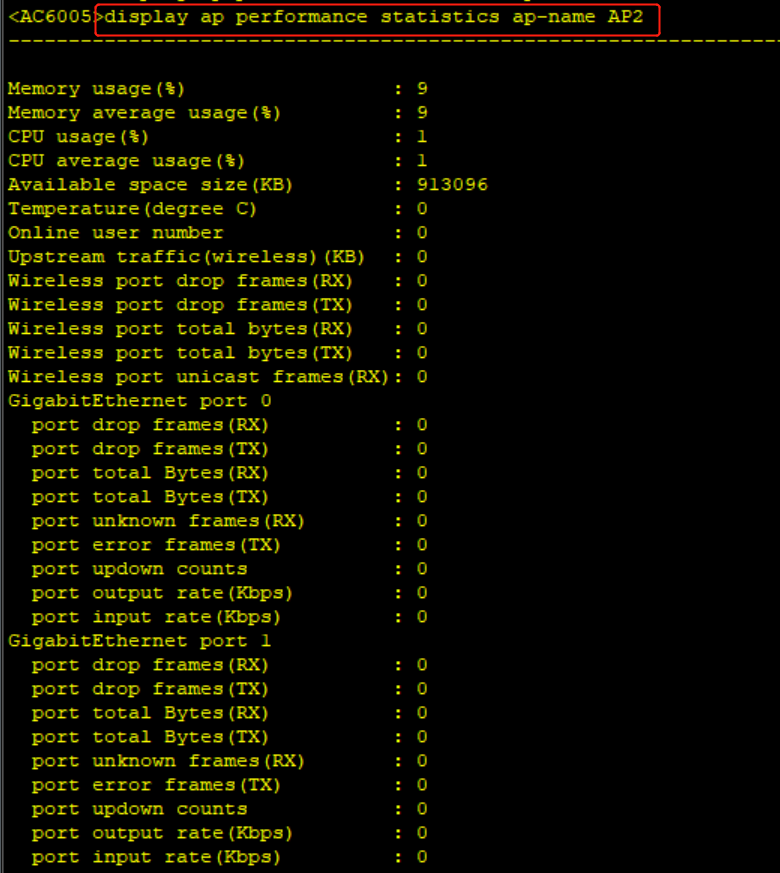
2.2、AP性能统计信息
display ap performance statistics ap-name XXX
display ap performance statistics ap-id XXX

2.3、AP的射频信息
display radio all
display radio ap-group ap-group-name-XXX
display radio ap-name ap-name-XXX
display radio ap-id ap-id-XXX
2.4、AP重启失败的记录
display ap asyn-message err-info all
display ap asyn-message err-info ap-name ap-name-XXX
display ap asyn-message err-info ap-id ap-id-XXX
2.5、非法AP的存在情况
display ap uncontrol all
2.6、设备信道切换的记录信息
display channel switch-record all
display channel switch-record calibrate
display channel switch-record ap-name ap-name-XXX radio radio-id-XXX
display channel switch-record ap-id ap-id-XXX radio radio-id-XXX
display channel switch-record reason reason-XXX
2.7、查看指定AP射频上的报文统计信息
display ap traffic statistics wireless ap-name apNameXXX radio radioIdXXX [ssid ssidXX]
display ap traffic statistics wireless ap-id apIdXXX radio radioIdXXX [ssid ssidXX]
2.8、查看指定AP的电子标签信息
display ap elabel ap-name apNameXXX
display ap elabel ap-id apIdXXX
2.9、查看指定AP上的ACL配置信息
display ap service-config acl [ipv6] ap-name ApNameXXX
display ap service-config acl [ipv6] ap-id ApIdXXX
2.10、查看AP的端口状态和流量信息
display ap port all
display ap port ap-name ap-nameXXX
display ap port ap-id ap-idXXX
display ap port ap-mac ap-macXXX
2.11、查看RU的信息
display distribute-ap all
display distribute-ap ap-id ap-idXXX
display distribute-ap ap-mac ap-macXXX
display distribute-ap ap-name ap-nameXXX
display distribute-ap central-ap-id central-ap-idXXX
display distribute-ap central-ap-mac central-ap-macXXX
display distribute-ap central-ap-name central-ap-name-XXX
2.12、查看添加到AC上的AP的AP类型统计信息
display ap statistics
3、STA相关信息
在STA成功关联到AP之后,可以在任意视图下选择执行如下命令,监控STA的运行情况。
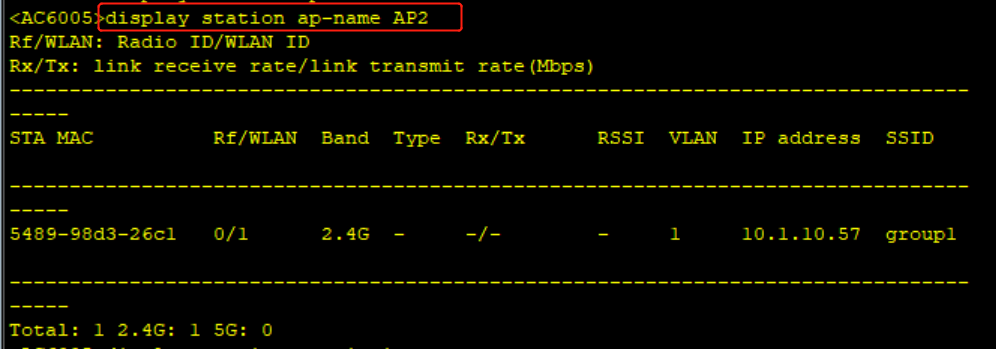
3.1、查看STA的接入信息
display station ap-group apGroupNameXXX
display station ap-name apNameXXX
display station ap-id apIdXXX
display station ssid ssidXXX
display station sta-mac staMacAddressXXX
display station vlan vlanIdXXX
display station all
3.2、查看STA的统计信息
display station statistics
display station statistics sta-mac StaMacAddressXXX
display station statistics ap-name ApNameXXX
display station statistics ap-id ApIdXXX
3.3、查看指定AP上STA的平均信号强度
display ap sta-signal strength ap-name ApName [radio RadioId]
display ap sta-signal strength ap-id ApId [radio RadioId]

本文来自互联网用户投稿,文章观点仅代表作者本人,不代表本站立场,不承担相关法律责任。如若转载,请注明出处。 如若内容造成侵权/违法违规/事实不符,请点击【内容举报】进行投诉反馈!