uniapp 快速上手语言包切换
1.下载vue-i18n
npm install vue-i18n
2.在main.js中引入插件
main.js
import Vue from 'vue'
import App from './App'
// 引入 多语言包
import VueI18n from 'vue-i18n'
import i18n from './assets/lang/index.js'Vue.prototype._i18n = i18nconst app = new Vue({i18n,...App
})
app.$mount()
目录结构
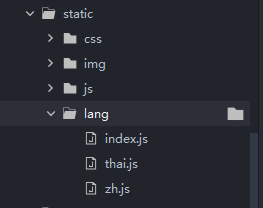
static/lang/index.js
import Vue from 'vue'
// 引入 多语言包
import VueI18n from 'vue-i18n'
import zh from './zh.js'
import thai from './thai.js'Vue.use(VueI18n)// 创建实例
const i18n = new VueI18n({locale: uni.getStorageSync('lang') ? uni.getStorageSync('lang') : "zh",messages: {zh, thai}
});export default i18n;
zh.js
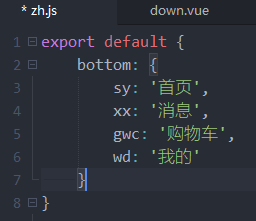
thai.js
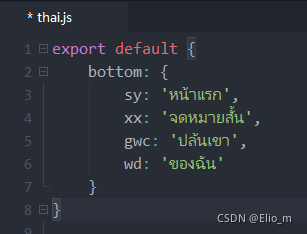
3.使用方式,需要通过计算属性的方式
index.vue
<template><view ><button >{{ i18n.sy}}</button></view>
</template><script>
export default {computed: {i18n() {return this.$t('bottom')}}}
</script>
4.切换语言
<button @click="changeLang('zh')">中文</button>
<button @click="changeLang('thai')">泰文</button>
changeLang(lang) {this._i18n.locale = lang;uni.setStorageSync('lang', lang);
},
本文来自互联网用户投稿,文章观点仅代表作者本人,不代表本站立场,不承担相关法律责任。如若转载,请注明出处。 如若内容造成侵权/违法违规/事实不符,请点击【内容举报】进行投诉反馈!