高德地图api实现索引聚合
需求背景
实现地图上的地点的聚合效果
解决效果
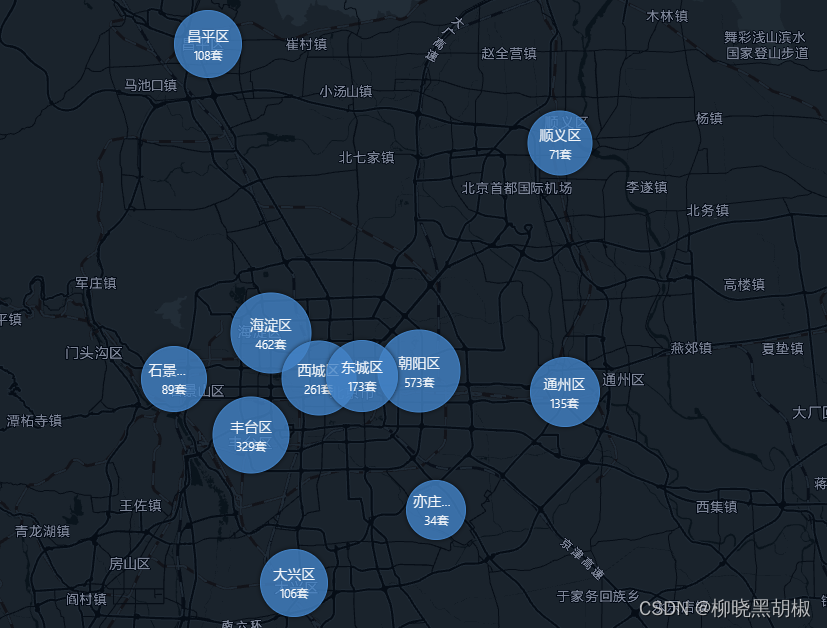
index.vue
<template><div class="map-container"><div id="frontPage-map"></div></div>
</template><script setup>
import ShenFeatureData from "./shen_features";
import pointsData from "./posData"
import {onMounted, reactive, toRefs} from "vue";const model = reactive({tempData: [],// 有位置信息的数据idexCluster: null,// 索引聚合addCluster: null,// 点聚合
})
const {tempData, idexCluster, addCluster} = toRefs(model)// 地图聚合分类
let clusterIndexSet = {province: {minZoom: 4,maxZoom: 6.5,},name: {minZoom: 15,maxZoom: 16,},
};const toVillage = (obj) => {alert('跳转到该地点',obj)
}// 地图省界限
const addPolygon = (pos, sheng) => {let polygon = new AMap.Polygon({path: pos,fillColor: 'transparent',strokeOpacity: 1,strokeColor: '#2b8cbe',strokeWeight: 1,strokeStyle: 'dashed',strokeDasharray: [5, 5],extData: sheng,});polygon.on('mouseover', () => {polygon.setOptions({fillOpacity: 0.3,fillColor: '#7bccc4'});});polygon.on('mouseout', () => {polygon.setOptions({fillOpacity: 0.5,fillColor: 'transparent'});});//创建右键菜单let contextMenu = new AMap.ContextMenu();contextMenu.addItem("缩放至全国范围,显示所有省份", function () {map.setZoomAndCenter(4.5, [108, 39]);// 清空图层idexCluster.value.setMap(null); // 清除地图上所有聚合idexCluster.value = null;// 添加新的聚合idexCluster.value = new AMap.IndexCluster(window.map, pointsData, {renderClusterMarker: renderClusterMarker,clusterIndexSet: clusterIndexSet,});addMarkerCluster(pointsData);}, 2);// 右键显示菜单polygon.on('rightclick', function (e) {if (window.map.getZoom() === 4.5) {return;}contextMenu.open(map, e.lnglat);});// 全球右键回到中心点window.map.on('rightclick', function (e) {if (window.map.getZoom() === 4.5) {return;}contextMenu.open(map, e.lnglat);});window.map.add(polygon);
}
// 按索引聚合
const getStyle = (context) => { // 设置样式let clusterData = context.clusterData; // 聚合中包含数据let index = context.index; // 聚合的条件let count = context.count; // 聚合中点的总数let color = ["8,60,156", "66,130,198"];let indexs = ["province", "name"];let i = indexs.indexOf(index["mainKey"]);let text = clusterData[0][index["mainKey"]];let size = Math.round(10 + Math.pow(count / 2300, 1 / 5) * 60); // 字体大小 todoif (index["mainKey"] === 'province') {let extra = `${context.count}`;let showTxt = text === '黑龙江省' ? "黑龙江" : text.slice(0, 2);text = '+ text + '">' + showTxt + "";text += extra;size = 40;} else {size = 12 * text.length + 20;text = '' + text + "";}let style = {bgColor: "rgba(" + color[i] + ",.8)",borderColor: "rgba(" + color[i] + ",1)",text: text,size: size,index: i,province: clusterData.province,offset: [0, 30],color: "#ffffff",textAlign: "center",cursor: 'pointer',boxShadow: "0px 0px 5px rgba(0,0,0,0.8)",};return style;
}
// 获取坐标
const getPosition = (context) => {let key = context.index?.mainKey || "province";let dataItem = context.clusterData && context.clusterData[0];let districtName = dataItem[key];if (!getShenCenter(districtName)) {return null;}let center = getShenCenter(districtName);let centerLnglat = new AMap.LngLat(center[0], center[1]);return centerLnglat;
}
//自定义聚合点样式
const renderClusterMarker = (context) => {let index = context.index; // 聚合的条件let marker = context.marker; // 聚合点标记对象let styleObj = getStyle(context);// 自定义点标记样式let div = document.createElement("div");div.className = "amap-cluster";div.style.backgroundColor = styleObj.bgColor;div.style.width = styleObj.size + "px";div.style.color = styleObj.color;div.style.fontSize = "8px";if (index["mainKey"] === 'province') {div.style.height = styleObj.size + "px";div.style.border = "solid 1px " + styleObj.borderColor;div.style.boxShadow = styleObj.boxShadow;// 自定义点击事件context.marker.on("click", function () {let char = marker.getContent().innerText.slice(0, 2);model.tempData = pointsData.filter(item => item.province.indexOf(char) !== -1);idexCluster.value.setMap(null); // 清除地图上所有聚合idexCluster.value = null;// 添加新的聚合idexCluster.value = new AMap.IndexCluster(window.map, model.tempData, {renderClusterMarker: renderClusterMarker,clusterIndexSet: clusterIndexSet,});// 跳到当前位置视角window.map.setZoomAndCenter(8, getPosition(context));});} else {div.style.width = "40px";div.style.height = "50px";div.style.color = "transparent";div.style.overflow = "hidden";div.style.whiteSpace = "nowrap";div.style.position = 'relative';div.style.top = '-40px';}div.style.borderRadius = styleObj.size + "px";div.innerHTML = styleObj.text;div.style.textAlign = styleObj.textAlign;context.marker.setContent(div);// 自定义聚合点标记显示位置let position = getPosition(context);if (position) {context.marker.setPosition(position);}context.marker.setAnchor("center");let zoom = window.map.getZoom();if (zoom == 4.5) {window.map.setCenter([108, 39]);}
}
// 按点聚合
const addMarkerCluster = (points) => {let gridSize = 60;let count = points.length;let _renderClusterMarker = function (context) {let factor = Math.pow(context.count / count, 1 / 18);let div = document.createElement('div');let Hue = 180 - factor * 180;let bgColor = 'hsla(' + Hue + ',100%,40%,0.7)';let fontColor = 'hsla(' + Hue + ',100%,90%,1)';let borderColor = 'hsla(' + Hue + ',100%,40%,1)';let shadowColor = 'hsla(' + Hue + ',100%,90%,1)';div.style.backgroundColor = bgColor;let size = Math.round(10 + Math.pow(context.count / count, 1 / 5) * 20);div.style.width = div.style.height = size + 'px';div.style.border = 'solid 1px ' + borderColor;div.style.borderRadius = size / 2 + 'px';div.style.boxShadow = '0 0 5px ' + shadowColor;div.innerHTML = context.count;div.style.lineHeight = size + 'px';div.style.color = fontColor;div.style.fontSize = '12px';div.style.textAlign = 'center';// 自定义点击事件context.marker.on("click", function (e) {let zoom = window.map.getZoom();window.map.setZoomAndCenter(zoom + 3, e.lnglat);});context.marker.setOffset(new AMap.Pixel(-size / 2, -size / 2));context.marker.setContent(div);};let _renderMarker = function (context) {let clusterData = context.data[0]; // 聚合中包含数据let content = document.createElement('div');let p = document.createElement('p');content.appendChild(p);content.style.width = "30px";content.style.height = "60px";content.style.position = 'relative';p.classList.add('tow');p.innerText = clusterData.name;p.setAttribute('title', clusterData.name);p.style.color = "#fff";p.style.textAlign = 'center';p.style.position = 'absolute';p.style.top = '10px';p.style.left = '50%';p.style.transform = 'translateX(-50%)';p.style.padding = '0 5px ';p.style.borderRadius = '5px';p.style.backgroundColor = 'rgba(112,92,98,.7)';p.style.lineHeight = '20px';p.style.fontSize = '8px';if (clusterData.type == 1) {content.style.background = `url('./src/assets/icon/zhen.png') no-repeat 0px 32px/contain`;} else {content.style.background = `url('./src/assets/icon/cun.png') no-repeat 0px 32px/contain`;}let offset = new AMap.Pixel(-22, -45);// 自定义点击事件context.marker.on("click", function () {let obj = {id: clusterData.id,name: clusterData.name,province: clusterData.province,city: clusterData.city,county: clusterData.county,visitorVolume: clusterData.visitorVolume,imageUrl: clusterData.imageUrl};toVillage(obj);});context.marker.setContent(content);context.marker.setOffset(offset);};if (addCluster.value) {addCluster.value.setMap(null);}addCluster.value = new AMap.MarkerCluster(window.map, points, {gridSize: gridSize, // 设置网格像素大小renderClusterMarker: _renderClusterMarker, // 自定义聚合点样式renderMarker: _renderMarker, // 自定义非聚合点样式});
}
// 获取省会中心
const getShenCenter = (name) => {const features = ShenFeatureData.features;const target = features.find(item => item.properties.name === name);return target.properties.center;
}onMounted(() => {window.map = new AMap.Map('frontPage-map', { // 创建地图center: new AMap.LngLat(108, 39),zoom: 4.4,zooms: [4.5, 14],animateEnable: true,});// 监听地图层级变化事件window.map.on("zoomchange", function () {let zoom = window.map.getZoom();if (zoom > 6.5) {addCluster.value || addMarkerCluster(model.tempData);} else {if (addCluster.value) {addCluster.value.setMap(null);addCluster.value = null;}}if (zoom <= 4.8) { // 显示所有的点idexCluster.value && idexCluster.value.setMap(null); // 清除地图上所有聚合idexCluster.value = null;// 添加新的聚合idexCluster.value = new AMap.IndexCluster(window.map, pointsData, {renderClusterMarker: renderClusterMarker,clusterIndexSet: clusterIndexSet,});}});// 绘制省界限const features = ShenFeatureData.features;let rings = [];features.forEach((feature) => {rings = feature.geometry.coordinates;rings.forEach((ring) => {addPolygon(ring, feature.properties.name);});});
});</script><style lang="scss" scoped>
.map-container {position: relative;width: 100%;height: 700px;margin-bottom: 20px;
}// 修改地图样式
::v-deep {#frontPage-map {width: 100%;height: 100%;.amap-cluster {//文字p {position: relative;//top: 5px;}}.amap-marker {.showName {width: 35px;line-height: 1.1;margin: 3px auto 0;}}}.tow {text-overflow: ellipsis;overflow: hidden;white-space: nowrap;}
}
</style>
posData.json
链接
shen_features.json
链接
视频效果
本文来自互联网用户投稿,文章观点仅代表作者本人,不代表本站立场,不承担相关法律责任。如若转载,请注明出处。 如若内容造成侵权/违法违规/事实不符,请点击【内容举报】进行投诉反馈!