openssl生成csr
一 python安装openssl:
pip install pyopenssl
安装完成即可import,cideing代码
# !/usr/bin/python3
# -*- coding: utf-8 -*-
import OpenSSL
from OpenSSL.crypto import sign, verify, PKey
import time
import hashlib
import  random
import  sys
import mathdef create_csr(common_name, country=None, state=None, city=None,organization=None, organizational_unit=None,email_address=None):key = OpenSSL.crypto.PKey()key.generate_key(OpenSSL.crypto.TYPE_RSA, 2048)req = OpenSSL.crypto.X509Req()req.get_subject().CN = common_nameif country:req.get_subject().C = countryif state:req.get_subject().ST = stateif city:req.get_subject().L = cityif organization:req.get_subject().O = organizationif organizational_unit:req.get_subject().OU = organizational_unitif email_address:req.get_subject().emailAddress = email_addressreq.set_pubkey(key)req.sign(key, 'sha256')private_key = OpenSSL.crypto.dump_privatekey(OpenSSL.crypto.FILETYPE_PEM, key)csr = OpenSSL.crypto.dump_certificate_request(OpenSSL.crypto.FILETYPE_PEM, req)return private_key, csr#保存成.cer文件,
def save_certfile(str):now=time.strftime("%Y-%m-%d_%H_%M_%S", time.localtime())filename = 'cert'+now+'.cer'with open(filename, 'w') as f:f.write(str)if __name__ == '__main__':uid=1205125# client_id= random.randint()%sys.client_id="5485929"client_id_sha1= hashlib.sha1(client_id.encode("utf-8")).hexdigest()device_type=1CN="mips."+ str(uid)+"."+str(client_id_sha1)+"."+str(device_type)print(CN)pk,csr=create_csr(CN,"CN","Beijing","Beijing","XIAOGOU","XIAOGOU INC. CERT",None)print(pk)print(csr)
二 openssl工具:
https://blog.csdn.net/flhhly/article/details/124123584
命令:
生成rsa:
openssl req -new -nodes -newkey rsa:2048 -keyout my.key -out my.csr
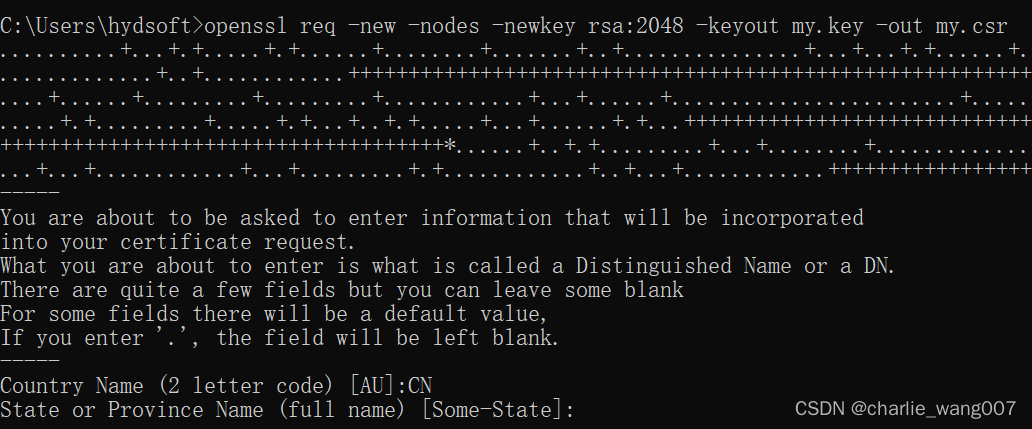
(手动输入信息)
检查csr
openssl req -in ed25519.csr -text
Certificate Request:Data:Version: 1 (0x0)Subject: CN = mips.1205125204.21078ee47bdd75846c8c98fa377b53ee917a400c.1Subject Public Key Info:Public Key Algorithm: ED25519ED25519 Public-Key:pub:a7:0a:59:cd:57:5c:5e:9d:b3:ba:91:bf:8a:a3:7f:13:3c:65:23:4d:80:2f:dc:1c:c0:bd:ef:b1:04:f0:c8:0aAttributes:(none)Requested Extensions:Signature Algorithm: ED25519Signature Value:2d:3b:92:a7:3a:e7:e0:4c:c1:73:3f:2c:21:8f:be:0b:62:41:20:6c:a4:82:9e:37:e2:3c:78:e8:20:b1:9e:4e:a7:70:a2:16:bd:a7:86:64:3f:f3:ed:73:77:fc:e1:4e:38:4d:ac:c4:a3:6c:a5:c8:c2:3e:a6:1b:fe:bb:97:08
-----BEGIN CERTIFICATE REQUEST-----
MIHEMHgCAQAwRTFDMEEGA1UEAww6bWlwcy4xMjA1MTI1MjA0LjIxMDc4ZWU0N2Jk
ZDc1ODQ2YzhjOThmYTM3N2I1M2VlOTE3YTQwMGMuMTAqMAUGAytlcAMhAKcKWc1X
XF6ds7qRv4qjfxM8ZSNNgC/cHMC977EE8MgKoAAwBQYDK2VwA0EALTuSpzrn4EzB
cz8sIY++C2JBIGykgp434jx46CCxnk6ncKIWvaeGZD/z7XN3/OFOOE2sxKNspcjC
PqYb/ruXCA==
-----END CERTIFICATE REQUEST-----
检查证书:
openssl x509 -in device.crt -text
也可以直接打开cer查看详细信息:

总结:
csr从代码角度来讲就是输入公司的信息后得到base64编码的csr
troubleshouting:
1 .TypeError: init() got an unexpected keyword argument ‘name‘
#1 强制更新pippython -m pip install -U --force-reinstall pip#2 重新安装myopensslpip install pyopenssl本文来自互联网用户投稿,文章观点仅代表作者本人,不代表本站立场,不承担相关法律责任。如若转载,请注明出处。 如若内容造成侵权/违法违规/事实不符,请点击【内容举报】进行投诉反馈!