Java创建Excel且设置一列样式为文本类型
Java创建Excel且设置一列样式为文本类型
- 动态创建Excel表格
- 创建Excel实体类
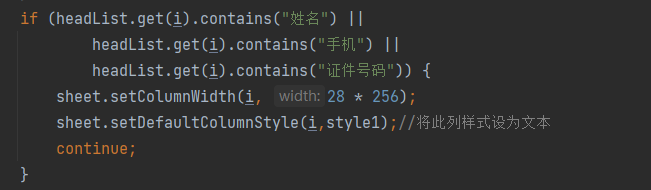
- 设置身份证列为文本格式
- Control层
- getExcelName类
动态创建Excel表格
创建Excel实体类
package com.homeinns.microsrvpmsadminservice.utils.excelUtils;
import com.homeinns.microsrvpmscommon.utils.excelUtils.DateType;
import com.homeinns.microsrvpmscommon.utils.excelUtils.ExcelField;
import org.apache.poi.hssf.usermodel.HSSFCellStyle;
import org.apache.poi.hssf.usermodel.HSSFFont;
import org.apache.poi.hssf.util.HSSFColor;
import org.apache.poi.ss.usermodel.Cell;
import org.apache.poi.ss.usermodel.CellStyle;
import org.apache.poi.ss.usermodel.Font;
import org.apache.poi.xssf.usermodel.*;
import javax.servlet.http.HttpServletResponse;
import java.io.IOException;
import java.io.OutputStream;
import java.lang.reflect.Field;
import java.math.BigDecimal;
import java.math.BigInteger;
import java.text.SimpleDateFormat;
import java.util.ArrayList;
import java.util.Date;
import java.util.List;
public class ExcelUtil_User {
// 生成excel,list导出的数据,list里的实体class,sumData合计数据
public static XSSFWorkbook createExcel(List
list, Class
cls, Q sumData)
throws IllegalArgumentException, IllegalAccessException {
XSSFWorkbook wb = new XSSFWorkbook();
Field[] fields = cls.getDeclaredFields();
ArrayList headList = new ArrayList();
    // 添加合计数据if (sumData != null) {list.add(sumData);}for (Field f : fields) {ExcelField field = f.getAnnotation(ExcelField.class);if (field != null) {headList.add(field.title());}}XSSFCellStyle style = getCellStyle(wb);// XSSFCellStyle styles = getCellStyles(wb);XSSFSheet sheet = wb.createSheet();XSSFCellStyle style1=wb.createCellStyle();XSSFDataFormat format=wb.createDataFormat();style1.setDataFormat(format.getFormat("@"));// 设置Excel表的第一行即表头XSSFRow row = sheet.createRow(0);sheet.createFreezePane(0, 1, 0, 1);row.setHeight((short) 500);for (int i = 0; i < headList.size(); i++) {XSSFCell headCell = row.createCell(i);headCell.setCellType(Cell.CELL_TYPE_STRING);headCell.setCellStyle(style);// 设置表头样式headCell.setCellValue(String.valueOf(headList.get(i)));if (headList.get(i).contains("备注") ||headList.get(i).contains("中介订单号") ||headList.get(i).contains("摘要") ||headList.get(i).contains("【")) {sheet.setColumnWidth(i, 30 * 256);continue;}if (headList.get(i).contains("姓名") ||headList.get(i).contains("手机") ||headList.get(i).contains("证件号码")) {sheet.setColumnWidth(i, 28 * 256);sheet.setDefaultColumnStyle(i,style1);//将此列样式设为文本continue;}if (headList.get(i).contains("状态") ||headList.get(i).contains("Tag") ||headList.get(i).contains("班别") ||headList.get(i).contains("班次") ||headList.get(i).contains("人数") ||headList.get(i).contains("国籍") ||headList.get(i).contains("保密") ||headList.get(i).contains("客密") ||headList.get(i).contains("房号")) {sheet.setColumnWidth(i, 8 * 256);continue;}if (headList.get(i).contains("日期") ||headList.get(i).contains("时间") ||headList.get(i).contains("有效期") ||headList.get(i).contains("到达") ||headList.get(i).contains("单位") ||headList.get(i).contains("生日") ||headList.get(i).contains("离开")) {sheet.setColumnWidth(i, 20 * 256);continue;}if (headList.get(i).contains("部门")) {sheet.setColumnWidth(i, 20 * 256);continue;}sheet.autoSizeColumn(i);// 设置单元格自适应sheet.setColumnWidth(i, sheet.getColumnWidth(i) * 22 / 10);}for (int i = 0; i < list.size(); i++) {XSSFRow rowdata = sheet.createRow(i + 1);// 创建数据行//rowdata.setHeight((short) 400);Q q = list.get(i);Field[] ff = q.getClass().getDeclaredFields();int j = 0;for (Field f : ff) {ExcelField field = f.getAnnotation(ExcelField.class);if (field == null) {continue;}f.setAccessible(true);Object obj = f.get(q);XSSFCell cell = rowdata.createCell(j);cell.setCellType(Cell.CELL_TYPE_STRING);cell.setCellStyle(style1);// 当数字时if (obj instanceof String) {cell.setCellValue((String) obj);}// 当为字符串时else if (obj instanceof String) {cell.setCellValue((String) obj);}// 当为布尔时else if (obj instanceof Boolean) {cell.setCellValue((Boolean) obj);}// 当为时间时else if (obj instanceof Date) {if (f.getAnnotation(DateType.class) != null && f.getAnnotation(DateType.class).type().equals("datetime")) {String stringDate = getStringDateTime((Date) obj);cell.setCellValue(stringDate);}if (f.getAnnotation(DateType.class) != null && f.getAnnotation(DateType.class).type().equals("date")) {String stringDate = getStringDate((Date) obj);cell.setCellValue(stringDate);}}j++;}}if (sumData != null) {int rowIndex = list.size();XSSFRow sumRow = sheet.getRow(rowIndex);XSSFCell sumCell = sumRow.getCell(0);sumCell.setCellStyle(style);sumCell.setCellValue("合计");}return wb;
}// 导出
public static void writeExcel(HttpServletResponse response, String fileName, XSSFWorkbook wb) throws IOException {response.setContentType("application/x-download");response.setCharacterEncoding("UTF-8");// 暴露Content-Disposition给前段获取response.setHeader("Access-Control-Expose-Headers", "Content-Disposition");response.setHeader("Content-Disposition", "attachment;filename=" + fileName);OutputStream ouputStream = null;try {ouputStream = response.getOutputStream();wb.write(ouputStream);} finally {ouputStream.close();}
}// 表头样式
public static XSSFCellStyle getCellStyle(XSSFWorkbook wb) {XSSFCellStyle style = wb.createCellStyle();Font font = wb.createFont();font.setFontName("黑体");font.setColor(HSSFColor.WHITE.index);font.setFontHeightInPoints((short) 12);// 设置字体大小font.setBoldweight(HSSFFont.BOLDWEIGHT_BOLD);// 加粗style.setFillForegroundColor(HSSFColor.DARK_TEAL.index);// 设置背景色style.setFillPattern(HSSFCellStyle.SOLID_FOREGROUND);style.setAlignment(HSSFCellStyle.SOLID_FOREGROUND);// 让单元格居中style.setAlignment(HSSFCellStyle.ALIGN_CENTER);// 左右居中style.setVerticalAlignment(HSSFCellStyle.VERTICAL_CENTER);// 上下居中style.setWrapText(true);// 设置自动换行style.setFont(font);return style;
}// 数据行样式
public static XSSFCellStyle getCellStyles(XSSFWorkbook wb) {XSSFCellStyle style = wb.createCellStyle();style.setAlignment(HSSFCellStyle.SOLID_FOREGROUND);// 让单元格居中//style.setAlignment(HSSFCellStyle.ALIGN_CENTER);// 左右居中style.setVerticalAlignment(HSSFCellStyle.VERTICAL_CENTER);// 上下居中style.setWrapText(true);// 设置自动换行return style;
}private static String getStringDate(Date date) {SimpleDateFormat formatter = new SimpleDateFormat("yyyy-MM-dd");String dateString = formatter.format(date);return dateString;
}private static String getStringDateTime(Date date) {SimpleDateFormat formatter = new SimpleDateFormat("yyyy-MM-dd HH:mm:ss");String dateString = formatter.format(date);return dateString;
}
}
设置身份证列为文本格式
Control层
@ApiOperation(value = “模板导出”)
@PostMapping(“/excelmodel”)
public void UserToExcelModel(HttpServletResponse response){
List list = new ArrayList<>();
list.add(new UserExcel());
try {
XSSFWorkbook excel = ExcelUtil_User.createExcel(list, UserExcel.class, null);
String filename = getExcelName(System.currentTimeMillis() + “”);
ExcelUtil_User.writeExcel(response, filename, excel);
} catch (Exception e) {
e.printStackTrace();
}
}
getExcelName类
// 转化为excel名称
private String getExcelName(String filename) throws UnsupportedEncodingException {
String excelName = StringUtils.join(filename, “.xlsx”);
return URLEncoder.encode(excelName, “UTF-8”);
}
本文来自互联网用户投稿,文章观点仅代表作者本人,不代表本站立场,不承担相关法律责任。如若转载,请注明出处。 如若内容造成侵权/违法违规/事实不符,请点击【内容举报】进行投诉反馈!