Unity编辑器 - 识别Lua文件
Unity编辑器 - 预览Lua文件
默认情况下Unity编辑器的Inspector窗口无法直接显示Lua文件详情
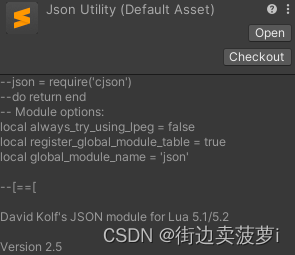
直接修改Inspector显示
Lua文件默认会被识别为DefaultAsset,我们可以通过重写DefaultAsset的Inspector面板来实现对Lua文件的预览
using System.IO;
using UnityEditor;
using UnityEngine;[CustomEditor(typeof(DefaultAsset))]
public class LuaInspector : UnityEditor.Editor
{GUIStyle textStyle;const int MaxLength = 5000;string detail;public override void OnInspectorGUI(){if (textStyle is null){textStyle = new GUIStyle();textStyle.normal.textColor = Color.white;}string assetPath = AssetDatabase.GetAssetPath(target);if (!assetPath.EndsWith(".lua"))return;if (string.IsNullOrEmpty(detail)){detail = File.ReadAllText(assetPath);if (detail.Length > MaxLength)detail = detail.Substring(0, MaxLength) + "...\n\n<...etc...>";}GUILayout.Box(detail, textStyle);}
}
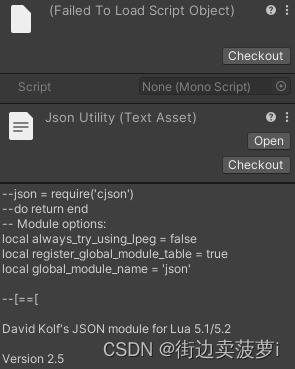
转换为TextAsset进行展示
读取文件内容后生成新的TextAsset再将新生成的TextAsset作为主要对象
using System.IO;
using UnityEditor.AssetImporters;
using UnityEngine;[ScriptedImporter(1, ".lua")]
public class LuaImporter : ScriptedImporter
{string luaTxt;public override void OnImportAsset(AssetImportContext ctx){if (string.IsNullOrEmpty(luaTxt))luaTxt = File.ReadAllText(ctx.assetPath);var display = new TextAsset(luaTxt);ctx.AddObjectToAsset("Lua Script", display);ctx.SetMainObject(display);}
}
参考
https://docs.unity.cn/cn/current/ScriptReference/AssetImporters.ScriptedImporter.html
本文来自互联网用户投稿,文章观点仅代表作者本人,不代表本站立场,不承担相关法律责任。如若转载,请注明出处。 如若内容造成侵权/违法违规/事实不符,请点击【内容举报】进行投诉反馈!