Camera HAL 下的SprdCamera3HWI.cpp 内容介绍
文章目录
- openCamera
- 1. channel stop 及 channelClearAllQBuff
- 2,mOEMIf->closeCamera();
- 3,delete
- configureStreams
- 1,创建各个channel
- 2,clear all stream
- 3,遍历参数 streamList,得到 stream_type 和 channel_type
- 4,根据 channel_type 和 stream_type 赋值
- 5,size 设到 SprdCamera3OEMIf 和 SprdCamera3Setting 中
- processCaptureRequest
- 1,入参request的setting对象
- 2,根据 configureStream 中的数据配置SprdCamera3OEMIf中的一些状态
- 3,填充 pendingRequest 对象 --- 3A参数
- 4,mMetadataChannel->start
- 5,开启预览
- 6,填充 pendingRequest 对象 --- starem_buffer
- 7,channel->request
SprdCamera3HWI.cpp 在 hal3_2v6下面的,它的位置也是比较靠前的,我们以openCamera的流程为例,看下HWI的位置。
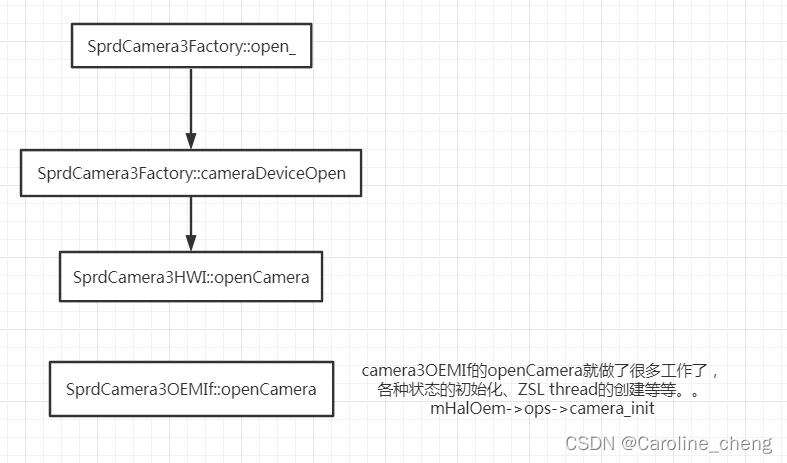
可以看到,HWI在第二个阶段就出现了,是与我们之前花大力气介绍的OEMIf直接交互的。我们本篇介绍HWI的3个重要部分
- openCamera
- configureStreams
- processCaptureRequest
openCamera
HWI的openCamer并没有做什么复杂的操作,因为openCamera的大部分操作是在HWI调用的OEMIf中做的,但是HWI在openCamera中创建了 SprdCamera3OEMIf
mSetting = new SprdCamera3Setting(mCameraId);
mOEMIf = new SprdCamera3OEMIf(mCameraId, mSetting);
从这两行代码我们可以看出来这几个关键cpp文件之间的关系。
SprdCamera3Setting 与 一个CameraId 对应
SprdCamera3OEMIf 与一个 SprdCamera3Setting 和 一个CameraId对应
并且这两者都是HWI的成员,也就是与HWI也是一一对应的关系
这里我们可以再看下HWI的closeCamera,会更加清楚
1. channel stop 及 channelClearAllQBuff
if (mMetadataChannel) {mMetadataChannel->stop(mFrameNum);
}
if (mRegularChan) {mRegularChan->stop(mFrameNum);regularChannel->channelClearAllQBuff(timestamp,CAMERA_STREAM_TYPE_PREVIEW);regularChannel->channelClearAllQBuff(timestamp,CAMERA_STREAM_TYPE_VIDEO);regularChannel->channelClearAllQBuff(timestamp,CAMERA_STREAM_TYPE_CALLBACK);regularChannel->channelClearAllQBuff(timestamp,CAMERA_STREAM_TYPE_YUV2);
}
if (mPicChan) {mPicChan->stop(mFrameNum);picChannel->channelClearAllQBuff(timestamp,CAMERA_STREAM_TYPE_PICTURE_SNAPSHOT);
}
2,mOEMIf->closeCamera();
mOEMIf->closeCamera();
3,delete
delete OEMIf、channel、camera3Setting
delete mOEMIf;
mOEMIf = NULL;if (mMetadataChannel) {delete mMetadataChannel;mMetadataChannel = NULL;
}
if (mRegularChan) {delete mRegularChan;mRegularChan = NULL;
}
if (mPicChan) {delete mPicChan;mPicChan = NULL;
}
if (mSetting) {delete mSetting;mSetting = NULL;
}
我们看到,在openCamera的时候创建SprdCamera3OEMIf、SprdCamera3Setting;在close camera的时候delete Camera3OEMIf、SprdCamera3Setting对应,同时还处理了channel。也就是说
SprdCamera3OEMIf、SprdCamera3Setting 的生命周期与HWI是紧紧绑定的。
configureStreams
入参是 camera3_stream_configuration_t 类型的 streamList, 即要配置的流对象
int SprdCamera3HWI::configureStreams(camera3_stream_configuration_t *streamList)
camera3_stream_configuration_t 的定义在:hardware\libhardware\include\hardware\camera3.h 中,其中最重要的成员就是 camera3_stream_t **streams,他是一个指向数组的指针;
typedef struct camera3_stream_configuration {/*** The total number of streams requested by the framework.  This includes* both input and output streams. The number of streams will be at least 1,* and there will be at least one output-capable stream.*/uint32_t num_streams;/*** An array of camera stream pointers, defining the input/output* configuration for the camera HAL device.** At most one input-capable stream may be defined (INPUT or BIDIRECTIONAL)* in a single configuration.** At least one output-capable stream must be defined (OUTPUT or* BIDIRECTIONAL).*/camera3_stream_t **streams;/*** >= CAMERA_DEVICE_API_VERSION_3_3:** The operation mode of streams in this configuration, one of the value* defined in camera3_stream_configuration_mode_t.  The HAL can use this* mode as an indicator to set the stream property (e.g.,* camera3_stream->max_buffers) appropriately. For example, if the* configuration is* CAMERA3_STREAM_CONFIGURATION_CONSTRAINED_HIGH_SPEED_MODE, the HAL may* want to set aside more buffers for batch mode operation (see* android.control.availableHighSpeedVideoConfigurations for batch mode* definition).**/uint32_t operation_mode;const camera_metadata_t *session_parameters;
} camera3_stream_configuration_t;
1,创建各个channel
创建channle的逻辑是:
如果当前channel为null,就new;
如果当前channel不为null,就stop此channel,必须new
if (mMetadataChannel == NULL) {mMetadataChannel = new SprdCamera3MetadataChannel(mOEMIf, captureResultCb, mSetting, this);if (mMetadataChannel == NULL) {HAL_LOGE("failed to allocate metadata channel");}
} else {mMetadataChannel->stop(mFrameNum);
}// regular channel
if (mRegularChan == NULL) {mRegularChan = new SprdCamera3RegularChannel(mOEMIf, captureResultCb, mSetting, mMetadataChannel,CAMERA_CHANNEL_TYPE_REGULAR, this);if (mRegularChan == NULL) {HAL_LOGE("channel created failed");return INVALID_OPERATION;}
} else {// for performance: dont delay for dc/dv switch or front/back switchmOEMIf->setSensorCloseFlag();mRegularChan->stop(mFrameNum);
}// picture channel
if (mPicChan == NULL) {mPicChan = new SprdCamera3PicChannel(mOEMIf, captureResultCb, mSetting,mMetadataChannel,CAMERA_CHANNEL_TYPE_PICTURE, this);if (mPicChan == NULL) {HAL_LOGE("channel created failed");return INVALID_OPERATION;}
} else {mPicChan->stop(mFrameNum);
}
2,clear all stream
mRegularChan->clearAllStreams();
mPicChan->clearAllStreams();
3,遍历参数 streamList,得到 stream_type 和 channel_type
- 预览:
case HAL_PIXEL_FORMAT_IMPLEMENTATION_DEFINED:
case HAL_PIXEL_FORMAT_YCrCb_420_SP:stream_type = CAMERA_STREAM_TYPE_PREVIEW;channel_type = CAMERA_CHANNEL_TYPE_REGULAR;
- previewCallback 和 缩略图
case HAL_PIXEL_FORMAT_YV12:
case HAL_PIXEL_FORMAT_YCbCr_420_888:if(newStream->width <= 320 && newStream->height <= 240 && !hasYuv2Stream){HAL_LOGI("width = %d, height = %d", newStream->width, newStream->height);stream_type = CAMERA_STREAM_TYPE_YUV2;channel_type = CAMERA_CHANNEL_TYPE_REGULAR;hasYuv2Stream = 1;} else {if (hasImplementationDefinedOutputStream == 0) {stream_type = CAMERA_STREAM_TYPE_PREVIEW;channel_type = CAMERA_CHANNEL_TYPE_REGULAR;// for two HAL_PIXEL_FORMAT_YCBCR_420_888 steamhasImplementationDefinedOutputStream = 1;} else if (hasCallbackStream == 0) {stream_type = CAMERA_STREAM_TYPE_CALLBACK;channel_type = CAMERA_CHANNEL_TYPE_REGULAR;hasCallbackStream = 1;} else if (hasYuv2Stream == 0) {stream_type = CAMERA_STREAM_TYPE_YUV2;channel_type = CAMERA_CHANNEL_TYPE_REGULAR;hasYuv2Stream = 1;}}break;
从这个case的逻辑看到:
如果满足:newStream->width <= 320 && newStream->height <= 240 条件,stream_type就直接为yuv
否则,优先进入 hasCallbackStream 的分支,即stream_type 优先为 CAMERA_STREAM_TYPE_CALLBACK,只有CAMERA_STREAM_TYPE_CALLBACK的位置被占用了,才会判断是否为CAMERA_STREAM_TYPE_YUV2。这两个else if的前后顺序要注意下。
另外,补充下 stream_type 和 channel_type 的定义:
typedef enum {CAMERA_STREAM_TYPE_DEFAULT,CAMERA_STREAM_TYPE_PREVIEW,//1CAMERA_STREAM_TYPE_VIDEO,CAMERA_STREAM_TYPE_CALLBACK,//3CAMERA_STREAM_TYPE_YUV2,CAMERA_STREAM_TYPE_ZSL_PREVIEW,CAMERA_STREAM_TYPE_PICTURE_SNAPSHOT,//6CAMERA_STREAM_TYPE_MAX,
} camera_stream_type_t;typedef enum {CAMERA_CHANNEL_TYPE_DEFAULT,CAMERA_CHANNEL_TYPE_REGULAR,CAMERA_CHANNEL_TYPE_PICTURE,CAMERA_CHANNEL_TYPE_MAX,
} camera_channel_type_t;
我们看到,channel只有两种:REGULAR 和 PICTURE,但是stream_type的类型比较多,但是只有 CAMERA_STREAM_TYPE_PICTURE_SNAPSHOT 是与 PICTURE的channel适配为一组。
- 拍照
case HAL_PIXEL_FORMAT_BLOB://拍照stream_type = CAMERA_STREAM_TYPE_PICTURE_SNAPSHOT;channel_type = CAMERA_CHANNEL_TYPE_PICTURE;
4,根据 channel_type 和 stream_type 赋值
根据上一步中得到的 channel_type 和 ctream_type 为mStreamConfiguration和对应的size赋值
switch (channel_type){
case CAMERA_CHANNEL_TYPE_REGULAR: {ret = mRegularChan->addStream(stream_type, newStream);if (ret) {HAL_LOGE("addStream failed");}if (stream_type == CAMERA_STREAM_TYPE_PREVIEW) {preview_size.width = newStream->width;preview_size.height = newStream->height;previewFormat = newStream->format;previewStreamType = CAMERA_STREAM_TYPE_PREVIEW;mStreamConfiguration.preview.status = CONFIGURED;mStreamConfiguration.preview.width = newStream->width;mStreamConfiguration.preview.height = newStream->height;mStreamConfiguration.preview.format = newStream->format;mStreamConfiguration.preview.type = CAMERA_STREAM_TYPE_PREVIEW;mStreamConfiguration.preview.stream = newStream;} else if (stream_type == CAMERA_STREAM_TYPE_VIDEO) {video_size.width = newStream->width;video_size.height = newStream->height;videoFormat = newStream->format;videoStreamType = CAMERA_STREAM_TYPE_VIDEO;mStreamConfiguration.video.status = CONFIGURED;mStreamConfiguration.video.width = newStream->width;mStreamConfiguration.video.height = newStream->height;mStreamConfiguration.video.format = newStream->format;mStreamConfiguration.video.type = CAMERA_STREAM_TYPE_VIDEO;mStreamConfiguration.video.stream = newStream;} else if (stream_type == CAMERA_STREAM_TYPE_CALLBACK) {property_get("persist.vendor.cam.isptool.mode.enable", value2, "false");property_get("persist.vendor.cam.raw.mode", value, "jpeg");if (strcmp(value2, "true") && strcmp(value, "raw")) {callback_size.width = newStream->width;callback_size.height = newStream->height;callbackFormat = newStream->format;callbackStreamType = CAMERA_STREAM_TYPE_CALLBACK;mStreamConfiguration.yuvcallback.status = CONFIGURED;mStreamConfiguration.yuvcallback.width = newStream->width;mStreamConfiguration.yuvcallback.height = newStream->height;mStreamConfiguration.yuvcallback.format = newStream->format;mStreamConfiguration.yuvcallback.type =CAMERA_STREAM_TYPE_CALLBACK;mStreamConfiguration.yuvcallback.stream = newStream;}else {mStreamConfiguration.num_streams = streamList->num_streams - 1;}} else if (stream_type == CAMERA_STREAM_TYPE_YUV2) {yuv2_size.width = newStream->width;yuv2_size.height = newStream->height;yuv2Format = newStream->format;yuv2StreamType = CAMERA_STREAM_TYPE_YUV2;mStreamConfiguration.yuv2.status = CONFIGURED;mStreamConfiguration.yuv2.width = newStream->width;mStreamConfiguration.yuv2.height = newStream->height;mStreamConfiguration.yuv2.format = newStream->format;mStreamConfiguration.yuv2.type = CAMERA_STREAM_TYPE_YUV2;mStreamConfiguration.yuv2.stream = newStream;}
case CAMERA_CHANNEL_TYPE_PICTURE: {ret = mPicChan->addStream(stream_type, newStream);if (ret) {HAL_LOGE("addStream failed");}if (stream_type == CAMERA_STREAM_TYPE_PICTURE_SNAPSHOT) {capture_size.width = newStream->width;capture_size.height = newStream->height;captureFormat = newStream->format;captureStreamType = CAMERA_STREAM_TYPE_PICTURE_SNAPSHOT;mStreamConfiguration.snapshot.status = CONFIGURED;mStreamConfiguration.snapshot.width = newStream->width;mStreamConfiguration.snapshot.height = newStream->height;mStreamConfiguration.snapshot.format = newStream->format;mStreamConfiguration.snapshot.type =CAMERA_STREAM_TYPE_PICTURE_SNAPSHOT;mStreamConfiguration.snapshot.stream = newStream;}newStream->priv = mPicChan;newStream->max_buffers = SprdCamera3PicChannel::kMaxBuffers;//1mPictureRequest = false;break;
}
| CAMERA_CHANNEL_TYPE_REGULAR | CAMERA_CHANNEL_TYPE_PICTURE |
|---|---|
| CAMERA_STREAM_TYPE_PREVIEW | CAMERA_STREAM_TYPE_PICTURE_SNAPSHOT |
| CAMERA_STREAM_TYPE_VIDEO | - |
| CAMERA_STREAM_TYPE_CALLBACK | - |
| CAMERA_STREAM_TYPE_YUV2 | - |
5,size 设到 SprdCamera3OEMIf 和 SprdCamera3Setting 中
mOEMIf->setCamStreamInfo(preview_size, previewFormat, previewStreamType);
mOEMIf->setCamStreamInfo(capture_size, captureFormat, captureStreamType);
mOEMIf->setCamStreamInfo(video_size, videoFormat, videoStreamType);
mOEMIf->setCamStreamInfo(callback_size, callbackFormat, callbackStreamType);
mOEMIf->setCamStreamInfo(yuv2_size, yuv2Format, yuv2StreamType);// need to update crop region each time when ConfigureStreams
mOEMIf->setCameraConvertCropRegion();mSetting->setPreviewSize(preview_size);
mSetting->setVideoSize(video_size);
mSetting->setPictureSize(capture_size);
mSetting->setCallbackSize(callback_size);
configureStream的流程就是这些了,主要是把入参 camera3_stream_configuration_t *streamList 中的数据解析出来,设到相应的位置上。
processCaptureRequest
预览和拍照请求都来自这个processCaptureRequest,我们知道连续不断的预览是来自连续不断的预览请求。
int SprdCamera3HWI::processCaptureRequest(camera3_capture_request_t *request)
入参是 camera3_capture_request_t 类型的变量 request,此类型同样定义在camera3.h中 ,其关键成员是 camera3_stream_buffer_t *output_buffers
typedef struct camera3_capture_request {/*** The frame number is an incrementing integer set by the framework to* uniquely identify this capture. It needs to be returned in the result* call, and is also used to identify the request in asynchronous* notifications sent to camera3_callback_ops_t.notify().*/uint32_t frame_number;/*** The settings buffer contains the capture and processing parameters for* the request. As a special case, a NULL settings buffer indicates that the* settings are identical to the most-recently submitted capture request. A* NULL buffer cannot be used as the first submitted request after a* configure_streams() call.*/const camera_metadata_t *settings;camera3_stream_buffer_t *input_buffer;/*** The number of output buffers for this capture request. Must be at least* 1.*/uint32_t num_output_buffers;/*** An array of num_output_buffers stream buffers, to be filled with image* data from this capture/reprocess. The HAL must wait on the acquire fences* of each stream buffer before writing to them.** The HAL takes ownership of the actual buffer_handle_t entries in* output_buffers; the framework does not access them until they are* returned in a camera3_capture_result_t.** <= CAMERA_DEVICE_API_VERSION_3_1:** All the buffers included here will have been registered with the HAL* through register_stream_buffers() before their inclusion in a request.** >= CAMERA_DEVICE_API_VERSION_3_2:** Any or all of the buffers included here may be brand new in this* request (having never before seen by the HAL).*/const camera3_stream_buffer_t *output_buffers;uint32_t num_physcam_settings;const char **physcam_id;const camera_metadata_t **physcam_settings;} camera3_capture_request_t;
1,入参request的setting对象
meta = request->settings;
mMetadataChannel->request(meta);
MetadataChannel的requst函数就是把参数meta的数据设置到SprdCamera3Setting中
int SprdCamera3MetadataChannel::request(const CameraMetadata &metadata) {mSetting->updateWorkParameters(metadata);return 0;
}
2,根据 configureStream 中的数据配置SprdCamera3OEMIf中的一些状态
mOEMIf->setCapturePara(CAMERA_CAPTURE_MODE_PREVIEW,mFrameNum);
mOEMIf->setStreamOnWithZsl();
3,填充 pendingRequest 对象 — 3A参数
将SprdCamera3Setting中的3A数据、flash状态等设置到 pendingRequest 对象中。注意在第一步的时候已经将入参 request 中的metadata数据设置到SprdCamera3Setting中了,所以此处在往 pendingRequest 的设置的数据且是也是来子入参 request。
pendingRequest.meta_info.flash_mode = flashInfo.mode;
pendingRequest.meta_info.ae_mode = controlInfo.ae_mode;
memcpy(pendingRequest.meta_info.ae_regions, controlInfo.ae_regions,5 * sizeof(controlInfo.ae_regions[0]));
memcpy(pendingRequest.meta_info.af_regions, controlInfo.af_regions,5 * sizeof(controlInfo.af_regions[0]));
pendingRequest.frame_number = frameNumber;
pendingRequest.threeA_info.af_trigger = controlInfo.af_trigger;
pendingRequest.threeA_info.af_state = controlInfo.af_state;
pendingRequest.threeA_info.ae_precap_trigger =controlInfo.ae_precap_trigger;
pendingRequest.threeA_info.ae_state = controlInfo.ae_state;
pendingRequest.threeA_info.ae_manual_trigger =controlInfo.ae_manual_trigger;
#ifdef SUPPORT_EXPOSURE_SENSITIVITY
pendingRequest.threeA_info.exposure_time = streamParaInfo.exposure_time;
pendingRequest.threeA_info.sensitivity= streamParaInfo.sensitivity;
#endif
pendingRequest.num_buffers = request->num_output_buffers;
pendingRequest.request_id = captureRequestId;
pendingRequest.bNotified = 0;
pendingRequest.input_buffer = request->input_buffer;
pendingRequest.pipeline_depth = 0;
4,mMetadataChannel->start
medataChannel的start函数是通过mOEMIf->SetCameraParaTag将参数进一步往底层oem端去设置
int SprdCamera3MetadataChannel::start(uint32_t frame_number) {CONTROL_Tag controlInfo;SPRD_DEF_Tag *sprddefInfo;JPEG_Tag jpegInfo;STATISTICS_Tag statisticsInfo;int tag = 0;while ((tag = mSetting->popAndroidParaTag()) != -1) {switch (tag) {case ANDROID_CONTROL_AF_TRIGGER:HAL_LOGD("ANDROID_CONTROL_AF_TRIGGER frame_number %d", frame_number);mOEMIf->SetCameraParaTag(ANDROID_CONTROL_AF_TRIGGER);break;case ANDROID_CONTROL_AE_PRECAPTURE_TRIGGER:HAL_LOGV("ANDROID_CONTROL_AE_PRECAPTURE_TRIGGER");mOEMIf->SetCameraParaTag(ANDROID_CONTROL_AE_PRECAPTURE_TRIGGER);break;case ............
5,开启预览
mFirstRegularRequest 的默认值是 1,只在第一次请求的时候会去调用 mRegularChan->start 开启预览
if (mFirstRegularRequest == 1) {HAL_LOGD(" mRegularChan->start num_output_buffers:%d", request->num_output_buffers);ret = mRegularChan->start(mFrameNum);//开启预览if (ret) {HAL_LOGE("mRegularChan->start failed, ret=%d", ret);goto exit;}mFirstRegularRequest = 0;
}
6,填充 pendingRequest 对象 — starem_buffer
我们在介绍 processCaptureRequest 的入参时说到,camera3_capture_request的关键成员是 camera3_stream_buffer_t 类型的 *output_buffers
一个 camera3_stream_buffer_t 对象是包含一个stream 和一个 buffer
typedef struct camera3_stream_buffer {/*** The handle of the stream this buffer is associated with*/camera3_stream_t *stream;/*** The native handle to the buffer*/buffer_handle_t *buffer;int status;int acquire_fence;int release_fence;} camera3_stream_buffer_t;
output_buffers 指向的是一个数组类型的 camera3_stream_buffer_t,这里将其 stream 和 buffer 成员解析出来,然后 push 到 pendingRequest.buffers 中。
for (i = 0; i < request->num_output_buffers; i++) {const camera3_stream_buffer_t &output = request->output_buffers[i];camera3_stream_t *stream = output.stream;RequestedBufferInfo requestedBuf;SprdCamera3Channel *channel = (SprdCamera3Channel *)stream->priv;if (channel == NULL) {HAL_LOGE("invalid channel pointer for stream");continue;}requestedBuf.stream = output.stream;requestedBuf.buffer = output.buffer;pendingRequest.buffers.push_back(requestedBuf);}
7,channel->request
我们以预览请求为例,这里的channel就是 SprdCamera3RegularChannel
for (i = 0; i < request->num_output_buffers; i++) {const camera3_stream_buffer_t &output = request->output_buffers[i];camera3_stream_t *stream = output.stream;SprdCamera3Channel *channel = (SprdCamera3Channel *)stream->priv;if (channel == NULL) {HAL_LOGE("invalid channel pointer for stream");continue;}HAL_LOGD(" getStreamType:%d",getStreamType(stream));ret = channel->request(stream, output.buffer, frameNumber);if (ret) {HAL_LOGE("channel->request failed %p (%d)", output.buffer,frameNumber);continue;}
}
我们到chanell里面去看request的实现,其又调用了 mOEMIf->queueBuffer,到这里我们就不在展开了,因为OEMIf的queueBuffer追下去又涉及很多内容,我们在下一篇文章中会在单独介绍这个重要的流程。
processCaptureRequest 的流程到这里就结束了,总结下其主要是将入参的metadata设下去,然后在第一次请求的时候开启预览,并调用 SprdCamera3RegularChannel的start,这里可以先透漏下,SprdCamera3RegularChannel的start是与buffer的配置有关。
SprdCamera3HWI.cpp 的主要内容就是这些,涉及openCamera、configureStream 和 processCaptureRequest三部分。这三部分也和用户点击桌面的cameraApp,hal端要做的事情的流程是一致的。
本文来自互联网用户投稿,文章观点仅代表作者本人,不代表本站立场,不承担相关法律责任。如若转载,请注明出处。 如若内容造成侵权/违法违规/事实不符,请点击【内容举报】进行投诉反馈!