Vue3全网最细介绍使用
文章目录
- 一、Vue3介绍
- 二、Vue3项目创建
- 三、Setup
- 四、ref与reactive
- 五、setup-context
- 六、计算属性
- 七、监听属性
- 八、Vue3生命周期
- 九、自定义hook函数
- 十、toRef
一、Vue3介绍
1.性能的提升
- 打包大小减少41%
- 初次渲染快55%, 更新渲染快133%
- 内存减少54%
2.源码的升级
- 使用Proxy代替defineProperty实现响应式
- 重写虚拟DOM的实现和Tree-Shaking
3.拥有TypeScript
- Vue3可以更好的支持TypeScript
4.新的特新
-
Composition API(组合API)
– Setup配置
– ref与reactive
– watch与watchEffect
– provide与inject -
新的内置组件
– Fragment
– Teleport
– Suspense -
其他改变
– 新的生命周期钩子
– data 选项应始终被声明为一个函数
– 移除keyCode支持作为 v-on 的修饰符
5.组合式API和配置项API
-
Options API 存在的问题
– 使用传统OptionsAPI中,新增或者修改一个需求,就需要分别在data,methods,computed里修改 。 -
Composition API的优势
–我们可以更加优雅的组织我们的代码,函数。让相关功能的代码更加有序的组织在一起。
二、Vue3项目创建
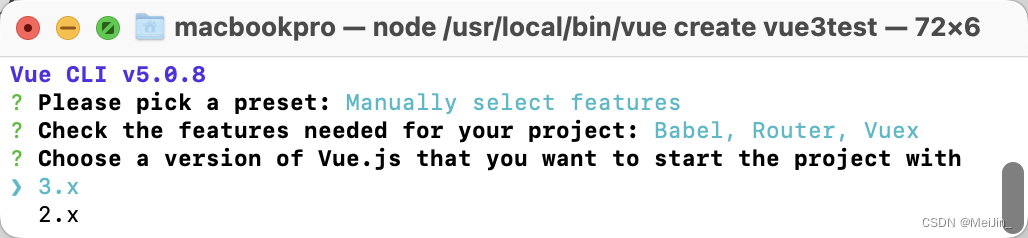
- Vue-cli安装Vue3
vue create 名称		// 选择需要的配置 到版本选择3.X即可
npm run server		// 运行服务器
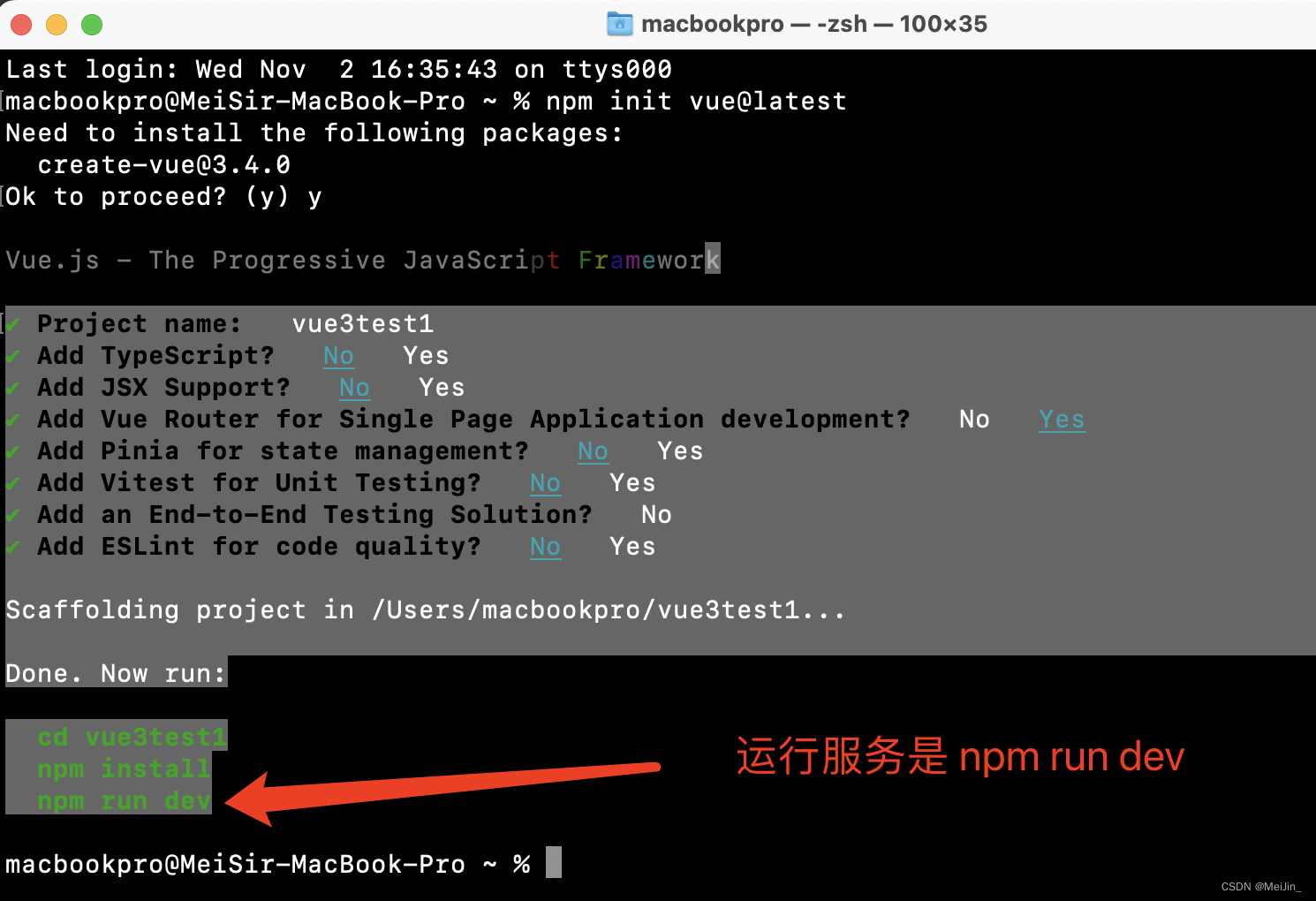
- Vite创建Vue3
npm init vue@latest		// 根据自己的需求选择功能
npm install				// 注意这个方式创建是没有node_modules的
npm run dev				// 运行服务器
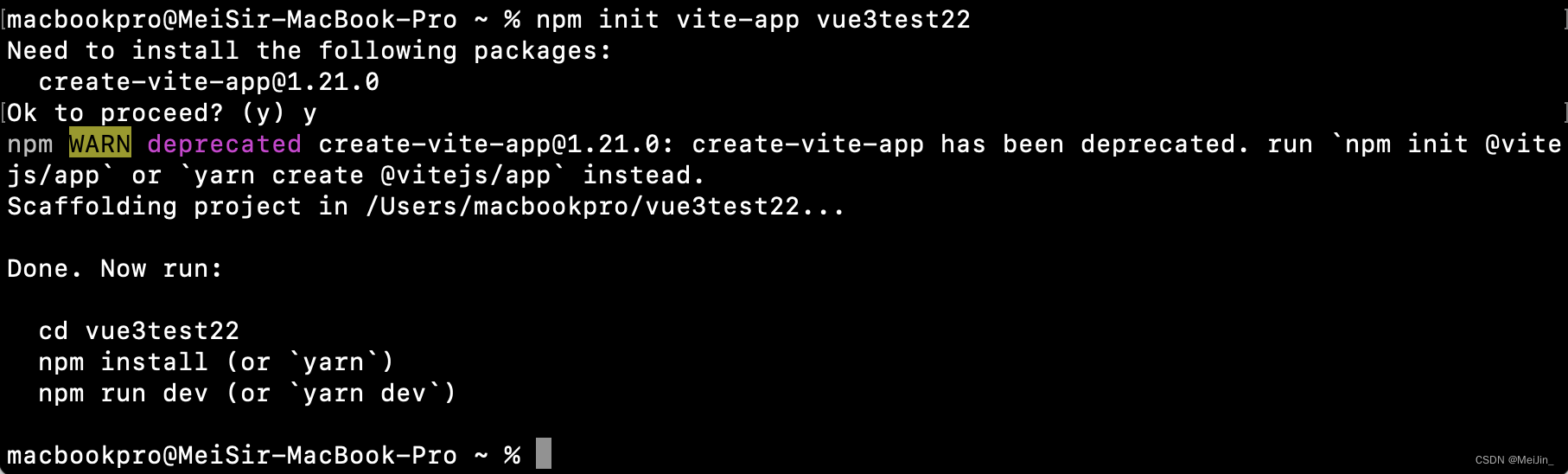
- Vite创建Vue(方式二)
npm init vite-app 项目名称 	// 默认功能是全不选的
npm install 				// 安装 依赖
npm run dev					// 运行服务
三、Setup
Vue3中新增Setup配置项函数 在里面定义函数变量 必须return 才能在模版中使用
<template><div><h1> APP Setup</h1><h3>我是{{name}}</h3><h3>今年{{age}}</h3><button @click="leftClick">点我看帅哥</button><button @click="addAge">点我年龄+1</button></div><router-view/>
</template><script>
export default{                   // Vue3中所有的变量 函数编写 都写在Setup函数中setup(){// console.log(this.name)       // Vue3中没有This let name = 'Like'let age = 20function leftClick() {alert('帅哥!!')}let addAge = () => {console.log('开始加啦!')age++                       // 发现问题 渲染没有问题 但是没有响应式 页面底层变了 变量没变console.log(age)}return {                    // 函数 变量 都需要返回 age, name, leftClick, addAge}}
}
</script>
四、ref与reactive
使用Ref 和 Reactive需要导入
import {ref, reactive} from "vue";
基本数据类型(数组 字符串 布尔)如果想要添加响应式 可以直接使用Ref包裹 通过变量名.Value来修改
对象 数组如果想要添加响应式需要使用Reactive包裹 通过变量.属性来修改
<template><div><h1> APP Setup</h1><h3>我是{{name.name}}</h3>    <!-- reactive的用法 --><h3>今年{{age}}</h3>      	  <!-- ref 的用法 --><button @click="leftClick">点我看帅哥</button><button @click="addAge">点我年龄+1</button></div><router-view/>
</template><script>import {ref, reactive} from "vue";export default{                  setup(){// console.log(this.name)       // Vue3中没有Thislet name = reactive({name:'like', height:180})      // 需要放在一个对象里面let age = ref(20)function leftClick() {name.name = name.name + '?'console.log(name)           // 这个时候我们可以看到name是一个Proxy对象 可以通过名称直接拿值}let addAge = () => {console.log('开始加啦!', age)   // 这个时候我们打印age发现是一个RefImpl对象 中有一个Value就是我们的数据值age.value = age.value+1                      // 发现问题 渲染没有问题 但是没有响应式 页面底层变了 变量没变console.log(age.value)}return {                    // 函数 变量 都需要返回age, name, leftClick, addAge,}}
}
</script>

五、setup-context
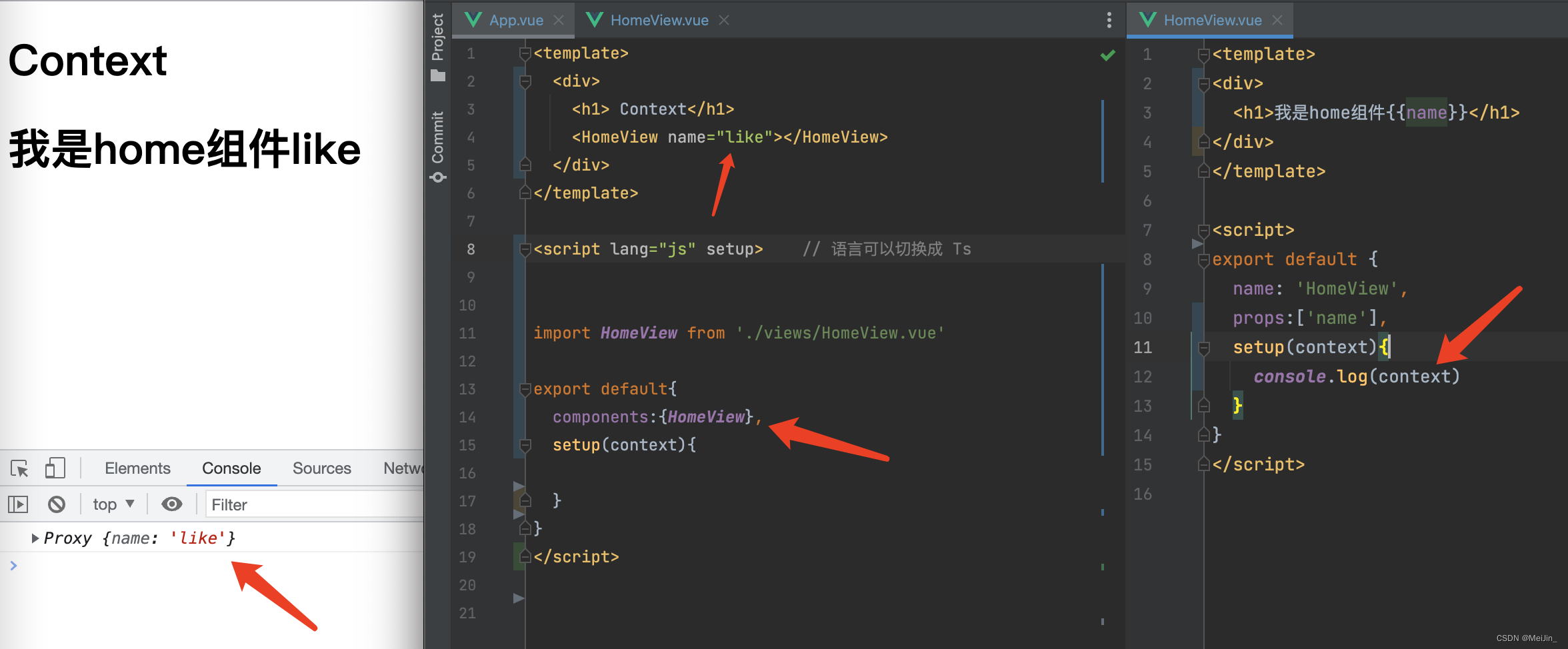
上下文的作用就是可以接收参数 context 内部函数props接受的自定义属性
组件 <template><div><h1>我是home组件{{name}}</h1></div></template><script>export default {name: 'HomeView',props:['name'],setup(context){console.log(context)}}</script>App.vue<template><div><h1> Context</h1><HomeView name="like"></HomeView></div>
</template><script lang="js" setup>    // 语言可以切换成 Tsimport HomeView from './views/HomeView.vue'export default{components:{HomeView},
}
</script>
六、计算属性
与Vue2中的computed配置功能一致(案例:当姓名都发生变化的时候 其他也跟着变换)
<template><p>姓:<input type="text" v-model="person.firstName"></p><p>名:<input type="text" v-model="person.lastName"></p><p>全名:{{ person.fullName }}</p><p>全名修改:<input type="text" v-model="person.fullName"></p></template><script>import {ref, reactive} from 'vue'
import {computed} from 'vue'export default {name: 'App',setup() {const person = reactive({firstName: '梅',lastName: '星星'})// let fullName = computed(() => {// return person.firstName + '-' + person.lastName})// 或者,传入箭头函数// person.fullName=computed(() => {// return person.firstName + '-' + person.lastName})// 修改,传入配置项目person.fullName = computed({get() {return person.firstName + '-' + person.lastName},set(value) {const nameArr = value.split('-')person.firstName = nameArr[0]person.lastName = nameArr[1]}})return {person}},
}
</script>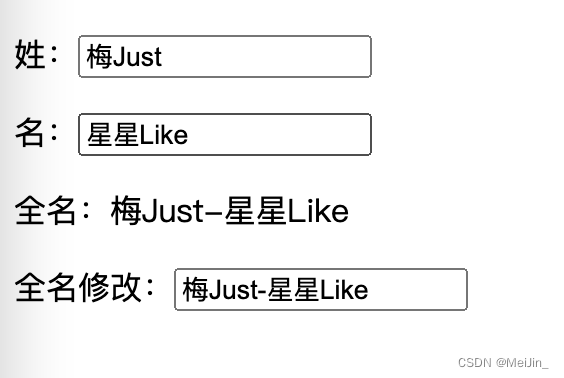
七、监听属性
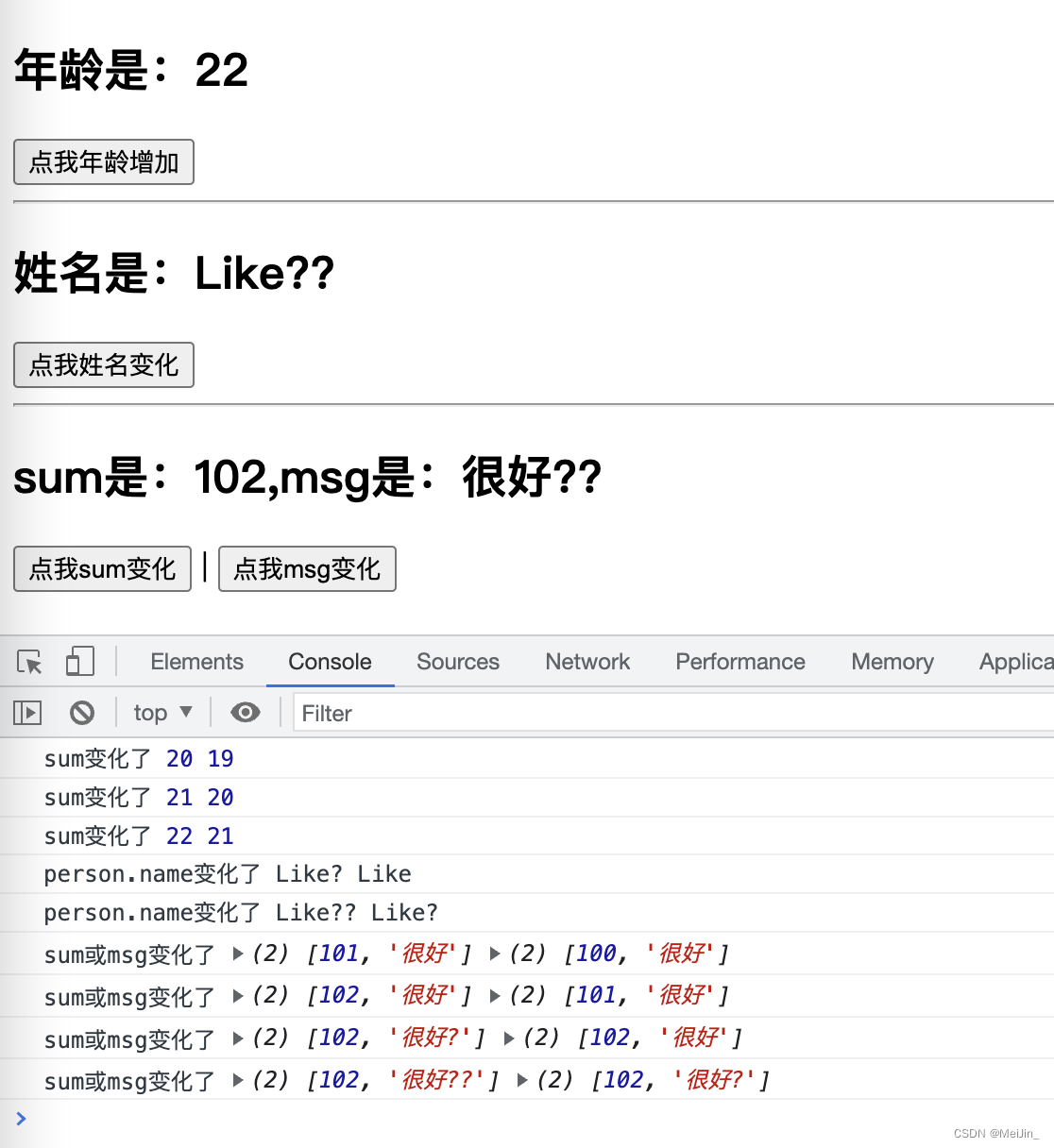
<template><h2>年龄是:{{ age }}</h2><button @click="age++">点我年龄增加</button><hr><h2>姓名是:{{ person.name }}</h2><button @click="person.name+='?'">点我姓名变化</button><hr><h2>sum是:{{ sum }},msg是:{{ msg }}</h2><button @click="sum++">点我sum变化</button>|<button @click="msg+='?'">点我msg变化</button></template><script>import {ref, reactive} from 'vue'
import {watch} from 'vue'export default {name: 'App',setup() {const age = ref(19)const person = reactive({name: 'Like',age: 20})//1 监听普通watch(age, (newValue, oldValue) => {console.log('sum变化了', newValue, oldValue)})// 2 监听对象watch(() => person.name, (newValue, oldValue) => {console.log('person.name变化了', newValue, oldValue)})// 3 监听多个const sum = ref(100)const msg = ref('很好')watch([sum, msg], (newValue, oldValue) => {console.log('sum或msg变化了', newValue, oldValue)})return {person, age, sum, msg}},
}
</script>
八、Vue3生命周期
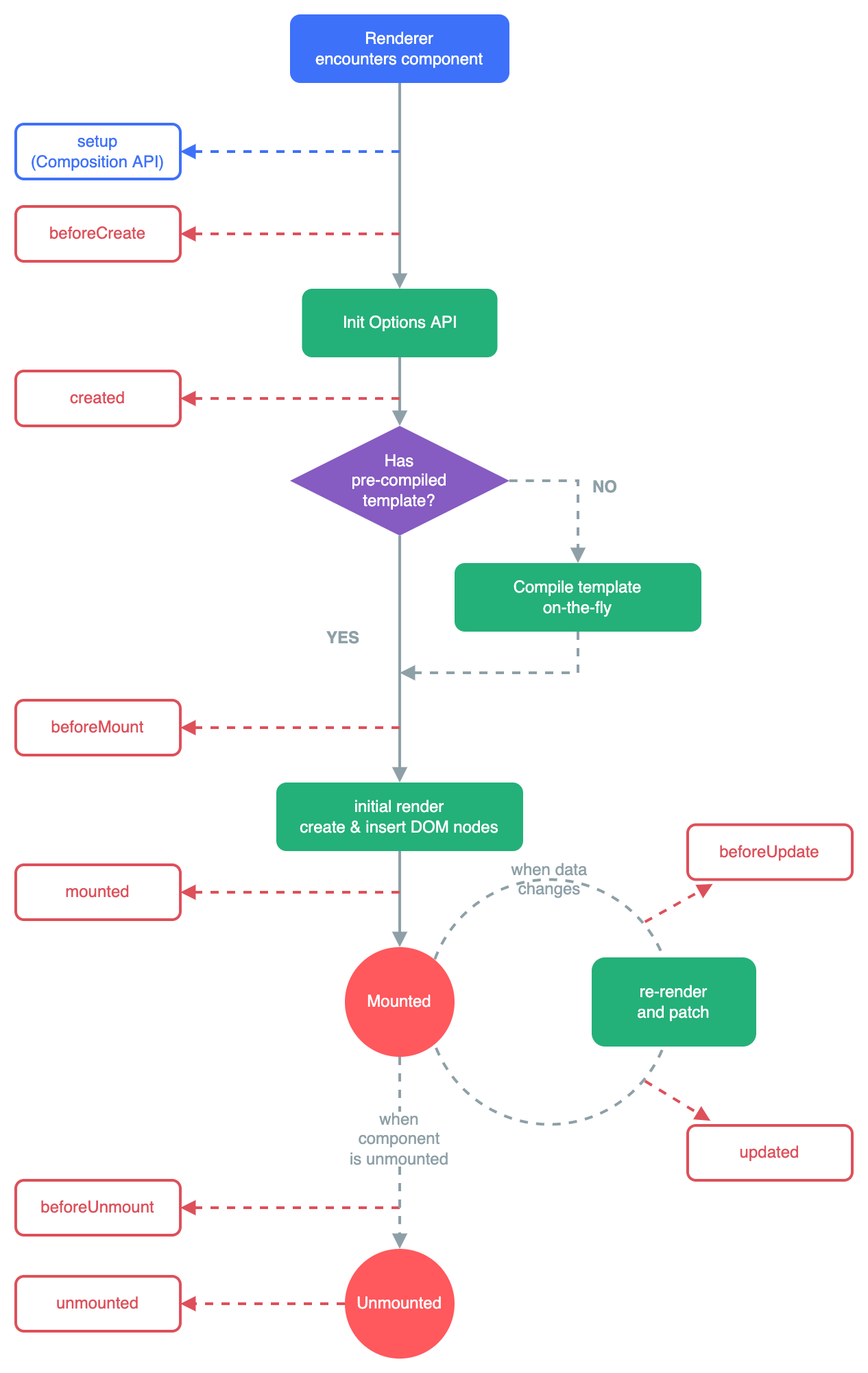
Vue3.0中可以继续使用Vue2.x中的生命周期钩子,但有有两个被更名:
- beforeDestroy改名为 beforeUnmount
- destroyed改名为 unmounted
Vue3.0也提供了 Composition API 形式的生命周期钩子,与Vue2.x中钩子对应关系如下:
- beforeCreate====>setup()
- created========>setup()
- beforeMount ====>onBeforeMount
- mounted========>onMounted
- beforeUpdate====>onBeforeUpdate
- updated ========>onUpdated
- beforeUnmount ==>onBeforeUnmount
- unmounted =====>onUnmounted
九、自定义hook函数
什么是hook?
本质是一个函数,把setup函数中使用的Composition API进行了封装,类似于vue2.x中的mixin,自定义hook的优势: 复用代码, 让setup中的逻辑更清楚易懂。
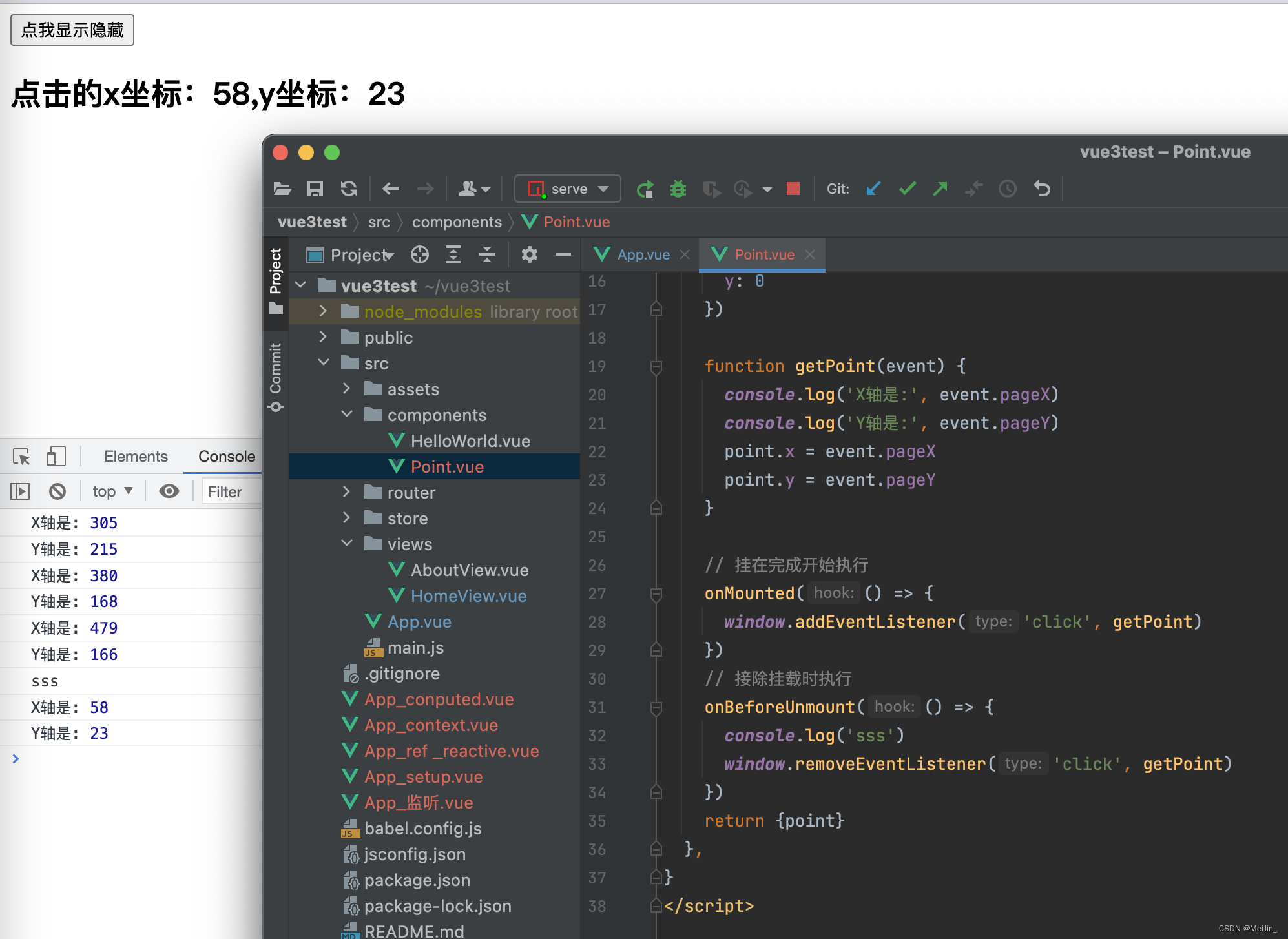
打点功能示例
<template><h2>点击的x坐标:{{ point.x }},y坐标:{{ point.y }}</h2>
</template><script>
import {reactive} from 'vue'
import {onMounted, onBeforeUnmount} from 'vue'export default {name: 'Point',setup() {const point = reactive({x: 0,y: 0})function getPoint(event) {console.log('X轴是:', event.pageX)console.log('Y轴是:', event.pageY)point.x = event.pageXpoint.y = event.pageY}// 挂在完成开始执行onMounted(() => {window.addEventListener('click', getPoint)})// 接除挂载时执行onBeforeUnmount(() => {console.log('sss')window.removeEventListener('click', getPoint)})return {point}},
}
</script>
<template><div><button @click="isShow=!isShow">点我显示隐藏</button><Point v-if="isShow"></Point></div>
</template><script>
import {ref, reactive} from 'vue'
import Point from "./components/Point.vue";
import Demo from './components/HelloWorld.vue'export default {name: 'App',components: {Demo, Point},setup() {const isShow = ref(true)return {isShow}},
}
</script>
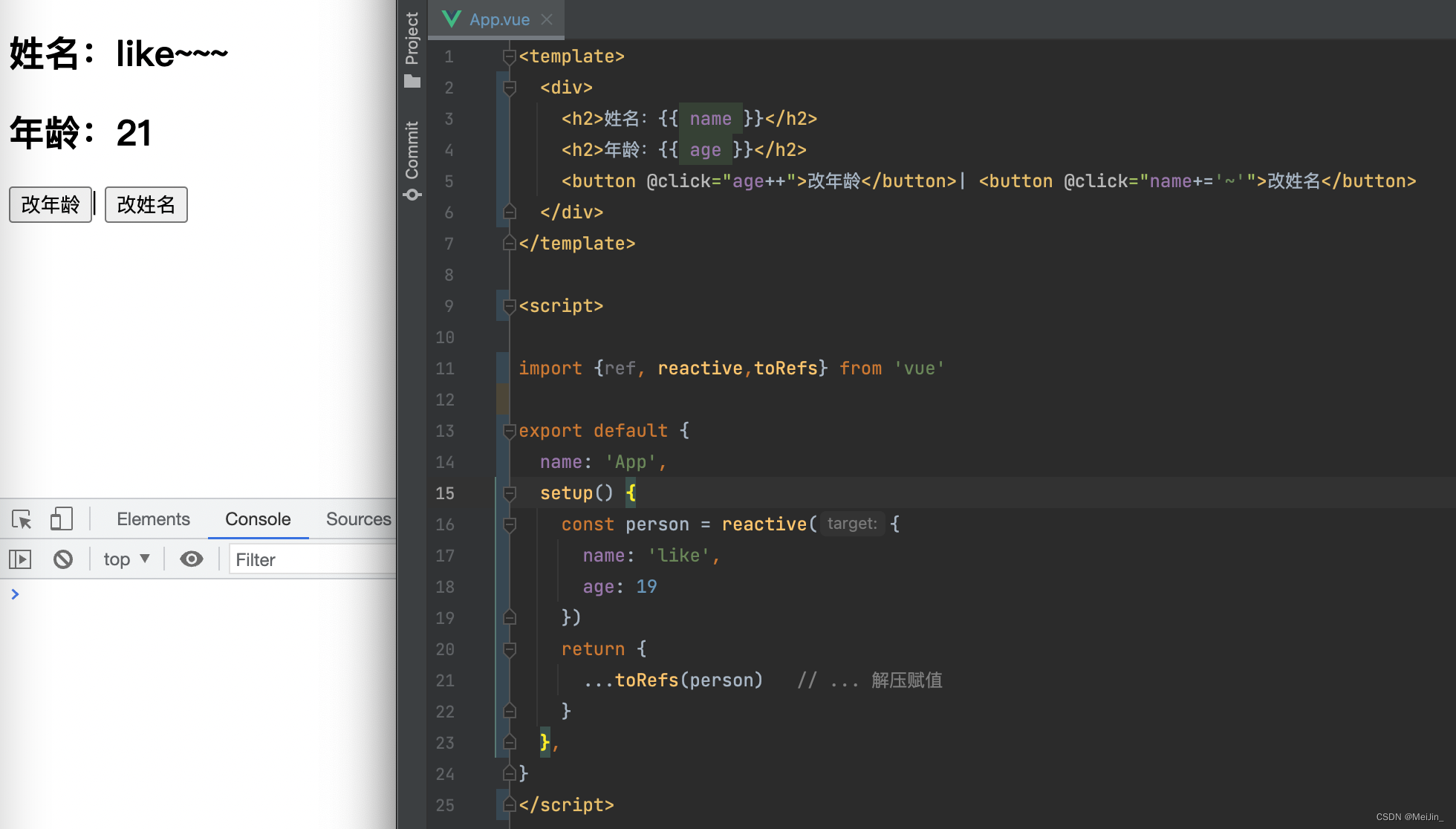
十、toRef
- toRef的作用:创建一个 ref 对象,其value值指向另一个对象中的某个属性。
- 语法:const name =
toRef(person,'name') - 应用: 要将响应式对象中的某个属性单独提供给外部使用时。
- 扩展:
toRefs与toRef功能一致,但可以批量创建多个ref 对象,语法:toRefs(person)
<template><div><h2>姓名:{{ name }}</h2><h2>年龄:{{ age }}</h2><button @click="age++">改年龄</button>| <button @click="name+='~'">改姓名</button></div>
</template><script>import {ref, reactive,toRefs} from 'vue'export default {name: 'App',setup() {const person = reactive({name: 'like',age: 19})return {...toRefs(person)   // ... 解压赋值}},
}
</script>
技术小白记录学习过程,有错误或不解的地方请指出,如果这篇文章对你有所帮助请
点点赞收藏+关注谢谢支持 !!!
本文来自互联网用户投稿,文章观点仅代表作者本人,不代表本站立场,不承担相关法律责任。如若转载,请注明出处。 如若内容造成侵权/违法违规/事实不符,请点击【内容举报】进行投诉反馈!