springboot工程中json浅析
一、在java开发中常用的json解析方式有jackson、fastjson、gson、net.sf.json。
1、jackson
jackson为用来序列化和反序列化json的java的开源框架,spring mvc默认的json解析器就是jackson。
com.fasterxml.jackson.core jackson-databind 2.13.1 public static void main(String[] args) throws JsonProcessingException {String json1 = "{\"id\":1,\"name\":\"first\",\"stus\":[{\"id\":101,\"name\":\"刘一\",\"age\":16}]}";String json2 = "[\"北京\",\"天津\",\"杭州\"]";ObjectMapper objectMapper = new ObjectMapper();Grade grade = objectMapper.readValue(json1, Grade.class);System.out.println(grade);List list = objectMapper.readValue(json2, new TypeReference>() {});System.out.println(list);ArrayList students = new ArrayList<>();for (int i = 0; i < 3; i++) {students.add(new Student(100 + i, "大哥" + i, 1000 + i));}Grade grade2 = new Grade(22, "first", students);ObjectMapper objectMapper2 = new ObjectMapper();String json = objectMapper2.writeValueAsString(grade2);System.out.println(json);}
2、fastjson
fastjson是阿里系产品,效率最高。
com.alibaba fastjson 1.2.47 public static void main(String[] args) {String json1 = "{'id':1,'name':'first','stus':[{'id':101,'name':'刘铭','age':16}]}";String json2 = "['北京','天津','杭州']";Grade grade = JSON.parseObject(json1, Grade.class);System.out.println(grade);List list = JSON.parseArray(json2, String.class);System.out.println(list);ArrayList list2 = new ArrayList<>();for (int i = 1; i < 3; i++) {list2.add(new Student(101 + i, "大哥", 20 + i));}Grade grade2 = new Grade(100001, "first", list2);String json = JSON.toJSONString(grade);System.out.println(json);}
3、gson
gson是谷歌产品,也很好用
com.google.code.gson gson 2.8.9 public static void main(String[] args) {String json1 = "{'id':1,'name':'first','stus':[{'id':101,'name':'刘一','age':16}]}";String json2 = "['北京','天津','杭州']";Gson gson = new Gson();Grade grade = gson.fromJson(json1, Grade.class);System.out.println(grade);ArrayList list = gson.fromJson(json2, new TypeToken>() {}.getType());System.out.println(list);ArrayList list2 = new ArrayList<>();for (int i = 1; i < 3; i++) {list2.add(new Student(101 + i, "大哥", 20 + i));}Grade grade2 = new Grade(100001, "first", list2);Gson gson2 = new Gson();String json = gson2.toJson(grade2);System.out.println(json);}
4、net.sf.json
json官方解析工具,最具有通用性。
net.sf.json-lib json-lib 2.4 jdk15 public static void main(String[] args) {String json = "{'id':1,'name':'first','stus':[{'id':101,'name':'刘一','age':16},{'id':102,'name':'刘二','age':23}]}";JSONObject jsonObject = JSONObject.fromObject(json);System.out.println(jsonObject);Map map = jsonObject;for (Map.Entry entry : map.entrySet()) {System.out.println(entry.getKey() + ": " + entry.getValue());}Grade grade = new Grade();grade.setId(jsonObject.getInt("id"));grade.setName(jsonObject.getString("name"));ArrayList students = new ArrayList<>();grade.setStus(students);JSONArray stus = jsonObject.getJSONArray("stus");for (Object o : stus) {JSONObject jsonObject1 = JSONObject.fromObject(o);Student student = new Student(jsonObject1.getInt("id"), jsonObject1.getString("name"), jsonObject1.getInt("age"));grade.getStus().add(student);}System.out.println("grade: " + grade);JSONObject jsonObject2 = new JSONObject();jsonObject2.put("id", 100);jsonObject2.put("name", "大哥");jsonObject2.put("age", 30);JSONObject jsonObject3 = new JSONObject();jsonObject3.put("id", 102);jsonObject3.put("name", "二哥");jsonObject3.put("age", 10);JSONArray jsonArray = new JSONArray();jsonArray.add(jsonObject2);jsonArray.add(jsonObject3);System.out.println("jsonArray: " + jsonArray);}
二、在springboot开发中返回json的方式有jackson、gson、fastjson。
json是目前主流的前后端数据传输方式,轻量级的数据交换格式。
1、jackson
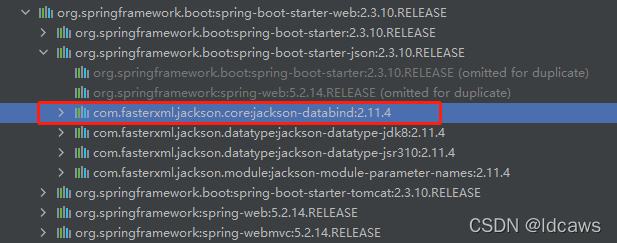
springboot工程添加web依赖时默认提供了jackson组件,不需添加额外的依赖。
实例
public class UserVO extends BaseVO {private static final long serialVersionUID = 1L;private long id;private String userName;private String name;...@JsonFormat(pattern = "yyyy-MM-dd hh:mm:ss", timezone = "GMT+8")private Date createTime;...
}
在实体类的属性上添加 @JsonFormat 注解可以实现时间类型的自定义格式。
@RequestMapping(value = "/getUserPage", method = RequestMethod.POST)public Object getUserPage(@RequestBody UserDTO params) throws ParamException {...PageData> result = ***;return ResponseData.ok(result, "查询成功!");}
JSON的解析离不开 HttpMessageConvert接口,HttpMessageConvert是一个消息转换工具,主要有两方面的功能:将服务端返回的对象序列化成JSON字符串;将前端传来的JSON字符串反序列化成Java对象。
自定义MappingJackson2HttpMessageConverter类,删除 @JsonFormat注解,新建一个配置类
@Configuration
public class WebMVCConfig {@BeanMappingJackson2HttpMessageConverter mappingJackson2HttpMessageConverter(){MappingJackson2HttpMessageConverter converter = new MappingJackson2HttpMessageConverter();ObjectMapper objectMapper = new ObjectMapper();objectMapper.setDateFormat(new SimpleDateFormat("yyyy-MM-dd"));converter.setObjectMapper(objectMapper);return converter;}
}
或自定义ObjectMapper类
@Configuration
public class WebMVCConfig {@BeanObjectMapper objectMapper(){ObjectMapper objectMapper = new ObjectMapper();objectMapper.setDateFormat(new SimpleDateFormat("yyyy-MM-dd"));return objectMapper;}
}
两种自定义的作用的是一样的。
2、gson
gson也在springboot工程中提供了自动化配置的,需要去掉spring-boot-starter-json依赖,然后引入gson依赖。
org.springframework.boot spring-boot-starter-web org.springframework.boot spring-boot-starter-json com.google.code.gson gson 自定义GsonHttpMessageConverter类
@Configuration
public class WebMVCConfig {@BeanGsonHttpMessageConverter gsonHttpMessageConverter(){GsonHttpMessageConverter converter=new GsonHttpMessageConverter();converter.setGson(new GsonBuilder().setDateFormat("yyyy-MM-dd").create());return converter;}
}
或自定义Gson类
@Configuration
public class WebMVCConfig {@BeanGson gson() {return new GsonBuilder().setDateFormat("yyyy-MM-dd").create();}
}
3、fastjson
fastjson是阿里系的开源框架,需要引入第三方的依赖。
org.springframework.boot spring-boot-starter-web org.springframework.boot spring-boot-starter-json com.alibaba fastjson 1.2.74 因为 SpringBoot没有提供相关的自动化配置类,所以我们需要手动创建 FastJson的消息转换工具类。
@Configuration
public class WebMVCConfig {@BeanFastJsonHttpMessageConverter fastJsonHttpMessageConverter() {FastJsonHttpMessageConverter converter = new FastJsonHttpMessageConverter();FastJsonConfig config = new FastJsonConfig();config.setDateFormat("yyyy-MM-dd HH:mm:ss");config.setCharset(Charset.forName("UTF-8"));config.setSerializerFeatures(SerializerFeature.WriteClassName,SerializerFeature.WriteMapNullValue,SerializerFeature.PrettyFormat,SerializerFeature.WriteNullListAsEmpty,SerializerFeature.WriteNullStringAsEmpty);converter.setFastJsonConfig(config);return converter;}
}
注意,不同的json解析组件对数据的处理是不一样的,如null或空值或时间的显示处理。
本文来自互联网用户投稿,文章观点仅代表作者本人,不代表本站立场,不承担相关法律责任。如若转载,请注明出处。 如若内容造成侵权/违法违规/事实不符,请点击【内容举报】进行投诉反馈!