KAA平台的数据上传
KAA平台系列文章:
- KAA平台单节点部署安装(kaa-node-0.10.0)
- KAA平台的配置使用
- KAA平台的数据上传
- KAA平台数据下发的四种方式
文章目录
- KAA平台的数据上传
- 1.生成SDK
- 2.客户端应用代码编写
- a) 为您的操作系统安装Oracle JDK 8。
- b) 创建一个demo_app目录,创建Java程序,并编写代码,
- 官方代码示例:
- 湿度计量代码示例:
- c)创建lib,放入jar包
- d)启动程序
- 3.检索收集的数据:
- a) 应用程序页面复制应用令牌;
- b) 进入mongodb客户端:
KAA平台的数据上传
官网
1.生成SDK
1)在“ 应用程序”列表中选择新应用程序,然后单击“ 生成SDK”按钮。
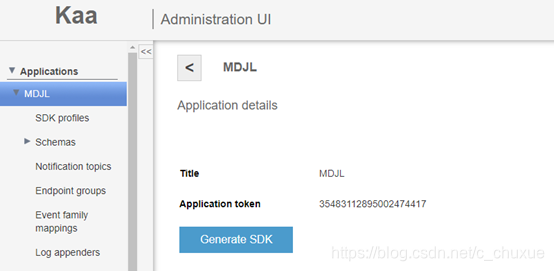
2) 在Generate SDK窗口中,选择SDK的目标平台,然后单击Generate SDK。

2.客户端应用代码编写
a) 为您的操作系统安装Oracle JDK 8。
b) 创建一个demo_app目录,创建Java程序,并编写代码,
官方代码示例:
import org.kaaproject.kaa.client.DesktopKaaPlatformContext;
import org.kaaproject.kaa.client.Kaa;
import org.kaaproject.kaa.client.KaaClient;
import org.kaaproject.kaa.client.SimpleKaaClientStateListener;
import org.kaaproject.kaa.client.configuration.base.ConfigurationListener;
import org.kaaproject.kaa.client.configuration.base.SimpleConfigurationStorage;
import org.kaaproject.kaa.client.logging.strategies.RecordCountLogUploadStrategy;
import org.kaaproject.kaa.schema.sample.Configuration;
import org.kaaproject.kaa.schema.sample.DataCollection;
import org.slf4j.Logger;
import org.slf4j.LoggerFactory;
import java.io.IOException;
import java.util.Random;
import java.util.concurrent.Executors;
import java.util.concurrent.ScheduledExecutorService;
import java.util.concurrent.ScheduledFuture;
import java.util.concurrent.TimeUnit;/*** Class implement functionality for First Kaa application. Application send temperature data* from the Kaa endpoint with required configured sampling period*/
public class FirstKaaDemo {private static final long DEFAULT_START_DELAY = 1000L;private static final Logger LOG = LoggerFactory.getLogger(FirstKaaDemo.class);private static KaaClient kaaClient;private static ScheduledFuture<?> scheduledFuture;private static ScheduledExecutorService scheduledExecutorService;public static void main(String[] args) {LOG.info(FirstKaaDemo.class.getSimpleName() + " app starting!");scheduledExecutorService = Executors.newScheduledThreadPool(1);//Create the Kaa desktop context for the application.DesktopKaaPlatformContext desktopKaaPlatformContext = new DesktopKaaPlatformContext();/** Create a Kaa client and add a listener which displays the Kaa client* configuration as soon as the Kaa client is started.*/kaaClient = Kaa.newClient(desktopKaaPlatformContext, new FirstKaaClientStateListener(), true);/**  Used by log collector on each adding of the new log record in order to check whether to send logs to server.*  Start log upload when there is at least one record in storage.*/RecordCountLogUploadStrategy strategy = new RecordCountLogUploadStrategy(1);strategy.setMaxParallelUploads(1);kaaClient.setLogUploadStrategy(strategy);/** Persist configuration in a local storage to avoid downloading it each* time the Kaa client is started.*/kaaClient.setConfigurationStorage(new SimpleConfigurationStorage(desktopKaaPlatformContext, "saved_config.cfg"));kaaClient.addConfigurationListener(new ConfigurationListener() {@Overridepublic void onConfigurationUpdate(Configuration configuration) {LOG.info("Received configuration data. New sample period: {}", configuration.getSamplePeriod());onChangedConfiguration(TimeUnit.SECONDS.toMillis(configuration.getSamplePeriod()));}});//Start the Kaa client and connect it to the Kaa server.kaaClient.start();LOG.info("--= Press any key to exit =--");try {System.in.read();} catch (IOException e) {LOG.error("IOException has occurred: {}", e.getMessage());}LOG.info("Stopping...");scheduledExecutorService.shutdown();kaaClient.stop();}/** Method, that emulate getting temperature from real sensor.* Retrieves random temperature.*/private static int getTemperatureRand() {return new Random().nextInt(10) + 25;}private static void onKaaStarted(long time) {if (time <= 0) {LOG.error("Wrong time is used. Please, check your configuration!");kaaClient.stop();System.exit(0);}scheduledFuture = scheduledExecutorService.scheduleAtFixedRate(new Runnable() {@Overridepublic void run() {int temperature = getTemperatureRand();kaaClient.addLogRecord(new DataCollection(temperature));LOG.info("Sampled Temperature: {}", temperature);}}, 0, time, TimeUnit.MILLISECONDS);}private static void onChangedConfiguration(long time) {if (time == 0) {time = DEFAULT_START_DELAY;}scheduledFuture.cancel(false);scheduledFuture = scheduledExecutorService.scheduleAtFixedRate(new Runnable() {@Overridepublic void run() {int temperature = getTemperatureRand();kaaClient.addLogRecord(new DataCollection(temperature));LOG.info("Sampled Temperature: {}", temperature);}}, 0, time, TimeUnit.MILLISECONDS);}private static class FirstKaaClientStateListener extends SimpleKaaClientStateListener {@Overridepublic void onStarted() {super.onStarted();LOG.info("Kaa client started");Configuration configuration = kaaClient.getConfiguration();LOG.info("Default sample period: {}", configuration.getSamplePeriod());onKaaStarted(TimeUnit.SECONDS.toMillis(configuration.getSamplePeriod()));}@Overridepublic void onStopped() {super.onStopped();LOG.info("Kaa client stopped");}}
}
湿度计量代码示例:
import com.zhyh.cn.NotificationPoint;
import com.zhyh.cn.TerminalMeasurement;
import org.kaaproject.kaa.client.DesktopKaaPlatformContext;
import org.kaaproject.kaa.client.Kaa;
import org.kaaproject.kaa.client.KaaClient;
import org.kaaproject.kaa.client.SimpleKaaClientStateListener;
import org.kaaproject.kaa.client.configuration.base.ConfigurationListener;
import org.kaaproject.kaa.client.configuration.base.SimpleConfigurationStorage;
import org.kaaproject.kaa.client.logging.strategies.RecordCountLogUploadStrategy;
import org.kaaproject.kaa.client.notification.NotificationListener;
import org.kaaproject.kaa.common.endpoint.gen.Topic;
import org.kaaproject.kaa.schema.system.EmptyData;
import org.slf4j.Logger;
import org.slf4j.LoggerFactory;import java.io.IOException;
import java.util.List;
import java.util.Random;
import java.util.concurrent.Executors;
import java.util.concurrent.ScheduledExecutorService;
import java.util.concurrent.ScheduledFuture;
import java.util.concurrent.TimeUnit;/*** Class implement functionality for First Kaa application. Application send temperature data* from the Kaa endpoint with required configured sampling period*/
public class FirstKaaDemo {private static final long DEFAULT_START_DELAY = 1000L;private static final Logger LOG = LoggerFactory.getLogger(FirstKaaDemo.class);private static KaaClient kaaClient;private static ScheduledFuture<?> scheduledFuture;private static ScheduledExecutorService scheduledExecutorService;public static void main(String[] args) {System.out.println(FirstKaaDemo.class.getSimpleName() + " app starting!");scheduledExecutorService = Executors.newScheduledThreadPool(1);//Create the Kaa desktop context for the application.//kaa上下文环境DesktopKaaPlatformContext desktopKaaPlatformContext = new DesktopKaaPlatformContext();/** Create a Kaa client and add a listener which displays the Kaa client* configuration as soon as the Kaa client is started.* 重新创建Kaa客户机并添加一个显示Kaa客户机的侦听器*/kaaClient = Kaa.newClient(desktopKaaPlatformContext, new FirstKaaClientStateListener(), true);/**  Used by log collector on each adding of the new log record in order to check whether to send logs to server.*  Start log upload when there is at least one record in storage.*  日志收集器在每次添加新日志记录时使用,以检查是否将日志发送到服务器。当存储中至少有一条记录时,启动日志上传。*/RecordCountLogUploadStrategy strategy = new RecordCountLogUploadStrategy(1);strategy.setMaxParallelUploads(1);kaaClient.setLogUploadStrategy(strategy);/** Persist configuration in a local storage to avoid downloading it each* time the Kaa client is started.* 将配置保存在本地存储中,以避免每次下载配置启动Kaa客户机的时间*/kaaClient.setConfigurationStorage(new SimpleConfigurationStorage(desktopKaaPlatformContext, "saved_config.cfg"));kaaClient.addConfigurationListener(new ConfigurationListener() {public void onConfigurationUpdate(EmptyData configuration) {System.out.println("Received configuration data. New sample period: {}" + configuration.get(1));}}/*                new ConfigurationListener() {@Overridepublic void onConfigurationUpdate(Configuration configuration) {System.out.println("Received configuration data. New sample period: {}", configuration.getSamplePeriod());onChangedConfiguration(TimeUnit.SECONDS.toMillis(configuration.getSamplePeriod()));}}*/);//添加监听器kaaClient.addNotificationListener(new NotificationListener() {@Overridepublic void onNotification(long topicId, NotificationPoint notification) {System.err.println("1111111111111111111111111" + topicId + notification.getMessage());}});//Start the Kaa client and connect it to the Kaa server.//启动Kaa客户机并将其连接到Kaa服务器。kaaClient.start();List<Topic> topics = kaaClient.getTopics();for (Topic topic : topics) {System.out.printf("Id: %s, name: %s, type: %s", topic.getId(), topic.getName(), topic.getSubscriptionType());}System.out.println("--= Press any key to exit =--");try {System.in.read();} catch (IOException e) {LOG.error("IOException has occurred: {}", e.getMessage());}System.out.println("Stopping...");scheduledExecutorService.shutdown();kaaClient.stop();}/** Method, that emulate getting temperature from real sensor.* Retrieves random temperature.* 方法,模拟从实际传感器获取温度。获取随机温度*/private static int getTemperatureRand() {return new Random().nextInt(110) + 1125;}private static void onKaaStarted(long time) {if (time <= 0) {LOG.error("Wrong time is used. Please, check your configuration!");kaaClient.stop();System.exit(0);}scheduledFuture = scheduledExecutorService.scheduleAtFixedRate(new Runnable() {public void run() {for (int i = 0; i < 10000; i++) {int temperature = getTemperatureRand();TerminalMeasurement record = new TerminalMeasurement("0909",""+temperature,""+temperature,"EPID001");kaaClient.addLogRecord(record);System.out.println("Sampled Temperature: {}" + temperature);}}}, 0, time, TimeUnit.MILLISECONDS);}private static class FirstKaaClientStateListener extends SimpleKaaClientStateListener {@Overridepublic void onStarted() {super.onStarted();System.out.println("Kaa client started");EmptyData configuration = kaaClient.getConfiguration();//System.out.println("Default sample period: {}" + configuration.get(0));onKaaStarted(TimeUnit.SECONDS.toMillis(1000));}@Overridepublic void onStopped() {super.onStopped();System.out.println("Kaa client stopped");}}
}
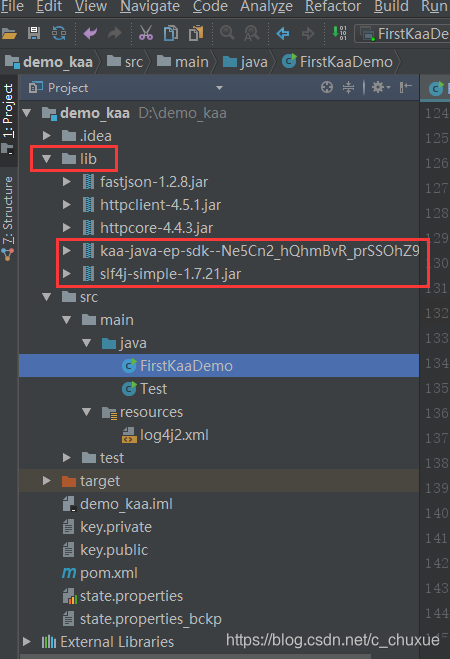
c)创建lib,放入jar包
SDK + slf4j
下载slf4j-simple-1.7.21.jar 地址:
http://central.maven.org/maven2/org/slf4j/slf4j-simple/1.7.21/slf4j-simple-1.7.21.jar

d)启动程序
3.检索收集的数据:
a) 应用程序页面复制应用令牌;
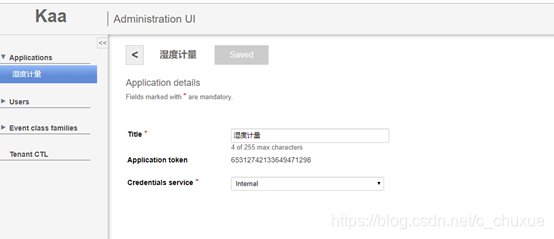
b) 进入mongodb客户端:
./mongo kaa
show dbs;
show collections;
db.logs_15464214871215164.count();
db.logs_15464214871215164.find();
db.notification.find()
本文来自互联网用户投稿,文章观点仅代表作者本人,不代表本站立场,不承担相关法律责任。如若转载,请注明出处。 如若内容造成侵权/违法违规/事实不符,请点击【内容举报】进行投诉反馈!