jsp自定义标签之select标签
jsp自定义标签之select标签
- 前言
- 标签详解
- 尾言
前言
上篇博文已经给大家介绍过自定义标签的开发步骤和优点,这篇博文主要给大家介绍一下数据标签
select
这是之前开发的标签
标签详解
首先要了解select标签的内容:
<select>
<option value="1">1</option>
<option value="2">2</option>
<option value="3">3</option>
<option value="4">4</option>
</select>
这里可以看到,select标签的原始标签的代码是比较多的,我们可以自定义一个select标签使用
- 首先就是标签助手类:
package com.xiaoyang;import java.io.IOException;
import java.lang.reflect.InvocationTargetException;
import java.util.List;import javax.servlet.jsp.JspException;
import javax.servlet.jsp.JspWriter;
import javax.servlet.jsp.tagext.BodyTagSupport;import org.apache.commons.beanutils.BeanUtils;public class SelectTag extends BodyTagSupport {private String headValue = "-1";// 头valueprivate String headText = "---请选择---";// 头文本private String valueProperty;// java对象的属性名private String textProperty;// java对象的属性名private List<Object> items;// 数据源private String select;// 判断默认选中的idpublic String getHeadValue() {return headValue;}public void setHeadValue(String headValue) {this.headValue = headValue;}public String getHeadText() {return headText;}public void setHeadText(String headText) {this.headText = headText;}public String getValueProperty() {return valueProperty;}public void setValueProperty(String valueProperty) {this.valueProperty = valueProperty;}public String getTextProperty() {return textProperty;}public void setTextProperty(String textProperty) {this.textProperty = textProperty;}public List<Object> getItems() {return items;}public void setItems(List<Object> items) {this.items = items;}public String getSelect() {return select;}public void setSelect(String select) {this.select = select;}@Overridepublic int doStartTag() throws JspException {JspWriter out = pageContext.getOut();try {out.print(toHtml());} catch (IOException | IllegalAccessException | InvocationTargetException | NoSuchMethodException e) {// TODO Auto-generated catch blocke.printStackTrace();}return super.doStartTag();}public String toHtml() throws IllegalAccessException, InvocationTargetException, NoSuchMethodException {// 利用stringbuffer拼接标签StringBuffer sb = new StringBuffer();sb.append(");sb.append(" + this.headText + "");if (items != null && items.size() > 0) {for (Object object : items) {// 利用反射获取到页面传过来的属性名对应的属性值String deptId = BeanUtils.getProperty(object, valueProperty);String deptName = BeanUtils.getProperty(object, textProperty);if (deptId.equals(select)) {sb.append(" + deptName + "");}else {sb.append(" + deptName + "");}}}sb.append("");return sb.toString();}
}- 然后是tld文件配置:
<tag><name>select</name><tag-class>com.xiaoyang.SelectTag</tag-class><body-content>JSP</body-content><attribute><name>headValue</name><required>true</required><rtexprvalue>false</rtexprvalue></attribute><attribute><name>headText</name><required>true</required><rtexprvalue>false</rtexprvalue></attribute><attribute><name>valueProperty</name><required>true</required><rtexprvalue>false</rtexprvalue></attribute><attribute><name>textProperty</name><required>true</required><rtexprvalue>false</rtexprvalue></attribute><attribute><name>items</name><required>true</required><rtexprvalue>true</rtexprvalue></attribute><attribute><name>select</name><required>true</required><rtexprvalue>false</rtexprvalue></attribute></tag>3.最后就是页面引用了:
这里由于是select标签,我用到了一个实体类去绑定数据到下拉框,所以在页面应用时:
List<Dept> deptLs = new ArrayList<Dept>();Dept d = new Dept("1", "aaa");Dept d1 = new Dept("2", "bbb");Dept d2 = new Dept("3", "ccc");deptLs.add(d);deptLs.add(d1);deptLs.add(d2);request.setAttribute("Dept", deptLs);
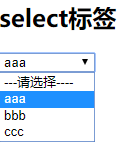
<x:select select="1" items="${Dept }" headValue="-1" valueProperty="deptId" textProperty="deptName" headText="---请选择----"></x:select>最后的到结果:
尾言
开发自定义标签的目的就是给我们带来更方便的操作,减少多余的代码,今天就到这了,溜了溜了…
本文来自互联网用户投稿,文章观点仅代表作者本人,不代表本站立场,不承担相关法律责任。如若转载,请注明出处。 如若内容造成侵权/违法违规/事实不符,请点击【内容举报】进行投诉反馈!