python 爬虫之登录和反盗链
导包
import requests
先用一个简单的做法的办法,下面是cookie的替代做法
resp = requests.get("https://user.17k.com/ck/author/shelf?page=1&appKey=2406394919", headers={
"Cookie" :"GU.Q=bbb5f65a.2fo2.40aQ.ac6.7.49.40eaeAadk: ....channek0:...SCe以eb:...d.stinctid.1.790bd!"
})
print(resp.json)
会话
必须得把上面的两个操作连起来
我们可以使用session进行请求 session你可以认为是一连串的请求,在这个过程中的cookie不会丢失
session = requests.session()data = {"loginName":"……………","password":"...."}
# 1.登录
url = "https://passport.17k.com/ck/user/login"
resp = session.post(url, data=data)
print(resp.text)
print(resp.cookies)# 2.拿书架上的数据
resp = session.get('https://user.17k.com/ck/author/shelf?page=1&appKey=2406394919')
print(resp.json)
requests 配合 etree
# 提取和解析数据
import requests
from lxml import etreeurl ="https://beijing.zbj.com/search/f/?type=new&kw=saas"
resp = requests.get(url)
print(resp.text)
# 解析
html = etree.HTML(resp.text)
html.xpath("/html/body/div[6]/div/div/div[2]/div[4]/div[1]/div[1]")# 拿到每一个服务商的div
divs=html.xpath("/html/body/div[6]/div/div/div[2]/div[4]/div[1]/div")
for div in divs: #每一个服务商信息price =div.xpath("./div/div/a[1]/div[2]/div[1]/span[1]/text()")[0].strip("¥")title ="saas".join(div.xpath("./div/div/a[1]/div[21/div[21/p/text()"))com_name =div.xpath("./div/div/a[2]/div[11/p/text()")[0]location =div.xpath("./div/div/a[2]/div[1]/div/span/text()")[0]print(com_name)
课程地址
https://www.bilibili.com/video/BV1i54y1h75W?p=43&spm_id_from=pageDriver&vd_source=82dc2acb60a90c43a2ac0d4023a2cd34
Video标签
如果是二次加载的话,我们怎么找
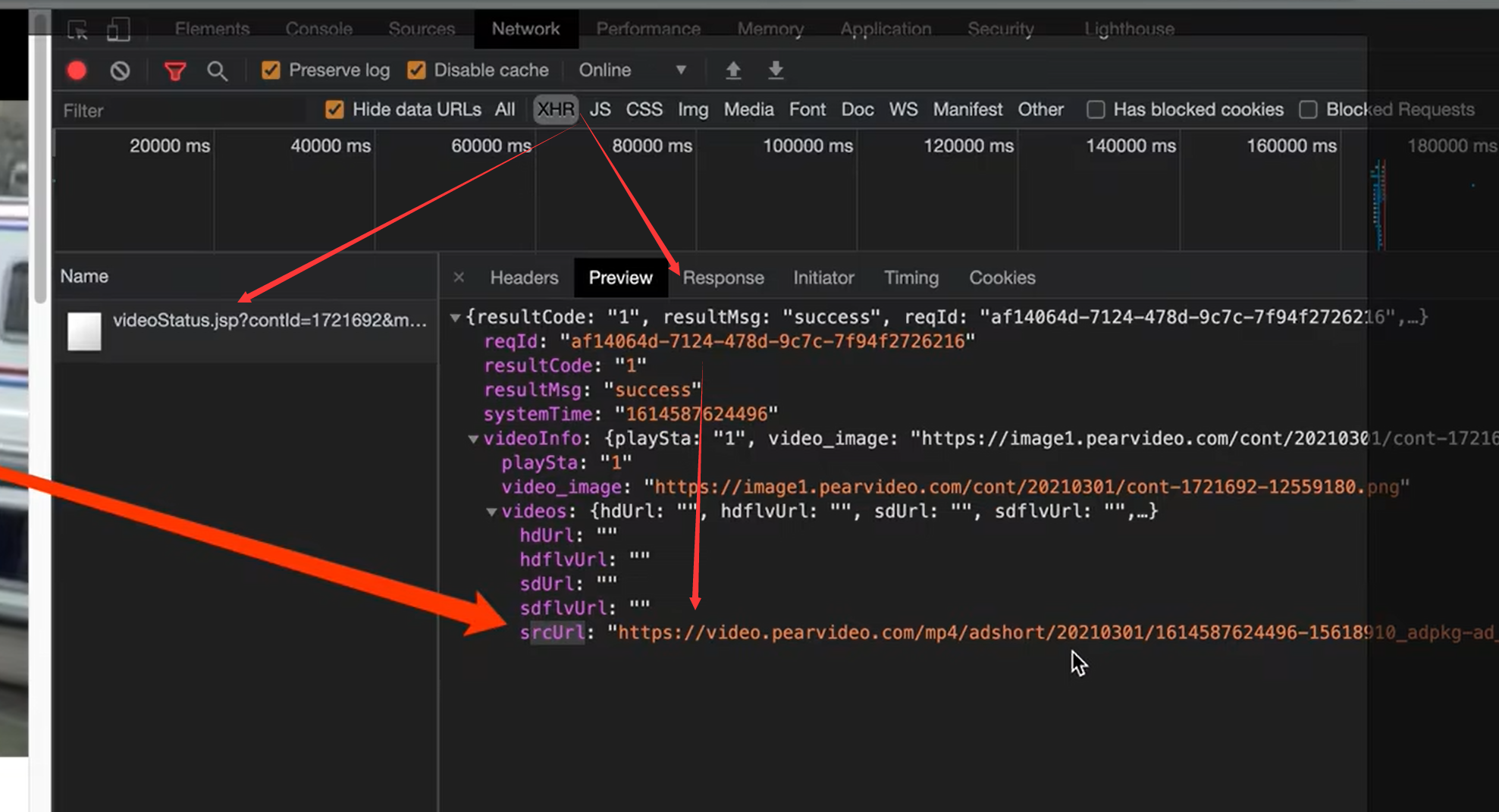
分析 二次加载的 srcUrl与实际url的区别

思路–重在观察
- 原视频的地址里面, id是和时间戳对应的
- 最终的地址是也页面的id相关的
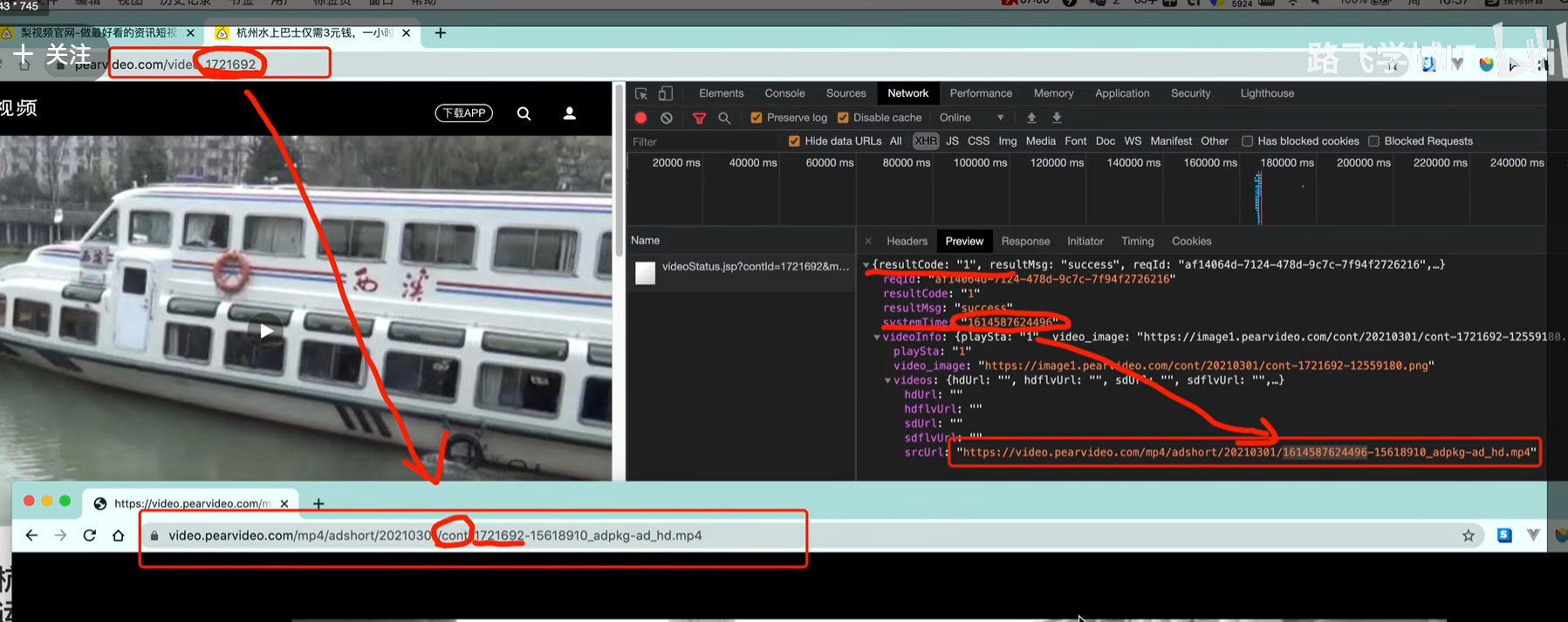
防盗链

从1 访问2,需要在2的Referer,填好。
# 拉取视频的网址
url ="https://www.pearvideo.com/video_1721605"
contId = url.split("_")[1]
videoStatusUrl =f"https://www.pearvideo.com/videoStatus.jsp?contId={contId}&mrd=0.6952007481227842"
headers = {"User-Agent":"Mozilla/5.0(Macintosh; Intel Mac os X10 15 4) AppleWebKit/537.36 (KHTML like",# 防盗链:溯源,当前本次请求的上一级是谁"Referer": url}
resp = requests.get(videoStatusUrl, headers=headers)
print(resp.text)# 具体的处理流程
resp = requests.get(videoStatusUrl, headers=headers)
dic = resp.json()
srcUrl = dic['videoInfo']['videos']['srcUrl']
systemTime = dic['systemTime']
srcUrl =srcUrl.repalce(systemTime, f"cont-{contId}")
print(srcUrl)# https://video.pearvideo.com/mp4/adshort/20210301/cont-1721692-15618910 adpkg-ad hd.mp4
# https://video.pearvideo.com/mp4/adshort/20210301/1614588366486-15618910 adpkg-ad hd.mp4
# 得到视频之后怎么下载,和保存图片一个道理
with open("a.mp4", mode="wb") as f:f.write(requests.get(srcUrl).content)
本文来自互联网用户投稿,文章观点仅代表作者本人,不代表本站立场,不承担相关法律责任。如若转载,请注明出处。 如若内容造成侵权/违法违规/事实不符,请点击【内容举报】进行投诉反馈!