使用com.goolge.zxing生成与解析二维码位图
依赖jar:【离线下载后的】【直接配置依赖也可以】
compile files('libs/core-3.3.3.jar')
或者
dependencies {......compile 'com.google.zxing:core:3.3.3'
}
测试机器:android7.0
@Event(R.id.fgBt1)
private void test(View v){Bitmap b=createQRBitmap(et.getText().toString());if(b!=null)iv.setImageBitmap(b);else
        Toast.makeText(getContext(),"二维码生成失败",Toast.LENGTH_SHORT).show();et.setText("");
}/**
*二维码 生产方法
 * @param data ,需要产生的二维码数据,英文字母<6000,汉字<1500
 * @return 二维码位图
 */
Bitmap bitmap=null;//位图
public Bitmap createQRBitmap(String data){BitMatrix bitMatrix;//矩阵
    MultiFormatWriter wr=new MultiFormatWriter();//二维码,宽高
    int width=400;int height=400;try {bitMatrix=wr.encode(data, BarcodeFormat.QR_CODE,width,height);/** 创建像素数组,并根据BitMatrix(位矩阵)对象为数组元素赋颜色值 */
        int[] pixels = new int[width * height];for(int y = 0; y < height; y++){for(int x = 0; x < width; x++){if(bitMatrix.get(x, y)){pixels[y * width + x] = Color.BLACK; // 黑色色块像素设置
                } else {pixels[y * width + x] = Color.WHITE; // 白色色块像素设置
                }}}bitmap = Bitmap.createBitmap(width, height, Bitmap.Config.ARGB_8888);bitmap.setPixels(pixels, 0, width, 0, 0, width, height);Log.i("Msg","二维码 生成OK");} catch (WriterException e) {e.printStackTrace();}return bitmap;
}
//二维码位图解析 @Event(R.id.sbBt) private void shibie(View v){int width = bitmap.getWidth();int height = bitmap.getHeight();int[] data = new int[width * height];bitmap.getPixels(data, 0, width, 0, 0, width, height);RGBLuminanceSource source = new RGBLuminanceSource(width, height, data);BinaryBitmap bitmap1 = new BinaryBitmap(new HybridBinarizer(source));QRCodeReader reader = new QRCodeReader();Result re = null;try {re = reader.decode(bitmap1);} catch (NotFoundException e) {e.printStackTrace();} catch (ChecksumException e) {e.printStackTrace();} catch (FormatException e) {e.printStackTrace();}if (re == null) {Log.i("Msg","解析失败");} else {et.setText(re.getText());}}
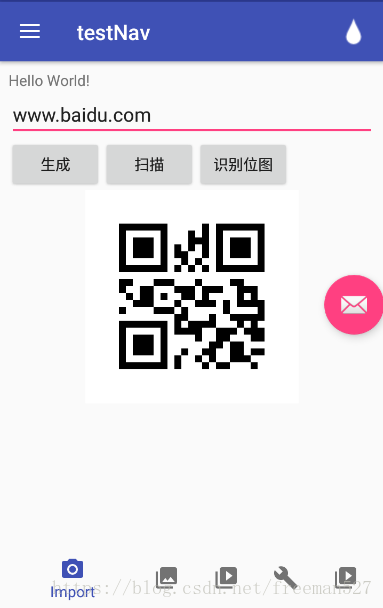
效果:
本文来自互联网用户投稿,文章观点仅代表作者本人,不代表本站立场,不承担相关法律责任。如若转载,请注明出处。 如若内容造成侵权/违法违规/事实不符,请点击【内容举报】进行投诉反馈!