小程序API之天气预报查询及百度APIkey(ak)的申请
简介:天气预报查询实时的天气状况,和实时温度,在input输入框中输入城市名称,点击搜索即可显示。
wx.request发起https网络请求。默认超时时间和最大时间都是60s,超时时间可在app.json中设置。一个微信小程序同时只能有五个网络请求连接。
我先一步一步写一下,写完后在最下面系统的帖一下所有代码。当然一步按步骤写也能写出来,但是没有样式而已
1.动态获取输入的城市名
在wxml中编写:
为input输入框绑定bindKeyInput()函数
"输入城市名进行搜索" bindinput="bindKeyInput">"icon">"search" size="25" bindtap="search" />
在js文件中编写代码,在Page()函数外声明一些变量,用于保存获取到的值,
var defaultcity, getweather, gettemp, getwind, getpic, getdate
然后编写input的bindKeyInput()事件处理函数
bindKeyInput:function(e){defaultcity = e.detail.value},
2.请求天气接口数据
点击搜索图标时,发起网络请求,调用获取天气API:
search: function(e) {var that = this wx.request({url: 'https://api.map.baidu.com/telematics/v3/weather?output=json&ak=这里写自己申请的百度ak&location=' + defaultcity,success: res => {console.log(res.data)if (!res.data.results) {console.log('获取天气接口失败')return}getweather = res.data.results[0].weather_data[0].weathergettemp = res.data.results[0].weather_data[0].temperaturegetwind = res.data.results[0].weather_data[0].windgetpic = res.data.results[0].weather_data[0].dayPictureUrlgetdate = res.data.results[0].weather_data[0].datethis.setData({city: defaultcity,weather: getweather,temp: gettemp,wind: getwind,pic: getpic,date: getdate})wx.hideLoading()}})},
4.渲染界面展示数据
wxml代码:
<view class="body"><view class="city"><text>{{city}}</text></view><view class="today"><text>{{date}}</text></view><view><image src="{{pic}}" mode="aspectFit" style="width: 400rpx; height: 400rpx" /></view></view><!-- bottom部分 --><view class="bottom"><view class="weather"><text>{{weather}}</text></view><view class="right"><view class="temp"><text>{{temp}}</text></view><view class="wind"><text>{{wind}}</text></view></view></view>
5.整体的代码
wxml代码:
<view class="page"><!-- top部分 --><view class="top"><input placeholder="输入城市名进行搜索" bindinput="bindKeyInput"></input><view class="icon"><icon type="search" size="25" bindtap="search" /></view></view><!-- body部分 --><view class="body"><view class="city"><text>{{city}}</text></view><view class="today"><text>{{date}}</text></view><view><image src="{{pic}}" mode="aspectFit" style="width: 400rpx; height: 400rpx" /></view></view><!-- bottom部分 --><view class="bottom"><view class="weather"><text>{{weather}}</text></view><view class="right"><view class="temp"><text>{{temp}}</text></view><view class="wind"><text>{{wind}}</text></view></view></view>
</view>
js代码:
var defaultcity, getweather, gettemp, getwind, getpic, getdate
Page({/*** 页面的初始数据*/data: {},//动态获取input输入值,城市名称bindKeyInput:function(e){defaultcity = e.detail.value},//搜索城市search: function(e) {this.weather()},weather: function() {wx.showLoading({title: '加载中',})wx.request({url: 'https://api.map.baidu.com/telematics/v3/weather?output=json&ak=自己的ak&location=' + defaultcity,success: res => {console.log(res.data)if (!res.data.results) {console.log('获取天气接口失败')return}getweather = res.data.results[0].weather_data[0].weathergettemp = res.data.results[0].weather_data[0].temperaturegetwind = res.data.results[0].weather_data[0].windgetpic = res.data.results[0].weather_data[0].dayPictureUrlgetdate = res.data.results[0].weather_data[0].datethis.setData({city: defaultcity,weather: getweather,temp: gettemp,wind: getwind,pic: getpic,date: getdate})wx.hideLoading()}})},})
css代码:
page {background-color: #5a9cd8;color: #fff;
}.page {margin: 50rpx;/* 与最上方有间隙 */
}.top {display: flex;padding: 20rpx;flex-direction: row;background-color: #efefef;position: relative;margin-bottom: 20rpx;border-radius: 10rpx;
}.input {width: 80%;font-size: 32rpx;
}.icon {width: 10%;position: absolute;right: 0;bottom: 5rpx;
}.body {text-align: center;display: flex;flex-direction: column; /*竖直显示 */
}.city {font-size: 80rpx;
}.today {font-size: 34rpx;
}.bottom {display: flex;flex-direction: row;align-items: center;text-align: center;
}.weather {font-size: 38rpx;width: 50%;
}.right {display: flex;flex-direction: column;
}.wind {font-size: 40rpx;
}.temp {font-size: 40rpx;font-weight: bold;font-family: Arial, Helvetica, sans-serif;
}input {color: #333;
}
运行图片:
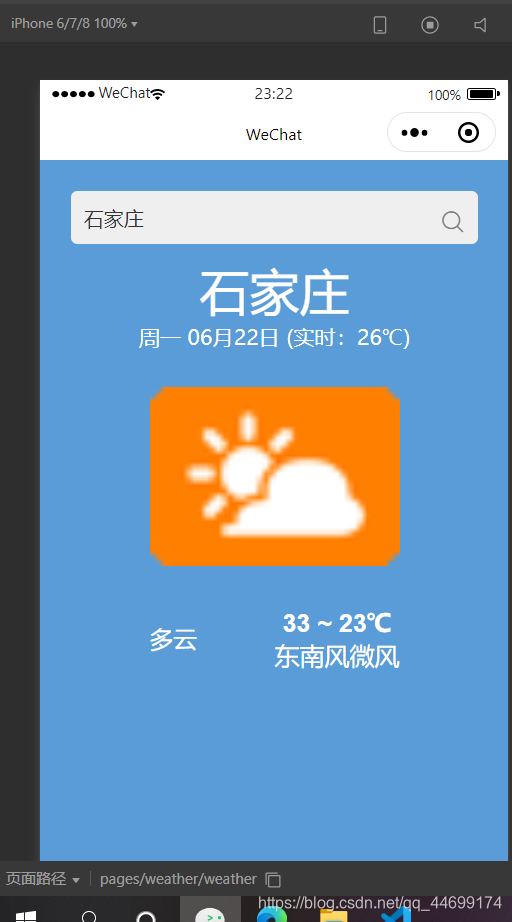
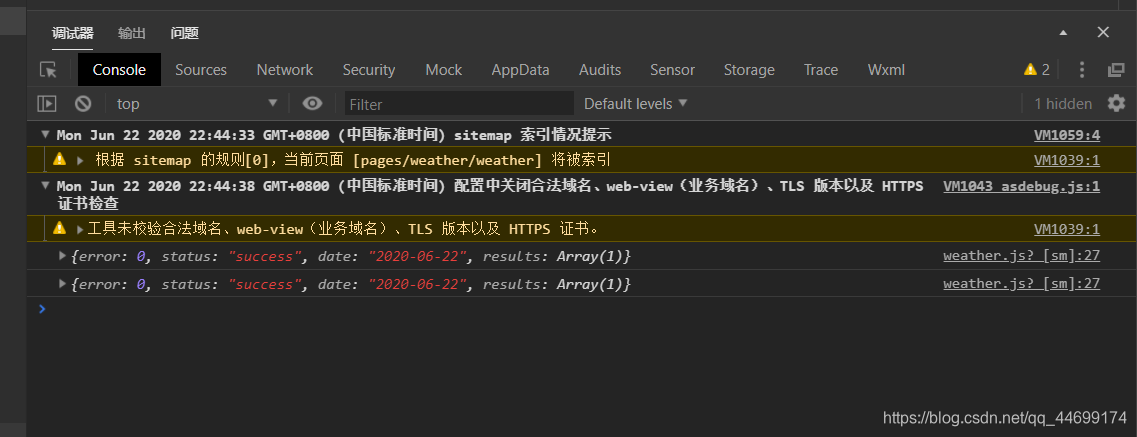
| 老八秘制小汉堡,一天三顿没烦恼 。一条可爱的分界线。 |
下面写一下百度APIkey的申请步骤,避免踩坑。
百度ak申请地址:http://lbsyun.baidu.com/apiconsole/key
打开后登陆网站,
创建应用,
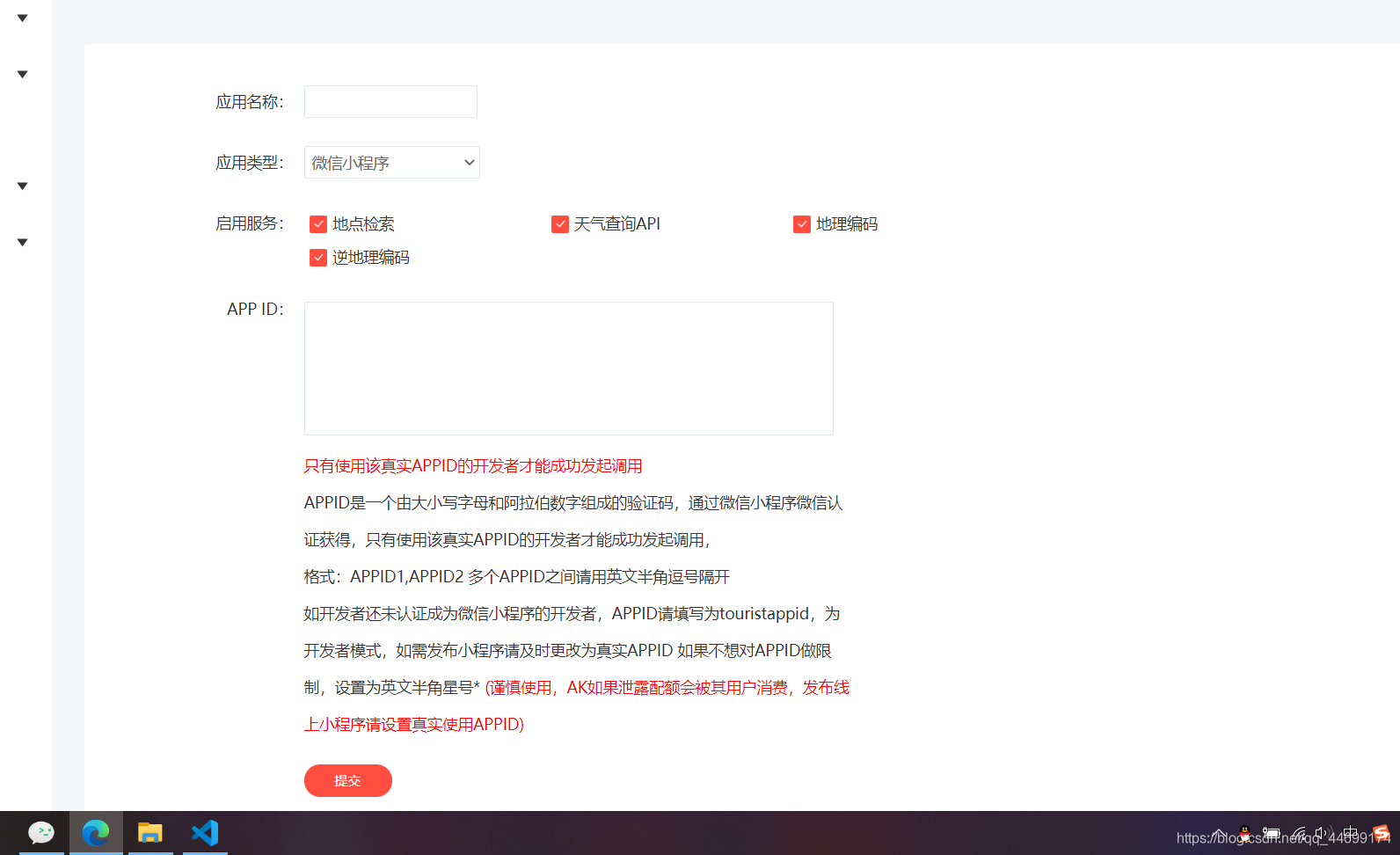
应用名称一定要和自己的程序应用名字一样。
应用类型选择微信小程序。
appid写自己小程序的APPID,但是我在写这里的时候遇到了一点小麻烦,输入自己的appid之后,一直显示格式错误,不得以之下选择了填上他给的默认值touristappid,然后提交之后如下图
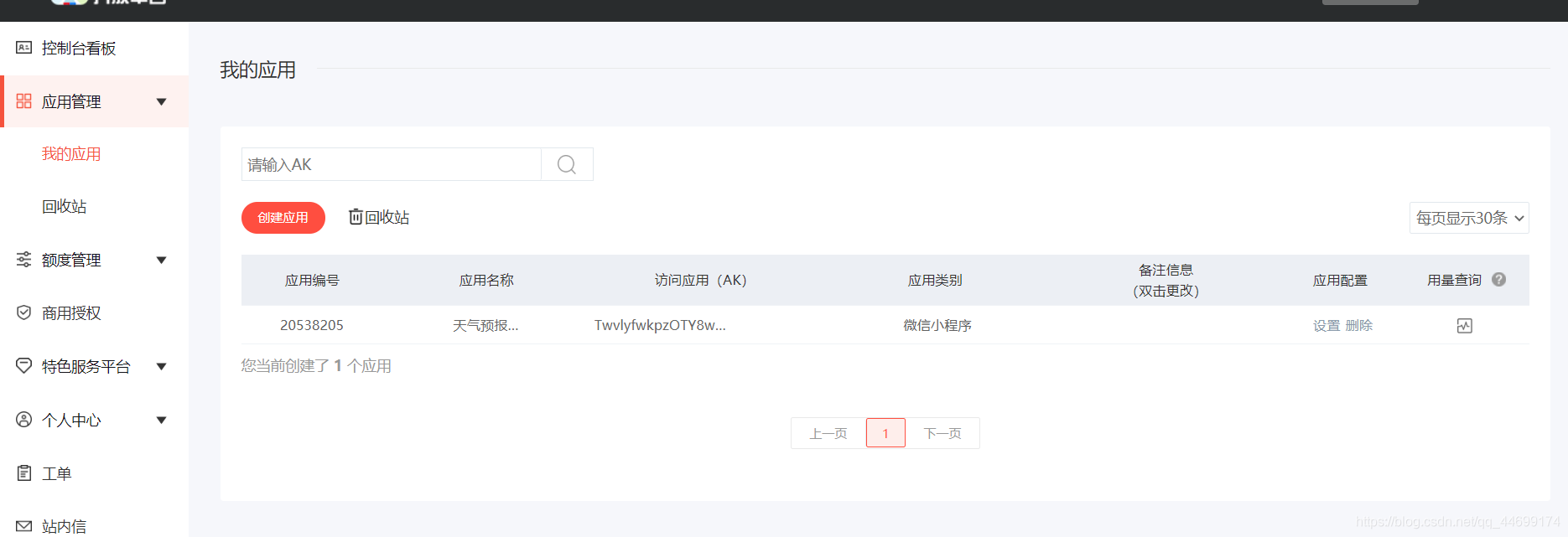
然后点击设置进去可以进行修改,然后把appid改成自己的appid,
这样就可以可了。
然后在程序中填写就OK了。
本文来自互联网用户投稿,文章观点仅代表作者本人,不代表本站立场,不承担相关法律责任。如若转载,请注明出处。 如若内容造成侵权/违法违规/事实不符,请点击【内容举报】进行投诉反馈!