Lifecycle、LiveData、ViewModel讲解之LiveData
Lifecycle、LiveData、ViewModel介绍
在 Android 框架中定义的大多数应用组件都存在生命周期。生命周期由操作系统或进程中运行的框架代码管理。它们是 Android 运作方式的核心,应用必须遵循它们。如果不这样做,可能会引发内存泄露甚至应用崩溃。
- LiveData
LiveData 是一种可观察的数据存储器类。与常规的可观察类不同,LiveData 具有生命周期感知能力,意指它遵循其他应用组件(如 Activity、Fragment 或 Service)的生命周期。这种感知能力可确保 LiveData 仅更新处于活跃生命周期状态的应用组件观察者
- LiveData产生的原因
使用 LiveData 具有以下优势:
确保界面符合数据状态
LiveData 遵循观察者模式。当生命周期状态发生变化时,LiveData 会通知 Observer对象。您可以整合代码以在这些 Observer 对象中更新界面。观察者可以在每次发生更改时更新界面,而不是在每次应用数据发生更改时更新界面。
不会发生内存泄漏
观察者会绑定到LifeCycle 对象,并在其关联的生命周期遭到销毁后进行自我清理。
不会因 Activity 停止而导致崩溃
如果观察者的生命周期处于非活跃状态(如返回栈中的 Activity),则它不会接收任何 LiveData 事件。
不再需要手动处理生命周期
界面组件只是观察相关数据,不会停止或恢复观察。LiveData 将自动管理所有这些操作,因为它在观察时可以感知相关的生命周期状态变化。
数据始终保持最新状态
如果生命周期变为非活跃状态,它会在再次变为活跃状态时接收最新的数据。例如,曾经在后台的 Activity 会在返回前台后立即接收最新的数据。
适当的配置更改
如果由于配置更改(如设备旋转)而重新创建了 Activity 或 Fragment,它会立即接收最新的可用数据。
共享资源
您可以使用单一实例模式扩展LiveData 对象以封装系统服务,以便在应用中共享它们。LiveData 对象连接到系统服务一次,然后需要相应资源的任何观察者只需观察 LiveData 对象。
2.LiveData
2.1LiveData关键类说明
- LiveData
LiveData 是一种可观察的数据存储器类。与常规的可观察类不同,LiveData 具有生命周期感知能力,意指它遵循其他应用组件(如 Activity、Fragment 或 Service)的生命周期。这种感知能力可确保 LiveData 仅更新处于活跃生命周期状态的应用组件观察者。
如果观察者(由 Observer 类表示)的生命周期处于 STARTED 或 RESUMED 状态,则 LiveData 会认为该观察者处于活跃状态。LiveData 只会将更新通知给活跃的观察者。为观察 LiveData 对象而注册的非活跃观察者不会收到更改通知。
您可以注册与实现 LifecycleOwner 接口的对象配对的观察者。有了这种关系,当相应的 Lifecycle 对象的状态变为 DESTROYED 时,便可移除此观察者。 这对于 Activity 和 Fragment 特别有用,因为它们可以放心地观察 LiveData 对象而不必担心泄露(当 Activity 和 Fragment 的生命周期被销毁时,系统会立即退订它们)。
LiveData 是一种可用于任何数据的封装容器,其中包括可实现 Collections 的对象,如 List。
- Observer
Observer用于接受LiveData数据的回调接口;
- MutableLiveData
继承LiveData类,对外暴露更新数据方法setValue()和postValue();
setValue():UI线程更新数据使用;
postValue():非UI或UI线程更新数据使用;
2.2LiveData使用示例
2.2.1创建LiveData对象
LiveData 是一种可用于任何数据的封装容器,其中包括可实现 Collections 的对象,如 List。LiveData 对象通常存储在 ViewModel 对象中,并可通过 getter 方法进行访问,如以下示例中所示:
public class NameViewModel extends ViewModel {//这里创建一个 MutableLiveData, 为要提供的数据类型,这里我们声明为 List。private  MutableLiveData> mWatcher;private Handler mWorkHandler;/*** 加载数据,在实际当中,加载数据的操作要放在 Repository 中进行,而不要放在 Model 中,* 它只是负责数据和 UI 的交互过程。**/public void load(){if(mWorkHandler == null){HandlerThread thread =  new HandlerThread("NameViewModel");thread.start();mWorkHandler = new Handler(thread.getLooper());}mWorkHandler.post(new Runnable() {@Overridepublic void run() {//模拟加载数据的过程。try {Thread.sleep(1000);} catch (Exception e) {e.printStackTrace();}List result = makeResult();setResults(result);}});}//创建数据监测者public MutableLiveData> getWatcher() {if(mWatcher == null){mWatcher = new MutableLiveData<>();}return mWatcher;}/*** 设置数据。** @param results 设置数据。*/private void setResults(List results) {//当数据加载完以后,调用 setValue/postValue 方法设置数据。if(Looper.getMainLooper() == Looper.myLooper()){getWatcher().setValue(results);}else{getWatcher().postValue(results);}}private List makeResult() {List result = new ArrayList<>();result.add("苹果 - 1");result.add("苹果 - 2");result.add("苹果 - 3");result.add("苹果 - 4");result.add("苹果 - 5");result.add("苹果 - 6");return result;}
} 最初,LiveData 对象中的数据并未经过设置。
注意:请确保用于更新界面的LiveData对象存储在ViewModel对象中,而不是将其存储在 Activity 或 Fragment 中,原因如下:
- 避免 Activity 和 Fragment 过于庞大。现在,这些界面控制器负责显示数据,但不负责存储数据状态。
- 将
LiveData实例与特定的 Activity 或 Fragment 实例分离开,并使LiveData对象在配置更改后继续存在。
2.2.2观察LiveData对象
在大多数情况下,应用组件的 onCreate() 方法是开始观察 LiveData 对象的正确着手点,原因如下:
- 确保系统不会从 Activity 或 Fragment 的 onResume() 方法进行冗余调用。
- 确保 Activity 或 Fragment 变为活跃状态后具有可以立即显示的数据。一旦应用组件处于 STARTED 状态,就会从它正在观察的 LiveData 对象接收最新值。只有在设置了要观察的 LiveData 对象时,才会发生这种情况。
通常,LiveData 仅在数据发生更改时才发送更新,并且仅发送给活跃观察者。此行为的一种例外情况是,观察者从非活跃状态更改为活跃状态时也会收到更新。此外,如果观察者第二次从非活跃状态更改为活跃状态,则只有在自上次变为活跃状态以来值发生了更改时,它才会收到更新。
以下示例代码说明了如何开始观察 LiveData 对象:
public class LiveDataActivity extends AppCompatActivity {private NameViewModel model;@Overrideprotected void onCreate(@Nullable Bundle savedInstanceState) {super.onCreate(savedInstanceState);setContentView(R.layout.activity_main);init();}private void init() {// Get the ViewModel.ViewModelProvider.Factory factory = ViewModelProvider.AndroidViewModelFactory.getInstance(getApplication());model = new ViewModelProvider(this, factory).get(NameViewModel.class);// Create the observer which updates the UI.final Observer> listObserver = new Observer>() {@Overridepublic void onChanged(@Nullable List strings) {// Update the UI, in this case, a TextView.nameText.setText("班级总人数:"+strings.size());}};// Observe the LiveData, passing in this activity as the LifecycleOwner and the observer.model.getWatcher().observe(this, listObserver);}
}
在传递 listObserver 参数的情况下调用 observe() 后,系统会立即调用 onChanged(),从而提供 mWatcher 中存储的最新值。如果 LiveData 对象尚未在 mWatcher 中设置值,则不会调用 onChanged()。
2.2.3更新LiveData对象
LiveData 没有公开可用的方法来更新存储的数据。MutableLiveData 类将公开 setValue(T) 和 postValue(T) 方法,如果您需要修改存储在 LiveData 对象中的值,则必须使用这些方法。通常情况下会在 ViewModel 中使用 MutableLiveData,然后 ViewModel 只会向观察者公开不可变的 LiveData 对象。
设置观察者关系后,您可以更新 LiveData 对象的值(如以下示例中所示),这样当用户点按某个按钮时会触发所有观察者:
add.setOnClickListener(new View.OnClickListener() {@Overridepublic void onClick(View v) {model.load();}});在所有情况下,调用 setValue() 或 postValue() 都会触发观察者并更新界面。
注意:您必须调用 setValue(T) 方法以从主线程更新 LiveData 对象。如果在 worker 线程中执行代码,则您可以改用 postValue(T) 方法来更新 LiveData 对象。
2.3LiveData实现原理
2.3.1LiveData添加数据变化的观察者如何与生命周期挂钩
以下是生命周期LiveData添加观察者方法:
ViewModel.MutableLiveData.observe(LifecycleOwner owner, @NonNull Observer
- owner.getLifecycle().addObserver(wrapper);
LifecycleBoundObserver继承LifecycleObserver,LifecycleBoundObserver类封装owner,observer对象;
将LifecycleBoundObserver添加生命周期监听中,保证仅活跃状态收到数据更新通知;
@MainThreadpublic void observe(@NonNull LifecycleOwner owner, @NonNull Observer observer) {LifecycleBoundObserver wrapper = new LifecycleBoundObserver(owner, observer);owner.getLifecycle().addObserver(wrapper);} - mOwner.getLifecycle().removeObserver(this);
Activity、Fragment或者Service销毁时,将LifecycleBoundObserver移除生命周期监听中,保证LiveData遵循其他应用组件(如 Activity、Fragment 或 Service)的生命周期。
生命周期状态发生变化时,最终会回调onStateChanged()方法,同时判断当前生命周期状态时DESTROYED,将LifecycleBoundObserver移除生命周期监听;
class LifecycleBoundObserver extends ObserverWrapper implements GenericLifecycleObserver {@NonNull final LifecycleOwner mOwner;LifecycleBoundObserver(@NonNull LifecycleOwner owner, Observer observer) {super(observer);mOwner = owner;}@Overrideboolean shouldBeActive() {return mOwner.getLifecycle().getCurrentState().isAtLeast(STARTED);}@Overridepublic void onStateChanged(LifecycleOwner source, Lifecycle.Event event) {if (mOwner.getLifecycle().getCurrentState() == DESTROYED) {removeObserver(mObserver);return;}activeStateChanged(shouldBeActive());}@Overrideboolean isAttachedTo(LifecycleOwner owner) {return mOwner == owner;}@Overridevoid detachObserver() {mOwner.getLifecycle().removeObserver(this);}}@MainThreadpublic void removeObserver(@NonNull final Observer observer) {assertMainThread("removeObserver");ObserverWrapper removed = mObservers.remove(observer);if (removed == null) {return;}removed.detachObserver();removed.activeStateChanged(false);} - mObservers
private SafeIterableMap
new SafeIterableMap<>();
LiveData本地通过mObservers变量存储LiveData数据变化的观察者:
//ViewModel.getWatcher().observe(LifecycleOwner owner, @NonNull Observer observer)调用将观察者回调对象保存
mObservers.putIfAbsent(observer, wrapper);
//组件销毁时将观察者回调对象移除
ObserverWrapper removed = mObservers.remove(observer);
2.3.2LiveData如何控制仅活跃状态通知数据更新
LiveData@MainThread
protected void setValue(T value) {mData = value;dispatchingValue(null);
}private void dispatchingValue(@Nullable ObserverWrapper initiator) {considerNotify(iterator.next().getValue());
}private void considerNotify(ObserverWrapper observer) {if (!observer.mActive) {return;}// Check latest state b4 dispatch. Maybe it changed state but we didn't get the event yet.//// we still first check observer.active to keep it as the entrance for events. So even if// the observer moved to an active state, if we've not received that event, we better not// notify for a more predictable notification order.if (!observer.shouldBeActive()) {observer.activeStateChanged(false);return;}if (observer.mLastVersion >= mVersion) {return;}observer.mLastVersion = mVersion;//noinspection uncheckedobserver.mObserver.onChanged((T) mData);}
LiveData.setValue最终会调用considerNotify(ObserverWrapper observer)方法通知observer观察者的onChanged()回调接受最新的数据;
如何判断当前是否处于活动状态需要更新数据呢,最终是通过shouldBeActive()方法判断处于STARTED或者RESUMED状态才需要更新数据,否则不处理;
@Overrideboolean shouldBeActive() {return mOwner.getLifecycle().getCurrentState().isAtLeast(STARTED);}需要自定义LiveData类时,LiveData提供onActive()-活动状态和onInactive()-不活动状态方法决定是否通知数据变化或者添加移除监听;
onActive()-活动状态和onInactive()-不活动状态方法调用依赖组件所处的状态,具体实现查看ObserverWrapper类下的activeStateChanged()方法的实现;
LiveData/*** Called when the number of active observers change to 1 from 0.* * This callback can be used to know that this LiveData is being used thus should be kept* up to date.*/protected void onActive() {}/*** Called when the number of active observers change from 1 to 0.*
* This does not mean that there are no observers left, there may still be observers but their* lifecycle states aren't {@link Lifecycle.State#STARTED} or {@link Lifecycle.State#RESUMED}* (like an Activity in the back stack).*
* You can check if there are observers via {@link #hasObservers()}.*/protected void onInactive() {}
自定义LiveData示例代码:
public class StockLiveData extends LiveData {private StockManager stockManager;private SimplePriceListener listener = new SimplePriceListener() {@Overridepublic void onPriceChanged(BigDecimal price) {setValue(price);}};public StockLiveData(String symbol) {stockManager = new StockManager(symbol);}@Overrideprotected void onActive() {stockManager.requestPriceUpdates(listener);}@Overrideprotected void onInactive() {stockManager.removeUpdates(listener);}} 2.3.3LiveData相关回调测试
a.点击加载数据日志
11-11 09:29:40.576 7186-7222/com.baidu.baike.newcomponents D/NameViewModel: setValue
11-11 09:29:40.577 7186-7186/com.baidu.baike.newcomponents D/LiveDataActivity: onChanged
b.点击加载数据过程中按Home退出,然后在返回前台
11-11 09:31:27.184 7186-7186/com.baidu.baike.newcomponents D/LiveDataActivity: onPause
11-11 09:31:27.548 7186-7186/com.baidu.baike.newcomponents D/LiveDataActivity: onStop
11-11 09:31:28.144 7186-7222/com.baidu.baike.newcomponents D/NameViewModel: setValue
11-11 09:31:35.196 7186-7186/com.baidu.baike.newcomponents D/LiveDataActivity: onStart
11-11 09:31:35.197 7186-7186/com.baidu.baike.newcomponents D/LiveDataActivity: onChanged
11-11 09:31:35.197 7186-7186/com.baidu.baike.newcomponents D/LiveDataActivity: onResume
通过观察日志我们会发现仅当组件处于活跃状态才会调用onChanged方法接受数据变化更新界面;
LiveData提供observeForever()方法可以一直接受数据变化,不管处于活跃或者不活跃状态,同时需要自己手动移除监听;
model.getWatcher().observeForever(listObserver);2.4小结
整个数据的流向如下所示:
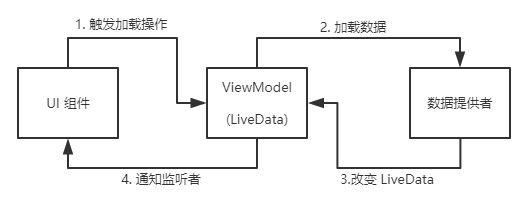
通过LiveData作为中介者,实现了UI组件和数据组件的隔离,对于UI组件来说,它只负责 发起请求操作 和 在数据变化的时候更新界面,而对于数据组件来说,它负责 接受请求和 改变LiveData,而通知UI组件的操作则是由LiveData来完成的,因此它可以根据当前UI组件的状态active/inative进行控制。
参考:
https://developer.android.google.cn/topic/libraries/architecture/livedata
https://www.jianshu.com/p/14af4b8c29e3
本文来自互联网用户投稿,文章观点仅代表作者本人,不代表本站立场,不承担相关法律责任。如若转载,请注明出处。 如若内容造成侵权/违法违规/事实不符,请点击【内容举报】进行投诉反馈!