阿里云IOT物联网MQTT协议快速接入JAVA(基于MNS消息队列)
前言:
1、本文介绍阿里云物联网的产品快速接入教程,仅针对监听MQTT协议以及处理,HTTP协议部分需在设备烧录,这里不做介绍,仅介绍JAVA如果快速接入;
2、本文的前提是设备端已经开发好,阿里云IOT的物模型、订阅topic、心跳都已经配置好;
3、所有的代码都是基于阿里IOT SDK云端开发API,需要引入以下依赖:
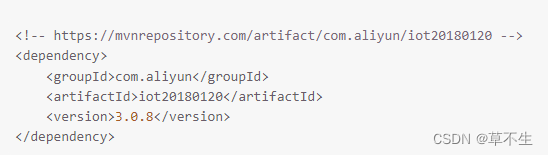
注:阿里云IOT文档地址:阿里云物联网平台-阿里云帮助中心
一、配置文件准备 (阿里云物联网消息队列(MQ)支持AMQP、MNS等,这里仅做MNS示例)
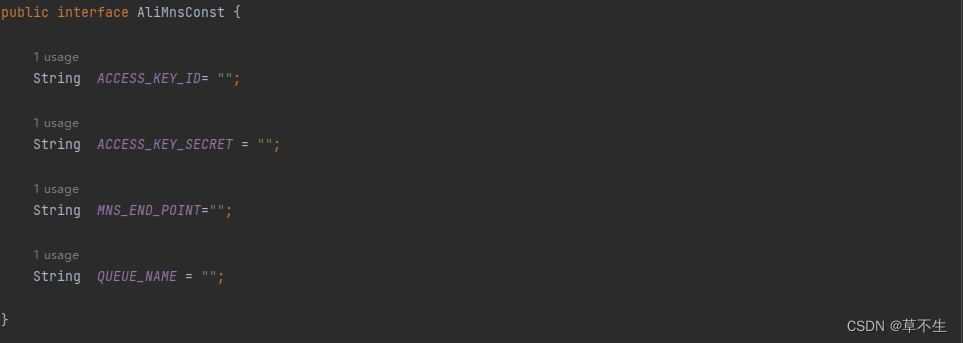
1、MNS消息队列常量
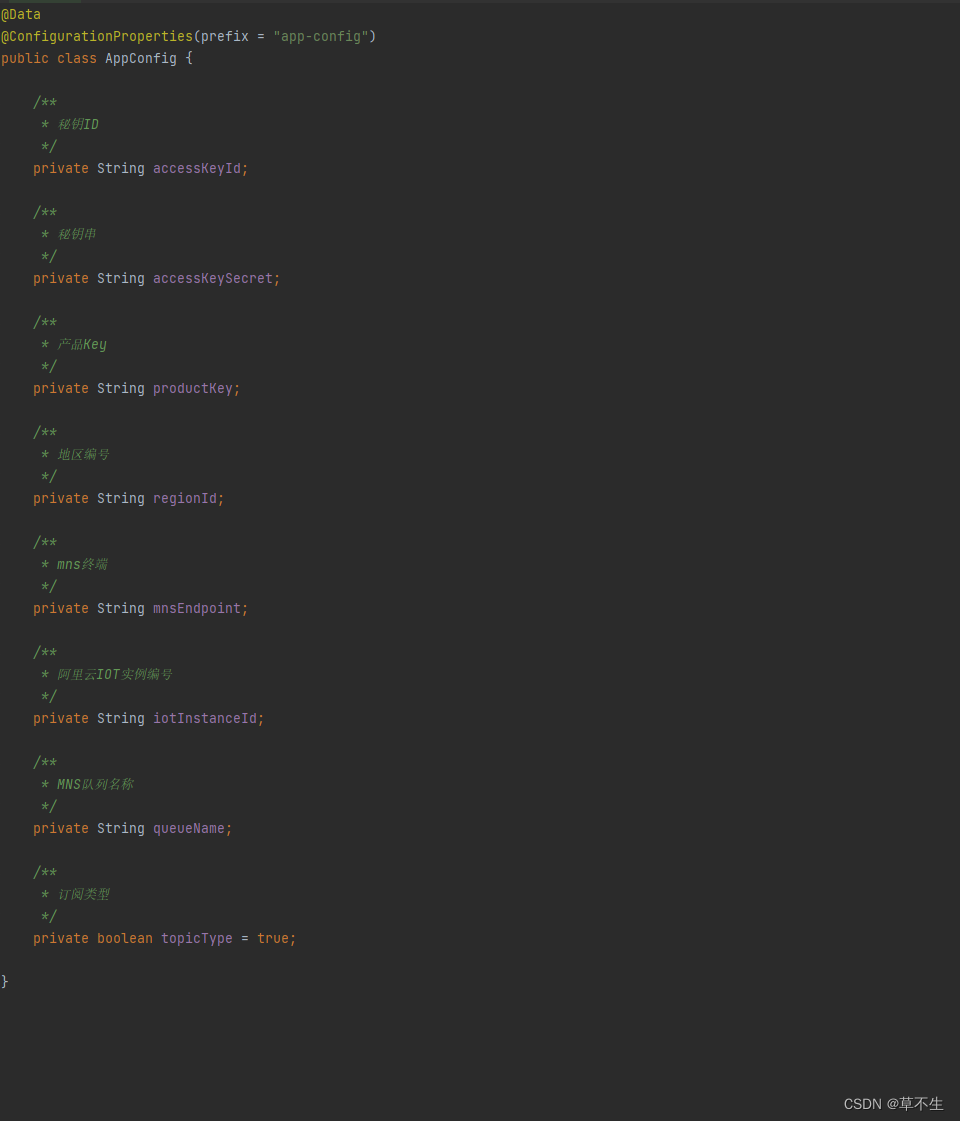
2、阿里云主配置文件
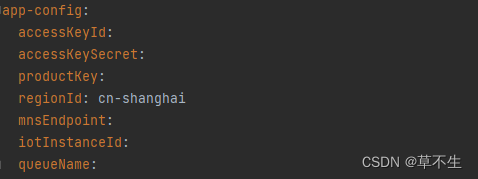
yml配置
二、实体类准备
1、设备实体类
@Data
public class DeviceConfig implements Serializable {/*** 验签信息*/private String sn;/*** 产品唯一key*/private String productKey;/*** 设备编号*/private String deviceName;/*** 设备秘钥*/private String deviceSecret;/*** 地址*/public String host;/*** 端口*/public int port;/*** 阿里云实例ID*/private String iotId;/*** token验签信息*/private String iotToken;/*** 创建时间*/private Date createdTime;/*** 过期时间 默认7天过期*/private Date overdueTime;/*** 时间戳*/private String timeStamp;}
2、消息主体实体类
@Data
public class MessageBody implements Serializable {private String payload;private String messageType;private String messageId;private String topic;private long timestamp;private String productKey;private String deviceName;public String getPayload() {return payload;}public String getPayloadAsString(){String data = new String(Base64.decodeBase64(getPayload()));return data;}public byte[] getPayloadAsBytes(){byte[] data = null;data = Base64.decodeBase64(getPayload());return data;}public void setPayload(String payload) {this.payload = payload;}public String getMessageType() {return messageType;}@JsonProperty(value="messagetype")public void setMessageType(String messageType) {this.messageType = messageType;}public String getMessageId() {return messageId;}@JsonProperty(value="messageid")public void setMessageId(String messageId) {this.messageId = messageId;}public String getTopic() {return topic;}public void setTopic(String topic) {this.topic = topic;String[] arr = topic.split("/");if(arr.length < 3){return;}productKey = arr[1];deviceName = arr[2];}public long getTimestamp() {return timestamp;}public void setTimestamp(long timestamp) {this.timestamp = timestamp;}public String getProductKey() {return productKey;}public String getDeviceName() {return deviceName;}public void setProductKey(String productKey) {this.productKey = productKey;}public void setDeviceName(String deviceName) {this.deviceName = deviceName;}
三、封装工具类,完成项目与物联网的基础交互
工具类主要完成设备的联网,注册,查询(基础信息、或设备状态),删除,发送指令
@Component
@Slf4j
public class IotUtils {private DefaultAcsClient client = null;@Resourceprivate AppConfig appConfig;@Autowiredpublic IotUtils(AppConfig appConfig){this.appConfig = appConfig;//初始化 DefaultAcsClient 对象DefaultProfile profile = DefaultProfile.getProfile(appConfig.getRegionId(), appConfig.getAccessKeyId(), appConfig.getAccessKeySecret());client = new DefaultAcsClient(profile);}/*** 获取MQTT鉴权地址* ...* 使用HTTPS认证再连接* @param productKey 设备编号* @param uuid 设备唯一标识* @return 阿里云返回设备的登录MQTT的账号和密码* @throws Exception 异常*/public DeviceConfig getIotDeviceConfig(String productKey, String uuid) throws Exception {log.info("【阿里云设备获取】 device_name:{}",uuid);DeviceConfig iotDeviceConfig = new DeviceConfig();//设备详细信息QueryDeviceDetailResponse query = getDeviceInfo(productKey, uuid);//阿里云注册设备if (!query.getSuccess() && "iot.device.NotExistedDevice".equals(query.getCode())) {registerDevice(productKey, uuid);//新激活的设备query = getDeviceInfo(productKey, uuid);}//设备详细信息QueryDeviceDetailResponse.Data deviceInfo = query.getData();//获取新的账号,密码iotDeviceConfig.setSn(uuid);iotDeviceConfig.setProductKey(productKey);iotDeviceConfig.setDeviceName(iotDeviceConfig.getSn());iotDeviceConfig.setDeviceSecret(deviceInfo.getDeviceSecret());iotDeviceConfig.setHost(iotDeviceConfig.getProductKey() + ".iot-as-mqtt." + appConfig.getRegionId() + ".aliyuncs.com");iotDeviceConfig.setPort(1883);iotDeviceConfig.setCreatedTime(new Date());//七天过期,这里保险设置6天iotDeviceConfig.setOverdueTime(DateUtils.addDays(new Date(), 6));iotDeviceConfig.setTimeStamp(String.valueOf(System.currentTimeMillis()));String sb = "clientId" + iotDeviceConfig.getDeviceName() +"deviceName" + iotDeviceConfig.getDeviceName() +"productKey" + iotDeviceConfig.getProductKey() +"timestamp" + iotDeviceConfig.getTimeStamp();//公共参数签名String sign = HmacCoder.encrypt(sb, iotDeviceConfig.getDeviceSecret(), HmacCoder.TYPE_HMAC_MD5);String iotId = uuid+"&"+productKey;iotDeviceConfig.setIotId(iotId);iotDeviceConfig.setIotToken(sign);return iotDeviceConfig;}/*** 注册设备* @param productKey 产品编号* @param deviceName 设备名称 非必须(不传的话aliyun会自动生成)*/public void registerDevice(String productKey, String deviceName) throws ClientException {RegisterDeviceRequest request = new RegisterDeviceRequest();request.setProductKey(productKey);request.setDeviceName(deviceName);request.setIotInstanceId(appConfig.getIotInstanceId());RegisterDeviceResponse response = client.getAcsResponse(request);if (!response.getSuccess()) {throw new ClientException(response.getErrorMessage());}}/*** 获取设备信息* @param deviceName 设备编号* @return 响应对象* @throws ClientException 客户端异常*/public QueryDeviceDetailResponse getDeviceInfo(String productKey, String deviceName) throws ClientException {QueryDeviceDetailRequest request = new QueryDeviceDetailRequest();request.setProductKey(productKey);request.setDeviceName(deviceName);request.setIotInstanceId(appConfig.getIotInstanceId());return client.getAcsResponse(request);}/*** 删除设备* @param deviceName 设备编号 必选*/public void removeDevice(String deviceName){DeleteDeviceRequest request = new DeleteDeviceRequest();request.setProductKey(appConfig.getProductKey());request.setDeviceName(deviceName);request.setIotInstanceId(appConfig.getIotInstanceId());try {// 发起请求并获取返回值DeleteDeviceResponse response = client.getAcsResponse(request);// 处理业务逻辑log.info("【设备删除成功】 response:{}",new Gson().toJson(response));} catch (ServerException e) {log.error("【业务处理异常】 ErrCode:{},ErrMsg:{}",e.getErrCode(),e.getErrMsg());e.printStackTrace();} catch (ClientException e) {log.error("【Client请求异常】 ErrCode:{},ErrMsg:{},RequestId:{}",e.getErrCode(),e.getErrMsg(),e.getRequestId());e.printStackTrace();}}/*** 获取设备状态* @param deviceName 设备编号* @return 设备状态* @throws ClientException 客户端异常*/public DeviceOnline getDeviceStatus(String deviceName) {DeviceOnline online = DeviceOnline.NO_DEVICE;Map map = null;try {map = getDeviceStatusMap(appConfig.getProductKey(), deviceName);} catch (ClientException e) {throw new RentBoxException(RentBoxExceptionCode.ALI_IOT_CLIENT_ERROR);}if (map.size() > 0) {return map.get(deviceName);}return online;}/*** getDeviceStatusList* @param productKey 产品编号* @param deviceNames 设备编号* @return 在线数据* @throws ClientException 客户端异常*/public Map getDeviceStatusMap(String productKey, String... deviceNames) throws ClientException{Map map = new LinkedHashMap();BatchGetDeviceStateRequest request = new BatchGetDeviceStateRequest();request.setProductKey(productKey);request.setIotInstanceId(appConfig.getIotInstanceId());List devices = new ArrayList();for (String deviceName : deviceNames) {if(!StringUtils.isBlank(deviceName)){devices.add(deviceName);map.put(deviceName, DeviceOnline.NO_DEVICE);}}if(devices.size() == 0){return map;}request.setDeviceNames(devices);BatchGetDeviceStateResponse response = client.getAcsResponse(request);List data = response.getDeviceStatusList();for(String key : map.keySet()){for(BatchGetDeviceStateResponse.DeviceStatus deviceStatus : data) {if (key.equals(deviceStatus.getDeviceName())) {DeviceOnline online = DeviceOnline.getByName(deviceStatus.getStatus());map.put(key, online);break;}}}return map;}/*** 发送异步消息* @param topicFullName 主题* @param messageContent 消息主体* @param qos 消息类型 0只发送1次 1至少发送一次* @return 推送响应* @throws ClientException 客户端异常*/public PubResponse sendMsgAsync( String topicFullName, String messageContent, int qos) throws ClientException {byte[] bytes = messageContent.getBytes(StandardCharsets.UTF_8);PubRequest request = new PubRequest();//设置产品Keyrequest.setProductKey(appConfig.getProductKey());//设置消息内容request.setMessageContent(Base64.getEncoder().encodeToString(bytes));//设置主题名request.setTopicFullName(topicFullName);//设置示例IDrequest.setIotInstanceId(appConfig.getIotInstanceId());//设置消息发送类型request.setQos(Math.min(qos, 1)); //目前支持QoS0和QoS1return client.getAcsResponse(request);}
注:在基础的MQTT协议下,系统发送给设备的指令都是异步的,所以上面只写了发送异步消息的方法,如果设备端烧录的时候兼容了RRPC模式,那么可以实现同步指令(发送指令以后拿到设备回复,某些场景RRPC非常方便),有兴趣的可以研究:调用RRpc向设备发送请求消息并同步返回响应_物联网平台-阿里云帮助中心
四、以上关于系统-->设备的模块准备就绪以后,我们已经能控制设备基础的生命周期,完成基础的物联网交互;非RRPC模式一下,设备的发送的MQTT协议数据,都只能通过监听MNS/AMQP消息队列的形式获取,所以接下来介绍的就是监听
1、创建一个守护线程,将需要用到的工具类传进去
/*** MNS消息队列监听器*/
@Service
@Slf4j
public class MnsListener extends Thread{@Resourceprivate RentboxUtils rentboxUtils;private MnsThread mnsThread;/*** 监听MNS队列消息*/public void startListen(){if (mnsThread!=null) return;MnsThread mnsThread = new MnsThread(rentboxUtils);this.mnsThread=mnsThread;mnsThread.setDaemon(true);mnsThread.start();}}
@Slf4j
public class MnsThread extends Thread{private RentboxUtils rentboxUtils;public MnsThread(RentboxUtils rentboxUtils){this.rentboxUtils=rentboxUtils;}/*** mns消息队列监听任务*/@Overridepublic void run(){super.run();CloudAccount cloudAccount = new CloudAccount(AliMnsConst.ACCESS_KEY_ID, AliMnsConst.ACCESS_KEY_SECRET,AliMnsConst.MNS_END_POINT);MNSClient client = cloudAccount.getMNSClient();CloudQueue queue = client.getQueueRef(AliMnsConst.QUEUE_NAME);Message message =null;while (!Thread.interrupted()){try {message = queue.popMessage(10);if (message!=null){String messageBodyJson = message.getMessageBodyAsString("UTF-8");MessageBody messageBody = JSON.parseObject(messageBodyJson, MessageBody.class);switch (messageBody.getMessageType()){case "upload"://进行设备上报操作rentboxUtils.handleCmd(messageBody);break;case "status"://进行设备状态变更操作rentboxUtils.handleStatusChange(messageBody);break;default:log.info("【默认】 status:{}",messageBody.getMessageType());}}else {System.out.println("continuing");}}catch (ServiceException e){e.printStackTrace();if (e.getErrorCode().equals("MessageNotExist")){log.error("队列中暂无消息");}else if (e.getMessage().equals("QueueNotExist")){log.error("队列不存在");}if (e.getErrorCode().equals("InternalServerError")) break;}catch (Exception e){e.printStackTrace();System.out.println(e.getClass());}finally {if (queue!=null && message!=null){try {queue.deleteMessage(message.getReceiptHandle()); //从队列中删除消息。}catch (Exception e){e.printStackTrace();log.error("【删除队列消息异常】 messageId:{}",message.getMessageId());}}}}}
2、本demo仅监听了设备上报数据和设备状态变更两个处理类型,具体的代码逻辑实现就需要根据自己的项目实际需求去实现;本文仅提供了基本的设备交互处理方法,还有更多地方并没有详细的介绍,对于不想了解阿里IOT而想直接用的人来说已经够了,如果想了解IOT的人来说,建议结合文档理解代码。
Last:阿里OpenApi真的是一个很庞大的体系,我也不敢说全部都能理解,也没办法每个方法步骤都作详细的介绍,只是想帮助到各位在小公司辛苦奋斗又需要接触物联网的码农(大公司这些东西也轮不到我们搭建)。
本文来自互联网用户投稿,文章观点仅代表作者本人,不代表本站立场,不承担相关法律责任。如若转载,请注明出处。 如若内容造成侵权/违法违规/事实不符,请点击【内容举报】进行投诉反馈!