Java实现阿里云OSS获取临时签名及操作
1. 背景说明
详细,请参阅阿里云那官方文档:
https://help.aliyun.com/document_detail/31926.html?spm=a2c4g.11186623.6.1737.5f3e3bd36kleqs
a. 采用JavaScript客户端直接签名时,AccessKey ID和AcessKey Secret会暴露在前端页面,因此存在严重的安全隐患。因此,OSS提供了服务端签名后直传的方案。

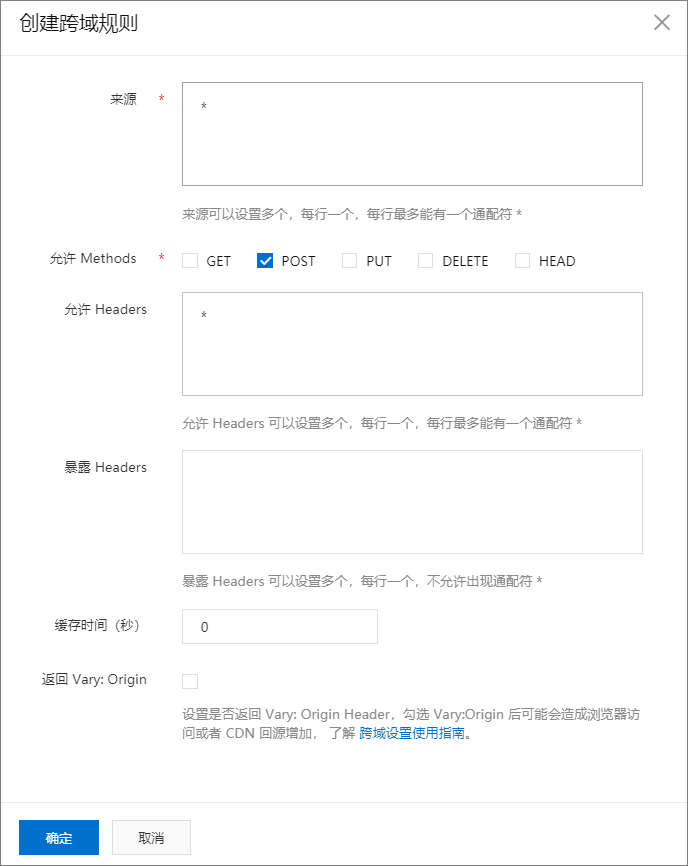
b. 修改OSS的CORS:
- 登录OSS管理控制台。
- 单击Bucket列表,之后单击目标Bucket名称。
- 单击权限管理 > 跨域设置,在跨域设置区域单击设置。
- 单击创建规则,配置如下图所示。
2. 获取临时访问凭证
a. 在pom文件中加入依赖:
com.aliyun.oss aliyun-sdk-oss 2.2.3
b. 建立一个配置文件类:
package com.common.properties;import org.springframework.beans.factory.annotation.Value;
import org.springframework.stereotype.Component;/*** 根据环境,读取阿里云配置环境信息* admin 2021/8/16 09:47*/
@Component
public class AliYunProperties {public static String accessKeyId;public static String accessKeySecret;public static String endpoint;@Value("${oss.accessKeyId}")public void setAccessKeyId(String accessKeyId) {AliYunProperties.accessKeyId = accessKeyId;}@Value("${oss.accessKeySecret}")public void setAccessKeySecret(String accessKeySecret) {AliYunProperties.accessKeySecret = accessKeySecret;}@Value("${oss.endpoint}")public void setEndpoint(String endpoint) {AliYunProperties.endpoint = endpoint;}}
c. 在yml配置文件中,加入对应的配置信息:
oss:bucket: bucket名accessKeyId: 你的keyaccessKeySecret: 你的 secretendpoint: oss-cn-hangzhou.aliyuncs.comd. 实现工具类:
package com.common.utils;import com.alibaba.fastjson.JSONObject;
import com.aliyun.oss.OSSClient;
import com.aliyun.oss.common.utils.BinaryUtil;
import com.aliyun.oss.model.GetObjectRequest;
import com.aliyun.oss.model.MatchMode;
import com.aliyun.oss.model.PolicyConditions;
import com.aliyun.oss.model.PutObjectResult;
import com.louwen.common.properties.AliYunProperties;
import lombok.extern.slf4j.Slf4j;
import org.springframework.core.io.ClassPathResource;import java.io.File;
import java.net.URL;
import java.nio.charset.StandardCharsets;
import java.util.Date;
import java.util.LinkedHashMap;
import java.util.Map;/*** 阿里云工具类* admin 2021/8/17 10:19*/
@Slf4j
public class AliUtil {private static String accessKeyId;private static String accessKeySecret;private static String endpoint;static {endpoint = AliYunProperties.endpoint;accessKeyId = AliYunProperties.accessKeyId;accessKeySecret = AliYunProperties.accessKeySecret;}/*** 获取临时访问OSS签名* 前端-用签名的方式上传文件* 官方链接地址:https://help.aliyun.com/document_detail/31926.html?spm=a2c4g.11186623.6.1737.5f3e3bd36kleqs** @param bucketName bucket名称,由前端传入(上传不同文件到不同文件夹)*/public static Map getSignature(String bucketName) {Map respMap = new LinkedHashMap<>();//host的格式为 bucketName.endpointString endpointForSig = "oss-cn-hangzhou.aliyuncs.com";String host = "https://" + bucketName + "." + endpointForSig;//callbackUrl为 上传回调服务器的URL,请将下面的IP和Port配置为您自己的真实信息。String callbackUrl = "";String dir = ""; // 用户上传文件时指定的前缀。OSSClient client = new OSSClient(endpointForSig, accessKeyId, accessKeySecret);try {//设置过期时间为半小时1800Llong expireTime = 60 * 30;long expireEndTime = System.currentTimeMillis() + expireTime * 1000;java.sql.Date expiration = new java.sql.Date(expireEndTime);// PostObject请求最大可支持的文件大小为5 GB,即CONTENT_LENGTH_RANGE为5*1024*1024*1024。PolicyConditions policyConditions = new PolicyConditions();policyConditions.addConditionItem(PolicyConditions.COND_CONTENT_LENGTH_RANGE, 0, 1048576000);policyConditions.addConditionItem(MatchMode.StartWith, PolicyConditions.COND_KEY, dir);String postPolicy = client.generatePostPolicy(expiration, policyConditions);byte[] binaryData = postPolicy.getBytes(StandardCharsets.UTF_8);String encodedPolicy = BinaryUtil.toBase64String(binaryData);String postSignature = client.calculatePostSignature(postPolicy);respMap.put("accessid", accessKeyId);respMap.put("policy", encodedPolicy);respMap.put("signature", postSignature);respMap.put("dir", dir);respMap.put("host", host);respMap.put("expire", String.valueOf(expireEndTime / 1000));JSONObject jasonCallback = new JSONObject();jasonCallback.put("callbackUrl", callbackUrl);jasonCallback.put("callbackBody","filename=${object}&size=${size}&mimeType=${mimeType}&height=${imageInfo.height}&width=${imageInfo.width}");jasonCallback.put("callbackBodyType", "application/x-www-form-urlencoded");String base64CallbackBody = BinaryUtil.toBase64String(jasonCallback.toString().getBytes());respMap.put("callback", base64CallbackBody);} catch (Exception e) {System.out.println(e.getMessage());}return respMap;}/**** 上传文件* @param key 文件名* @param file 文件*/public static void uploadFile(String bucket, String key, File file) {// 创建OSSClient实例OSSClient ossClient = new OSSClient(endpoint, accessKeyId, accessKeySecret);// 上传文件PutObjectResult putObjectResult = ossClient.putObject(bucket, key, file);String eTag = putObjectResult.getETag();System.out.println(eTag);// 关闭clientossClient.shutdown();}/*** 从OSS下载文件,将文件存储在项目tmp目录下,文件名是时间戳** @param objectName oss文件名* @return 文件本地存储路径*/public static String downloadFileFromOSS(String objectName, String bucketName) {String resource;String OS = System.getProperty("os.name").toLowerCase();if (OS.equals("linux")) {resource = new ClassPathResource("/background/template_bg_image.jpg").getPath();} else {resource = AliUtil.class.getClassLoader().getResource("background/template_bg_image.jpg").getPath();}// 创建OSSClient实例OSSClient ossClient = new OSSClient(endpoint, accessKeyId, accessKeySecret);// 填写不包含Bucket名称在内的Object完整路径,例如testfolder/exampleobject.txt。ossClient.getObject(new GetObjectRequest(bucketName, objectName), new File(resource));ossClient.shutdown();return resource;}/**** 获取下载地址*/public static String getDownUrl(String key, String bucket) {OSSClient client = new OSSClient(endpoint, accessKeyId, accessKeySecret);//判断文件是否存在// 设置URL过期时间为10年Date expiration = new Date(System.currentTimeMillis() + 3600L * 1000 * 24 * 10 * 365);// 生成URLURL url = client.generatePresignedUrl(bucket, key, expiration);client.shutdown();String s = url.toString().substring(0, url.toString().indexOf("?"));//生产环境中,OSS地址为内网地址,在此处转成外网地址if (s.contains("-internal")) {s = s.replace("-internal", "");}return s;}}
e. 调用示范(测试注意需写单元测试类):
public static void main(String[] args) {String bg = "https://img-test.oss-cn-hangzhou.aliyuncs.com/template_bg_img1.jpg";String subFirst = bg.substring(bg.indexOf("com/"));String objectName = subFirst.substring(4);String resource = AliUtil.class.getClassLoader().getResource("background/create.jpg").getPath();File file = new File(resource);String key = "a-template.jpg";AliUtil.getSignature("img-test");AliUtil.downloadFileFromOSS(objectName, "img-test");AliUtil.uploadFile("img-test", key, file);AliUtil.getDownUrl(key, "img-test");}你的努力,终将成为你最有力的资本!
本文来自互联网用户投稿,文章观点仅代表作者本人,不代表本站立场,不承担相关法律责任。如若转载,请注明出处。 如若内容造成侵权/违法违规/事实不符,请点击【内容举报】进行投诉反馈!