html分页查询实现案例
这里主要运用了pagehelper的分页插件,大家可以在这个网址查看怎么使用:https://pagehelper.github.io/docs/howtouse/?tdsourcetag=s_pctim_aiomsg,下面我就拿我自己写的一个案例给大家讲一下
主要运用的技术:Mybatis+pagehelper分页插件+layui
基本项目结构: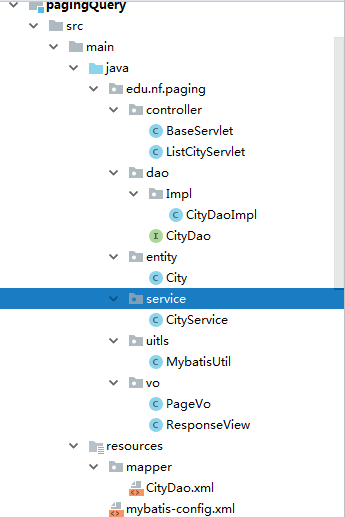
1.新建一个Maven项目,在Maven项目的pom.xml配置中添加分页插件的依赖,如下
<dependency><groupId>com.github.pagehelpergroupId><artifactId>pagehelperartifactId><version>5.1.6version>dependency>
2.需要在mybatis-config.xml中配置分页插件
xml version="1.0" encoding="utf-8"?>
DOCTYPE configuration PUBLIC "-//mybatis.org//DTD Config 3.0//EN""http://mybatis.org/dtd/mybatis-3-config.dtd"><configuration><typeAliases><package name="edu.nf.paging.entity"/>typeAliases><plugins><plugin interceptor="com.github.pagehelper.PageInterceptor"><property name="helperDialect" value="mysql"/><property name="reasonable" value="true"/>plugin>plugins><environments default="mysql"><environment id="mysql"><transactionManager type="JDBC"/><dataSource type="POOLED"><property name="driver" value="com.mysql.jdbc.Driver"/><property name="url" value="jdbc:mysql://localhost:3306/mydb?useSSL=true&useUnicode=true&characterEncoding=utf-8"/><property name="username" value="root"/><property name="password" value="root"/>dataSource>environment>environments><mappers><mapper resource="mapper/CityDao.xml">mapper>mappers>
configuration>
3.数据库查询接口类:
package edu.nf.paging.dao;import edu.nf.paging.entity.City; import org.apache.ibatis.annotations.ResultMap; import org.apache.ibatis.annotations.Select;import java.util.List;/*** @Author lance* @Date 2018/9/20 0020*/ public interface CityDao {@Select("select * from city_info")@ResultMap("edu.nf.paging.dao.CityDao.CityMap")ListlistCity(); }
4.接口实现类:
package edu.nf.paging.dao.Impl;import edu.nf.paging.dao.CityDao; import edu.nf.paging.entity.City; import edu.nf.paging.uitls.MybatisUtil; import org.apache.ibatis.session.SqlSession;import java.util.List;/*** 描述:* 实现类** @author lance* @create 2018-09-20 10:41*/ public class CityDaoImpl implements CityDao {@Overridepublic ListlistCity() {SqlSession session = MybatisUtil.getSession();List list = null;try {CityDao dao = session.getMapper(CityDao.class);list = dao.listCity();} catch (Exception e) {e.printStackTrace();throw new RuntimeException(e.getMessage());} finally {session.close();}return list;} }
5.在业务逻辑层将数据库中查询出来的数据封装到PageInfo对象集合中(分页插件中的一个类):
package edu.nf.paging.service;import com.github.pagehelper.PageHelper; import com.github.pagehelper.PageInfo; import edu.nf.paging.dao.CityDao; import edu.nf.paging.dao.Impl.CityDaoImpl; import edu.nf.paging.entity.City;import java.util.List;/*** 描述:* 业务层** @author lance* @create 2018-09-20 11:31*/ public class CityService {/*** 查询城市信息,并封装成pageInfo对象* pageInfo对象包含了所有的城市信息* page:表示从第几页开始* limit:表示查询多少条数据* */public PageInfolistCity(Integer page,Integer limit){//设置分页 PageHelper.startPage(page,limit);//拿到所有的城市信息CityDao dao = new CityDaoImpl();List list = dao.listCity();//将城市信息存放到pageInfo对象中PageInfo pageInfo = new PageInfo<>(list);return pageInfo;} }
6.两个视图对象,主要用于对数据的封装,返回到html页面中
package edu.nf.paging.vo;import com.github.pagehelper.PageInfo;/*** 描述:* 分页响应视图* 这个vo专门用于分页使用,继承ResponseView* @author lance* @create 2018-09-20 11:52**/
public class PageVo extends ResponseView{/*** 为layui插件准备一个总记录数,用于页面插件的使用* */private Long count;public Long getCount() {return count;}public void setCount(Long count) {this.count = count;}
}
package edu.nf.paging.vo;/*** 描述:* 视图响应** @author lance* @create 2018-09-20 11:47*/
public class ResponseView {private Integer code = 200;private String message;private Object data;public Integer getCode() {return code;}public void setCode(Integer code) {this.code = code;}public String getMessage() {return message;}public void setMessage(String message) {this.message = message;}public Object getData() {return data;}public void setData(Object data) {this.data = data;}
}
7.控制层
BaseServlet:主要用于封装两个视图对象,返回html页面中,继承HttpServlet,作用:当有一些用到分页时和没用到分页时都可以从父类中直接拿到视图对象来进行封装,不用分页的写一个方法,不分页的也写一个方法,而且这个类中还继承HttpServlet,我们可以直接继承BaseServlet这个类时就可以了
package edu.nf.paging.controller;import com.github.pagehelper.PageInfo;
import edu.nf.paging.vo.PageVo;
import edu.nf.paging.vo.ResponseView;import javax.servlet.http.HttpServlet;/*** 描述:* 这个类主要用于封装视图对象返回到html页面中,继承HttpServlet(面向对象的思想)** @author lance* @create 2018-09-20 11:46*/
public class BaseServlet extends HttpServlet {/*** 封装PageVo的对象* */protected PageVo pageVo(PageInfo pageInfo){PageVo vo = new PageVo();//layui的状态响应码为0vo.setCode(0);//将分页的list设置到vo的data中来
        vo.setData(pageInfo.getList());//设置分页的总数
        vo.setCount(pageInfo.getTotal());return vo;}/*** 封装ResponseView的对象(不需要分页的数据)* */protected ResponseView responseView(Object data){ResponseView vo = new ResponseView();vo.setData(data);return vo;}/*** 封装ResponseView的对象的错误消息* */protected ResponseView responseView(Integer code ,String message){ResponseView vo = new ResponseView();vo.setCode(code);vo.setMessage(message);return vo;}}
8.与直接页面交互的,将数据封装成json返回到页面中:
package edu.nf.paging.controller;import com.github.pagehelper.PageInfo; import com.google.gson.Gson; import edu.nf.paging.entity.City; import edu.nf.paging.service.CityService; import edu.nf.paging.vo.PageVo;import javax.servlet.ServletException; import javax.servlet.annotation.WebServlet; import javax.servlet.http.HttpServlet; import javax.servlet.http.HttpServletRequest; import javax.servlet.http.HttpServletResponse; import java.io.IOException;/*** 描述:* 分页** @author lance* @create 2018-09-20 11:41*/ @WebServlet("/listCity") public class ListCityServlet extends BaseServlet {@Overrideprotected void service(HttpServletRequest req, HttpServletResponse resp) throws ServletException, IOException {resp.setContentType("application/json;charset=utf-8");//从页面中拿到页数和行数(这两个是默认就有的)String pageStr = req.getParameter("page");String limitStr = req.getParameter("limit");//转为Integer类型的Integer page = Integer.valueOf(pageStr);Integer limit = Integer.valueOf(limitStr);//从业务层拿到list集合中的数据CityService service = new CityService();//将list集合中的数据存放到PageInfo对象集合中PageInfopageInfo = service.listCity(page,limit);//用视图层将数据封装起来PageVo vo = pageVo(pageInfo);//将视图层数据封装成json对象写回页面String json = new Gson().toJson(vo);resp.getWriter().print(json);} }
9.html页面代码
注:因为这里用到layui,大家要在layui官网下载layui的插件,这是官网地址:https://www.layui.com/
https://www.layui.com/doc/ 这是layui的API文档说明,大家有兴趣可以学习一下
DOCTYPE html>
<html>
<head><meta charset="utf-8"><title>城市列表title><meta name="renderer" content="webkit"><meta http-equiv="X-UA-Compatible" content="IE=edge,chrome=1"><meta name="viewport" content="width=device-width, initial-scale=1, maximum-scale=1"><link rel="stylesheet" href="layui/css/layui.css"  media="all">
head>
<body><table class="layui-hide" id="test">table><script src="layui/layui.js" charset="utf-8">script>
<script>//模块化导入
    layui.use(['table'], function(){//使用table对象var table = layui.table;//使用table对象
        table.render({elem: '#test' //对应表格的id
            ,url:'listCity' //后台请求
            ,cols: [[ //设置表头信息,field指定返回json中的字段名(也就是你实体类的字段名)//title:表的列名
                {field:'cityId', width:'20%', title: '城市编号'},{field:'cityCn', width:'20%', title: '城市名称'},{field:'countryCode', width:'20%', title: 'CN'},{field:'countryCn', width: '20%', title: '国家名称'},{field:'provinceCn', width: '20%', title: '省份'}]],page: true //启用分页
        });});
script>body>
html>
最后附上实现页面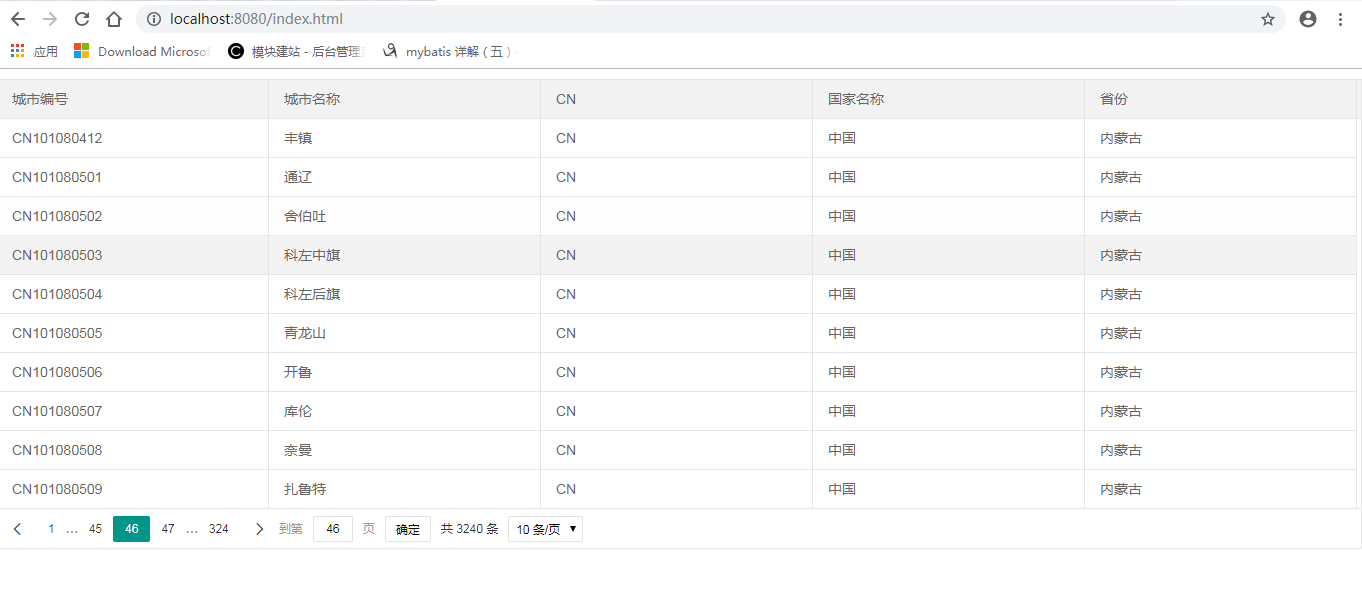
好了,大家如果有什么不懂可以留言问我,我会尽力帮助大家解答
转载于:https://www.cnblogs.com/gepuginy/p/9683181.html
本文来自互联网用户投稿,文章观点仅代表作者本人,不代表本站立场,不承担相关法律责任。如若转载,请注明出处。 如若内容造成侵权/违法违规/事实不符,请点击【内容举报】进行投诉反馈!