Android学习——Keyguard之解锁屏
Keyguard:即Android 中处理锁屏(电源键按下、屏幕显示时间超时)、解锁(滑动、图案、指纹、声音、人脸、虹膜等)、锁屏下显示通知管理者。
闲言少叙来看一下涉及Keyguard的部分:
1、SystemUI
\frameworks\base\packages\SystemUI
2、Keyguard
\frameworks\base\packages\Keyguard
3、\frameworks\base\services\core\java\com\android\server\policy
一些重要文件大意:
PhoneWindowManger:管理系统的准备工作等
KeyguardViewMediator:涉及到keyguard的协调请求,包含了关于keyguard的状态、电源管理事件是否影响keyguard当被展示或者重启,回调手机窗口管理器通知其什么时候展示,从keyguard视图事件本身叙述这个keyguard成功解锁等问题。
KeyguardService:继承自Service,处理Keyguard的系统服务。
StatusBarKeyuardViewManger:管理、创建、显示、隐藏和重置状态栏中的Keyguard。
KeyguardBouncer:用于管理锁屏的措施。
画的序列图实在“”吃藕“”,借鉴一下前人的锁屏流程时序图:
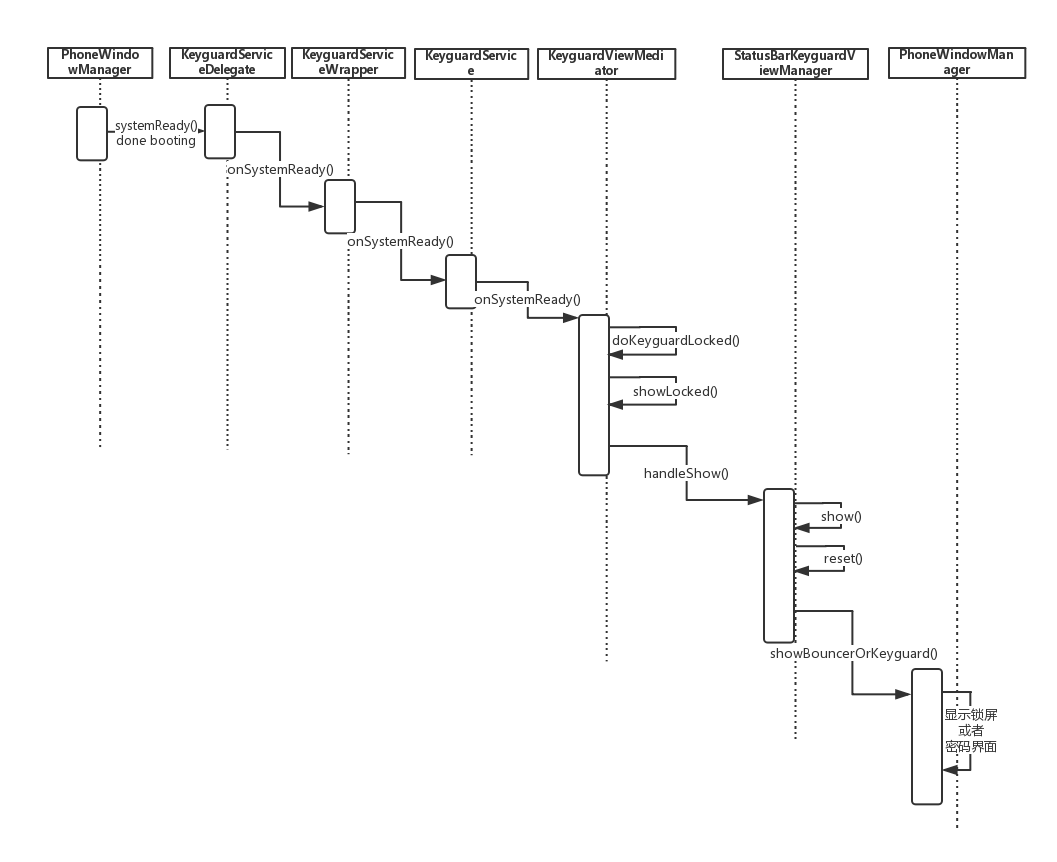
直接从framework的锁屏入口阅读代码;
KeyguardService.java
/frameworks/base/packages/SystemUI/src/com/android/systemui/keyguard/KeyguardService.java
public void onSystemReady() {checkPermission();//避免死锁并检查系统权限mKeyguardViewMediator.onSystemReady();//进入锁屏入口}KeyguardViewMediator.java
/frameworks/base/packages/SystemUI/src/com/android/systemui/keyguard/KeyguardViewMediator.java
public void onSystemReady() {mSearchManager = (SearchManager) mContext.getSystemService(Context.SEARCH_SERVICE);synchronized (this) {if (DEBUG) Log.d(TAG, "onSystemReady");AntiTheftManager.checkPplStatus();//检查手机是否加密(是否加了手机隐私锁)mSystemReady = true;doKeyguardLocked(null);// 进行锁屏预处理判断等操作mUpdateMonitor.registerCallback(mUpdateCallback);mPowerOffAlarmManager.onSystemReady();}// Most services aren't available until the system reaches the ready state, so we// send it here when the device first boots.maybeSendUserPresentBroadcast();}
onKeyguardLocked()
public class KeyguardViewMediator extends SystemUI {private void doKeyguardLocked(Bundle options) {if (!mExternallyEnabled) {// 其他应用禁止锁屏呈现,例如接电话等操作.if (DEBUG) Log.d(TAG, "doKeyguard: not showing because externally disabled");return;}// 判断锁屏是否正在展示if (mStatusBarKeyguardViewManager.isShowing()) {if (DEBUG) Log.d(TAG, "doKeyguard: not showing because it is already showing");resetStateLocked();return;}// 判断是否无sim卡也可使用手机final boolean requireSim = !SystemProperties.getBoolean("keyguard.no_require_sim", false);// 获取sim卡状态final boolean absent = SubscriptionManager.isValidSubscriptionId(mUpdateMonitor.getNextSubIdForState(IccCardConstants.State.ABSENT));final boolean disabled = SubscriptionManager.isValidSubscriptionId(mUpdateMonitor.getNextSubIdForState(IccCardConstants.State.PERM_DISABLED));final boolean lockedOrMissing = mUpdateMonitor.isSimPinSecure()|| ((absent || disabled) && requireSim);if (!lockedOrMissing && shouldWaitForProvisioning()) {if (DEBUG) Log.d(TAG, "doKeyguard: not showing because device isn't provisioned"+ " and the sim is not locked or missing");return;}if (mLockPatternUtils.isLockScreenDisabled() && !lockedOrMissing) {// Settings中没有启用锁屏return;}if (mLockPatternUtils.checkVoldPassword()) {setShowingLocked(false);hideLocked();return;}// 经过上述判断后,去展示锁屏showLocked(options);}
}
showLocked()
Send message to keyguard telling it to show itself 告诉keyguard显示handleShow
private void showLocked(Bundle options) {if (DEBUG) Log.d(TAG, "showLocked");setReadyToShow(true) ;updateActivityLockScreenState();// ensure we stay awake until we are finished displaying the keyguardmShowKeyguardWakeLock.acquire();// 获取PARTIAL_WAKE_LOCK,不受电源键影响,不让CPU进入休眠状态Message msg = mHandler.obtainMessage(SHOW, options); // 发送msg.what为SHOW类型的messagemHandler.sendMessage(msg);}mShowKeyguardWakeLock相关的代码如下
public class KeyguardViewMediator extends SystemUI {private PowerManager.WakeLock mShowKeyguardWakeLock;private void setupLocked() {// 获取了PARTIAL_WAKE_LOCK锁,即不受电源键控制,即使按下电源键也不能使系统进入休眠状态mShowKeyguardWakeLock = mPM.newWakeLock(PowerManager.PARTIAL_WAKE_LOCK, "show keyguard");mShowKeyguardWakeLock.setReferenceCounted(false);}private void showLocked(Bundle options) {// 获取PARTIAL_WAKE_LOCKmShowKeyguardWakeLock.acquire();}private void handleShow(Bundle options) {synchronized (KeyguardViewMediator.this) {// 释放PARTIAL_WAKE_LOCKmShowKeyguardWakeLock.release();}}
}public class KeyguardViewMediator extends SystemUI {private PowerManager.WakeLock mShowKeyguardWakeLock;private void setupLocked() {// 获取了PARTIAL_WAKE_LOCK锁,即不受电源键控制,即使按下电源键也不能使系统进入休眠状态mShowKeyguardWakeLock = mPM.newWakeLock(PowerManager.PARTIAL_WAKE_LOCK, "show keyguard");mShowKeyguardWakeLock.setReferenceCounted(false);}private void showLocked(Bundle options) {// 获取PARTIAL_WAKE_LOCKmShowKeyguardWakeLock.acquire();}private void handleShow(Bundle options) {synchronized (KeyguardViewMediator.this) {// 释放PARTIAL_WAKE_LOCKmShowKeyguardWakeLock.release();}}
}handleShow()
mHandle处理SHOW类型消息的方法如下:public class KeyguardViewMediator extends SystemUI {private Handler mHandler = new Handler(Looper.myLooper(), null /*callback*/, true /*async*/) {@Overridepublic void handleMessage(Message msg) {switch (msg.what) {case SHOW:handleShow((Bundle) msg.obj);}}}private void handleShow(Bundle options) {synchronized (KeyguardViewMediator.this) {if (!mSystemReady) {// 系统未Ready,则不呈现锁屏return;} else {if (DEBUG) Log.d(TAG, "handleShow");}setShowingLocked(true);// 展示锁屏界面mStatusBarKeyguardViewManager.show(options);mHiding = false;resetKeyguardDonePendingLocked();mHideAnimationRun = false;updateActivityLockScreenState();adjustStatusBarLocked();userActivity();// Do this at the end to not slow down display of the keyguard.playSounds(true);mShowKeyguardWakeLock.release();}mKeyguardDisplayManager.show();}
}StatusBarKeyguardViewManager
framework/base/package/SystemUI/src/com/android/systemui/statusbar/phone/StatusBarKeyguardViewManager.java 先从show方法开始入手public void show(Bundle options) {if (DEBUG) Log.d(TAG, "show() is called.") ;mShowing = true;// 设置keguard是否显示的标志mStatusBarWindowManager.setKeyguardShowing(true);mScrimController.abortKeyguardFadingOut();reset();// 重置view的状态,进行keyguard锁屏显示}reset()
public void reset() {if (DEBUG) {Log.d(TAG, "reset() is called, mShowing = " + mShowing + " ,mOccluded = " + mOccluded);}if (mShowing) {if (mOccluded) {mPhoneStatusBar.hideKeyguard();mPhoneStatusBar.stopWaitingForKeyguardExit();mBouncer.hide(false /* destroyView */);} else {showBouncerOrKeyguard();// 判断是调用安全锁屏还是调用直接滑动解锁}KeyguardUpdateMonitor.getInstance(mContext).sendKeyguardReset();updateStates();}}showBouncerOrKeyguard()
private void showBouncerOrKeyguard() {if (DEBUG) Log.d(TAG, "showBouncerOrKeyguard() is called.") ;if (mBouncer.needsFullscreenBouncer()) {if (DEBUG) {Log.d(TAG, "needsFullscreenBouncer() is true, show \"Bouncer\" view directly.");}// The keyguard might be showing (already). So we need to hide it.mPhoneStatusBar.hideKeyguard();//需要使用Bouncer隐藏keyguardmBouncer.show(true /* resetSecuritySelection */);//显示Bouncer} else {if (DEBUG) {Log.d(TAG, "needsFullscreenBouncer() is false,"+ "show \"Notification Keyguard\" view.");}mPhoneStatusBar.showKeyguard();//滑屏解锁mBouncer.hide(false /* destroyView */);mBouncer.prepare();}}不显示Bouncer就接不下去了并且没有学习意义。接下来跟我一起继续跟代码在显示Bouncer的情况下: KeyguardBouncer.java show()
public void show(boolean resetSecuritySelection, boolean authenticated) {if (DEBUG) {Log.d(TAG, "show(resetSecuritySelection = " + resetSecuritySelection);}if (PowerOffAlarmManager.isAlarmBoot()) {/// before the KeyguardPasswordView is gone.if (mKeyguardView != null && mRoot != null) {mKeyguardView.onPause();}// force to remove views.inflateView() ;} else {ensureView();}if (resetSecuritySelection) {//判断是否安全模式已发生改变// showPrimarySecurityScreen() updates the current security method. This is needed in// case we are already showing and the current security method changed.mKeyguardView.showPrimarySecurityScreen();}if (mRoot.getVisibility() == View.VISIBLE || mShowingSoon) {return;}// Try to dismiss the Keyguard. If no security pattern is set, this will dismiss the whole// Keyguard. If we need to authenticate, show the bouncer.if (!mKeyguardView.dismiss(authenticated)) {if (DEBUG) {Log.d(TAG, "show() - try to dismiss \"Bouncer\" directly.") ;}mShowingSoon = true;// Split up the work over multiple frames.DejankUtils.postAfterTraversal(mShowRunnable);}}public SecurityMode getCurrentSecurityMode() {return mCurrentSecuritySelection;}获取当前锁屏模式后返回当前锁屏模式: KeyguardSecuiityModel.java
private void inflateView() {if (DEBUG) {Log.d(TAG, "inflateView() is called, we force to re-inflate the \"Bouncer\" view.");}removeView();mRoot = (ViewGroup) LayoutInflater.from(mContext).inflate(R.layout.keyguard_bouncer, null);//加载布局mKeyguardView = (KeyguardHostView) mRoot.findViewById(R.id.keyguard_host_view);mKeyguardView.setLockPatternUtils(mLockPatternUtils);mKeyguardView.setViewMediatorCallback(mCallback);mKeyguardView.setNotificationPanelView(mNotificationPanel) ;mContainer.addView(mRoot, mContainer.getChildCount());mRoot.setVisibility(View.INVISIBLE);mRoot.setSystemUiVisibility(View.STATUS_BAR_DISABLE_HOME);} 至此加载到显示结束。
本文来自互联网用户投稿,文章观点仅代表作者本人,不代表本站立场,不承担相关法律责任。如若转载,请注明出处。 如若内容造成侵权/违法违规/事实不符,请点击【内容举报】进行投诉反馈!