java调用matlab中神经网络_C#.NET 调用 MatlabBP神经网络工具箱——通过调用matlab引擎实现...
【这是笔者上一篇博客,本文提供另一种方式去解决调用matlab工具箱的问题】http://www.cnblogs.com/Erma/p/9349185.html
啥也不说了,上主要代码!
using DoSmoothPro;
using MathWorks.MATLAB.NET.Arrays;
using System;
using System.Collections.Generic;
using System.ComponentModel;
using System.Data;
using System.Drawing;
using System.IO;
using System.Linq;
using System.Text;
using System.Threading.Tasks;
using System.Windows.Forms;
namespace test_BPnetApp
{
public partial class Form1 : Form
{
List specList1 = new List();
List specList2 = new List();
List trainList = new List();
List testList = new List();
double[] origenalX, origenalY,smoothedY;
int femaleCount, maleCount;
//DoNetClass doNetClass = new DoNetClass();
MLApp.MLApp matlab = null;
public Form1()
{
InitializeComponent();
}
///
/// 导入数据
///
///
///
private void btn_loadTranData_Click(object sender, EventArgs e)
{
specList1.Clear();
femaleCount = 0;
OpenFileDialog ofd = new OpenFileDialog();
ofd.Filter = "(*.txt)|*.txt|(*.*)|*.*";
ofd.RestoreDirectory = true;
ofd.Multiselect = true;
if (ofd.ShowDialog() == DialogResult.OK)
{
String[] names = ofd.FileNames;
// List arr1 = new List();
List arr2 = new List();
for (int i = 0; i < names.Length; i++)
{
arr2.Clear();
femaleCount++;
FileStream fs = new FileStream(names[i], FileMode.Open);
StreamReader sr = new StreamReader(fs);
try
{
string line = sr.ReadLine();
while (line != null)
{
String[] a = line.Split(' ');
//arr1.Add(double.Parse(a[0]));
arr2.Add(double.Parse(a[1]));
line = sr.ReadLine();
}
//double[] bfwavelength = arr1.ToArray();
double[] bfspec = arr2.ToArray();
specList1.Add(bfspec);
}
catch (Exception ex)
{
MessageBox.Show(ex.Message.ToString());
}
finally
{
sr.Close();
fs.Close();
}
}
}
ofd.Dispose();
}
///
/// 导入数据
///
///
///
private void button1_Click(object sender, EventArgs e)
{
specList2.Clear();
maleCount = 0;
OpenFileDialog ofd = new OpenFileDialog();
ofd.Filter = "(*.txt)|*.txt|(*.*)|*.*";
ofd.RestoreDirectory = true;
ofd.Multiselect = true;
if (ofd.ShowDialog() == DialogResult.OK)
{
String[] names = ofd.FileNames;
//List arr1 = new List();
List arr2 = new List();
for (int i = 0; i < names.Length; i++)
{
arr2.Clear();
maleCount++;
FileStream fs = new FileStream(names[i], FileMode.Open);
StreamReader sr = new StreamReader(fs);
try
{
string line = sr.ReadLine();
while (line != null)
{
String[] a = line.Split(' ');
//arr1.Add(double.Parse(a[0]));
arr2.Add(double.Parse(a[1]));
line = sr.ReadLine();
}
//double[] bfwavelength = arr1.ToArray();
double[] bfspec = arr2.ToArray();
specList2.Add(bfspec);
}
catch (Exception ex)
{
MessageBox.Show(ex.Message.ToString());
}
finally
{
sr.Close();
fs.Close();
}
}
}
ofd.Dispose();
}
///
/// 导入测试数据
///
///
///
private void btn_loadTestData_Click(object sender, EventArgs e)
{
testList.Clear();
//maleCount = 0;
OpenFileDialog ofd = new OpenFileDialog();
ofd.Filter = "(*.txt)|*.txt|(*.*)|*.*";
ofd.RestoreDirectory = true;
ofd.Multiselect = true;
if (ofd.ShowDialog() == DialogResult.OK)
{
String[] names = ofd.FileNames;
//List arr1 = new List();
List arr2 = new List();
for (int i = 0; i < names.Length; i++)
{
arr2.Clear();
//maleCount++;
FileStream fs = new FileStream(names[i], FileMode.Open);
StreamReader sr = new StreamReader(fs);
try
{
string line = sr.ReadLine();
while (line != null)
{
String[] a = line.Split(' ');
//arr1.Add(double.Parse(a[0]));
arr2.Add(double.Parse(a[1]));
line = sr.ReadLine();
}
//double[] bfwavelength = arr1.ToArray();
double[] bfspec = arr2.ToArray();
testList.Add(bfspec);
}
catch (Exception ex)
{
MessageBox.Show(ex.Message.ToString());
}
finally
{
sr.Close();
fs.Close();
}
}
}
ofd.Dispose();
}
///
/// 开始测试
///
///
///
private void btn_test_Click(object sender, EventArgs e)
{
double[,] simdata = new double[512,testList.Count];
double[,] simdataIm= new double[512,testList.Count];
for (int i = 0; i < testList.Count; i++)
{
for (int j = 0; j < 512; j++)
{
simdata[j, i] = testList[i][j];
}
}
matlab.PutFullMatrix("simdata", "base", simdata, simdataIm);
matlab.Execute(@"sim_Ren = doSim(simdata)");
double[,] result = matlab.GetVariable("sim_Ren", "base");
for(int i=0;i
{
richTextBox1.AppendText(result[0,i].ToString("f5")+"\r\n");
}
}
///
/// 初始化matlab环境和工作路径,一定要先安装matlab才行。
///
///
///
private void Form1_Load(object sender, EventArgs e)
{
Type matlabAppType = Type.GetTypeFromProgID("Matlab.Application");
matlab = Activator.CreateInstance(matlabAppType) as MLApp.MLApp;
string command;
command = "clear all;";
matlab.Execute(command);
matlab.Visible = 0;
string path_project = Directory.GetCurrentDirectory(); //工程文件的路径,如bin下面的debug
command = "cd('" + path_project + "')"; //自定义matlab工作路径
matlab.Execute(command);
}
///
/// 关闭matlab
///
///
///
private void Form1_FormClosing(object sender, FormClosingEventArgs e)
{
string command2 = @"close all";
matlab.Execute(command2);
matlab.Quit();
}
///
/// 初始化matlab,有时候有缓存在matlab环境中,用此方法清理。
/// 神经网络训练不好时,清理也没用,要关掉程序重新开始才训练的好效果。
///
///
///
private void init_matlab_Click(object sender, EventArgs e)
{
string command2 = @"close all";
matlab.Execute(command2);
matlab.Quit();
Type matlabAppType = Type.GetTypeFromProgID("Matlab.Application");
matlab = Activator.CreateInstance(matlabAppType) as MLApp.MLApp;
string command;
command = "clear all;";
matlab.Execute(command);
matlab.Visible = 0;
string path_project = Directory.GetCurrentDirectory(); //工程文件的路径,如bin下面的debug
command = "cd('" + path_project + "')"; //自定义matlab工作路径
matlab.Execute(command);
}
///
/// 导入数据后,开始训练
///
///
///
private void btn_tran_Click(object sender, EventArgs e)
{
trainList.AddRange(specList1);
trainList .AddRange(specList2);
double[,] arraydata = new double[512, femaleCount + maleCount];
double[,] arraydataIm = new double[512, femaleCount + maleCount];
for (int i=0;i
{
for(int j=0;j<512;j++)
{
arraydata[j,i] = trainList[i][j];
}
}
double[] femaleCountnum = { femaleCount };
double[] femaleCountIm = { 0 };
double[] maleCountnum = { maleCount };
double[] maleCountIm = { 0 };
matlab.PutFullMatrix("arraydata", "base", arraydata, arraydataIm);//第一个data表示存储的数据,第二个参数表示工作空间,第三个参数data表示输入数据的实部,第四个参数表示输入数据的虚部
matlab.PutFullMatrix("femaleCount", "base", femaleCountnum, femaleCountIm);
matlab.PutFullMatrix("maleCount", "base", maleCountnum, maleCountIm);
string command1;
command1 = "t=0:0.01:2*pi;y=sin(t);h=plot(t,y)";//matlab脚本命令行
String path = Directory.GetCurrentDirectory();//获取当前路径
matlab.Execute(command1);
matlab.Execute(@" createNet(arraydata, femaleCount, maleCount)");
}
}
}
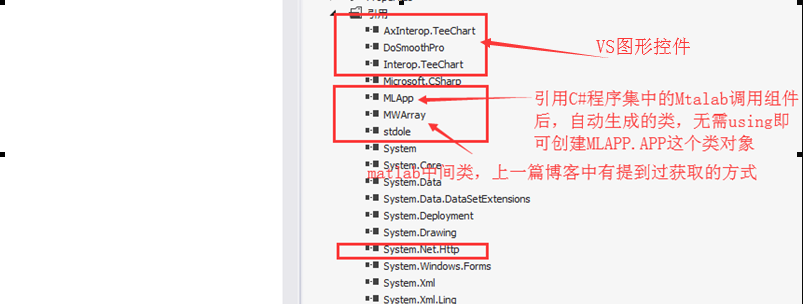
一些需要注意的地方:

本文来自互联网用户投稿,文章观点仅代表作者本人,不代表本站立场,不承担相关法律责任。如若转载,请注明出处。 如若内容造成侵权/违法违规/事实不符,请点击【内容举报】进行投诉反馈!