iOS开发系列之常用自定义控件开发集—进度条Loading控件开发
在很多项目中,经常要进行网络请求操作而为了更好的用户体验和美观,我们需要定制开发网络加载控件,下面是自定义网络加载控件实现方式:
头文件UIView+WHC_Loading.h实现:
//
// UIView+WHC_Loading.h
// UIView+WHC_Loading
//
// Created by 吴海超 on 15/3/25.
// Copyright (c) 2015年 吴海超. All rights reserved.
//#import 源文件UIView+WHC_Loading.m实现方式:
//
//  UIView+WHC_Loading.m
//  UIView+WHC_Loading
//
//  Created by 吴海超 on 15/3/25.
//  Copyright (c) 2015年 吴海超. All rights reserved.
//#import "UIView+WHC_Loading.h"
#define KWHC_LOADING_VIEW_SIZE (50.0)                 //显示不带提示文字view的尺寸
#define KWHC_FONT_SIZE (15.0)                         //默认字体大小
#define KWHC_LOADING_VIEW_SIZE_TXT (100.0)            //显示带提示文字view的尺寸
#define KWHC_LOADING_LABLE_HEIGHT (15.0)              //文字提示高度
#define KWHC_LOADING_VIEW_CORNER (10.0)               //圆角
#define KWHC_LOADING_VIEW_ALPHA (0.8)                 //透明度
#define KWHC_LOADING_VIEW_TAG (10000000)              //tag值
#define KWHC_LOADING_TXT (@"请稍等")                   //默认提示信息
@implementation UIView (WHC_Loading)//创建主view
- (UIView *)createLoadingViewWithIsTxt:(BOOL)isTxt customTitle:(NSString *)customTitle{CGSize  screenSize = [UIScreen mainScreen].bounds.size;CGFloat backViewSize = KWHC_LOADING_VIEW_SIZE;if(isTxt){if(customTitle == nil){customTitle = KWHC_LOADING_TXT;}if(customTitle.length == 0){customTitle = KWHC_LOADING_TXT;}backViewSize = KWHC_LOADING_VIEW_SIZE_TXT;}UIView * backView = [[UIView alloc]initWithFrame:CGRectMake((screenSize.width - backViewSize) / 2.0, screenSize.height / 2.0, backViewSize, backViewSize)];backView.layer.cornerRadius = KWHC_LOADING_VIEW_CORNER;backView.backgroundColor = [UIColor blackColor];backView.alpha = KWHC_LOADING_VIEW_ALPHA;backView.clipsToBounds = YES;backView.tag = KWHC_LOADING_VIEW_TAG;UIActivityIndicatorView  * indicatorView = [[UIActivityIndicatorView alloc]initWithActivityIndicatorStyle:UIActivityIndicatorViewStyleWhiteLarge];if(isTxt){indicatorView.center = CGPointMake(CGRectGetWidth(backView.frame) / 2.0, (CGRectGetHeight(backView.frame) - KWHC_LOADING_LABLE_HEIGHT)/ 2.0);}else{indicatorView.center = CGPointMake(CGRectGetWidth(backView.frame) / 2.0, CGRectGetHeight(backView.frame) / 2.0);}[indicatorView startAnimating];[backView addSubview:indicatorView];if(isTxt){//判断是否有提示信息UILabel * labTxt = [[UILabel alloc]initWithFrame:CGRectMake(0.0, CGRectGetHeight(indicatorView.frame) + indicatorView.frame.origin.y+ 5.0, CGRectGetWidth(backView.frame), KWHC_LOADING_LABLE_HEIGHT)];labTxt.backgroundColor = [UIColor clearColor];labTxt.minimumScaleFactor = 0.2;           //设置字体缩放英子0.2labTxt.adjustsFontSizeToFitWidth = YES;    //设置能够调整字体大小自适应labTxt.text = customTitle;labTxt.textAlignment = NSTextAlignmentCenter;labTxt.textColor = [UIColor whiteColor];[backView addSubview:labTxt];}return backView;
}/*显示网络加载控件isUser:显示菊花控件时用户是否可以触摸交互isTxt:是否要显示文字提示标签customTitle:要显示的提示文字*/- (void)baseStartLoadingWithUser:(BOOL)isUser withIsTxt:(BOOL)isTxt customTitle:(NSString*)customTitle{UIView * loadingView = [self viewWithTag:KWHC_LOADING_VIEW_TAG];if(loadingView == nil){self.alpha = 0.5;self.userInteractionEnabled = isUser;  //用户是否可以交互[self addSubview:[self createLoadingViewWithIsTxt:isTxt customTitle:customTitle]];}
}/*隐藏网络加载控件isUser:显示菊花控件时用户是否可以触摸交互*/- (void)baseStopLoadingWithUser:(BOOL)isUser{UIView * clearView = [self viewWithTag:KWHC_LOADING_VIEW_TAG];if(clearView != nil){self.alpha = 1.0;self.userInteractionEnabled = isUser;[clearView removeFromSuperview];clearView = nil;}
}/*显示网络加载控件note:该方式用户不能交互,不显示提示文字信息*/- (void)startLoading{[self baseStartLoadingWithUser:NO withIsTxt:NO customTitle:nil];
}/*隐藏网络加载控件*/- (void)stopLoading{[self baseStopLoadingWithUser:YES];
}/*显示网络加载控件用户不可以触摸交互customTitle:要显示的提示文字*/- (void)startLoadingWithTxt:(NSString*)customTitle{[self baseStartLoadingWithUser:NO withIsTxt:YES customTitle:customTitle];
}/*隐藏网络加载控件*/- (void)stopLoadingWithTxt{[self stopLoading];
}/*显示网络加载控件用户可以触摸交互customTitle:要显示的提示文字*/
- (void)startLoadingWithTxtUser:(NSString*)customTitle{[self baseStartLoadingWithUser:YES withIsTxt:YES customTitle:customTitle];
}/*隐藏网络加载控件*/
- (void)stopLoadingWithTxtUser{[self stopLoading];
}/*显示网络加载控件用户可以触摸交互无显示的提示文字*/
- (void)startLoadingWithUser{[self baseStartLoadingWithUser:YES withIsTxt:NO customTitle:nil];
}/*隐藏网络加载控件*/
- (void)stopLoadingWithUser{[self stopLoading];
}
@end
运行效果:
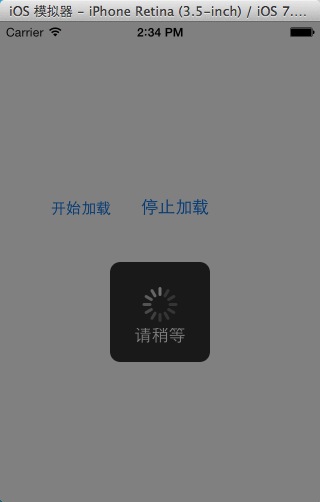
本文来自互联网用户投稿,文章观点仅代表作者本人,不代表本站立场,不承担相关法律责任。如若转载,请注明出处。 如若内容造成侵权/违法违规/事实不符,请点击【内容举报】进行投诉反馈!