Qt / QWidget、QFrame 区别
QFrame 是基本控件的基类,QWidget 是 QFrame 基类,关系如下:
QWidget <- QFrame <- QPushButton,QLabel…
我们经常会从 QFrame 或者 QWidget 继承然后自定义一个复杂的 widget,在设置样式表的时候它们就有一个大的区别。
dialog.h
#ifndef DIALOG_H
#define DIALOG_H#include
#include
#include
#include
#include namespace Ui {
class Dialog;
}class MyWidget : public QWidget {Q_OBJECT
public:MyWidget(QWidget *parent = 0) : QWidget(parent) {this->setStyleSheet("QWidget{background:#ff0000;} QWidget:hover{background:#00ff00;}");}//protected:
//    virtual void paintEvent(QPaintEvent *event) override
//    {
//        Q_UNUSED(event);
//        QStyleOption opt;
//        opt.init(this);
//        QPainter p(this);
//        style()->drawPrimitive(QStyle::PE_Widget, &opt, &p, this);
//    }
};class MyFrame : public QFrame {Q_OBJECT
public:MyFrame(QWidget *parent = 0) : QFrame(parent) {this->setStyleSheet("QWidget{background:#ff0000;} QWidget:hover{background:#00ff00;}");}
};class Dialog : public QDialog
{Q_OBJECTpublic:explicit Dialog(QWidget *parent = 0);~Dialog();private:Ui::Dialog *ui;
};#endif // DIALOG_H
dialog.cpp
#include "dialog.h"
#include "ui_dialog.h"Dialog::Dialog(QWidget *parent) :QDialog(parent),ui(new Ui::Dialog)
{ui->setupUi(this);setFixedSize(QSize(400,300));MyWidget *widget = new MyWidget(this);MyFrame *frame = new MyFrame(this);widget->setFixedSize(50, 50);frame->setFixedSize(50, 50);widget->move(0, 0);frame->move(0, 50);
}Dialog::~Dialog()
{delete ui;
}
如下图,发现从 QWidget 继承过来的 MyWidget 并没有显示出样式来。
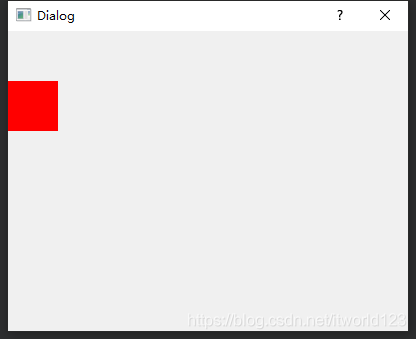
具体原因还不是很清楚,不过下面一段话可能对我们有些帮助:
QWidget Supports only the background, background-clip and background-origin properties.
If you subclass from QWidget, you need to provide a paintEvent for your custom QWidget as below:
void CustomWidget::paintEvent(QPaintEvent *)
{QStyleOption opt;opt.init(this);QPainter p(this);style()->drawPrimitive(QStyle::PE_Widget, &opt, &p, this);
}
The above code is a no-operation if there is no stylesheet set.
Warning: Make sure you define the Q_OBJECT macro for your custom widget。
转载于:QFrame与QWidget的区别_Keep It Simple, Stupid-CSDN博客
(SAW:Game Over!)
本文来自互联网用户投稿,文章观点仅代表作者本人,不代表本站立场,不承担相关法律责任。如若转载,请注明出处。 如若内容造成侵权/违法违规/事实不符,请点击【内容举报】进行投诉反馈!