java 随机数生成实现_java实现随机数生成器
本文实例为大家分享了java实现随机数生成器的具体代码,供大家参考,具体内容如下
自己编的随机数生成器,比较简陋,功能也单一,当作练手。
Application.java
package src;
public class Application {
public static void main(String[] args) {
WindowBoxLayout win=new WindowBoxLayout();
win.setBounds(100,200,300,350);
win.setTitle("随机数生成器");
win.setVisible(true);
}
}
RandomListener.java
package src;
import java.awt.event.ActionEvent;
import java.awt.event.ActionListener;
import java.util.Random;
import javax.swing.*;
public class RandomListener implements ActionListener{
JTextField text1;
JTextArea text2;
Random random=new Random();
int result=0;
public void setJTextField(JTextField t){
text1=t;
}
public void setJTextArea(JTextArea t){
text2=t;
}
@Override
public void actionPerformed(ActionEvent e) {
try{
text2.setText("");
Integer number=Integer.parseInt(text1.getText());
result=random.nextInt(number)+1;
text2.append(result+"");
}
catch(Exception exp){
text2.append("请输入数字字符");
}
}
}
Windowboxlayout.java
package src;
import javax.swing.*;
public class WindowBoxLayout extends JFrame{
/**
*
*/
private static final long serialVersionUID = 1L;
Box baseBox;
JTextField text1;
JTextArea text2;
JButton button;
RandomListener random;
public WindowBoxLayout(){
setLayout(new java.awt.FlowLayout());
init();
setVisible(true);
setDefaultCloseOperation(JFrame.EXIT_ON_CLOSE);
}
void init(){
baseBox=Box.createVerticalBox();
baseBox.add(new JLabel("请输入随机数的最大范围值:"));
baseBox.add(Box.createVerticalStrut(8));
text1=new JTextField(5);
baseBox.add(text1);
baseBox.add(Box.createVerticalStrut(8));
button=new JButton("确定");
baseBox.add(Box.createVerticalStrut(8));
baseBox.add(button);
text2=new JTextArea(6,12);
baseBox.add(Box.createVerticalStrut(18));
baseBox.add(text2);
add(baseBox);
random=new RandomListener();
random.setJTextField(text1);
random.setJTextArea(text2);
button.addActionListener(random);
}
}
类结构图:
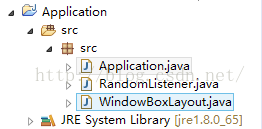
效果图:
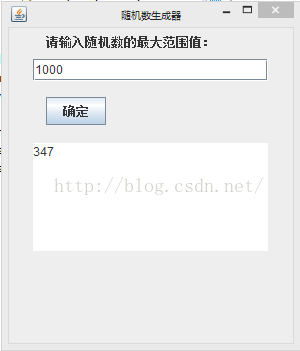
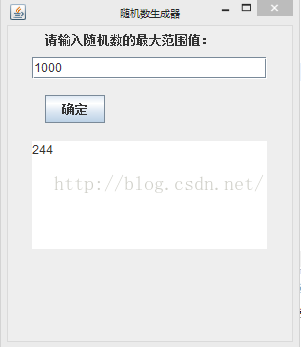
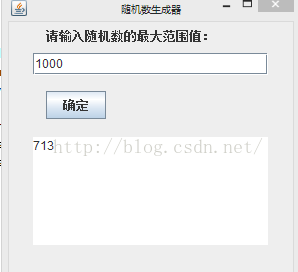
本文来自互联网用户投稿,文章观点仅代表作者本人,不代表本站立场,不承担相关法律责任。如若转载,请注明出处。 如若内容造成侵权/违法违规/事实不符,请点击【内容举报】进行投诉反馈!