Java Socket实现NIO通信
文章目录
- 一.简单介绍
- 通道(Channel)
- 多路复用器(Selector)
- 二.代码实现.
- 客户端
- 服务端
- 运行结果
一.简单介绍
NIO 很多人也称之为 Non-block I/O,即非阻塞 I/O,因为这样叫,更能体现它的特点。
为什么这么说呢?传统的 I/O 存在阻塞问题。因为对 Socket 的输入流进行读取时,读取流会一直阻塞,直到发生以下三种情况的任意一种才会解除阻塞:
- 有数据可读;
- 连接释放;
- 空指针或 I/O 异常。
阻塞问题,就是传统 I/O 最大的弊端。
NIO 发布后,通道和多路复用器这两个基本组件实现了 NIO 的非阻塞,下面我们就一起来了解下这两个组件的优化原理。
通道(Channel)
传统 I/O 的数据读取和写入是从用户空间到内核空间来回复制,而内核空间的数据是通过操作系统层面的 I/O 接口从磁盘读取或写入。
最开始,在应用程序调用操作系统 I/O 接口时,是由 CPU 完成分配,这种方式最大的问题是“发生大量 I/O 请求时,非常消耗 CPU“;之后,操作系统引入了 DMA(直接存储器存储),内核空间与磁盘之间的存取完全由 DMA 负责,但这种方式依然需要向 CPU 申请权限,且需要借助 DMA 总线来完成数据的复制操作,如果 DMA 总线过多,就会造成总线冲突。
通道的出现解决了以上问题,Channel 有自己的处理器,就是在DMA的基础上增加了能执行有限通道指令的I/O控制器,代替CPU管理控制外设.它有自己的指令系统,是一个协处理器,他实质能够执行有限的输入输出指令,并且由专门通讯传输的通道总线完成控制.
所以,Channel可以完成内核空间和磁盘之间的 I/O 操作。在 NIO 中,我们读取和写入数据都要通过 Channel,由于 Channel 是双向的,所以读、写可以同时进行。
多路复用器(Selector)
Selector 是 Java NIO 编程的基础。用于检查一个或多个 NIO Channel 的状态是否处于可读、可写。
Selector 是基于事件驱动实现的,我们可以在 Selector 中注册 accpet、read 监听事件,Selector 会不断轮询注册在其上的 Channel,如果某个 Channel 上面发生监听事件,这个 Channel 就处于就绪状态,然后进行 I/O 操作。
一个线程使用一个 Selector,通过轮询的方式,可以监听多个 Channel 上的事件。我们可以在注册 Channel 时设置该通道为非阻塞,当 Channel 上没有 I/O 操作时,该线程就不会一直等待了,而是会不断轮询所有 Channel,从而避免发生阻塞。
目前操作系统的 I/O 多路复用机制都使用了 epoll,相比传统的 select 机制,epoll 没有最大连接句柄 1024 的限制。所以 Selector 在理论上可以轮询成千上万的客户端。
二.代码实现.
总共涉及四个类,以下代码可以直接拿去用
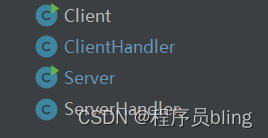
消息得大概处理流程是这样得:
- 创建Channel,监听连接
- 创建多路复用器Selector,将Channel注册到Selector中
- Selector去轮询所有注册在其上的channel,当发现一个或多个就绪时,返回就绪的监听事件
- 程序匹配到监听事件,进行处理
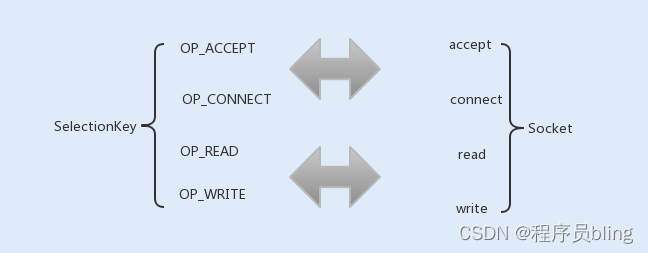
这里扩充一下细节,在将Channel注册到Selector中时,需要指定监听事件,这个监听事件正好对应Socket通信中的 conect、accept、read 、write 几个阻塞操作.
客户端
Client 类.
import java.util.Scanner;public class Client {private static String DEFAULT_HOST = "127.0.0.1"; private static int DEFAULT_PORT = 8081; private static ClientHandler clientHandler; public static void start(){ start(DEFAULT_HOST,DEFAULT_PORT); } public static synchronized void start(String ip,int port){ clientHandler = new ClientHandler(ip,port); new Thread(clientHandler,"Server").start(); } //向服务器发送消息 public static boolean sendMsg(String msg) throws Exception{ clientHandler.sendMsg(msg); return true; } @SuppressWarnings("resource")public static void main(String[] args) {// 运行客户端Client.start();try {while (Client.sendMsg(new Scanner(System.in).nextLine()));} catch (Exception e) {// TODO Auto-generated catch blocke.printStackTrace();}}}ClientHandler类.
public class ClientHandler implements Runnable {private SocketChannel socketChannel;private int port;private Selector selector;private String host;private boolean stop;public ClientHandler(String host, int port) {this.host = host;this.port = port;try {selector = Selector.open();socketChannel = SocketChannel.open();socketChannel.configureBlocking(false);} catch (IOException e) {e.printStackTrace();System.exit(1);}}public void run() {try {doConnect();// 连接} catch (IOException e) {e.printStackTrace();}while (!stop) {try {selector.select(1000);Set<SelectionKey> selectionKeys = selector.selectedKeys();Iterator<SelectionKey> it = selectionKeys.iterator();SelectionKey key = null;while (it.hasNext()) {key = it.next();it.remove();handleInput(key);}} catch (IOException e) {e.printStackTrace();}}if (selector != null) {try {selector.close();} catch (IOException e) {e.printStackTrace();}}}private void handleInput(SelectionKey key) throws IOException {//这个通道已经可以读取了if (key.isValid()) {SocketChannel sc = (SocketChannel) key.channel();if (key.isConnectable()) {if (sc.finishConnect()) {} else {System.exit(1);}}if (key.isReadable()) {// 读取消息ByteBuffer readBuffer = ByteBuffer.allocate(1024);int read = sc.read(readBuffer);if (read > 0) {readBuffer.flip();byte[] bytes = new byte[readBuffer.remaining()];readBuffer.get(bytes);String body = new String(bytes, "utf-8");System.out.println("现在时间为:" + body);this.stop = true;} else if (read < 0) {key.cancel();sc.close();} else {}}}}private void doConnect() throws IOException {if (socketChannel.connect(new InetSocketAddress(host, port))) {socketChannel.register(selector, SelectionKey.OP_READ);} else {socketChannel.register(selector, SelectionKey.OP_CONNECT);}}private void doWrite(SocketChannel socketChannel,String request)throws IOException {byte[] bytes = request.getBytes();ByteBuffer writeBuff = ByteBuffer.allocate(bytes.length);writeBuff.put(bytes);writeBuff.flip();socketChannel.write(writeBuff);if (!writeBuff.hasRemaining()) {System.out.println("客户端发送命令成功");}}public void sendMsg(String msg) throws Exception{ doWrite(socketChannel, msg); } }
服务端
Server类.
public class Server {private static int DEFAULT_PORT = 8081;private static ServerHandler serverHandler;public static void start() {start(DEFAULT_PORT);}public static synchronized void start(int port) {if (serverHandler != null) {serverHandler.stop();}serverHandler = new ServerHandler(port);new Thread(serverHandler, "Server").start();}/*** 1.创建channel,监听连接* 2.创建多路复用器Selector,将Channel注册到Selector中* 3.Selector去轮询所有注册在其上的channel,当发现一个或多个就绪时,返回就绪的监听事件* 4.程序匹配到监听事件,进行处理* @param args*/public static void main(String[] args) {// 运行服务器Server.start();}}ServerHandler类.
public class ServerHandler implements Runnable {private Selector selector = null;private ServerSocketChannel serverChannel = null;private boolean stop;/*** 初始化多路复用器,绑定监听端口** @param port*/public ServerHandler(int port) {try {selector = Selector.open();serverChannel = ServerSocketChannel.open();serverChannel.configureBlocking(false);serverChannel.socket().bind(new InetSocketAddress(port), 1024);serverChannel.register(selector, SelectionKey.OP_ACCEPT);System.out.println("服务器监听" + port);} catch (IOException e) {e.printStackTrace();System.exit(1);}}public void stop() {this.stop = true;}public void run() {while (!stop) {try {selector.select(1000);Set<SelectionKey> selectionKeys = selector.selectedKeys();Iterator<SelectionKey> it = selectionKeys.iterator();SelectionKey key = null;while (it.hasNext()) {key = it.next();it.remove();try {handleInput(key);} catch (IOException e) {if (key != null) {key.cancel();if (key.channel() != null)key.channel().close();}}}} catch (IOException e) {e.printStackTrace();}}if (selector != null) {try {selector.close();} catch (IOException e) {e.printStackTrace();}}}/*** 处理事件* @param key* @throws IOException*/private void handleInput(SelectionKey key) throws IOException {if (key.isValid()) {if (key.isAcceptable()) {ServerSocketChannel ssc = (ServerSocketChannel) key.channel();SocketChannel sc = ssc.accept();sc.configureBlocking(false);sc.register(selector, SelectionKey.OP_READ);}if (key.isReadable()) {SocketChannel sc = (SocketChannel) key.channel();ByteBuffer readBuff = ByteBuffer.allocate(1024);//非阻塞的int read = sc.read(readBuff);if (read > 0) {readBuff.flip();byte[] bytes = new byte[readBuff.remaining()];readBuff.get(bytes);String body = new String(bytes, "utf-8");System.out.println("服务收到消息:" + body);String currentTime = new Date(System.currentTimeMillis()).toString();doWrite(sc, currentTime);} else if (read < 0) {key.cancel();sc.close();} else {}}}}/*** 异步发送应答消息 * @param sc* @param content* @throws IOException*/private void doWrite(SocketChannel sc, String content) throws IOException {if (content != null && content.trim().length() > 0) {byte[] bytes = content.getBytes();ByteBuffer byteBuffer = ByteBuffer.allocate(bytes.length);byteBuffer.put(bytes);byteBuffer.flip();sc.write(byteBuffer);}}
}
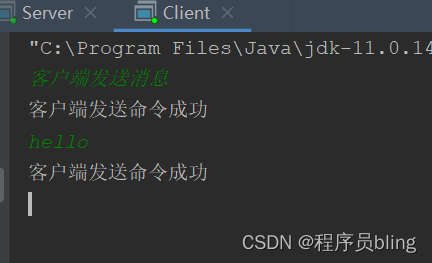
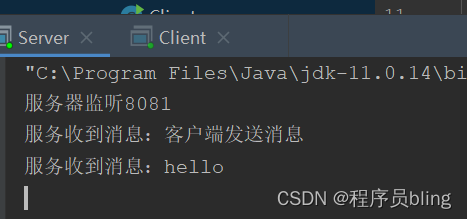
运行结果
今天的分享就到这里了,有问题可以在评论区留言,均会及时回复呀.
我是bling,未来不会太差,只要我们不要太懒就行, 咱们下期见.

本文来自互联网用户投稿,文章观点仅代表作者本人,不代表本站立场,不承担相关法律责任。如若转载,请注明出处。 如若内容造成侵权/违法违规/事实不符,请点击【内容举报】进行投诉反馈!