varnish详解
一、关于Varnish
Varnish 是一款高性能且开源的反向代理服务器和 HTTP 加速器,其采用全新的软件体系机构,和现在的硬件体系紧密配合,与传统的 squid 相比,varnish 具有性能更高、速度更快、管理更加方便等诸多优点,很多大型的网站都开始尝试使用 varnish 来替换 squid,这些都促进 varnish 迅速发展起来。挪威的最大的在线报纸 Verdens Gang(vg.no) 使用 3 台 Varnish 代替了原来的 12 台 Squid,性能比以前更好,这是 Varnish 最成功的应用案例。
1、varnish系统架构
varnish主要运行两个进程:Management进程和Child进程(也叫Cache进程)。

Management进程主要实现:
应用新的配置、编译VCL、监控varnish、初始化varnish以及提供一个命令行接口等。Management进程会每隔几秒钟探测一下Child进程以判断其是否正常运行,如果在指定的时长内未得到Child进程的回应,Management将会重启此Child进程。
Child进程包含多种类型的线程,常见的如:
Command line:命令行接口;
Storage hashing:管理存储及缓存中的键
log stats:记录日志及统计数据
Backend communication:与后端服务器通信使用
Acceptor线程:接收新的连接请求并响应;
Worker线程:child进程会为每个会话启动一个worker线程,因此,在高并发的场景中可能会出现数百个worker线程甚至更多;
Object Expiry线程:管理缓存项过期时间,一旦过期,从缓存中清理过期内容;Varnish依赖“工作区(workspace)”以降低线程在申请或修改内存时出现竞争的可能性。在varnish内部有多种不同的工作区,其中最关键的当属用于管理会话数据的session工作区。
2、varnish日志
为了与系统的其它部分进行交互,Child进程使用了可以通过文件系统接口进行访问的共享内存日志(shared memory log),因此,如果某线程需要记录信息,其仅需要持有一个锁,而后向共享内存中的某内存区域写入数据,再释放持有的锁即可。而为了减少竞争,每个worker线程都使用了日志数据缓存。
共享内存日志大小一般为90M,其分为两部分,前一部分为计数器,后半部分为客户端请求的数据。varnish提供了多个不同的工具如varnishlog、varnishncsa或varnishstat等来分析共享内存日志中的信息并能够以指定的方式进行显示。
3、VCL
Varnish Configuration Language (VCL)是varnish配置缓存策略的工具,它是一种基于“域”(domain specific)的简单编程语言,它支持有限的算术运算和逻辑运算操作、允许使用正则表达式进行字符串匹配、允许用户使用set自定义变量、支持if判断语句,也有内置的函数和变量等。使用VCL编写的缓存策略通常保存至.vcl文件中,其需要编译成二进制的格式后才能由varnish调用。事实上,整个缓存策略就是由几个特定的子例程如vcl_recv、vcl_fetch等组成,它们分别在不同的位置(或时间)执行,如果没有事先为某个位置自定义子例程,varnish将会执行默认的定义。
VCL策略在启用前,会由management进程将其转换为C代码,而后再由gcc编译器将C代码编译成(share object)二进制程序。编译完成后,management负责将其连接至varnish实例,即child进程。正是由于编译工作在child进程之外完成,它避免了装载错误格式VCL的风险。因此,varnish修改配置的开销非常小,其可以同时保有几份尚在引用的旧版本配置,也能够让新的配置即刻生效。编译后的旧版本配置通常在varnish重启时才会被丢弃,如果需要手动清理,则可以使用varnishadm的vcl.discard命令完成。
4、varnish的后端存储
varnish支持多种不同类型的后端存储,这可以在varnishd启动时使用-s选项指定。后端存储的类型包括:
(1)file:使用特定的文件存储全部的缓存数据,并通过操作系统的mmap()系统调用将整个缓存文件映射至内存区域(如果条件允许);
(2)malloc:使用malloc()库调用在varnish启动时向操作系统申请指定大小的内存空间以存储缓存对象;
(3)persistent(experimental):与file的功能相同,但可以持久存储数据(即重启varnish数据时不会被清除);仍处于测试期;
varnish无法追踪某缓存对象是否存入了缓存文件,从而也就无从得知磁盘上的缓存文件是否可用,因此,file存储方法在varnish停止或重启时会清除数据。而persistent方法的出现对此有了一个弥补,但persistent仍处于测试阶段,例如目前尚无法有效处理要缓存对象总体大小超出缓存空间的情况,所以,其仅适用于有着巨大缓存空间的场景。
选择使用合适的存储方式有助于提升系统性,从经验的角度来看,建议在内存空间足以存储所有的缓存对象时使用malloc的方法,反之,file存储将有着更好的性能的表现。然而,需要注意的是,varnishd实际上使用的空间比使用-s选项指定的缓存空间更大,一般说来,其需要为每个缓存对象多使用差不多1K左右的存储空间,这意味着,对于100万个缓存对象的场景来说,其使用的缓存空间将超出指定大小1G左右。另外,为了保存数据结构等,varnish自身也会占去不小的内存空间。
为varnishd指定使用的缓存类型时,-s选项可接受的参数格式如下:
malloc[,size] 或
file[,path[,size[,granularity]]] 或
persistent,path,size {experimental}
file中的granularity用于设定缓存空间分配单位,默认单位是字节,所有其它的大小都会被圆整。
实验环境:
node3 varnish服务器: ens192 192.168.170.10
ens224 192.168.170.254
node2 backend server: 192.168.10.11
node1 backend server1:192.168.10.12
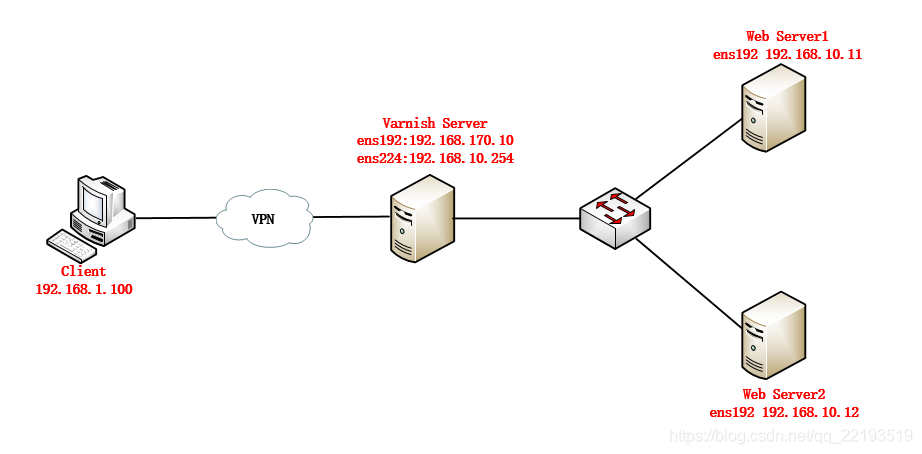
基础实验配置:
varnish server:192.168.170.10 安装varnish服务并启动服务,编辑配置文件
[root@node3 ~]# yum info varnish
[root@node3 ~]# yum -y install varnish
[root@node3 ~]# rpm -ql varnish
[root@node3 ~]# vi /etc/varnish.params
VARNISH_LISTEN_PORT=80
VARNISH_STORAGE="file,/data/varnish/cache,1g"
[root@node3 ~]# cd /etc/varnish/
[root@node3 ~]# mkdir /data/varnish/cache
[root@node3 ~]# chown -R varnish.varnish /data/varnish/cache
[root@node3 ~]# systemctl restart varnish
[root@node3 ~]# vi /etc/varnish/default.vcl
backend default {.host = "192.168.10.11";.port ="80";
}
重启varnish服务
[root@node3 ~]# varnish_reload_vclBackend Server:192.168.10.11
安装http服务启动服务,查看端口状态
[root@node2 ~]# yum -y install httpd
[root@node2 ~]# vi /var/www/html/index.html
Backend Server
[root@node2 ~]# systemctl start httpd
[root@node2 ~]# ss -tunlp
Netid  State      Recv-Q Send-Q Local Address:Port               Peer Address:Port
tcp    LISTEN     0      128              :::80                           :::*                   users:(("httpd",pid=4192,fd=4),("httpd",pid=4171,fd=4),("httpd",pid=4170,fd=4),("httpd",pid=4169,fd=4),("httpd",pid=4168,fd=4),("httpd",pid=4167,fd=4),("httpd",pid=4166,fd=4))varnishadm命令行工具连接到varnish
[root@node3 ~]# varnishadm -T 127.0.0.1:6082 -S /etc/varnish/secret 200
-----------------------------
Varnish Cache CLI 1.0
-----------------------------
Linux,3.10.0-862.el7.x86_64,x86_64,-sfile,-smalloc,-hcritbit
varnish-4.0.5 revision 07eff4c29Type 'help' for command list.
Type 'quit' to close CLI session.varnish>
varnish> help #通过help获取命名使用
200
help []
ping []
auth
quit
banner
status
start
stop
vcl.load
vcl.inline
vcl.use
vcl.discard
vcl.list
param.show [-l] []
param.set
panic.show
panic.clear
storage.list
vcl.show [-v]
backend.list []
backend.set_health
ban    [&&   ]...
ban.list客户端测试访问正常
[root@node1 ~]# curl http://192.168.170.10
Backend Server
示例1:
编辑varnish配置文件
[root@node3 ~]# vi default.vcl
sub vcl_deliver {if (obj.hits > 0) {set resp.http.X-Cache = "HIT via " + server.ip;}else {set resp.http.X-Cache = "MISS via " + server.ip;}return (deliver);
}
"/etc/varnish/default.vcl" 47L, 1371C written
[root@node3 ~]#
[root@node3 ~]#
通过varnishadm连接到varnish 重新加载配置文件
[root@node3 ~]# varnishadm -T 127.0.0.1:6082 -S /etc/varnish/secret
200
-----------------------------
Varnish Cache CLI 1.0
-----------------------------
Linux,3.10.0-862.el7.x86_64,x86_64,-sfile,-smalloc,-hcritbit
varnish-4.0.5 revision 07eff4c29Type 'help' for command list.
Type 'quit' to close CLI session.varnish> vcl.list
200
active          0 bootvarnish> vcl.load test1 default.vcl
200
VCL compiled.varnish> vcl.list
200
active          0 boot
available       0 test1varnish> vcl.use test1
200
VCL 'test1' now activevarnish>
浏览器输入http://192.168.170.10
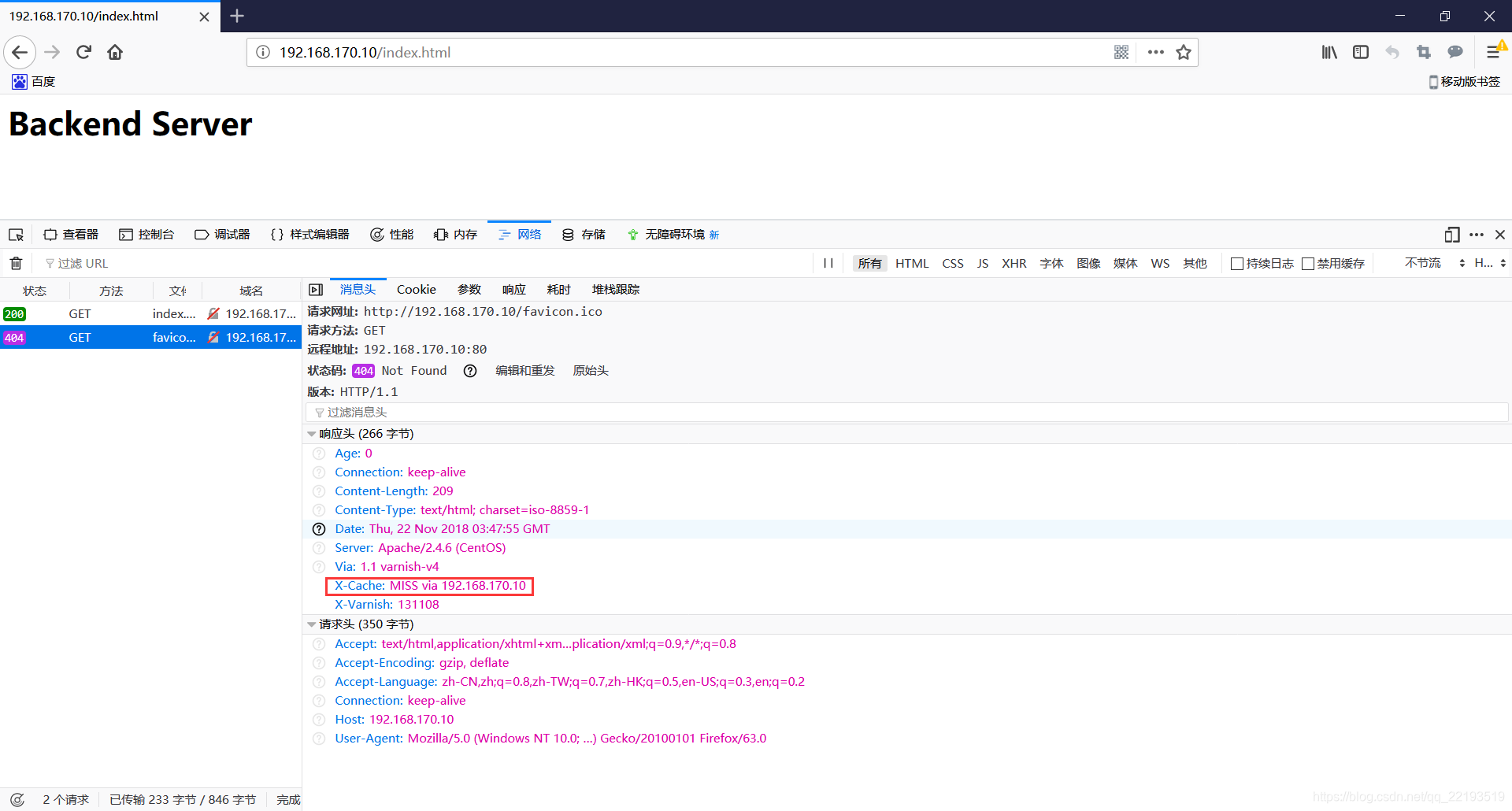
客户端第一次请求未命中缓存。
 客户端第二次请求命中缓存。
示例2:
[root@node2 ~]# mkdir -pv /var/www/html/{admin,login}
[root@node2 ~]# vi /var/www/html/admin
Admin
[root@node2 ~]# vi /var/www/html/login
login
[root@node3 ~]# vi /etc/varnish/default.vcl
vcl_recv {if (req.url ~ "(?i)^/(login|admin)") {return(pass);}
}[root@node3 ~]# varnishadm -S /etc/varnish/secret -T 127.0.0.1:6082
200
-----------------------------
Varnish Cache CLI 1.0
-----------------------------
Linux,3.10.0-862.el7.x86_64,x86_64,-sfile,-smalloc,-hcritbit
varnish-4.0.5 revision 07eff4c29Type 'help' for command list.
Type 'quit' to close CLI session.varnish> vcl.load test2 default.vcl
200
VCL compiled.varnish> vcl.use test2
200
VCL 'test2' now activevarnish> vcl.list
200
available       0 boot
available       0 test1
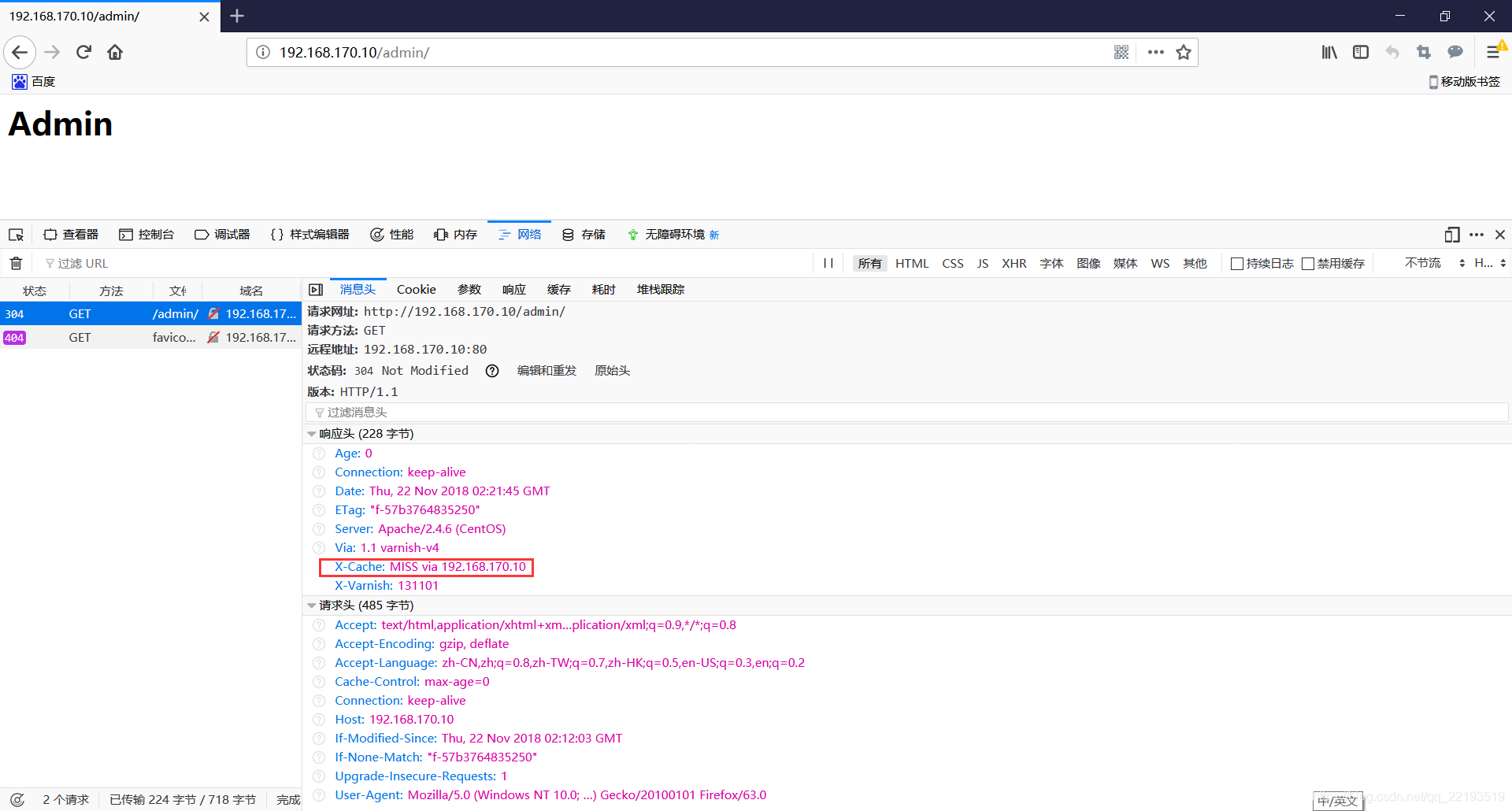
active          0 test2浏览器测试:192.168.170.10[root@node1 ~]# curl http://192.168.170.10/admin/
Admin
浏览器输入http://192.168.170.10/admin测试,访问的数据都是从backend server响应的,而不是从缓存服务得到的。
示例3
[root@node3 ~]# vi /etc/varnish/default.vcl
vcl_recv {if (req.http.User-Agent ~ "(?i)curl") {return(synth(405));}if (req.url ~ "(?i)^/(login|admin)") {return(pass);}
}[root@node3 ~]# varnishadm -T 127.0.0.1:6082 -S /etc/varnish/secret
200
-----------------------------
Varnish Cache CLI 1.0
-----------------------------
Linux,3.10.0-862.el7.x86_64,x86_64,-sfile,-smalloc,-hcritbit
varnish-4.0.5 revision 07eff4c29Type 'help' for command list.
Type 'quit' to close CLI session.
varnish>
varnish> vcl.load test3 default.vcl
200
VCL compiled.varnish> vcl.use test3
200
VCL 'test3' now activevarnish> vcl.list
200
available 0 boot
available 0 test1
available 0 test2
available 0 reload_2018-11-22T02:16:42
active 0 test3curl命令请求无法访问
[root@node1 ~]# curl http://192.168.170.10/admin/
405 Method Not Allowed Error 405 Method Not Allowed
Method Not Allowed
Guru Meditation:
XID: 65581
Varnish cache server
[root@node1 ~]#
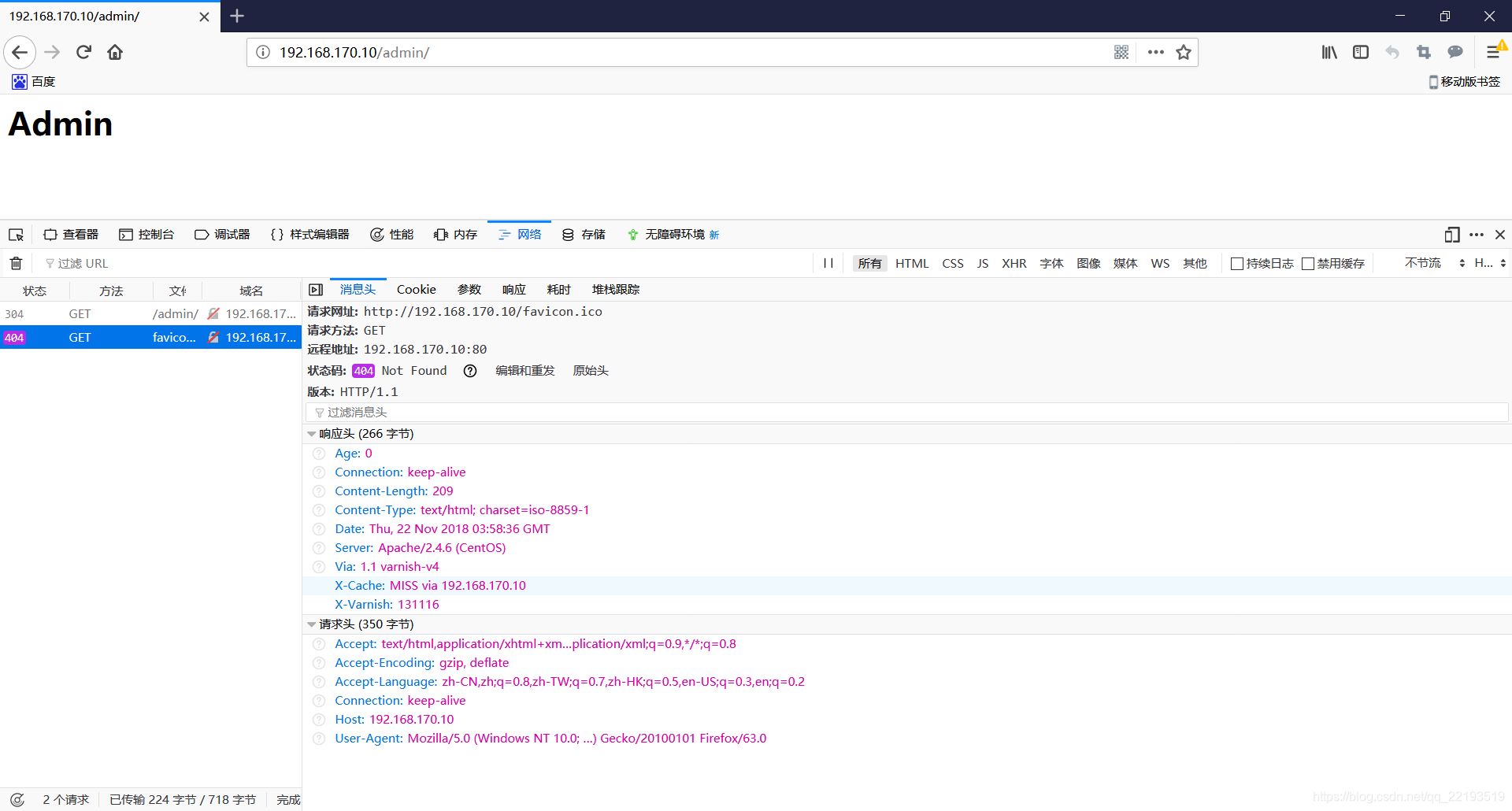
浏览器访问正常。
示例4:
[root@node3 ~]# vi /etc/varnish/default.vcl
vcl_backend_response {if (beresp.http.cache-control !~ "(?i)s-maxage") {if (bereq.url ~ "(?i)\.(jpg|jpeg|png|gif|css|js)") {unset beresp.http.Set-Cookie;set beresp.ttl = 3600s;}}
}
[root@node3 ~]# varnishadm -S /etc/varnish/secret -T 127.0.0.1:6082
200
-----------------------------
Varnish Cache CLI 1.0
-----------------------------
Linux,3.10.0-862.el7.x86_64,x86_64,-sfile,-smalloc,-hcritbit
varnish-4.0.5 revision 07eff4c29Type 'help' for command list.
Type 'quit' to close CLI session.varnish> vcl.load test4 default.vcl
200
VCL compiled.varnish> vcl.use test4
200
VCL 'test4' now activevarnish> vcl.list
200
available       0 boot
available       0 test1
available       0 test2
available       0 reload_2018-11-22T02:16:42
available       0 test3
active          0 test4backend server:192.168.10.11
在服务器上上传flower.jpg图片
[root@node2 html]# ls
admin  flower.jpg  index.html  index.php  login
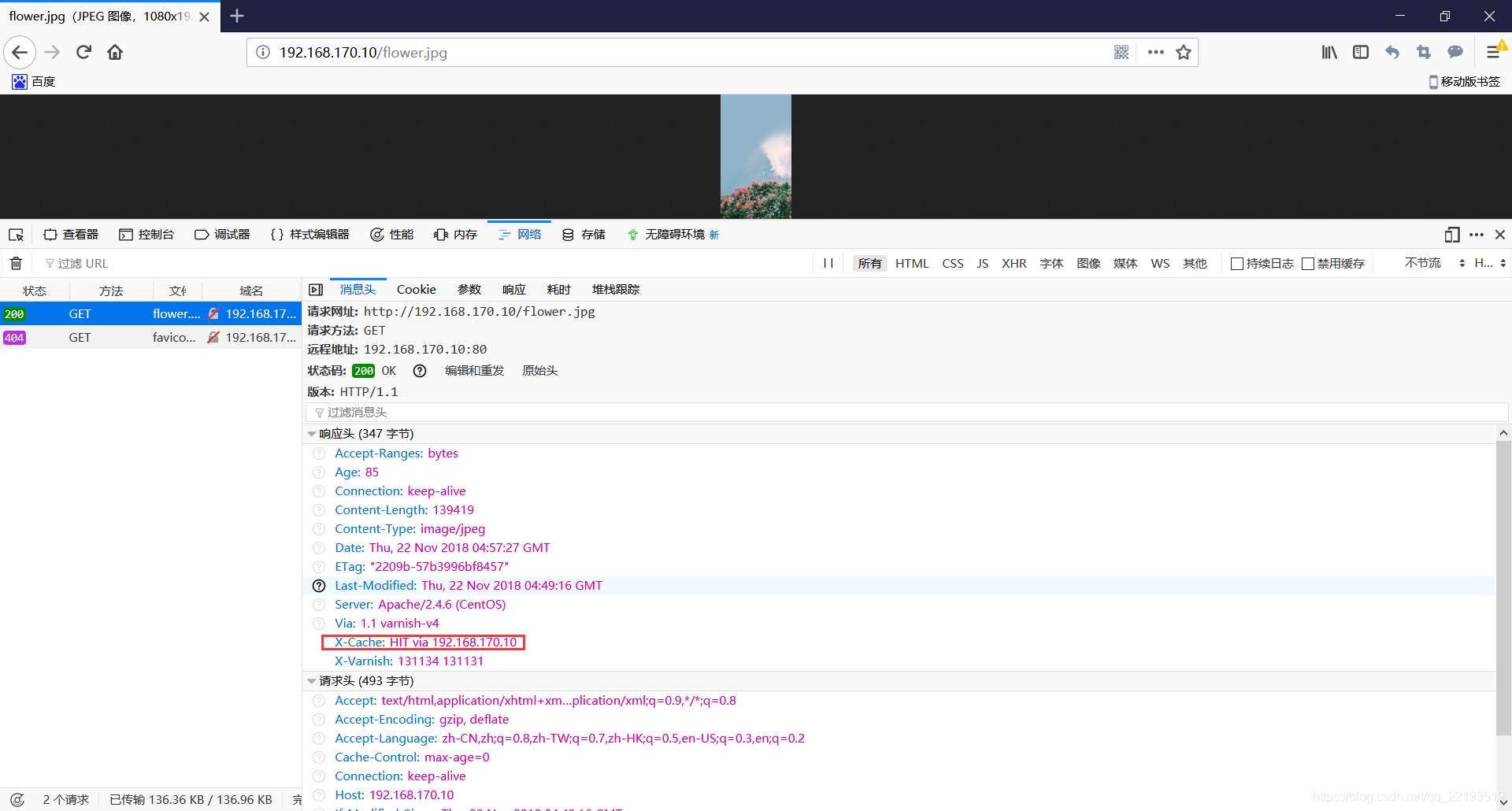
客户端输入http://172.16.0.6/flower.jpg 测试只要是jpg结尾的文件都会,命中缓存响应给客户端。
示例5:
示例5
[root@node3 ~]# vi /etc/varnish/default.vcl
sub vcl_recv {if (req.restarts == 0) {if (req.http.X-Fowarded-For) {set req.http.X-Forwarded-For = req.http.X-Forwarded-For + "," + client.ip;} else {set req.http.X-Forwarded-For = client.ip;}}
}
[root@node3 ~]# varnishadm -T 127.0.0.1:6082 -S /etc/varnish/secret
200
-----------------------------
Varnish Cache CLI 1.0
-----------------------------
Linux,3.10.0-862.el7.x86_64,x86_64,-sfile,-smalloc,-hcritbit
varnish-4.0.5 revision 07eff4c29Type 'help' for command list.
Type 'quit' to close CLI session.
varnish> vcl.load test5 default.vcl
200
VCL compiled.
varnish> vcl.use test5
200
VCL 'test5' now active
varnish> vcl.list
200
available       0 boot
available       0 test1
available       0 test2
available       0 reload_2018-11-22T02:16:42
available       0 test3
available       0 test4
available       0 test5backend server:192.168.10.11[root@node2 ~]# vi /etc/httpd/conf/httpd.conf
LogFormat "%{X-Forwarded-For}i
[root@node2 ~]# systemctl restart httpdbackend server收到的客户端请求的地址确实是客户端自己的ip地址
[root@node2 ~]# tail /var/log/httpd/access_log
192.168.10.254 - - [22/Nov/2018:13:20:38 +0800] "GET /favicon.ico HTTP/1.1" 404 209 "-" "Mozilla/5.0 (Windows NT 10.0; Win64; x64; rv:63.0) Gecko/20100101 Firefox/63.0"
192.168.10.254 - - [22/Nov/2018:13:21:08 +0800] "GET /admin/index.html HTTP/1.1" 304 - "-" "Mozilla/5.0 (Windows NT 10.0; Win64; x64; rv:63.0) Gecko/20100101 Firefox/63.0"
192.168.10.254 - - [22/Nov/2018:13:22:14 +0800] "GET /admin/index.html HTTP/1.1" 304 - "-" "Mozilla/5.0 (Windows NT 10.0; Win64; x64; rv:63.0) Gecko/20100101 Firefox/63.0"
192.168.10.254 - - [22/Nov/2018:13:22:46 +0800] "GET /favicon.ico HTTP/1.1" 404 209 "-" "Mozilla/5.0 (Windows NT 10.0; Win64; x64; rv:63.0) Gecko/20100101 Firefox/63.0"
192.168.10.254 - - [22/Nov/2018:13:22:51 +0800] "GET /admin/index.html HTTP/1.1" 304 - "-" "Mozilla/5.0 (Windows NT 10.0; Win64; x64; rv:63.0) Gecko/20100101 Firefox/63.0"
172.17.1.129 - - [22/Nov/2018:13:24:48 +0800] "GET /admin/index.html HTTP/1.1" 304 - "-" "Mozilla/5.0 (Windows NT 10.0; Win64; x64; rv:63.0) Gecko/20100101 Firefox/63.0"
172.17.1.129 - - [22/Nov/2018:13:24:48 +0800] "GET /favicon.ico HTTP/1.1" 404 209 "-" "Mozilla/5.0 (Windows NT 10.0; Win64; x64; rv:63.0) Gecko/20100101 Firefox/63.0"
172.17.1.130 - - [22/Nov/2018:13:35:45 +0800] "GET /admin HTTP/1.1" 301 236 "-" "Mozilla/5.0 (Windows NT 10.0; Win64; x64) AppleWebKit/537.36 (KHTML, like Gecko) Chrome/70.0.3538.102 Safari/537.36"
172.17.1.130 - - [22/Nov/2018:13:35:45 +0800] "GET /admin/ HTTP/1.1" 200 15 "-" "Mozilla/5.0 (Windows NT 10.0; Win64; x64) AppleWebKit/537.36 (KHTML, like Gecko) Chrome/70.0.3538.102 Safari/537.36"
172.17.1.130 - - [22/Nov/2018:13:35:59 +0800] "GET /admin/ HTTP/1.1" 200 15 "-" "Mozilla/5.0 (Linux; Android 6.0; Nexus 5 Build/MRA58N) AppleWebKit/537.36 (KHTML, like Gecko) Chrome/70.0.3538.102 Mobile Safari/537.36"
[root@node2 ~]#
示例6:
[root@node3 ~]# vi /etc/varnish/default.vcl
sub vcl_recv {if (req.method == "PURGE") {return(purge);}
# if (req.http.User-Agent ~ "(?i)curl") {
# return(synth(405));
# }
}vcl.load test6 default.vcl
vcl.use test6
[root@node3 ~]# varnishadm -S /etc/varnish/secret -T 127.0.0.1:6082
200
-----------------------------
Varnish Cache CLI 1.0
-----------------------------
Linux,3.10.0-862.el7.x86_64,x86_64,-sfile,-smalloc,-hcritbit
varnish-4.0.5 revision 07eff4c29Type 'help' for command list.
Type 'quit' to close CLI session.varnish> vcl.load test6 default.vcl
200
VCL compiled.varnish> vcl.use test6
200
VCL 'test6' now activevarnish> vcl.list
200
available 0 boot
available 0 test1
available 0 test2
available 0 reload_2018-11-22T02:16:42
available 0 test3
available 0 test4
available 0 test5
active 0 test6客户端第一次请求未命中缓存
[root@node1 ~]# curl -I http://192.168.170.10/index.html
HTTP/1.1 200 OK
Date: Thu, 22 Nov 2018 11:41:48 GMT
Server: Apache/2.4.6 (CentOS)
Last-Modified: Wed, 21 Nov 2018 11:52:30 GMT
ETag: "18-57b2b628e8597"
Content-Length: 24
Content-Type: text/html; charset=UTF-8
X-Varnish: 131164
Age: 0
Via: 1.1 varnish-v4
X-Cache: MISS via 192.168.170.10
Connection: keep-alive客户端第二次请求命中缓存
[root@node1 ~]# curl -I http://192.168.170.10/index.html
HTTP/1.1 200 OK
Date: Thu, 22 Nov 2018 11:41:48 GMT
Server: Apache/2.4.6 (CentOS)
Last-Modified: Wed, 21 Nov 2018 11:52:30 GMT
ETag: "18-57b2b628e8597"
Content-Length: 24
Content-Type: text/html; charset=UTF-8
X-Varnish: 131167 131165
Age: 34
Via: 1.1 varnish-v4
X-Cache: HIT via 192.168.170.10
Connection: keep-alive客户端purge命中缓存完成
[root@node1 ~]# curl -X PURGE http://192.168.170.10/index.html
200 Purged Error 200 Purged
Purged
Guru Meditation:
XID: 98364
Varnish cache server
客户端再次请求未命中缓存
[root@node1 ~]# curl -I http://192.168.170.10/index.html
HTTP/1.1 200 OK
Date: Thu, 22 Nov 2018 11:42:53 GMT
Server: Apache/2.4.6 (CentOS)
Last-Modified: Wed, 21 Nov 2018 11:52:30 GMT
ETag: "18-57b2b628e8597"
Content-Length: 24
Content-Type: text/html; charset=UTF-8
X-Varnish: 98366
Age: 0
Via: 1.1 varnish-v4
X-Cache: MISS via 192.168.170.10
Connection: keep-alive客户端再次请求又未命中缓存
[root@node1 ~]# curl -I http://192.168.170.10/index.html
HTTP/1.1 200 OK
Date: Thu, 22 Nov 2018 11:42:53 GMT
Server: Apache/2.4.6 (CentOS)
Last-Modified: Wed, 21 Nov 2018 11:52:30 GMT
ETag: "18-57b2b628e8597"
Content-Length: 24
Content-Type: text/html; charset=UTF-8
X-Varnish: 98369 98367
Age: 4
Via: 1.1 varnish-v4
X-Cache: HIT via 192.168.170.10
Connection: keep-alive通过curl -X PURGE http://192.168.170.10/index.html 说明如果缓存命中将从缓存中删除。
示例7:
做访问控制修剪[root@node3 ~]# vi /etc/varnish/default.vcl
acl_purgers {"127.0.0.0"/8"192.168.0.0"/16;
}sub vcl_recv {if (req.method == "PURGE") {if(!client.ip ~ purgers) {return (synth(405,"Purging not allowed for " + client.ip));}return(purge);}
# if (req.http.User-Agent ~ "(?i)curl") {
# return(synth(405));
# }
}
[root@node3 ~]# varnishadm -S /etc/varnish/secret -T 127.0.0.1:6082
vcl.load test7 default.vcl
200
VCL compiled.varnish> vcl.use test7
200
VCL 'test7' now activevarnish> vcl.list
200
available 0 boot
available 0 test1
available 0 test2
available 0 reload_2018-11-22T02:16:42
available 0 test3
available 0 test4
available 0 test5
available 0 test6
active 0 test7node1内网主机:192.168.170.8 客户端第一次请求未命中缓存
[root@node1 ~]# curl -I http://192.168.170.10/index.html
HTTP/1.1 200 OK
Date: Thu, 22 Nov 2018 11:53:44 GMT
Server: Apache/2.4.6 (CentOS)
Last-Modified: Wed, 21 Nov 2018 11:52:30 GMT
ETag: "18-57b2b628e8597"
Content-Length: 24
Content-Type: text/html; charset=UTF-8
X-Varnish: 98371
Age: 0
Via: 1.1 varnish-v4
X-Cache: MISS via 192.168.170.10
Connection: keep-alive
客户端第二次请求命中缓存
[root@node1 ~]# curl -I http://192.168.170.10/index.html
HTTP/1.1 200 OK
Date: Thu, 22 Nov 2018 11:53:44 GMT
Server: Apache/2.4.6 (CentOS)
Last-Modified: Wed, 21 Nov 2018 11:52:30 GMT
ETag: "18-57b2b628e8597"
Content-Length: 24
Content-Type: text/html; charset=UTF-8
X-Varnish: 131174 98372
Age: 2
Via: 1.1 varnish-v4
X-Cache: HIT via 192.168.170.10
Connection: keep-alive
客户端用purge命令修剪命中缓存
[root@node1 ~]# curl -X PURGE http://192.168.170.10/index.html
200 Purged Error 200 Purged
Purged
Guru Meditation:
XID: 131176
Varnish cache server
curl -X PURGE http://172.16.0.6/index.html内网主机允许purge,外网主机不允许purge示例8:
banning类型的操作[root@node2 ~]# mkdir /var/www/html/javascripts
[root@node2 ~]# vi /var/www/html/javascripts/test.js
hello客户端测试命中varnish缓存
[root@node1 ~]# curl -I http://192.168.170.10/javascripts/test.js
HTTP/1.1 200 OK
Date: Thu, 22 Nov 2018 12:23:23 GMT
Server: Apache/2.4.6 (CentOS)
Last-Modified: Thu, 22 Nov 2018 12:19:19 GMT
ETag: "6-57b3fe04ddfa2"
Content-Length: 6
Content-Type: application/javascript
X-Varnish: 98380
Age: 0
Via: 1.1 varnish-v4
X-Cache: MISS via 192.168.170.10
Connection: keep-alive[root@node1 ~]# curl -I http://192.168.170.10/javascripts/test.js
HTTP/1.1 200 OK
Date: Thu, 22 Nov 2018 12:23:23 GMT
Server: Apache/2.4.6 (CentOS)
Last-Modified: Thu, 22 Nov 2018 12:19:19 GMT
ETag: "6-57b3fe04ddfa2"
Content-Length: 6
Content-Type: application/javascript
X-Varnish: 98383 98381
Age: 6
Via: 1.1 varnish-v4
X-Cache: HIT via 192.168.170.10
Connection: keep-aliv[root@node3 ~]# varnishadm -S /etc/varnish/secret -T 127.0.0.1:6082
varnish> ban req.url ~ ^/javascripts  清理varnish缓存项
客户端再次请求未命中varnish,说明清除缓存成功
[root@node1 ~]# curl -I http://192.168.170.10/javascripts/test.js
HTTP/1.1 200 OK
Date: Thu, 22 Nov 2018 12:24:08 GMT
Server: Apache/2.4.6 (CentOS)
Last-Modified: Thu, 22 Nov 2018 12:19:19 GMT
ETag: "6-57b3fe04ddfa2"
Content-Length: 6
Content-Type: application/javascript
X-Varnish: 131183
Age: 0
Via: 1.1 varnish-v4
X-Cache: MISS via 192.168.170.10
Connection: keep-alive
示例9:
缓存项修剪2[root@node3 ~]# vi /etc/varnish/default.vclif (req.method == "BAN") {ban("req.http.host == " + req.http.host + " && req.url == " + req.url);# Throw a synthetic page so the request won't go to the backend.return(synth(200, "Ban added"));} 等同于以下;
varnish> ban req.http.host == 172.16.0.6 && req.url == /javascripts/test.js
[root@node3 ~]# varnishadm -S /etc/varnish/secret -T 127.0.0.1:6082
200
-----------------------------
Varnish Cache CLI 1.0
-----------------------------
Linux,3.10.0-862.el7.x86_64,x86_64,-sfile,-smalloc,-hcritbit
varnish-4.0.5 revision 07eff4c29Type 'help' for command list.
Type 'quit' to close CLI session.varnish> vcl.load test9 default.vcl
200
VCL compiled.varnish> vcl.use test9
200
VCL 'test9' now active
varnish> vcl.list
200
available 0 boot
available 0 test1
available 0 test2
available 0 reload_2018-11-22T02:16:42
available 0 test3
available 0 test4
available 0 test5
available 0 test6
available 0 test7
active 0 test9客户端测试请求realserver发现命中varnish缓存
[root@node1 ~]# curl -I http://192.168.170.10/javascripts/test.js
HTTP/1.1 200 OK
Date: Thu, 22 Nov 2018 12:24:08 GMT
Server: Apache/2.4.6 (CentOS)
Last-Modified: Thu, 22 Nov 2018 12:19:19 GMT
ETag: "6-57b3fe04ddfa2"
Content-Length: 6
Content-Type: application/javascript
X-Varnish: 131186 131184
Age: 1388
Via: 1.1 varnish-v4
X-Cache: HIT via 192.168.170.10
Connection: keep-alive
客户端通过BAN命令操作清除varnish缓存成功
[root@node1 ~]# curl -X BAN http://192.168.170.10/javascripts/test.js
200 Ban added Error 200 Ban added
Ban added
Guru Meditation:
XID: 98385
Varnish cache server
客户端再次请求realserver未命中varnish缓存
[root@node1 ~]# curl -I http://192.168.170.10/javascripts/test.js
HTTP/1.1 200 OK
Date: Thu, 22 Nov 2018 12:47:52 GMT
Server: Apache/2.4.6 (CentOS)
Last-Modified: Thu, 22 Nov 2018 12:19:19 GMT
ETag: "6-57b3fe04ddfa2"
Content-Length: 6
Content-Type: application/javascript
X-Varnish: 98387
Age: 0
Via: 1.1 varnish-v4
X-Cache: MISS via 192.168.170.10
Connection: keep-alive[root@node1 ~]# 示例11:
varnish做代理主机
varnish 作为代理,需要使用directors功能
[root@node3 ~]# vi /etc/varnish/default.vclimport directors; # load the directorsbackend server1 {.host = "192.168.10.11";.port = "80";}backend server2 {.host = "192.168.10.12";.port = "80";}sub vcl_init {new GROUP_NAME = directors.round_robin();GROUP_NAME.add_backend(server1);GROUP_NAME.add_backend(server2);}sub vcl_recv {# send all traffic to the bar director:set req.backend_hint = GROUP_NAME.backend();}
重新加载配置文件
varnish> vcl.load test10 default.vcl
200
VCL compiled.varnish> vcl.use test10
200
VCL 'test10' now active
varnish>
客户端请求realserver命中varnish缓存
[root@node1 ~]# curl -I http://192.168.170.10/index.html
HTTP/1.1 200 OK
Date: Fri, 23 Nov 2018 03:56:23 GMT
Server: Apache/2.4.6 (CentOS)
Last-Modified: Wed, 21 Nov 2018 11:52:30 GMT
ETag: "18-57b2b628e8597"
Content-Length: 24
Content-Type: text/html; charset=UTF-8
X-Varnish: 98400 98398
Age: 14
Via: 1.1 varnish-v4
X-Cache: HIT via 192.168.170.10
Connection: keep-alive
客户端通过BAN命令操作清除varnish缓存成功,再次请求数据从backend server取数据是在backend server2上取数据
[root@node1 ~]# curl -X BAN http://192.168.170.10/index.html
200 Ban added Error 200 Ban added
Ban added
Guru Meditation:
XID: 98402
Varnish cache server
[root@node1 ~]# curl -I http://192.168.170.10/index.html
HTTP/1.1 200 OK
Date: Fri, 23 Nov 2018 03:52:18 GMT
Server: Apache/2.2.15 (CentOS)
Last-Modified: Fri, 23 Nov 2018 02:34:57 GMT
ETag: "414bb-19-57b4bd44121da"
Content-Length: 25
Content-Type: text/html; charset=UTF-8
X-Varnish: 131208
Age: 0
Via: 1.1 varnish-v4
X-Cache: MISS via 192.168.170.10
Connection: keep-alive[root@node1 ~]# curl -I http://192.168.170.10/index.html
HTTP/1.1 200 OK
Date: Fri, 23 Nov 2018 03:52:18 GMT
Server: Apache/2.2.15 (CentOS)
Last-Modified: Fri, 23 Nov 2018 02:34:57 GMT
ETag: "414bb-19-57b4bd44121da"
Content-Length: 25
Content-Type: text/html; charset=UTF-8
X-Varnish: 98404 131209
Age: 7
Via: 1.1 varnish-v4
X-Cache: HIT via 192.168.170.10
Connection: keep-alive[root@node1 ~]# curl http://192.168.170.10/index.html
Backend Server2
[root@node1 ~]#
示例11:
[root@node3 ~]#vi /etc/varnish/default.vcl
probe check {.url = "/index.html";.window = 5;.threshold = 4;.interval = 2s;.timeout = 1s;
}backend server1 {.host = "192.168.10.11";.port = "80";.probe = check;}backend server2 {.host = "192.168.10.12";.port = "80";.probe = check;}[root@node3 ~]# varnishadm -S /etc/varnish/secret -T 127.0.0.1:6082
200
-----------------------------
Varnish Cache CLI 1.0
-----------------------------
Linux,3.10.0-862.el7.x86_64,x86_64,-sfile,-smalloc,-hcritbit
varnish-4.0.5 revision 07eff4c29Type 'help' for command list.
Type 'quit' to close CLI session.varnish> vcl.load test11 default.vcl
200
VCL compiled.varnish> vcl.use test11
200
VCL 'test11' now activevarnish> vcl.list
200
available       0 boot
available       0 test1
available       0 test2
available       0 reload_2018-11-22T02:16:42
available       0 test3
available       0 test4
available       0 test5
available       0 test6
available       0 test7
available       0 test9
available       0 test10
active          0 test11[root@node2 ~]# systemctl stop httpd
[root@node2 ~]# systemctl start httpdvarnish> backend.
backend.list       backend.set_health
varnish> backend.list
200
Backend name                   Refs   Admin      Probe
default(192.168.10.11,,80)     10     probe      Healthy (no probe)
server1(192.168.10.11,,80)     2      probe      Healthy 5/5
server2(192.168.10.12,,80)     2      probe      Healthy 5/5varnish>
varnish> backend.list
200
Backend name                   Refs   Admin      Probe
default(192.168.10.11,,80)     10     probe      Healthy (no probe)
server1(192.168.10.11,,80)     2      probe      Sick 0/5
server2(192.168.10.12,,80)     2      probe      Healthy 5/5varnish> backend.list
200
Backend name                   Refs   Admin      Probe
default(192.168.10.11,,80)     10     probe      Healthy (no probe)
server1(192.168.10.11,,80)     2      probe      Sick 1/5
server2(192.168.10.12,,80)     2      probe      Healthy 5/5
backend.list
200
Backend name                   Refs   Admin      Probe
default(192.168.10.11,,80)     10     probe      Healthy (no probe)
server1(192.168.10.11,,80)     2      probe      Sick 2/5
server2(192.168.10.12,,80)     2      probe      Healthy 5/5
backend.list
200
Backend name                   Refs   Admin      Probe
default(192.168.10.11,,80)     10     probe      Healthy (no probe)
server1(192.168.10.11,,80)     2      probe      Sick 3/5
server2(192.168.10.12,,80)     2      probe      Healthy 5/5
backend.list
200
Backend name                   Refs   Admin      Probe
default(192.168.10.11,,80)     10     probe      Healthy (no probe)
server1(192.168.10.11,,80)     2      probe      Healthy 4/5
server2(192.168.10.12,,80)     2      probe      Healthy 5/5
backend.list
200
Backend name                   Refs   Admin      Probe
default(192.168.10.11,,80)     10     probe      Healthy (no probe)
server1(192.168.10.11,,80)     2      probe      Healthy 5/5
server2(192.168.10.12,,80)     2      probe      Healthy 5/5手动做健康状态检测
varnish> backend.set_health server2 Sick
200        varnish> backend.list
200
Backend name                   Refs   Admin      Probe
default(192.168.10.11,,80)     10     probe      Healthy (no probe)
server1(192.168.10.11,,80)     2      probe      Healthy 5/5
server2(192.168.10.12,,80)     2      sick       Healthy 5/5varnish> backend.set_health server2 Healthy
200
backend.list
200
Backend name                   Refs   Admin      Probe
default(192.168.10.11,,80)     10     probe      Healthy (no probe)
server1(192.168.10.11,,80)     2      probe      Healthy 5/5
server2(192.168.10.12,,80)     2      healthy    Healthy 5/5示例:12
设置后端主机的属性
本文来自互联网用户投稿,文章观点仅代表作者本人,不代表本站立场,不承担相关法律责任。如若转载,请注明出处。 如若内容造成侵权/违法违规/事实不符,请点击【内容举报】进行投诉反馈!