SpringBoot 导出多个Excel文件,压缩成.zip格式下载
前言
之前写过一篇极其简单的excel导入导出,是单个文件的:
Springboot 最简单的结合MYSQL数据实现EXCEL表格导出及数据导入_小目标青年的博客-CSDN博客
还有指定模板的:
Springboot 指定自定义模板导出Excel文件_小目标青年的博客-CSDN博客
今天有人问到,多个文件导出,放到zip压缩包里面怎么搞?

不多说,开搞。
正文
三步:
1. 引入 核心依赖
2. 复制粘贴已经给你们写好的工具类
3. 送一步,自测看效果
第一步,引依赖
cn.afterturn easypoi-base 3.0.3 cn.afterturn easypoi-web 3.0.3 cn.afterturn easypoi-annotation 3.0.3
第二步,加工具类
ExcelUtil.java
import cn.afterturn.easypoi.excel.ExcelExportUtil;
import cn.afterturn.easypoi.excel.entity.ExportParams;
import org.apache.poi.ss.usermodel.Workbook;
import javax.servlet.http.HttpServletResponse;
import java.io.ByteArrayOutputStream;
import java.io.IOException;
import java.net.URLEncoder;
import java.util.List;/*** @Author: JCccc* @Date: 2022-7-13 16:02* @Description: excel工具类*/
public class ExcelUtil {/*** 导出* @param list* @param title* @param sheetName* @param pojoClass* @param fileName* @param response*/public static void exportExcel(List list, String title, String sheetName, Class pojoClass, String fileName, HttpServletResponse response) {defaultExport(list, pojoClass, fileName, response, new ExportParams(title, sheetName));}/*** 导出excle转换成 bytes* @param list* @param title* @param sheetName* @param pojoClass* @param fileName* @param response* @return* @throws IOException*/public static byte[] getExportExcelBytes(List list, String title, String sheetName, Class pojoClass, String fileName, HttpServletResponse response) throws IOException {Workbook workbook = ExcelExportUtil.exportExcel(new ExportParams(title, sheetName), pojoClass, list);ByteArrayOutputStream os = new ByteArrayOutputStream();workbook.write(os);return os.toByteArray();}private static void defaultExport(List list, Class pojoClass, String fileName, HttpServletResponse response, ExportParams exportParams) {Workbook workbook = ExcelExportUtil.exportExcel(exportParams, pojoClass, list);downLoadExcel(fileName, response, workbook);}private static void downLoadExcel(String fileName, HttpServletResponse response, Workbook workbook) {try {response.setCharacterEncoding("UTF-8");response.setHeader("content-Type", "application/vnd.ms-excel");response.setHeader("Content-Disposition","attachment;filename=" + URLEncoder.encode(fileName, "UTF-8"));workbook.write(response.getOutputStream());} catch (IOException e) {throw new RuntimeException(e.getMessage());}}}
ZipUtils.java
import java.io.*;
import java.util.List;
import java.util.Map;
import java.util.Objects;
import java.util.zip.ZipEntry;
import java.util.zip.ZipOutputStream;
import static org.springframework.util.StreamUtils.BUFFER_SIZE;/*** @Author: JCccc* @Date: 2022-7-13 16:02* @Description: zip工具类*/
public class ZipUtils {/*** 传入文件file* @param outputStream* @param fileList*/public static void downloadZipForFiles(OutputStream outputStream, List fileList){ZipOutputStream zipOutputStream = null;try {zipOutputStream = new ZipOutputStream(outputStream);for (File file : fileList) {ZipEntry zipEntry = new ZipEntry(file.getName());zipOutputStream.putNextEntry(zipEntry);byte[] buf = new byte[BUFFER_SIZE];int len;FileInputStream in = new FileInputStream(file);while ((len = in.read(buf)) != -1) {zipOutputStream.write(buf, 0, len);zipOutputStream.flush();}}zipOutputStream.flush();zipOutputStream.close();} catch (IOException e) {e.printStackTrace();} finally {// 关闭流try {if (zipOutputStream != null ) {zipOutputStream.close();}if (outputStream != null) {outputStream.close();}} catch (IOException e) {e.printStackTrace();}}}/*** 传入文件的 byte[]* Map fileBufMap key是文件名(包含后缀),value是文件的byte[]* @param outputStream* @param fileBufMap*/public static void downloadZipForByteMore(OutputStream outputStream,Map fileBufMap)  {ZipOutputStream zipOutputStream = null;try {zipOutputStream = new ZipOutputStream(outputStream);for (String fileName:fileBufMap.keySet()){ZipEntry zipEntry = new ZipEntry(fileName);zipOutputStream.putNextEntry(zipEntry);if (Objects.nonNull(fileBufMap.get(fileName))){byte[] fileBytes = fileBufMap.get(fileName);zipOutputStream.write(fileBytes);zipOutputStream.flush();}}zipOutputStream.flush();zipOutputStream.close();} catch (IOException e) {e.printStackTrace();}finally {// 关闭流try {if (zipOutputStream != null ) {zipOutputStream.close();}if (outputStream != null) {outputStream.close();}} catch (IOException e) {e.printStackTrace();}}}/*** 返回zip包的 byte[]** @param fileBufMap* @return*/public static byte[] getZipForByteMore(Map fileBufMap)  {ByteArrayOutputStream totalZipBytes = null;ZipOutputStream zipOutputStream = null;try {totalZipBytes = new ByteArrayOutputStream();zipOutputStream = new ZipOutputStream(totalZipBytes);for (String fileName:fileBufMap.keySet()){ZipEntry zipEntry = new ZipEntry(fileName);zipOutputStream.putNextEntry(zipEntry);if (Objects.nonNull(fileBufMap.get(fileName))){byte[] fileBytes = fileBufMap.get(fileName);zipOutputStream.write(fileBytes);zipOutputStream.flush();}}zipOutputStream.close();byte[] bytes = totalZipBytes.toByteArray();totalZipBytes.close();// 关闭流return bytes;} catch (IOException e) {e.printStackTrace();} finally {// 关闭流try {if (totalZipBytes != null) {totalZipBytes.close();}if (zipOutputStream != null) {zipOutputStream.close();}} catch (IOException e) {e.printStackTrace();}}return null;}}
第三步,使用工具类,看看效果
回顾一下,单个excel导出,写过使用场景接口:
@RequestMapping("exportUserExcel")public void exportUserExcel(HttpServletResponse response){// List userList = userService.queryUserInfo();List userList=new ArrayList<>();User user1=new User(1,"a","12");User user2=new User(1,"b","12");User user3=new User(1,"c","12");userList.add(user1);userList.add(user2);userList.add(user3);//导出操作ExcelUtil.exportExcel(userList,"用户信息","sheet1",User.class,"users.xls",response);} 调用一下:
多个文件导出,zip方式下载:
① 已经知道存在的文件路径
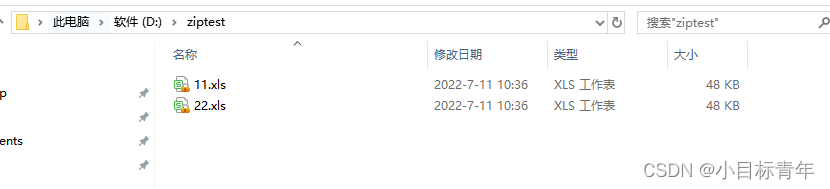
接口使用代码:
/*** 将指定文件打包成zip并下载*/@RequestMapping("exportExcelZipWithFile")public void exportExcelZipWithFile(HttpServletResponse response) throws IOException {// 这里还是和上面一样String[] filePath = new String[]{"D:\\ziptest\\11.xls", "D:\\ziptest\\22.xls"};List fileList = new ArrayList<>();for (String s : filePath) {File file = new File(s);fileList.add(file);}response.setHeader("content-type", "application/octet-stream");response.setContentType("application/octet-stream");response.setHeader(HttpHeaders.CONTENT_DISPOSITION, "attachment; filename=configDetail.zip");ZipUtils.downloadZipForFiles(response.getOutputStream(), fileList);} 效果:
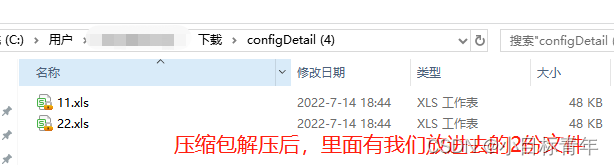
②直接生成excel,转换成byte再导出zip
/*** 将excel文件的Byte[]打包成zip并下载*/@RequestMapping("exportExcelZipWithByte")public void exportExcelZipWithByte(HttpServletResponse response) throws IOException {Map fileBufMap=new HashMap<>();List accountList=new ArrayList<>();Account account1=new Account(1,"1234");Account account2=new Account(2,"12222");Account account3=new Account(3,"1431546");accountList.add(account1);accountList.add(account2);accountList.add(account3);//导出操作 1byte[] exportAccountExcelBytes = ExcelUtil.getExportExcelBytes(accountList, "账号信息", "sheet1", Account.class, "accounts.xls", response);List userList=new ArrayList<>();User user1=new User(1,"a","12");User user2=new User(1,"b","12");User user3=new User(1,"c","12");userList.add(user1);userList.add(user2);userList.add(user3);//导出操作byte[] exportUserExcelBytes = ExcelUtil.getExportExcelBytes(userList,"用户信息","sheet1",User.class,"users.xls",response);fileBufMap.put("accounts.xls",exportAccountExcelBytes);fileBufMap.put("users.xls",exportUserExcelBytes);response.setHeader("content-type", "application/octet-stream");response.setContentType("application/octet-stream");response.setHeader(HttpHeaders.CONTENT_DISPOSITION, "attachment; filename=configDetail.zip");ZipUtils.downloadZipForByteMore(response.getOutputStream(), fileBufMap);} 代码简析:
这个map,key 是zip压缩包里面的文件名, vlaue是 excel文件的字节流:

生成excel文件,我们直接返回 byte[]流:


把多份excel文件的byte[] 都丢到map里面:
把每一个excel文件的 byte[]都放入 zip流: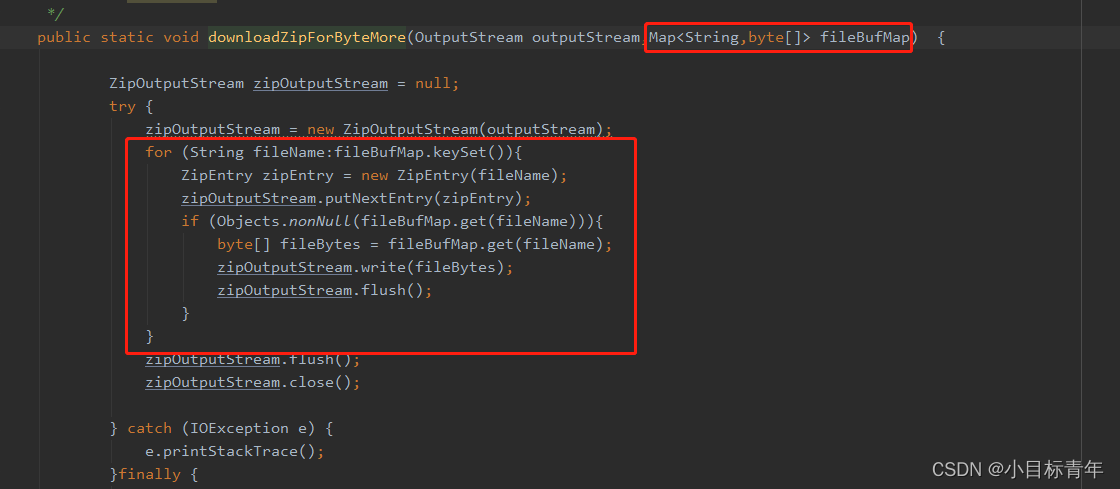
实现效果:

好吧,该篇就到这。
本文来自互联网用户投稿,文章观点仅代表作者本人,不代表本站立场,不承担相关法律责任。如若转载,请注明出处。 如若内容造成侵权/违法违规/事实不符,请点击【内容举报】进行投诉反馈!