【Furion】jmx添加Backend Listener元件
需要在jmx中自动添加Backend Listener元件,实现将jmeter中的请求数据写入influxDB,并在grafana中配置面板查看聚合报告
一、代码实现
1.1 Jmeter运行环境配置
// 设置Jmeter运行环境相关的配置
String jmeterHome = System.getProperty("user.dir") + "/jmxs";
String jmeterHomeBin = jmeterHome + "/bin";JMeterUtils.loadJMeterProperties(jmeterHomeBin + File.separator + "jmeter.properties");
JMeterUtils.setJMeterHome(jmeterHome);
JMeterUtils.initLocale();SaveService.loadProperties();
1.2 加载jmx文件
File in = new File(jmxFilePath);
HashTree testPlanTree = SaveService.loadTree(in);
1.3 定义BackendListener数据
// 设置属性
BackendListener backendListener = new BackendListener();
backendListener.clear();
backendListener.setProperty(new StringProperty("TestElement.gui_class", "BackendListenerGui"));
backendListener.setProperty(new StringProperty("TestElement.test_class", "BackendListener"));
backendListener.setProperty(new StringProperty("TestElement.name", "Backend Listener"));
backendListener.setProperty(new StringProperty("TestElement.enabled", "true"));backendListener.setClassname("rocks.nt.apm.jmeter.JMeterInfluxDBBackendListenerClient");
backendListener.setQueueSize("5000");// 构建TestElementProperty// 首先构建TestElementProperty子参数列表
ArrayList<TestElementProperty> list = new ArrayList<>(BackendConstant.LIST);
list.add(new BackendConstant("testName", testName).toProperty());
list.add(new BackendConstant("runId", runId).toProperty());Arguments TestElementArguments = new Arguments();
TestElementArguments.setProperty(new CollectionProperty("Arguments.arguments", list));//构建TestElementProperty
TestElementProperty testElementProperty = new TestElementProperty("arguments", TestElementArguments);
testElementProperty.addProperty(new StringProperty("TestElement.gui_class", "ArgumentsPanel"));
testElementProperty.addProperty(new StringProperty("TestElement.test_class", "Arguments"));
testElementProperty.addProperty(new StringProperty("TestElement.enabled", "true"));
backendListener.setProperty(testElementProperty);
1.4 组装数据
// 将backendListener组装到testPlanTree
testPlanTree.add(backendListener);
1.5 保存jmx数据
SaveService.saveTree(testPlanTree, new FileOutputStream(jmxFilePath));
1.6 BackendConstant列表数据
@Data
@NoArgsConstructor
@AllArgsConstructor
public class BackendConstant {public static final List<TestElementProperty> LIST = new ArrayList<>();//    private static final Map constantMap = new HashMap(){{
//        put("key1", "value2");
//    }};
//    for (Map.Entry key2Value : constantMap.entrySet()) {
//        LIST.add(new BackendConstant(key2Value.getKey(), key2Value.getValue()).toProperty());
//
//    }	static {LIST.add(new BackendConstant("nodeName", "lluozh-mac").toProperty());LIST.add(new BackendConstant("influxDBHost", "influxdata.lluozh.com").toProperty());LIST.add(new BackendConstant("influxDBPort", "3242").toProperty());LIST.add(new BackendConstant("influxDBUser", "fagent").toProperty());LIST.add(new BackendConstant("influxDBPassword", "lluozh").toProperty());LIST.add(new BackendConstant("influxDBDatabase", "fagent").toProperty());LIST.add(new BackendConstant("retentionPolicy", "autogen").toProperty());LIST.add(new BackendConstant("useRegexForSamplerList", "true").toProperty());LIST.add(new BackendConstant("recordSubSamples", "true").toProperty());LIST.add(new BackendConstant("influxHTTPScheme", "https").toProperty());}String key;String value;public TestElementProperty toProperty() {Argument argument = new Argument();argument.setProperty(new StringProperty("Argument.name", key));argument.setProperty(new StringProperty("Argument.value", value));argument.setProperty(new StringProperty("Argument.metadata", "="));return new TestElementProperty(key, argument);}
}
1.7 运行代码
public void processBackendListener(String jmxFilePath, String testName, String runId) throws IOException {public static void main(String[] args) throws IOException {JmeterDocumentParser jmeterDocumentParser = new JmeterDocumentParser();jmeterDocumentParser.processBackendListener("/Users/lluozh/Desktop/furion_influx.jmx", "Test666", "Report666");}
}
可正常生成jmx文件
二、BackendListener执行转化异常
2.1 异常信息
采用Apache-Jmeter-Api方式执行变更后的furion_influx.jmx脚本文件,抛出异常
[2021-02-26 13:29:50.491][http-nio-5009-exec-1][ERROR][?:][-][172.20.209.118] 未知异常!原因是:
java.lang.ClassCastException: org.apache.jmeter.visualizers.backend.BackendListener cannot be cast to org.apache.jmeter.testelement.TestPlanat com.lluozh.fagent.jmeter.engine.LocalStandardJMeterEngine.configure(LocalStandardJMeterEngine.java:166) ~[classes/:?]at com.lluozh.fagent.jmeter.JmeterRunLocal.executeJmx(JmeterRunLocal.java:105) ~[classes/:?]at com.lluozh.fagent.service.impl.JmeterRunServiceImpl.jmeterExecute(JmeterRunServiceImpl.java:165) ~[classes/:?]at com.lluozh.fagent.controller.jmeterController.runLocal(jmeterController.java:29) ~[classes/:?]at com.lluozh.fagent.controller.jmeterController$$FastClassBySpringCGLIB$$ecd1dbfb.invoke(<generated>) ~[classes/:?]at org.springframework.cglib.proxy.MethodProxy.invoke(MethodProxy.java:218) ~[spring-core-5.1.9.RELEASE.jar:5.1.9.RELEASE]at org.springframework.aop.framework.CglibAopProxy$CglibMethodInvocation.invokeJoinpoint(CglibAopProxy.java:749) ~[spring-aop-5.1.9.RELEASE.jar:5.1.9.RELEASE]at org.springframework.aop.framework.ReflectiveMethodInvocation.proceed(ReflectiveMethodInvocation.java:163) ~[spring-aop-5.1.9.RELEASE.jar:5.1.9.RELEASE]
2.2 jmeter保存
使用jmeter打开furion_influx.jmx文件后直接点击保存,此时该furion_influx.jmx可正常运行并提交数据
2.3 数据结构
暂时先不对比保存前后的jmx文件内容,首先看一下加载后的数据格式
-
未添加backendListener
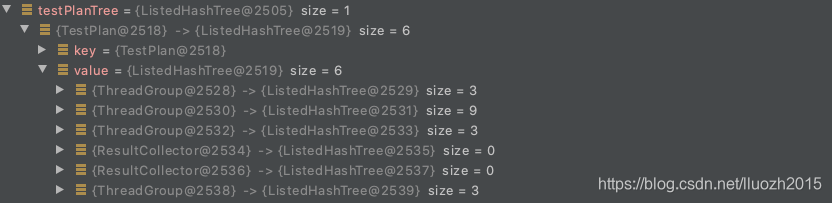
-
添加backendListener

- 经过jmeter保存后正确的数据
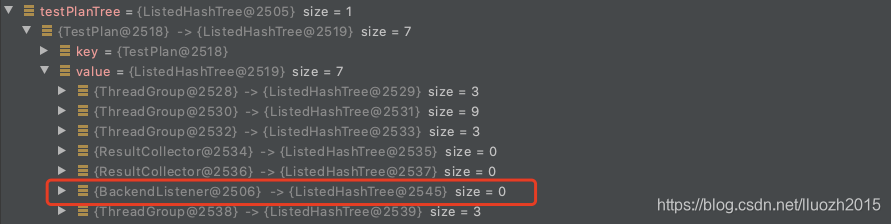
不难发现,BackendListener应该在testPlanTree中TestPlan下的属性值
2.4 修复问题
将1.4中的代码更新
// 将backendListener组装到testPlanTree
testPlanTree.add(Collections.singletonList(testPlanTree.keySet()).get(0), backendListener);
更新后的代码执行
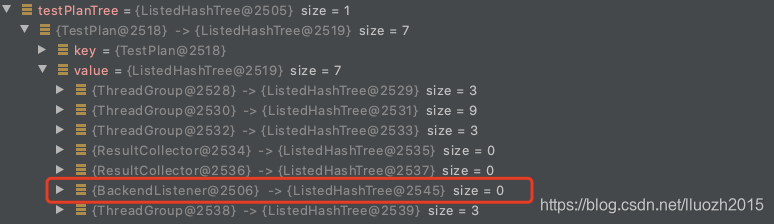
ok,可产生可执行的文件
三、BackendListener数据上报不符
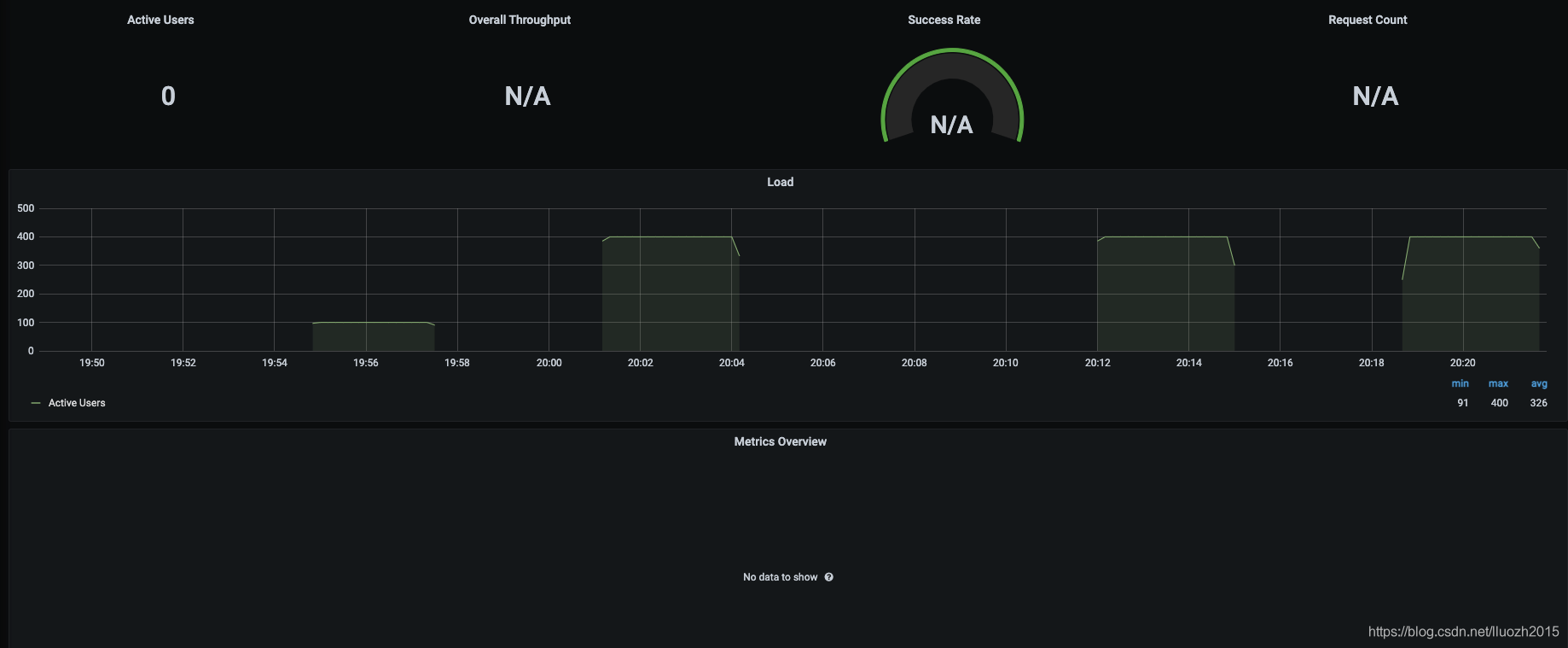
3.1 grafana看板
运行后发现仅仅上报了用户并发线程数据,其他数据均无
3.2 查看influxdb上报的数据
- requestsRaw请求数据
SELECT * FROM "requestsRaw" WHERE $timeFilter

- virtualUsers用户数据
SELECT * FROM "virtualUsers" WHERE $timeFilter
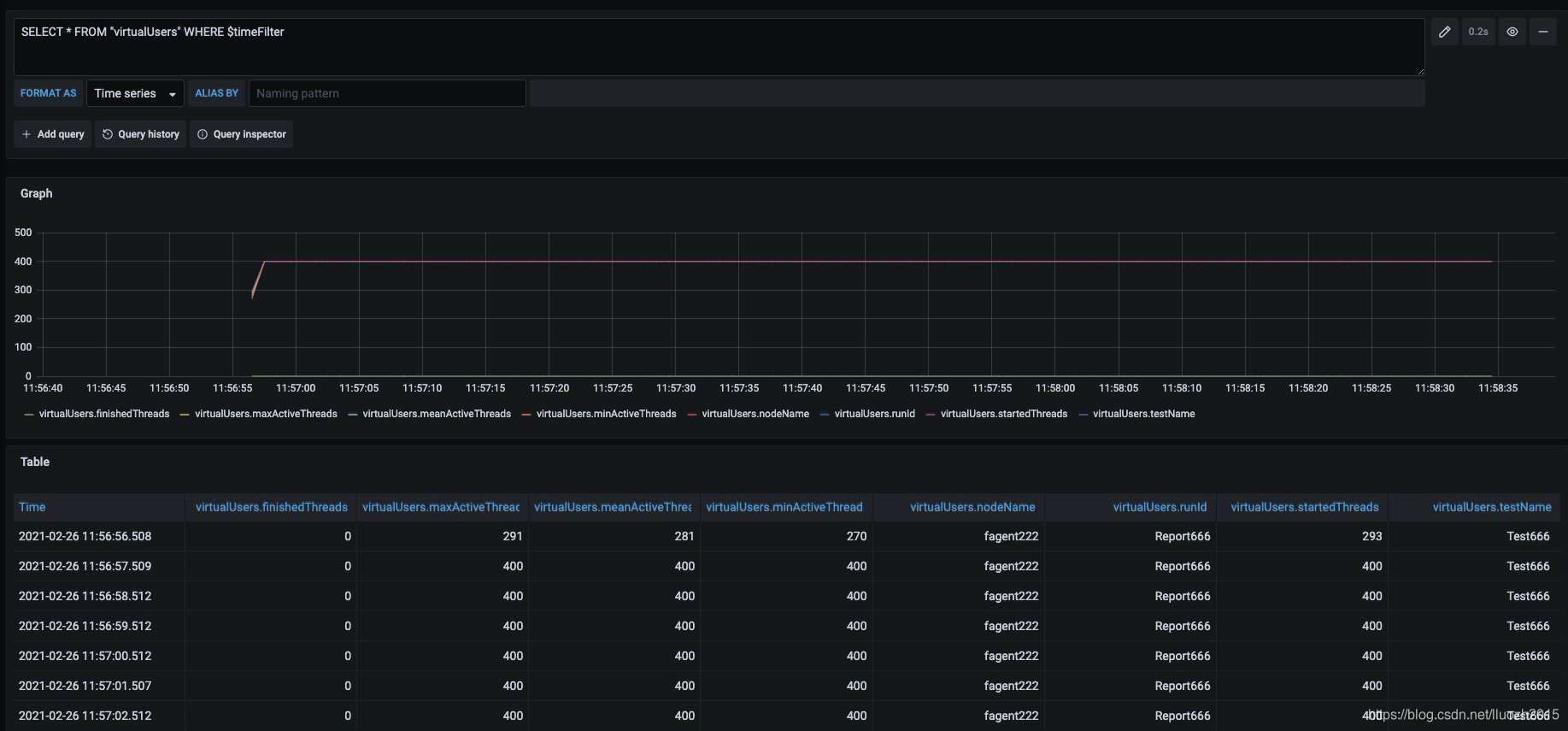
也就是数据库连接成功,但是并未成功上报用户请求信息
3.3 对比jmx文件
保存生成的furion_influx.jmx后,再次通过Apache-Jmeter-Api方式执行,可正常上报数据
那是否可以通过对比直接生成的furion_influx.jmx文件和再次保存后生成的furion_influx.jmx文件
发现两个问题:
- 缺少samplersList属性
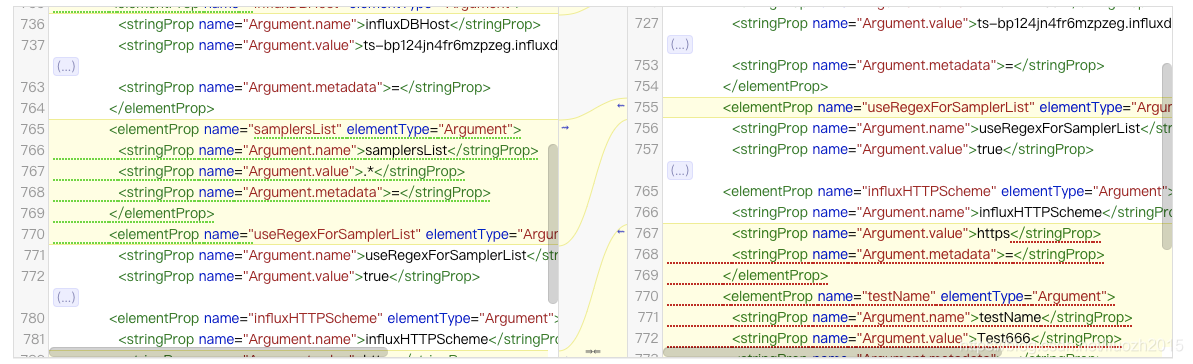
- collectionProp中elementProp顺序不一致
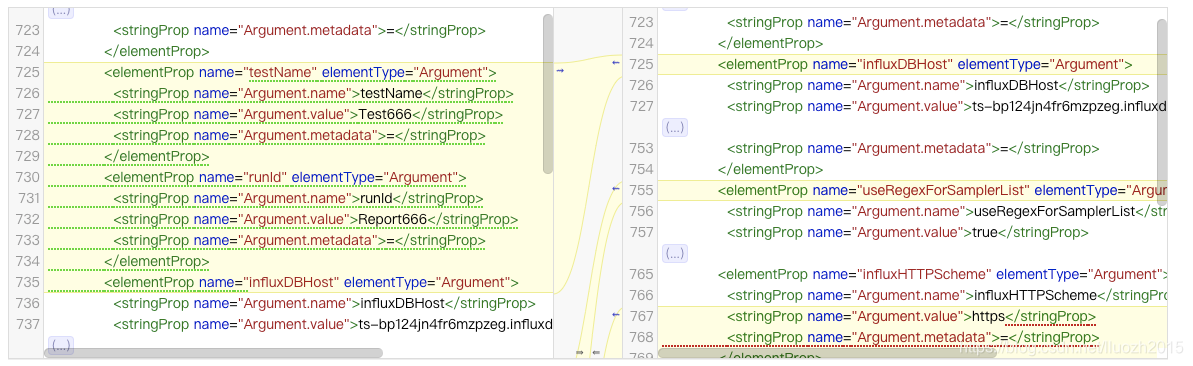
3.4 修改文件
- 增加samplersList属性
确实在生成的时候遗漏了samplersList属性,故增加
static {LIST.add(new BackendConstant("nodeName", "lluozh-mac").toProperty());LIST.add(new BackendConstant("influxDBHost", "influxdata.lluozh.com").toProperty());LIST.add(new BackendConstant("influxDBPort", "3242").toProperty());LIST.add(new BackendConstant("influxDBUser", "fagent").toProperty());LIST.add(new BackendConstant("influxDBPassword", "lluozh").toProperty());LIST.add(new BackendConstant("influxDBDatabase", "fagent").toProperty());LIST.add(new BackendConstant("retentionPolicy", "autogen").toProperty());LIST.add(new BackendConstant("samplersList", ".*").toProperty());LIST.add(new BackendConstant("useRegexForSamplerList", "true").toProperty());LIST.add(new BackendConstant("recordSubSamples", "true").toProperty());LIST.add(new BackendConstant("influxHTTPScheme", "https").toProperty());}
讲道理与属性的排序无关,故重新生成文件再次执行,发现问题依旧存在,仍仅上报了并发用户数据
- 修改排序
因为static LIST后再add属性值为变量的对象,这样更改属性排序麻烦,static LIST静态变量无法通过传参的方式,直接通过方法构造list列表数据
@Data
@NoArgsConstructor
@AllArgsConstructor
public class BackendConstant {String key;String value;public TestElementProperty toProperty() {Argument argument = new Argument();argument.setProperty(new StringProperty("Argument.name", key));argument.setProperty(new StringProperty("Argument.value", value));argument.setProperty(new StringProperty("Argument.metadata", "="));return new TestElementProperty(key, argument);}public static List<TestElementProperty> generate(String testName, String runId) {List<TestElementProperty> list = new ArrayList<>();list.add(new BackendConstant("testName", testName).toProperty());list.add(new BackendConstant("nodeName", "lluozh-mac").toProperty());list.add(new BackendConstant("runId", runId).toProperty());list.add(new BackendConstant("influxDBHost", "influxdata.lluozh").toProperty());list.add(new BackendConstant("influxDBPort", "3242").toProperty());list.add(new BackendConstant("influxDBUser", "fagent").toProperty());list.add(new BackendConstant("influxDBPassword", "lluozh").toProperty());list.add(new BackendConstant("influxDBDatabase", "fagent").toProperty());list.add(new BackendConstant("retentionPolicy", "autogen").toProperty());list.add(new BackendConstant("samplersList", ".*").toProperty());list.add(new BackendConstant("useRegexForSamplerList", "true").toProperty());list.add(new BackendConstant("recordSubSamples", "true").toProperty());list.add(new BackendConstant("influxHTTPScheme", "https").toProperty());return list;}
}
直接通过调用方法
TestElementArguments.setProperty(new CollectionProperty("Arguments.arguments", BackendConstant.generate("Test666", "Report666")));
此时生成的furion_influx.jmx直接通过Apache-Jmeter-Api方式执行,可正常上报数据
竟然和属性的排序有关?这个有点儿不科学
3.5 原因验证
如果因为jmx中hashTree中的属性排序的原因,那打乱排序应该上报异常
通过修改jmx中TestElementProperty的属性顺序,发现不管如何排序,均可可以正常上报数据
那是否说明与排序无关?做了如下验证:
- 去掉samplersList属性,排序一致
异常 - 去掉samplersList属性,将testName和runId排序在最后
异常 - 增加samplersList属性,排序一致
正常 - 增加samplersList属性,将samplersList排序打乱
正常 - 增加samplersList属性,将testName和runId排序在最后
正常 - 增加samplersList属性,将samplersList、testName和runId排序打乱
正常
可以得到结论,与samplersList属性有关,与属性的顺序无关
前面的操作或许是因为文件拷贝等原因的误操作
至此,jmx中添加Backend Listener元件,并正常完成功能
本文来自互联网用户投稿,文章观点仅代表作者本人,不代表本站立场,不承担相关法律责任。如若转载,请注明出处。 如若内容造成侵权/违法违规/事实不符,请点击【内容举报】进行投诉反馈!