JSON携程文档
目录
目录
一、前言
二、JSON基础
2.1 什么是JSON?
2.2 JSON 语法规则
2.3 JSON的值
三、JSON数据类型
3.1 有效和无效的数据类型
3.2 JSON 字符串
3.3 JSON 数字
3.4 JSON 对象
3.5 JSON 数组
3.6 JSON 布尔
3.7 JSON null
四、JsonPath 的使用
4.1 JsonPath 的介绍
4.2 JsonPath 语法
4.2.1 操作符
4.2.2 函数
4.2.3 过滤器
4.3 JsonPath 常用用法
4.4 JsonPath 返回值
4.5 MappingProvider SPI反序列化器编辑
4.6 Predicates过滤器断言
4.6.1 Inline Predicates
4.6.2 Filter Predicates
4.6.3 Roll Your Own
4.7返回检索到的Path路径列表
4.8 配置Options
4.8.1 DEFAULT_PATH_LEAF_TO_NULL
4.8.2 ALWAYS_RETURN_LIST
4.8.3 SUPPRESS_EXCEPTIONS
4.8.4 AS_PATH_LIST
4.8.5 REQUIRE_PROPERTIES
4.9 Cache SPI
五、日常使用中一些坑
5.1 数据类型问题
5.2 类型转换异常问题
5.3 JSONObject put()的顺序问题
5.4 JSON嵌套格式问题
5.5 文件写入问题
六、总结
一、前言
本文主要包含: JSON基础、JSON数据类型、JsonPath的使用、日常使用的坑点
二、JSON基础
2.1 什么是JSON?
JSON(JavaScript Object Notation, JS对象简谱)是一种轻量级的数据交换格式。它基于 ECMAScript(European Computer Manufacturers Association, 欧洲计算机协会制定的js规范)的一个子集,采用完全独立于编程语言的文本格式来存储和表示数据。简洁和清晰的层次结构使得 JSON 成为理想的数据交换语言。 易于人阅读和编写,同时也易于机器解析和生成,并有效地提升网络传输效率。
2.2 JSON 语法规则
JSON是一个标记符的序列。这套标记符包含六个构造字符、字符串、数字和三个字面名。
JSON是一个序列化的对象或数组。
六个构造字符:
begin-array = ws %x5B ws ; [ 左方括号
begin-object = ws %x7B ws ; { 左大括号
end-array = ws %x5D ws ; ] 右方括号
end-object = ws %x7D ws ; } 右大括号
name-separator = ws %x3A ws ; : 冒号
value-separator = ws %x2C ws ; , 逗号
在这六个构造字符的前或后允许存在无意义的空白符(ws):
ws = *(%x20 /; 空间
%x09 /; 水平标签
%x0A /; 换行或换行
%x0D); 回程
2.3 JSON的值
值可以是对象、数组、数字、字符串或者三个字面值(false、null、true)中的一个。值中的字面值中的英文必须使用小写。
对象由花括号括起来的逗号分割的成员构成,成员是字符串键和上文所述的值由逗号分割的键值对组成,如:
1
{"name":"John Doe","age": 18,"address": {"country":"china","zip-code":"10000"}}JSON中的对象可以包含多个键值对,并且有数组结构,该语言正是一次实现过程内容的描述。
数组是由方括号括起来的一组值构成,如:
1
[3, 1, 4, 1, 5, 9, 2, 6]表示对象
对象是一个无序的“‘名称/值’对”集合。一个对象以{左括号开始,}右括号结束。每个“名称”后跟一个:冒号;“‘名称/值’ 对”之间使用,逗号分隔。
1
{"firstName":"Brett","lastName":"McLaughlin"}表示数组
和普通的 JS 数组一样,JSON 表示数组的方式也是使用方括号 []。
1
2
3
4
5
6
7
8
9
10
11
{
"people":[{
"firstName": "Brett",
"lastName":"McLaughlin"
},
{
"firstName":"Jason",
"lastName":"Hunter"
}]
}字符串与C或者Java的字符串非常相似。字符串是由双引号包围的任意数量Unicode字符的集合,使用反斜线转义。一个字符(character)即一个单独的字符串(character string)。
数字也与C或者Java的数值非常相似。除去未曾使用的八进制与十六进制格式。除去一些编码细节。
一些合法的JSON的实例:
1
{"a": 1,"b": [1, 2, 3]}
2
[1, 2,"3", {"a": 4}]
3
3.14
4
"plain_text"
下面给出一个我国省份城市Json实例:
{"name": "中国","province": [{"name": "黑龙江","cities": {"city": ["哈尔滨", "大庆"]}}, {"name": "广东","cities": {"city": ["广州", "深圳", "珠海"]}}, {"name": "台湾","cities": {"city": ["台北", "高雄"]}}, {"name": "新疆","cities": {"city": ["乌鲁木齐"]}}]
}
其中, "province" 下是数组, 数组里包含各个省份对象, 省份下 "cities" 是城市对象,里面有对应的城市数组.
更通俗来说, 看见{ } 就去想对象, 看见[ ] 就去想数组.
三、JSON数据类型
在上面JSON基础中已有提到Json数据类型,下面进一步说明.
3.1 有效和无效的数据类型
在 JSON 中,值必须是以下数据类型之一:
- 字符串
- 数字
- 对象(JSON 对象)
- 数组
- 布尔
- Null
JSON 的值不可以是以下数据类型之一:
- 函数
- 日期
- undefined
3.2 JSON 字符串
JSON 中的字符串必须用双引号包围。
实例
{ "name":"Bill" }
3.3 JSON 数字
JSON 中的数字必须是整数或浮点数。
实例
{ "age":30 }
3.4 JSON 对象
JSON 中的值可以是对象。
实例
{"employee":{ "name":"Bill Gates", "age":62, "city":"Seattle" }
}
JSON 中作为值的对象必须遵守与 JSON 对象相同的规则。
3.5 JSON 数组
JSON 中的值可以是数组。
实例
{
"employees":[ "Bill", "Steve", "David" ]
}
3.6 JSON 布尔
JSON 中的值可以是 true/false。
实例
{ "sale":true }
3.7 JSON null
JSON 中的值可以是 null。
实例
{ "middlename":null }
四、JsonPath 的使用
参考至: JsonPath教程_koflance的博客-CSDN博客_jsonpath的用法
4.1 JsonPath 的介绍
通过名字可以知道,JsonPath和JSON文档有关系,JsonPath非常强大,通过JsonPath我们可以轻松的解析JSON,获取需要的内容.
4.2 JsonPath 语法
4.2.1 操作符
| 符号 | 描述 |
|---|---|
| $ | 查询的根节点对象,用于表示一个json数据,可以是数组或对象 |
| @ | 过滤器断言(filter predicate)处理的当前节点对象,类似于java中的this字段 |
| * | 通配符,可以表示一个名字或数字 |
| .. | 可以理解为递归搜索,Deep scan. Available anywhere a name is required. |
| . | 表示一个子节点 |
| [‘ | 表示一个或多个子节点 |
| [ | 表示一个或多个数组下标 |
| [start:end] | 数组片段,区间为[start,end),不包含end |
| [?( | 过滤器表达式,表达式结果必须是boolean |
4.2.2 函数
| 名称 | 描述 | 输出 |
|---|---|---|
| min() | 获取数值类型数组的最小值 | Double |
| max() | 获取数值类型数组的最大值 | Double |
| avg() | 获取数值类型数组的平均值 | Double |
| stddev() | 获取数值类型数组的标准差 | Double |
| length() | 获取数值类型数组的长度 | Integer |
4.2.3 过滤器
过滤器是用于过滤数组的逻辑表达式,一个通常的表达式形如:[?(@.age > 18)],可以通过逻辑表达式&&或||组合多个过滤器表达式,例如[?(@.price < 10 && @.category == ‘fiction’)],字符串必须用单引号或双引号包围,例如[?(@.color == ‘blue’)] or [?(@.color == “blue”)]
| 操作符 | 描述 |
|---|---|
| == | 等于符号,但数字1不等于字符1(note that 1 is not equal to ‘1’) |
| != | 不等于符号 |
| < | 小于符号 |
| <= | 小于等于符号 |
| > | 大于符号 |
| >= | 大于等于符号 |
| =~ | 判断是否符合正则表达式,例如[?(@.name =~ /foo.*?/i)] |
| in | 所属符号,例如[?(@.size in [‘S’, ‘M’])] |
| nin | 排除符号 |
| size | size of left (array or string) should match right |
| empty | 判空符号 |
示例:
String json = "
{"store": {"book": [{"category": "reference","author": "Nigel Rees","title": "Sayings of the Century","price": 8.95},{"category": "fiction","author": "Evelyn Waugh","title": "Sword of Honour","price": 12.99},{"category": "fiction","author": "Herman Melville","title": "Moby Dick","isbn": "0-553-21311-3","price": 8.99},{"category": "fiction","author": "J. R. R. Tolkien","title": "The Lord of the Rings","isbn": "0-395-19395-8","price": 22.99}],"bicycle": {"color": "red","price": 19.95}},"expensive": 10
}";| JsonPath表达式 | 结果 |
|---|---|
| $.store.book[*].author 或 $..author | [ “Nigel Rees”, “Evelyn Waugh”, “Herman Melville”, “J. R. R. Tolkien” ] |
/* 获取全部authors
["Nigel Rees","Evelyn Waugh","Herman Melville","J. R. R. Tolkien"]
*/
// 1. $.store.book[*].author
List authors1 = JsonPath.read(json, "$.store.book.[*].author");
// 2. $..author
List authors2 = JsonPath.read(json, "$..author");
在使用时,强烈建议按照第一种语法进行使用!
处理JSON数据时,一定要层层筛选,避免出错,不要图省事!
| JsonPath表达式 | 结果 |
|---|---|
| $.store.* 显示所有叶子节点值 | [[{”category” : “reference”,”author” : “Nigel Rees”,”title” : “Sayings of the Century”,”price” : 8.95},{”category” : “fiction”,”author” : “Evelyn Waugh”,”title” : “Sword of Honour”,”price” : 12.99},{”category” : “fiction”,”author” : “Herman Melville”,”title” : “Moby Dick”,”isbn” : “0-553-21311-3”,”price” : 8.99},{”category” : “fiction”,”author” : “J. R. R. Tolkien”,”title” : “The Lord of the Rings”,”isbn” : “0-395-19395-8”,”price” : 22.99}],{”color” : “red”,”price” : 19.95}] |
// [[{"category":"reference","author":"Nigel Rees","title":"Sayings of the Century","price":8.95},{"category":"fiction","author":"Evelyn Waugh","title":"Sword of Honour","price":12.99},{"category":"fiction","author":"Herman Melville","title":"Moby Dick","isbn":"0-553-21311-3","price":8.99},{"category":"fiction","author":"J. R. R. Tolkien","title":"The Lord of the Rings","isbn":"0-395-19395-8","price":22.99}],{"color":"red","price":19.95}]
List all = JsonPath.read(json, "$.store.*"); | JsonPath表达式 | 结果 |
|---|---|
| $.store.book.[*].price $.store.book.[0].price | [8.95,12.99,8.99,22.99] [8.95] |
// [8.95,12.99,8.99,22.99]
List prices = JsonPath.read(json, "$.store.book.[*].price");
// 8.95
double priceOfBook1 = JsonPath.read(json, "$.store.book.[0].price"); | JsonPath表达式 | 结果 |
|---|---|
| $..book[0,1] | [{"category":"reference","author":"Nigel Rees","title":"Sayings of the Century","price":8.95},{"category":"fiction","author":"Evelyn Waugh","title":"Sword of Honour","price":12.99}] |
| $..book[-2:] | [{"category":"fiction","author":"Herman Melville","title":"Moby Dick","isbn":"0-553-21311-3","price":8.99},{"category":"fiction","author":"J. R. R. Tolkien","title":"The Lord of the Rings","isbn":"0-395-19395-8","price":22.99}] |
// [{"category":"reference","author":"Nigel Rees","title":"Sayings of the Century","price":8.95},{"category":"fiction","author":"Evelyn Waugh","title":"Sword of Honour","price":12.99}]
List books1 = JsonPath.read(json, "$..book[0, 1]");
List books2 = JsonPath.read(json, "$..book[:2]");//[{"category":"fiction","author":"Herman Melville","title":"Moby Dick","isbn":"0-553-21311-3","price":8.99},{"category":"fiction","author":"J. R. R. Tolkien","title":"The Lord of the Rings","isbn":"0-395-19395-8","price":22.99}]
List books3 = JsonPath.read(json, "$..book[-2:]");//[{"category":"fiction","author":"Herman Melville","title":"Moby Dick","isbn":"0-553-21311-3","price":8.99},{"category":"fiction","author":"J. R. R. Tolkien","title":"The Lord of the Rings","isbn":"0-395-19395-8","price":22.99}]
List books4 = JsonPath.read(json, "$..book[2:]"); JSON数组跟Java、C数组一样,下标从0开始.
book[0, 1] 表示获取第一个,第二个书.
book[:2] 表示获取前两本书.
book[-2:] 表示获取最后两本书.
book[2:] 表示获取除前两本书外,剩余的书.
| $..book[?(@.isbn)] $.store.book[?(@.price < 10)] $..book[?(@.price <= $[‘expensive’])] $..book[?(@.author =~ /.*REES/i)] | [{"category":"fiction","author":"Herman Melville","title":"Moby Dick","isbn":"0-553-21311-3","price":8.99},{"category":"fiction","author":"J. R. R. Tolkien","title":"The Lord of the Rings","isbn":"0-395-19395-8","price":22.99}] [{"category":"reference","author":"Nigel Rees","title":"Sayings of the Century","price":8.95},{"category":"fiction","author":"Herman Melville","title":"Moby Dick","isbn":"0-553-21311-3","price":8.99}] [{"category":"reference","author":"Nigel Rees","title":"Sayings of the Century","price":8.95},{"category":"fiction","author":"Herman Melville","title":"Moby Dick","isbn":"0-553-21311-3","price":8.99}] 所有符合正则表达式的书 |
//[{"category":"fiction","author":"Herman Melville","title":"Moby Dick","isbn":"0-553-21311-3","price":8.99},{"category":"fiction","author":"J. R. R. Tolkien","title":"The Lord of the Rings","isbn":"0-395-19395-8","price":22.99}]
List books5 = JsonPath.read(json, "$..book[?(@.isbn)]");//[{"category":"reference","author":"Nigel Rees","title":"Sayings of the Century","price":8.95},{"category":"fiction","author":"Herman Melville","title":"Moby Dick","isbn":"0-553-21311-3","price":8.99}]
List books6 = JsonPath.read(json, "$..book[?(@.price < 10)]");//[{"category":"reference","author":"Nigel Rees","title":"Sayings of the Century","price":8.95},{"category":"fiction","author":"Herman Melville","title":"Moby Dick","isbn":"0-553-21311-3","price":8.99}]
List books7 = JsonPath.read(json, "$..book[?(@.price < $['expensive'])]");//[{”category” : “reference”,”author” : “Nigel Rees”,”title” : “Sayings of the Century”,”price” : 8.95}]
List books8 = JsonPath.read(json, "$..book[?(@.author =~ /.*Rees/i)]");
$..book[?(@.isbn)] 表示获取所有含有“isbn” 的书
$.store.book[?(@.price < 10)] 表示获取所有价格低于10的书
$..book[?(@.price <= $[‘expensive’])] 表示获取所有价格低于expensive字段的值的书
$..book[?(@.author =~ /.*REES/i)] 表示获取所有作者名包含"REES" (不区分大小写) 的书
| $.store.book.length() | 4 |
// 4
int len = JsonPath.read(json, "$.store.book.length()");
不使用函数,也可对JSON数据进行操作
Listprices = JsonPath.read(json, "$.store.book.[*].price"); Double max = Double.valueOf(0.00); for (Double price : prices){if (price > max){max = price;} } // 22.99 System.out.println(max);
Tip: 贴两个在线资源 :
1. JSON在线格式化 : JSON在线视图查看器(Online JSON Viewer)
2. JsonPath在线编辑 : JSONPath Online Evaluator
4.3 JsonPath 常用用法
通常是直接使用静态方法API进行调用,例如:
String json = "...";List authors = JsonPath.read(json, "$.store.book[*].author"); 但以上方式仅仅适用于解析一次json的情况,如果需要对同一个json解析多次,不建议使用,因为每次read都会重新解析一次json,针对此种情况,建议使用ReadContext、WriteContext,例如:
String json = "...";ReadContext ctx = JsonPath.parse(json);List authorsOfBooksWithISBN = ctx.read("$.store.book[?(@.isbn)].author");List> expensiveBooks = JsonPath.using(configuration).parse(json).read("$.store.book[?(@.price > 10)]", List.class); 4.4 JsonPath 返回值
通常read后的返回值会进行自动转型到指定的类型,对应明确定义definite的表达式,应指定其对应的类型,对于indefinite含糊表达式,例如包括..、?(
String json = "{\"date_as_long\" : 1411455611975}";
//使用JsonSmartMappingProvider
Date date = JsonPath.parse(json).read("$['date_as_long']", Date.class);
//使用GsonMappingProvider
Book book = JsonPath.parse(json).read("$.store.book[0]", Book.class);
4.5 MappingProvider SPI反序列化器
在另一个文章有写到:MappingProvider 反序列化器_Reo_Accepted的博客-CSDN博客默认情况下,一个简单的对象映射器由MappingProviderSPI提供。JsonPath提供了默认的实现JsonSmartJsonProvider和JsonSmartMappingProvider。但是不能将json字符串转为POJO对象。计算路径时需要知道路径是明确的还是不明确的,明确的返回单个值,不明确的返回一个List.JsonPath将自动尝试将结果强制转换为调用方所期望的类型。JsonSmartMappingProvider(默认)......https://blog.csdn.net/qq_51490751/article/details/126009307?csdn_share_tail=%7B%22type%22%3A%22blog%22%2C%22rType%22%3A%22article%22%2C%22rId%22%3A%22126009307%22%2C%22source%22%3A%22qq_51490751%22%7D&ctrtid=YFj74

其中JsonSmartMappingProvider提供了如下基本数据类型的转换,此provider是默认设置的,在Configuration.defaultConfiguration()中返回的DefaultsImpl类,使用的就是JsonSmartMappingProvider。
DEFAULT.registerReader(Long.class, new LongReader());
DEFAULT.registerReader(long.class, new LongReader());
DEFAULT.registerReader(Integer.class, new IntegerReader());
DEFAULT.registerReader(int.class, new IntegerReader());
DEFAULT.registerReader(Double.class, new DoubleReader());
DEFAULT.registerReader(double.class, new DoubleReader());
DEFAULT.registerReader(Float.class, new FloatReader());
DEFAULT.registerReader(float.class, new FloatReader());
DEFAULT.registerReader(BigDecimal.class, new BigDecimalReader());
DEFAULT.registerReader(String.class, new StringReader());
DEFAULT.registerReader(Date.class, new DateReader());
切换Provider,如下:
Configuration.setDefaults(new Configuration.Defaults() {private final JsonProvider jsonProvider = new JacksonJsonProvider();private final MappingProvider mappingProvider = new JacksonMappingProvider();@Overridepublic JsonProvider jsonProvider() {return jsonProvider;}@Overridepublic MappingProvider mappingProvider() {return mappingProvider;}@Overridepublic Set4.6 Predicates过滤器断言
有三种方式创建过滤器断言。
4.6.1 Inline Predicates
即使用过滤器断言表达式?(<@expression>),例如:
List> books = JsonPath.parse(json).read("$.store.book[?(@.price < 10)]"); 4.6.2 Filter Predicates
使用Filter API。例如:
每一个语句的结果都以注释在上方给出
import static com.jayway.jsonpath.JsonPath.parse;
import static com.jayway.jsonpath.Criteria.where;
import static com.jayway.jsonpath.Filter.filter;
...
...// [?(@['category'] == 'fiction' && @['price'] <= 10.0)]
Filter cheapFictionFilter = filter(where("category").is("fiction").and("price").lte(10D)
);List> books =  parse(json).read("$.store.book[?]", cheapFictionFilter);// [?(@['foo'] || @['bar'])]
Filter fooOrBar = filter(where("foo").exists(true)).or(where("bar").exists(true)
);// [?(@['foo'] && @['bar'])]
Filter fooAndBar = filter(where("foo").exists(true)).and(where("bar").exists(true)
);
注意:
JsonPath表达式中必须要有断言占位符“?”,当有多个占位符时,会依据顺序进行替换。
多个filter之间还可以使用or或and。
4.6.3 Roll Your Own
自己实现Predicate接口。
ReadContext reader = JsonPath.parse(json);
Predicate booksWithISBN = new Predicate() {@Overridepublic boolean apply(PredicateContext ctx) {return ctx.item(Map.class).containsKey("isbn");}
};List> books = reader.read("$.store.book[?].isbn", List.class, booksWithISBN);
注意:在自定义过滤器中,context.item(Map.class) 这句话。这句中的Map.class是根据预定的结果类型定义的,如果返回的是String类型值,那就改为String.class
4.7返回检索到的Path路径列表
有时候需要返回当前JsonPath表达式所检索到的全部路径,可以如下使用:
// 首先设置 Configuration
Configuration conf = Configuration.builder().options(Option.AS_PATH_LIST).build();// ["$['store']['book'][0]['author']",
//  "$['store']['book'][1]['author']",
//  "$['store']['book'][2]['author']",
//  "$['store']['book'][3]['author']"]
List pathList = using(conf).parse(json).read("$..author");
4.8 配置Options
4.8.1 DEFAULT_PATH_LEAF_TO_NULL
当检索不到时返回null对象,否则如果不配置这个,会直接抛出异常PathNotFoundException,例如:
[{"name" : "john","gender" : "male"},{"name" : "ben"}
]
Configuration conf = Configuration.defaultConfiguration();//Works fine
String gender0 = JsonPath.using(conf).parse(json).read("$[0]['gender']");
//PathNotFoundException thrown
String gender1 = JsonPath.using(conf).parse(json).read("$[1]['gender']");Configuration conf2 = conf.addOptions(Option.DEFAULT_PATH_LEAF_TO_NULL);//Works fine
String gender0 = JsonPath.using(conf2).parse(json).read("$[0]['gender']");
//Works fine (null is returned)
String gender1 = JsonPath.using(conf2).parse(json).read("$[1]['gender']");4.8.2 ALWAYS_RETURN_LIST
总是返回list,即便是一个确定的非list类型,也会被包装成list。
Configuration conf = Configuration.defaultConfiguration().addOptions(Option.ALWAYS_RETURN_LIST);4.8.3 SUPPRESS_EXCEPTIONS
不抛出异常,需要判断如下:
ALWAYS_RETURN_LIST开启,则返回空list
ALWAYS_RETURN_LIST关闭,则返回null
4.8.4 AS_PATH_LIST
返回path
Configuration conf = Configuration.builder().options(Option.AS_PATH_LIST).build();4.8.5 REQUIRE_PROPERTIES
如果设置,则不允许使用通配符,比如$[*].b,会抛出PathNotFoundException异常。
Configuration conf = Configuration.builder().options(Option.REQUIRE_PROPERTIES).build();4.9 Cache SPI
每次read时都会获取cache,以提高速度,但默认情况下是不启用的。
@Override
public  T read(String path, Predicate... filters) {notEmpty(path, "path can not be null or empty");Cache cache = CacheProvider.getCache();path = path.trim();LinkedList filterStack = new LinkedList(asList(filters));String cacheKey = Utils.concat(path, filterStack.toString());JsonPath jsonPath = cache.get(cacheKey);if(jsonPath != null){return read(jsonPath);} else {jsonPath = compile(path, filters);cache.put(cacheKey, jsonPath);return read(jsonPath);}
}
JsonPath 2.1.0提供新的spi,必须在使用前或抛出JsonPathException前配置。目前提供了两种实现:
com.jayway.jsonpath.spi.cache.NOOPCache (no cache)
com.jayway.jsonpath.spi.cache.LRUCache (default, thread safe)
如果想要自己实现,例如:
CacheProvider.setCache(new Cache() {//Not thread safe simple cacheprivate Map map = new HashMap();@Overridepublic JsonPath get(String key) {return map.get(key);}@Overridepublic void put(String key, JsonPath jsonPath) {map.put(key, jsonPath);}
});
五、日常使用中一些坑
5.1 数据类型问题
处理JSON文件之间一定要先弄清楚数据类型
比如:json : { "soldNums" : [ { "soldNum" : 100 } , { "soldNum" : "1万+" } ] }
数组里的soldNum的数据类型既有整形也有字符串,出现不止一种数据类型的情况,有以下几种解决方案
1.统一用Object父类囊括
String json = "{\"soldNums\":[{\"soldNum\" : 100 },{\"soldNum\":\"1万+\"}]}"; List2. 使用JSONObject
里面是坑中坑
抛出异常 :
class java.util.LinkedHashMap cannot be cast to class net.minidev.json.JSONObjectListsoldNums = JsonPath.read(json, "$.soldNums.[*]"); for (JSONObject num : soldNums){String soldNum = num.getAsString("soldNum");System.out.println(soldNum); } 放到下一小节说
5.2 类型转换异常问题
书接上文抛出异常
一开始尝试强转, String.ValueOf(), (String), toString() ...... 都以失败告终
输出一下试试
ListsoldNums = JsonPath.read(json, "$.soldNums.[*].soldNum"); System.out.println(soldNums); 输出结果 : [100,"1万+"]
查了好多资料,找到是反序列化的问题
资料1 : Jackson: java.util.LinkedHashMap cannot be cast to X | Baeldung
资料2 : 解决java.util.LinkedHashMap cannot be cast to 的问题_coder_monarch的博客-CSDN博客解决java.util.LinkedHashMap cannot be cast to 的问题
https://blog.csdn.net/qq_38058050/article/details/120139046
map是LinkedHashMap,得到的是map,而不是实体类。
贴代码:
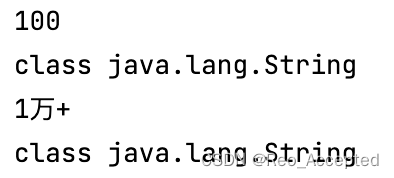
Listjsons = new ArrayList<>();jsons = (List ) JsonPath.read(json, "$.soldNums.[*]"); String s = JSON.toJSONString(jsons); jsons = JSON.parseArray(s, JSONObject.class);for (JSONObject num : jsons) {String soldNum = num.getAsString("soldNum");System.out.println(soldNum);// 输出 soldNum 的类型System.out.println(soldNum.getClass()); }
问题解决!
再加个例子: 用JSONObject会方便很多
(养成用JSONOBject来处理数据的习惯,方便)Listnums = (List ) JsonPath.read(json, "$..soldNums[?(@.soldNum == 100)]"); String s2 = JSON.toJSONString(nums); nums = JSON.parseArray(s2, JSONObject.class); for (JSONObject n : nums){String sold = n.getAsString("soldNum");System.out.println(sold);System.out.println(sold.getClass()); } // 输出结果 : 100 // class java.lang.String
5.3 JSONObject put()的顺序问题
/*Obj :{ "soldNum" : ..."tuanName" : ..."price" : ..."o_price" : ..."}put 进去的顺序和最终JSONObject的顺序不一致!
*/
JSONObject Obj = new JSONObject();
Obj.put("tuanName", tuanName);
Obj.put("soldNum", soldNum);
Obj.put("price", price);
Obj.put("o_price", o_price);/*Obj :{ "tuanName" : ..."soldNum" : ..."price" : ..."o_price" : ..."}put 进去的顺序和最终JSONObject的顺序一致!
*/
JSONObject Obj = new JSONObject(new LinkedHashMap());
Obj.put("tuanName", tuanName);
Obj.put("soldNum", soldNum);
Obj.put("price", price);
Obj.put("o_price", o_price);
原因:
JsonObject内部是默认用Hashmap来存储的,所以输出是按key的排序来的,如果要让JsonObject按固定顺序(put的顺序)排列,可以修改JsonObject的定义HashMap改为LinkedHashMap.
5.4 JSON嵌套格式问题
上周(7.18号),给的任务就是一个例子, 已经上传另一个文章 : https://blog.csdn.net/qq_51490751/article/details/125934371?spm=1001.2014.3001.5502
https://blog.csdn.net/qq_51490751/article/details/125934371?spm=1001.2014.3001.5502
最初思路比较乱, 要求的格式是这样
{"tuan_list": [{"tuanName": "【特惠指压】养气推拿","soldNum": "1142","price": "159","o_price": "209"},{"tuanName": "【本店爆款】禅【足浴 推拿】,免费WiFi,男女通用","soldNum": "814","price": "209","o_price": "259"}],"shopID": "H2WTGQ10qifYdc54"
}
我操作后是....:
{"tuan_list": [{{"tuanName": "【特惠指压】养气推拿"},{"soldNum": "1142"},{"price": "159"},{"o_price": "209"}},{{"tuanName": "【本店爆款】禅【足浴 推拿】,免费WiFi,男女通用"},{"soldNum": "814"},{"price": "209"},{"o_price": "259}"}],"shopID": "H2WTGQ10qifYdc54"
}
原本思路错了 : 每次获取一个属性, 就直接添加到JSONArray里面了, 导致每次都是加进去的是一个对象, 每个属性都是一个个独立的对象, 而不是一个对象里包含多个属性!
这是正确代码, 需要 两个 JSONObject 一个 JSONArray
for (JSONObject jsonObject : jsons){String title = jsonObject.getAsString("tuanName");String price = jsonObject.getAsString("price");String marketPrice = jsonObject.getAsString("o_price");String saleCount = jsonObject.getAsString("soldNum");JSONObject obj = new JSONObject(new LinkedHashMap<>());obj.put("title", title);obj.put("saleCount", saleCount);obj.put("price", price);obj.put("marketPrice", marketPrice);jsonArray.add(obj);
}
ansJson.put("shopTuan", jsonArray);
ansJson.put("shopUuid", shopUuid);
问题解决!
5.5 文件写入问题
这里问题不是很大
// 用JSONObject 写入文件
JSONObject json = ......;
FileUtils.writeStringToFile(new File("文件写入地址"), json.toJSONString() + "\n", "UTF-8", true);
几个注意点⚠️:
- 别自己在那sout, 慢, 容易错! 用JSONObject效率很高
- JSONObjet的toString()方法是转化成一行字符串,没有换行,记得加上 "\n" 换行符
- 在"UTF-8" 后的 true, 是继续写入的意思, 按append理解, 不设置为true写入会有问题,最后只写入一条.
六、总结
这两周主要都是跟JSON打交道, 磕磕绊绊, 出现很多错误. 对JSON格式和数据类型理解不清,导致代码非常脆弱,很容易抛出异常导致中断.集合类也要重新拿起来,好多方法非常好用,然而都忘了...要多复习.还有很重要一点,程序遇到问题多加断点调试,思路捋顺再解决问题😢.底层知识也要多看看,像文中的类型转换错误就卡了好久,要多查文档资料,不要躲避英文文档.
第一次写这么多的博客, 里面也有不少是借鉴的百度和CSDN, 看到例子多跑代码, 动手敲一敲会解决很多疑惑.
还有,写文档的时候态度要端正,不能糊弄了事,没搞懂以后全是坑,前两周已经被坑的快不行了...全是自己当时没弄懂的锅,前期逃得懒,都会利滚利之后在后面等我...(悲)
最后, 好好学习,天天向上,工作顺利.
本文来自互联网用户投稿,文章观点仅代表作者本人,不代表本站立场,不承担相关法律责任。如若转载,请注明出处。 如若内容造成侵权/违法违规/事实不符,请点击【内容举报】进行投诉反馈!