CLANG 学习笔记
man clang 能看到很多manual没有提到的参数,所以查看man是不能忘记的
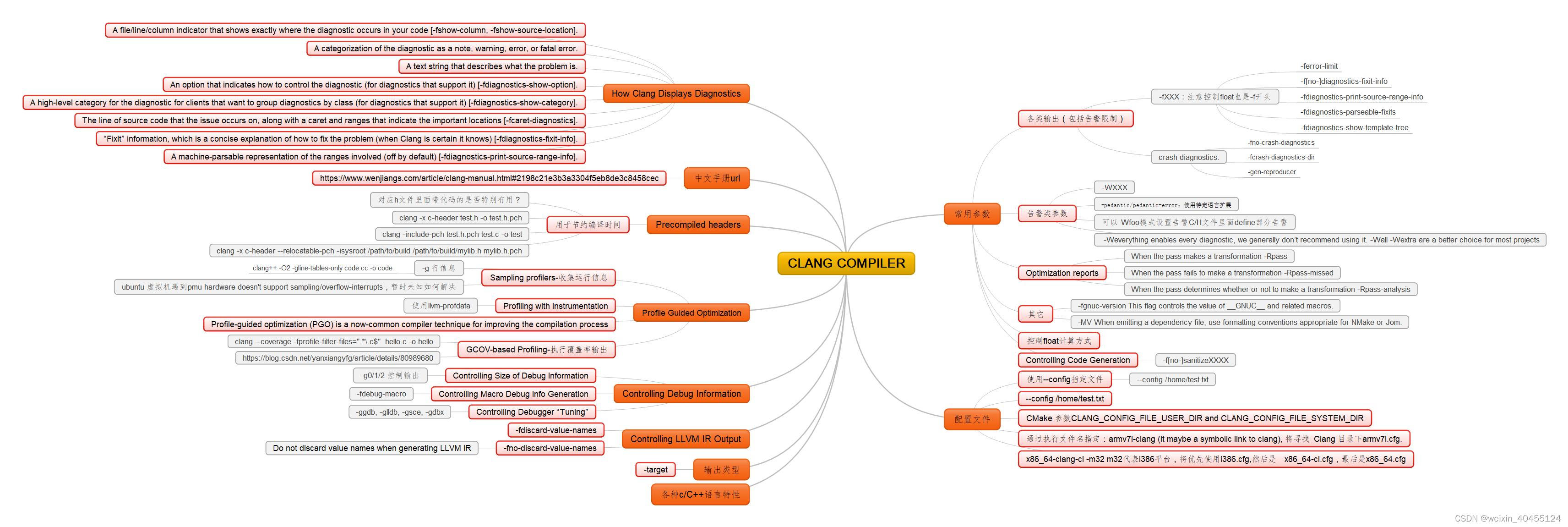
1.1. 常用参数
1.1.1. 各类输出(包括告警限制)
1.1.1.1. -fXXX:注意控制float也是-f开头
1.1.1.1.1. -ferror-limit
1.1.1.1.2. -f[no-]diagnostics-fixit-info
1.1.1.1.3. -fdiagnostics-print-source-range-info
1.1.1.1.4. -fdiagnostics-parseable-fixits
1.1.1.1.5. -fdiagnostics-show-template-tree
1.1.1.2. crash diagnostics.
1.1.1.2.1. -fno-crash-diagnostics
1.1.1.2.2. -fcrash-diagnostics-dir
1.1.1.2.3. -gen-reproducer
1.1.2. 告警类参数
1.1.2.1. -WXXX
1.1.2.2. -pedantic/pedantic-error:使用特定语言扩展
1.1.2.3. 可以-Wfoo模式设置告警C/H文件里面define部分告警
1.1.2.4. -Weverything enables every diagnostic, we generally don’t recommend using it. -Wall -Wextra are a better choice for most projects
1.1.3. Optimization reports
1.1.3.1. When the pass makes a transformation -Rpass
1.1.3.2. When the pass fails to make a transformation -Rpass-missed
1.1.3.3. When the pass determines whether or not to make a transformation -Rpass-analysis
1.1.4. 其它
1.1.4.1. -fgnuc-version This flag controls the value of GNUC and related macros.
1.1.4.2. -MV When emitting a dependency file, use formatting conventions appropriate for NMake or Jom.
1.1.5. 控制float计算方式
1.1.6. Controlling Code Generation
1.1.6.1. -f[no-]sanitizeXXXX
1.2. 配置文件
1.2.1. 使用–config指定文件
1.2.1.1. --config /home/test.txt
1.2.2. --config /home/test.txt
1.2.3. CMake 参数CLANG_CONFIG_FILE_USER_DIR and CLANG_CONFIG_FILE_SYSTEM_DIR
1.2.4. 通过执行文件名指定:armv7l-clang (it maybe a symbolic link to clang), 将寻找 Clang 目录下armv7l.cfg.
1.2.5. x86_64-clang-cl -m32 m32代表i386平台,将优先使用i386.cfg,然后是 x86_64-cl.cfg,最后是x86_64.cfg
1.3. How Clang Displays Diagnostics
1.3.1. A file/line/column indicator that shows exactly where the diagnostic occurs in your code [-fshow-column, -fshow-source-location].
1.3.2. A categorization of the diagnostic as a note, warning, error, or fatal error.
1.3.3. A text string that describes what the problem is.
1.3.4. An option that indicates how to control the diagnostic (for diagnostics that support it) [-fdiagnostics-show-option].
1.3.5. A high-level category for the diagnostic for clients that want to group diagnostics by class (for diagnostics that support it) [-fdiagnostics-show-category].
1.3.6. The line of source code that the issue occurs on, along with a caret and ranges that indicate the important locations [-fcaret-diagnostics].
1.3.7. “FixIt” information, which is a concise explanation of how to fix the problem (when Clang is certain it knows) [-fdiagnostics-fixit-info].
1.3.8. A machine-parsable representation of the ranges involved (off by default) [-fdiagnostics-print-source-range-info].
1.4. 中文手册url
1.4.1. https://www.wenjiangs.com/article/clang-manual.html#2198c21e3b3a3304f5eb8de3c8458cec
1.5. Precompiled headers
1.5.1. 用于节约编译时间
1.5.1.1. 对应h文件里面带代码的是否特别有用?
1.5.1.2. clang -x c-header test.h -o test.h.pch
1.5.1.3. clang -include-pch test.h.pch test.c -o test
1.5.1.4. clang -x c-header --relocatable-pch -isysroot /path/to/build /path/to/build/mylib.h mylib.h.pch
1.6. Profile Guided Optimization
1.6.1. Sampling profilers-收集运行信息
1.6.1.1. -g 行信息
1.6.1.1.1. clang++ -O2 -gline-tables-only code.cc -o code
1.6.1.2. ubuntu 虚拟机遇到pmu hardware doesn’t support sampling/overflow-interrupts,暂时未知如何解决
1.6.2. Profiling with Instrumentation
1.6.2.1. 使用llvm-profdata
1.6.3. Profile-guided optimization (PGO) is a now-common compiler technique for improving the compilation process
1.6.4. GCOV-based Profiling-执行覆盖率输出
1.6.4.1. clang --coverage -fprofile-filter-files=“.*.c$” hello.c -o hello
1.6.4.2. 参考 https://blog.csdn.net/yanxiangyfg/article/details/80989680
1.7. Controlling Debug Information
1.7.1. Controlling Size of Debug Information
1.7.1.1. -g0/1/2 控制输出
1.7.2. Controlling Macro Debug Info Generation
1.7.2.1. -fdebug-macro
1.7.3. Controlling Debugger “Tuning”
1.7.3.1. -ggdb, -glldb, -gsce, -gdbx
1.8. Controlling LLVM IR Output
1.8.1. -fdiscard-value-names
1.8.2. -fno-discard-value-names
1.8.2.1. Do not discard value names when generating LLVM IR
1.9. 输出类型
1.9.1. -target
1.10. 各种c/C++语言特性
本文来自互联网用户投稿,文章观点仅代表作者本人,不代表本站立场,不承担相关法律责任。如若转载,请注明出处。 如若内容造成侵权/违法违规/事实不符,请点击【内容举报】进行投诉反馈!