【Android入门到项目实战-- 9.4】—— 方向传感器的详细使用教程
目录
一、基础知识
二、实战使用
一、基础知识
Android的方向传感器,返回三轴的角度数据,方向数据的单位是角度。
提供三个数据:azimuth、pitch和roll。
azimuth:方位,返回水平时磁北极和Y轴的夹角,范围是0°到360°;0°=北,90°=东,180°=南,270°=西。
pitch:x轴和水平面的夹角,范围是-180°到180°;当z轴向y轴转动时,角度为正值。
roll:y轴和水平面的夹角,范围是-90°到90°;当x轴向z轴移动时,角度为正值。
在应用程序中使用SensorManager.getOrientation()来获得原始数据。
public static float[] getOrientation (float[] R, float[] values)第一个参数是R用来保存磁场和加速度的数据,通过该函数获取方位角。
第二个参数是函数输出,数据自动填充。
- values[0]:方向角,但用(磁场+加速度)得到的数据范围是(-180~180),也就是说,0表示正北,90表示正东,180/-180表示正南,-90表示正西。而直接通过方向感应器数据范围是(0~359)360/0表示正北,90表示正东,180表示正南,270表示正西。
- values[1]:pitch 倾斜角即由静止状态开始,前后翻转,手机顶部往上抬起(0~-90),手机尾部往上抬起(0~90)
- values[2]:roll 旋转角 即由静止状态开始,左右翻转,手机左侧抬起(0~90),手机右侧抬起(0~-90)
通过函数getRotationMatrix获取R
public static boolean getRotationMatrix (float[] R, float[] I, float[] gravity, float[] geomagnetic)注册监听
sensorManager.registerListener(this, acc_sensor, SensorManager.SENSOR_DELAY_GAME);
sensorManager.registerListener(this, mag_sensor,SensorManager.SENSOR_DELAY_GAME);
二、实战使用
如下图:下面实现具有以下功能的简单检测。
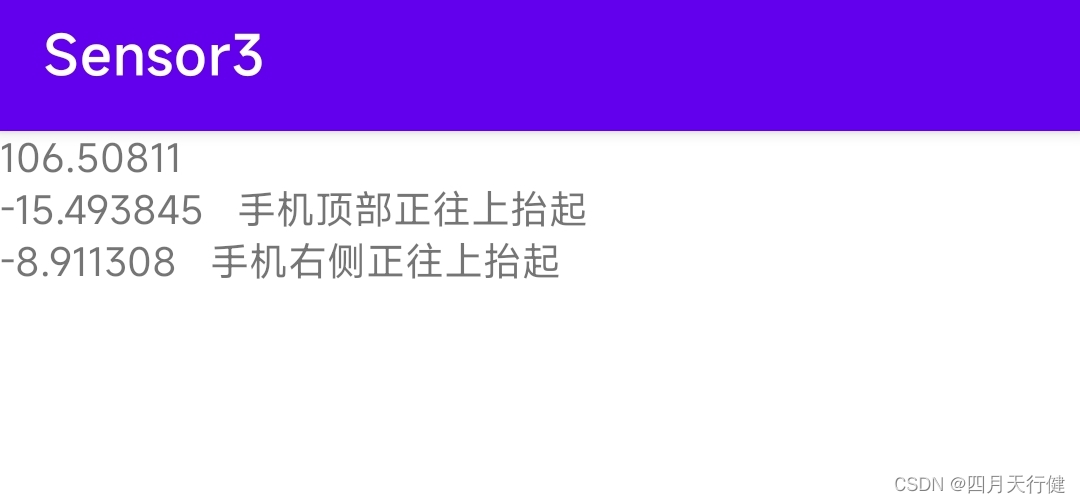
可以检测到是否指向东北方向,手机顶部时候抬起,手机右侧是否抬起。
新建项目,修改activity_main.xml代码
修改MainActivity代码,如下:
public class MainActivity extends AppCompatActivity implements SensorEventListener {private SensorManager sm;TextView textViewx;TextView textViewy;TextView textViewz;//加速度传感器数据float accValues[] = new float[3];//地磁传感器数据float magValues[] = new float[3];//旋转矩阵,用来保存磁场和加速度的数据float r[] = new float[9];//模拟方向传感器的数据(原始数据为弧度)float values[] = new float[3];@Overrideprotected void onCreate(Bundle savedInstanceState) {super.onCreate(savedInstanceState);setContentView(R.layout.activity_main);textViewx = (TextView) findViewById(R.id.textViewx);textViewy = (TextView) findViewById(R.id.textViewy);textViewz = (TextView) findViewById(R.id.textViewz);//        获取传感器管理器sm = (SensorManager)getSystemService(SENSOR_SERVICE);
//        调用方法获得需要的传感器Sensor mSensorOrientation = sm.getDefaultSensor(Sensor.TYPE_MAGNETIC_FIELD);Sensor nSensorOrientation = sm.getDefaultSensor(Sensor.TYPE_ACCELEROMETER);
//        注册监听器
//        SENSOR_DELAY_FASTEST最灵敏//        SENSOR_DELAY_GAME 游戏的时候,不过一般用这个就够了//        SENSOR_DELAY_NORMAL 比较慢。//        SENSOR_DELAY_UI 最慢的sm.registerListener(this, mSensorOrientation, android.hardware.SensorManager.SENSOR_DELAY_UI);sm.registerListener(this, nSensorOrientation, android.hardware.SensorManager.SENSOR_DELAY_UI);}//    该方法在传感器的值发生改变的时候调用@Overridepublic void onSensorChanged(SensorEvent event) {if(event.sensor.getType() == Sensor.TYPE_ACCELEROMETER){accValues = event.values.clone();}else if(event.sensor.getType() == Sensor.TYPE_MAGNETIC_FIELD){magValues = event.values.clone();}/*** r:要填充的旋转数组* I: 将磁场数据转换进实际的重力坐标中,一般默认情况下可以设置为null* gravity: 加速度传感器数据* geomagnetic:地磁传感器数据*/SensorManager.getRotationMatrix(r, null, accValues, magValues);/*** R:旋转数组* values:模拟方向传感器的数据*/SensorManager.getOrientation(r, values);//将弧度转化为角度后输出float azimuth = (float) Math.toDegrees(values[0]);float pitch = (float) Math.toDegrees(values[1]);float roll = (float) Math.toDegrees(values[2]);if(azimuth >= 0 && azimuth <= 90){textViewx.setText(azimuth+"   "+"正指向东北方向");}else{textViewx.setText(azimuth+"");}if(pitch <=0 && pitch >= -90){textViewy.setText(pitch+"   "+"手机顶部正往上抬起");}else{textViewy.setText(pitch+"");}if(roll <=0 && pitch >= -90){textViewz.setText(roll+"   "+"手机右侧正往上抬起");}else{textViewz.setText(roll+"");}}//    当传感器的进度发生改变时会回调@Overridepublic void onAccuracyChanged(Sensor sensor, int accuracy) {}//    在activity变为不可见的时候,传感器依然在工作,这样很耗电,所以我们根据需求可以在onPause方法里面停掉传感器的工作@Overridepublic void onPause() {sm.unregisterListener(this);super.onPause();}
}
本文来自互联网用户投稿,文章观点仅代表作者本人,不代表本站立场,不承担相关法律责任。如若转载,请注明出处。 如若内容造成侵权/违法违规/事实不符,请点击【内容举报】进行投诉反馈!