nginx搭建文件服务器脚本,nginx搭建web服务器,配置端口复用
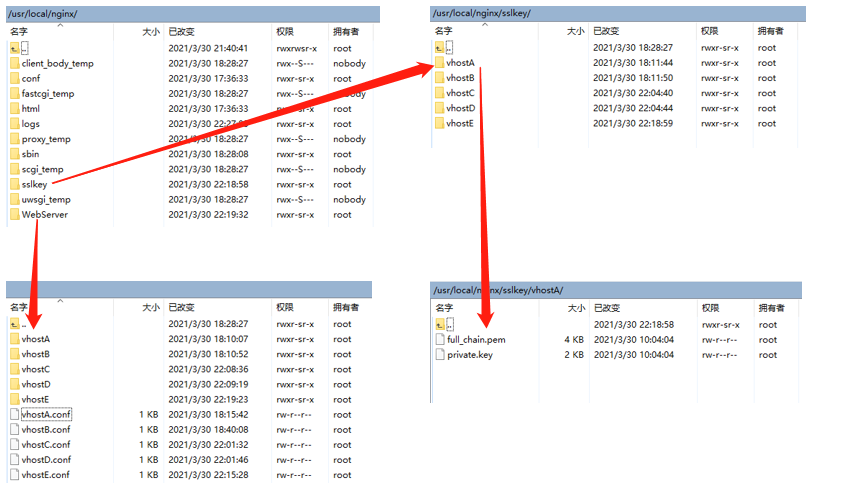
1、文件安装目录说明Nginx安装目录为/usr/local/nginx
Nginx主配置文件目录为/usr/local/nginx/conf/nginx.conf
https密钥key存放目录/usr/local/nginx/sslkey/vhost*
网站存放目录/usr/local/nginx/WebServer
各网站主配置文件存放目录/usr/local/nginx/WebServer/vhost*.conf
2、Nginx主配置文件worker_processes 1;
events {
worker_connections 1024;
}
http {
include mime.types;
default_type application/octet-stream;
sendfile on;
keepalive_timeout 65;
#gzip on;
server {
listen 80; #业务监听端口
server_name localhost;
#charset koi8-r;
#access_log logs/host.access.log main;
location / {
root html;
index index.html index.htm;
}
}
include /usr/local/nginx/WebServer/*.conf; #外链加载的主Nginx的配置文件路径,需要指向到各个网站的配置文件上去
}
3、各网站主配置文件的解释server {
listen 80;
server_name www.secddi.com; #此处为需要重写的URL地址
rewrite ^(.*) https://$server_name$1 permanent;
} #以上配置文件的意思为重写服务器的http 80端口至https 443端口
server {
listen 443;
server_name www.secddi.com; #此处为https的URL地址
index index.html;
root /usr/local/nginx/WebServer/vhostA; #此处为web网站的访问目录,主页路径
ssl_certificate /usr/local/nginx/sslkey/vhostA/full_chain.pem; #此处为配置的https证书路径
ssl_certificate_key /usr/local/nginx/sslkey/vhostA/private.key; #此处为配置的https证书路径
ssl_session_cache shared:SSL:1m;
ssl_session_timeout 5m;
server_tokens off;
fastcgi_param HTTPS on;
fastcgi_param HTTP_SCHEME https;
access_log /usr/local/nginx/logs/httpsaccess.log;
}
4、配置nginx脚本#!/bin/bash
#description: Ngnix Service
#chkconfig:2345 88 77
#帮助函数
Usage (){
echo $"Usage:$0 {start|stop|restart}"
}
#启动函数
start(){
pid_file="/usr/local/nginx/logs/nginx.pid"
if [ -f $pid_file ];then
echo "Ngnix Already Running, Do Not Run Again.。"
exit 1
else
echo "Ngnix Service Is Start Running..."
/usr/local/nginx/sbin/./nginx
/usr/local/nginx/sbin/./nginx -s reload
fi
}
#停止函数
stop(){
pid_file="/usr/local/nginx/logs/nginx.pid"
if [ -f $pid_file ];then
echo "Ngnix coming to stop running"
/usr/local/nginx/sbin/./nginx -s stop
else
echo "Ngnix is not running..."
exit 1
fi
}
#选择语句
case $1 in
start )
start
;;
stop )
stop
;;
restart )
stop
sleep 1
start
;;
* )
Usage
;;
esac
5、将配置文件保存在/etc/init.d/nginx位置即可。之后即可通过下面的命令进行启动服务。chmod +777 /etc/init.d/nginx
/etc/init.d/nginx stop/start/restart
标签:web,配置文件,stop,复用,server,nginx,usr,local
来源: https://blog.51cto.com/eholog/2685046
本文来自互联网用户投稿,文章观点仅代表作者本人,不代表本站立场,不承担相关法律责任。如若转载,请注明出处。 如若内容造成侵权/违法违规/事实不符,请点击【内容举报】进行投诉反馈!