使用Mongoose的populate方法实现多表关联查询
MongoDB在3.2以上的版本有类似于 join 的 $lookup 聚合操作符,其实 Mongoose 有一个更强大的替代方法,叫做populate ( ),它允许你在其他集合中引用文档,实现更简洁优雅的查询操作。
以内容管理系统为例,有文章分类、文章详情、文章作者三个集合,UML图如下:
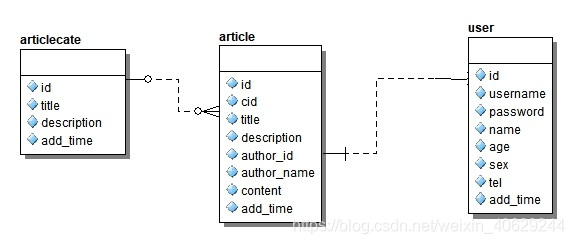
业务需求如下:查询文章信息,并显示文章的分类以及文章的作者信息,下面用 populate 来实现这个查询需求。
1. 定义文章分类的schema生成模型导出,文件名 aritcleCate.js
// 引入自定义的数据库连接文件
var mongoose=require('./db.js');
var ArticleCateSchema = new mongoose.Schema({title  : { type: String, unique: true },descripton:String,addtime:{type:Date       }
});module.exports=mongoose.model('ArticleCate',ArticleCateSchema,'articlecate');
2. 定义用户的schema生成模型导出,文件名 user.js
// 引入自定义的数据库连接文件
var mongoose = require('./db.js');var UserSchema = new mongoose.Schema({username: {type: String,unique: true},password: String,name: String,age: Number,sex: String,tel: Number,status: {type: Number,default: 1}
});
module.exports = mongoose.model('User', UserSchema, 'user');
3. 定义文章的 schema 生成模型导出,文件名 article.js
通过给 schema 中的关联字段添加 ref 与指定的模型建立关联
// 引入自定义的数据库连接文件
var mongoose = require('./db.js');
var Schema = mongoose.Schema;var ArticleSchema = new Schema({title: {type: String, unique: true},// 分类IDcid: {type: Schema.Types.ObjectId,// 引用文章分类的模型  ref: "ArticleCate"},// 用户IDauthor_id: {type: Schema.Types.ObjectId,// 引用 user 的模型ref: "User"},author_name: {type: String},descripton: String,content: String
});module.exports = mongoose.model('Article', ArticleSchema, 'article');
4. 执行查询操作
// 注意使用 populate 需要引入用到的 model
var ArticleCateModel=require('./model/articleCate.js');
var ArticleModel=require('./model/article.js');
var UserModel=require('./model/user.js');// 文章表、分类表关联
ArticleModel.find({}).populate('cid').exec(function(err,docs){console.log(docs);
})// 文章表、分类表、用户表关联
ArticleModel.find({}).populate('cid').populate('author_id').exec(function(err,docs){console.log(docs);
})
通过给 populate 中传入所关联的字段与指定的集合进行关联查询,在 exec( ) 的回调方法中获取查询的结果。
本文来自互联网用户投稿,文章观点仅代表作者本人,不代表本站立场,不承担相关法律责任。如若转载,请注明出处。 如若内容造成侵权/违法违规/事实不符,请点击【内容举报】进行投诉反馈!