使用ThreeJS绘制一个饼图
总体思路
使用THREE.Shape绘制一个外边圆弧和内边圆弧,让外边圆弧剔除内边圆弧,由于内边圆弧半径是可控的,所以也能通过这种办法绘制正常圆弧。最后使用THREE.ExtrudeGeometry挤出最终的图形,形成3D扇形图。制作单个扇形图之后,以此类推,制作剩下的扇形,最终将获得的扇形图集合,置入同一个THREE.Group中,形成一个3D饼图
具体代码(饼图)
import * as THREE from'three'
//饼图继承Group(对象组合)类
class Pie extends THREE.Group {constructor (option) {super()this.option = Object.assign({intervalAngle: 3,//每个扇形之间间距度数,代表每个扇形之间的间距,为0的话则无间距interval: 0,//每个扇形距离原本中心坐标点的额外距离,如果过高会导致扇形离中心点散开}, option)//总值let sum = 0//总间距=扇形数量x每个扇形之间间距度数this.totalInterval = this.option.intervalAngle * this.option.items.length//遍历传入的数组,获取总值this.option.items.forEach(item => {sum += item.value})//绘制扇形总角度为this.totalAngle = 360 - this.totalInterval//随机起始度数let current = Math.random() * 360//根据传入的数组绘制多个扇形for (let i = 0, len = this.option.items.length; i < len; i++) {let item = this.option.items[i]//扇形let geometry = this.sector(5, 15, current, current + item.value / sum * this.totalAngle, this.option.height)// 赋予扇形材质let mesh = new THREE.Mesh(geometry, new THREE.MeshPhongMaterial({ color: item.color, opacity: 1, transparent: true }))//扇形中心坐标点=(起始度数+最终度数)/2*Π/180let center = (current + current + item.value / sum * this.totalAngle) / 2 * Math.PI / 180//扇形坐标点=扇形中心坐标点*离中心点距离mesh.position.x += this.option.interval * Math.cos(center);mesh.position.y += this.option.interval * Math.sin(center);this.add(mesh)//起始度数加上值对应的间隔度数(值对应的间隔度数=总间隔度数*(值与总值的比例)) current += item.value / sum * this.totalAngle//起始度数加上单位间隔度数current += this.option.intervalAngle}//调整整体饼图的旋转角度,可加。也可在外部调整// this.rotation.x = -Math.PI / 3}//绘制扇形(内边圆半径,外边圆半径,起始角度,终止角度,高度)sector (inRadius, outRadius, begin, end, height) {var shape = new THREE.Shape()//如果内边圆半径为0if (inRadius == 0) {//那么绘制扇形的圆心点为0shape.moveTo(0, 0)} else {//否则设置绘制扇形的圆心点内边圆半径shape.moveTo(inRadius, 0)//绘制内边框扇形圆弧shape.absarc(0, 0, inRadius, begin / 180 * Math.PI, end / 180 * Math.PI, false)}shape.lineTo(outRadius * Math.cos(end / 180 * Math.PI), outRadius * Math.sin(end / 180 * Math.PI))//绘制外边框扇形圆弧shape.absarc(0, 0, outRadius, end / 180 * Math.PI, begin / 180 * Math.PI, true)shape.lineTo(inRadius * Math.cos(begin / 180 * Math.PI), inRadius * Math.sin(begin / 180 * Math.PI))//将绘制的平面扇形挤出设置的高度,使其变成3D扇形(shape平面扇形,amount挤压高度,bevelEnabled是否设置斜角,steps指定拉伸体沿深度方向分成多少段)return new THREE.ExtrudeGeometry(shape, { amount: height, bevelEnabled: false, steps: 1 })}//添加文字(暂无)addText (text, x, y, z) {}}export default Pie
具体代码(使用场景实例)
<template><div class="hisotyChart"></div>
</template>
<style scoped lang="scss">
.hisotyChart {width: 90%;height:100%;// height: 100vh;// width: 100vw;margin-bottom: 3%;background-color: cornflowerblue;canvas{width: 100%;height:100%;}
}
</style>
<script>
import * as THREE from 'three';
import { OrbitControls } from 'three/examples/jsm/controls/OrbitControls';
import Pie from './3DChart/3DPie';const $ = s => document.querySelector(s);
let pyramid = null;
//展示模型
let showModel = null;
//摄像头
let camera = null;
//场景
let scene = null;//灯光
let light = null;
//渲染器
let render = null;
//用户交互插件
let controls = null;
let group = new THREE.Group();export default {name: 'HisotyChart',data() {return {};},methods: {//场景初始化initScene() {console.log("绘制场景");scene = new THREE.Scene();scene.background = new THREE.Color(0xa0a0a0);console.log("绘制场景结束");},//初始化摄像头initCamera() {console.log("绘制场景");camera = new THREE.PerspectiveCamera(45, window.innerWidth / window.innerHeight, 0.1, 1000);// -7.951022465039643, y: 50.66599857875026, z: 84.02389415272548camera.position.set(0, 0, 0);console.log(camera);camera.lookAt(new THREE.Vector3(0, 0, 0));},//初始化灯光initLight() {scene.add(new THREE.AmbientLight(0x444444));light = new THREE.SpotLight(0xffffff);// light.position.set(0, 1.25, 1.25);// light.position.set(0, -110, 20);light.matrixWorldAutoUpdate = true;light.position.set(165.8, 35.6, 80.6);//告诉点光需要开启阴影投射light.castShadow = true;light.shadow.bias = -0.000005;light.shadow.mapSize.width = 2048; //阴影贴图宽度设置为1024像素light.shadow.mapSize.height = 2048; //阴影贴图高度设置为1024像素var ligntCameraHelper = new THREE.SpotLightHelper(light, 20);ligntCameraHelper.visible = false;// let Ambient = new THREE.AmbientLight(0x404040, 2);scene.add(ligntCameraHelper);scene.add(light);var shadowCameraHelper = new THREE.CameraHelper(light.shadow.camera);shadowCameraHelper.visible = false;// let Ambient = new THREE.AmbientLight(0x404040, 2);scene.add(shadowCameraHelper);},//3D饼图初始化initPie() {pyramid = new Pie({items: [{value: Math.random() * 10,color: '#DE5347'}, {value: Math.random() * 10,color: '#3DCE3D'}, {value: Math.random() * 10,color: '#0080FF'},{value: Math.random() * 10,color: '#A473EA'}],text: (item) => {return 'value-' + item.value}});pyramid.rotation.x = -Math.PI / 3;group.add(pyramid);scene.add(group);},//渲染器初始化initRender() {console.log("渲染渲染器");render = new THREE.WebGLRenderer({ antialias: true });// render.setSize(window.innerWidth, window.innerHeight);//修改渲染器输出格式render.outputEncoding = THREE.sRGBEncoding;render.shadowMap.enabled = true;render.shadowMap.type = THREE.PCFSoftShadowMap;//渲染器添加toneMapping效果// render.toneMapping = THREE.ACESFilmicToneMapping;//告诉渲染器需要阴影效果 render.setClearColor('#1F2025', 1.0);render.domElement.style.width="100%";render.domElement.style.height="100%";$('.hisotyChart').appendChild(render.domElement);},//用户插件初始化initControls() {controls = new OrbitControls(camera, render.domElement);// 使动画循环使用时阻尼或自转 意思是否有惯性controls.enableDamping = true;//动态阻尼系数 就是鼠标拖拽旋转灵敏度//controls.dampingFactor = 0.25;//是否可以缩放controls.enableZoom = true;//是否自动旋转controls.autoRotate = true;controls.autoRotateSpeed = 0.5;//设置相机距离原点的最远距离controls.minDistance = 1;//设置相机距离原点的最远距离controls.maxDistance = 500;//是否开启右键拖拽controls.enablePan = true;},render() {render.render(scene, camera);},//窗口变动触发的函数onWindowResize() {camera.aspect = window.innerWidth / window.innerHeight;camera.updateProjectionMatrix();this.render();//render.setSize(window.innerWidth, window.innerHeight);},animate() {//更新requestAnimationFrame(this.animate);this.render();},//绘制draw() {console.log("开始绘制");this.initScene();this.initCamera();this.initRender();this.initLight();this.initControls();this.initPie();this.animate();window.onresize = this.onWindowResize;}},created(){},mounted() {this.draw();}
}
</script><!-- <template><div class="hisotyChart"></div>
</template>
<script>export default{name:"HisotyChart"}
</script>
<style scoped lang="scss">.hisotyChart{height: 90%;width: 100%;margin-bottom: 3%;background-color: cornflowerblue;}
</style> -->
最终效果(空心圆饼图)

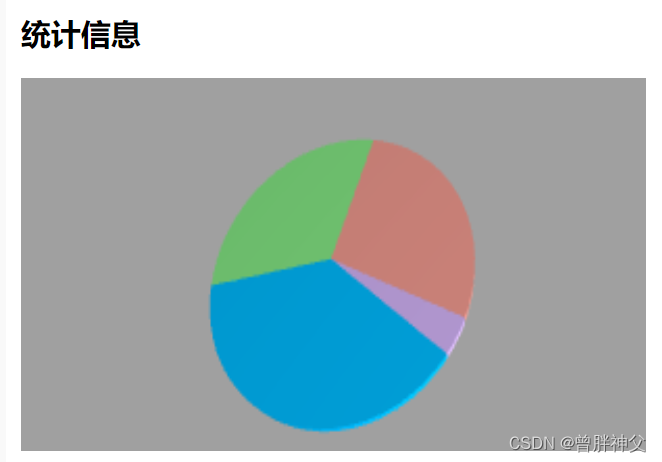
最终效果(标准实心圆饼图)

设置内边圆为0,即可获得实心圆

设置扇形间距距离为0,使其无间距。
最终效果如下
本文来自互联网用户投稿,文章观点仅代表作者本人,不代表本站立场,不承担相关法律责任。如若转载,请注明出处。 如若内容造成侵权/违法违规/事实不符,请点击【内容举报】进行投诉反馈!