VUE + cesium 动态路网、动态圆、范围线
效果:
1、动态路网
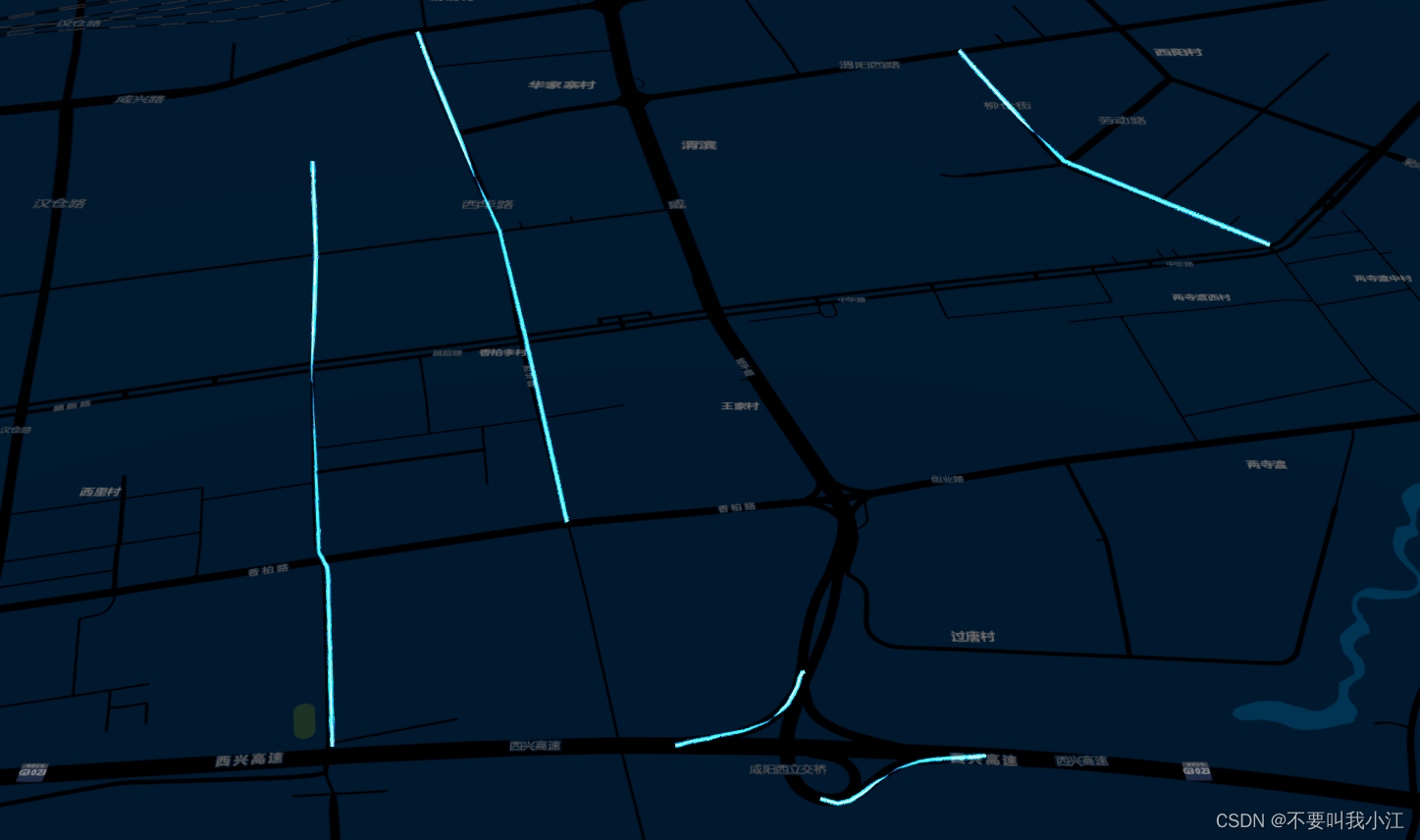
2、动态圆:

3、范围线:

代码实现:
1、动态路网:
js部分:主要引入光效线的方法
// 光效线
function CityLineMaterial(Cesium) {var Color = Cesium.Color,defaultValue = Cesium.defaultValue,defined = Cesium.defined,defineProperties = Object.defineProperties,Event = Cesium.Event,createPropertyDescriptor = Cesium.createPropertyDescriptor,Property = Cesium.Property,Material = Cesium.Material,defaultColor = Color.WHITE;function PolylineCityLinkMaterialProperty(options) {options = defaultValue(options, defaultValue.EMPTY_OBJECT);this._definitionChanged = new Event();this._color = undefined;this._colorSubscription = undefined;this.color = options.color || Cesium.Color.BLUE;this.duration = options.duration || 1000;this._time = undefined;this.image = options.image || nullMaterial.PolylineCityLinkType = 'PolylineCityLink';Material._materialCache.addMaterial(Material.PolylineCityLinkType, {fabric: {type: Material.PolylineCityLinkType,uniforms: {color: options.color,image: options.image,time: 0,},source: getDynamicLightLineShader({get: true})},translucent: function () {return true;}});}defineProperties(PolylineCityLinkMaterialProperty.prototype, {isvarant: {get: function () {return false;}},definitionChanged: {get: function () {return this._definitionChanged;}},color: createPropertyDescriptor('color')});PolylineCityLinkMaterialProperty.prototype.getType = function (time) {return Material.PolylineCityLinkType;};PolylineCityLinkMaterialProperty.prototype.getValue = function (time, result) {if (!defined(result)) {result = {};}result.color = Property.getValueOrClonedDefault(this._color, time, defaultColor, result.color);result.image = Material.PolylineCityLinkImage;if (this._time === undefined) {this._time = time.secondsOfDay;}result.image = this.image;result.time = (time.secondsOfDay - this._time) * 1000 / this.duration;return result;};PolylineCityLinkMaterialProperty.prototype.equals = function (other) {return this === other || //(other instanceof PolylineCityLinkMaterialProperty &&Property.equals(this._color, other._color));};Cesium.PolylineCityLinkMaterialProperty = PolylineCityLinkMaterialProperty}
vue调用:
//引入动态线方法CityLineMaterial(Cesium);// 动态路网let roads = require("../../static/data/road.json");roads.map((item) => {this.viewer.entities.add({polyline: {positions: Cesium.Cartesian3.fromDegreesArrayHeights(item), width: 5,material: new Cesium.PolylineCityLinkMaterialProperty({image: require("../../static/data/images/Textures/meteor_01.png"),color: new Cesium.Color(3.0, 36.0, 64.0),duration: 900,}),},});})2、动态圆
js部分:
//动态旋转圆/*** * @param {*} Cesium * @param {*} viewer 三维视图* @param {*} options positions radius scale imge  (lng lat height) 半径 天平盘 底图*/function craeteDynamicCricleGraphics(Cesium, viewer, options) {if (options && options.positions) {var entity = new Cesium.Entity(),_radius = options.radius || 800,_rotateAmount = options.rotateAmount || 0.05,_stRotation = 0,_height = options.height || 1,heading = 0,pitch = 0,roll = 0,_scale = options.scale || null,_scale2 = options.scale2 || null,_material = options.material || new Cesium.ImageMaterialProperty({image: options.imge,transparent: true});entity.position = options.positionsentity.orientation = new Cesium.CallbackProperty(function () {return Cesium.Transforms.headingPitchRollQuaternion(options.positions,new Cesium.HeadingPitchRoll(Cesium.Math.toRadians(heading),Cesium.Math.toRadians(pitch),Cesium.Math.toRadians(roll)))}, false)let bg_scale = _radius,flag = false;var updateScalerAxis = () => {if (_radius >= _scale || _radius <= bg_scale) {flag = !flag}flag ? _radius += 2 : _radius -= 2;}var updateScalerAxis2 = () => {_scale2 >= _radius ? _radius += 2 : _radius = bg_scale;}entity.ellipse = {material: _material,height: _height,semiMajorAxis: new Cesium.CallbackProperty(function () {return _radius}, false),semiMinorAxis: new Cesium.CallbackProperty(function () {return _radius}, false),stRotation: new Cesium.CallbackProperty(function () {if (_rotateAmount > 0) {_stRotation += _rotateAmountif (_stRotation >= 360) {_stRotation = 0}}if (_scale) updateScalerAxis()if (_scale2) updateScalerAxis2()return _stRotation}, false)}viewer.graphicsLayer.entities.add(entity)}
}
vue调用:
craeteDynamicCricleGraphics(Cesium,this.viewer,{positions: Cesium.Cartesian3.fromDegrees(108.646665039063,34.309817437066,1),radius: 400,scale: 800,imge: require("../../static/data/images/Textures/circle_bg.png"),});3、范围线
js部分:
//构建动态范围线/*** * @param {*} Cesium * @param {*} viewer 三维视图* @param {*} options positions material     * {positions:lng lat height} * {material:材质-WallLinkCustomMaterialProperty}* {WallLinkCustomMaterialProperty:image freely direction count color duration}* {WallLinkCustomMaterialProperty:底图 自由度:vertical  方向:+ 层 color:#efff00  duration}*/function craeteDynamicPolyLineGraphics(Cesium, viewer, options) {if (options && options.positions) {var entity = new Cesium.Entity()entity.polyline = {show: true,positions: [],material: options.material || Cesium.Color.CHARTREUSE,width: options.width || 5,clampToGround: options.clampToGround || false}entity.polyline.positions = new Cesium.CallbackProperty(function () {return options.positions;}, false);return viewer.graphicsLayer.entities.add(entity);}
}
vue调用:
craeteDynamicPolyLineGraphics(Cesium, this.viewer, {positions: Cesium.Cartesian3.fromDegreesArrayHeights([X1,Y1,Z1,X2,Y2,Z2,...,...,...,]//坐标格式,可输入自己需要的坐标数组),material: new Cesium.WallLinkCustomMaterialProperty({image: require("../../static/data/images/Textures/color1.png"),freely: "vertical",direction: "+",count: 2, color: Cesium.Color.fromCssColorString("#efff00"),duration: 50000,})})本文来自互联网用户投稿,文章观点仅代表作者本人,不代表本站立场,不承担相关法律责任。如若转载,请注明出处。 如若内容造成侵权/违法违规/事实不符,请点击【内容举报】进行投诉反馈!