SpringMVC配置swagger2
Swagger能成为最受欢迎的REST APIs文档生成工具之一,有以下几个原因:
Swagger 可以生成一个具有互动性的API控制台,开发者可以用来快速学习和尝试API。
Swagger 可以生成客户端SDK代码用于各种不同的平台上的实现。
Swagger 文件可以在许多不同的平台上从代码注释中自动生成。
Swagger 有一个强大的社区,里面有许多强悍的贡献者。
Swagger 文档提供了一个方法,使我们可以用指定的 JSON 或者 YAML 摘要来描述你的 API,包括了比如 NAMES、ORDER 等 API 信息。
你可以通过一个文本编辑器来编辑 Swagger 文件,或者你也可以从你的代码注释中自动生成。各种工具都可以使用 Swagger 文件来生成互动的 API 文档。
一、pom.xml引入基于maven的swagger依赖
io.springfox springfox-swagger2 2.7.0 io.springfox springfox-swagger-ui 2.7.0 二、编写SwaggerConfig配置类
SwaggerConfiguration.java
package com.shao.util;import org.springframework.context.annotation.Bean;
import org.springframework.context.annotation.Configuration;import springfox.documentation.builders.ApiInfoBuilder;
import springfox.documentation.builders.PathSelectors;
import springfox.documentation.builders.RequestHandlerSelectors;
import springfox.documentation.service.ApiInfo;
import springfox.documentation.spi.DocumentationType;
import springfox.documentation.spring.web.plugins.Docket;
import springfox.documentation.swagger2.annotations.EnableSwagger2;/*** Swagger2配置类* 通过@Configuration注解,让Spring来加载该类配置。* 再通过@EnableSwagger2注解来启用Swagger2。*/
@Configuration
@EnableSwagger2
public class SwaggerConfiguration {/*** 创建API应用* apiInfo() 增加API相关信息* 通过select()函数返回一个ApiSelectorBuilder实例,用来控制哪些接口暴露给Swagger来展现,* 本例采用指定扫描的包路径来定义指定要建立API的目录。** @return*/@Beanpublic Docket createRestApi() {return new Docket(DocumentationType.SWAGGER_2).apiInfo(apiInfo()).select().apis(RequestHandlerSelectors.basePackage("com.shao.controller")) //这里填写controller类路径.paths(PathSelectors.any()).build();}/*** 创建该API的基本信息(这些基本信息会展现在文档页面中)* 访问地址:http://项目实际地址/swagger-ui.html* @return*/private ApiInfo apiInfo() {return new ApiInfoBuilder().title("Spring MVC中使用Swagger2构建RESTful APIs").description("").termsOfServiceUrl("http://www.baidu.com").contact("shao").version("1.0").build();}
}
三、在spring mvc配置xml里面加入Swagger配置
在spring.xml文件中配置
四、controller层的编写例子
package com.shao.controller;import com.shao.bean.User;
import com.shao.service.UserService;
import io.swagger.annotations.Api;
import io.swagger.annotations.ApiOperation;
import org.slf4j.Logger;
import org.slf4j.LoggerFactory;
import org.springframework.beans.factory.annotation.Autowired;
import org.springframework.web.bind.annotation.RequestBody;
import org.springframework.web.bind.annotation.RequestMapping;
import org.springframework.web.bind.annotation.RequestMethod;
import org.springframework.web.bind.annotation.RestController;import java.util.HashMap;
import java.util.Map;/*** Created by shao on 2018/9/18.*/
@RestController
@Api(tags = "用户控制层")
@RequestMapping(value = "/user")
public class UserController {private Logger logger = LoggerFactory.getLogger(UserController.class);@Autowiredprivate UserService userService;@ApiOperation(value = "保存用户信息")@RequestMapping(value = "/saveUser", method = {RequestMethod.POST})public Map saveUser(@RequestBody User user){boolean res = true;try{userService.saveUser(user);}catch (Exception e){logger.info("saveUser方法报错:"+e.getMessage());res = false;}Map result = new HashMap<>();result.put("res",res);return result;}
}
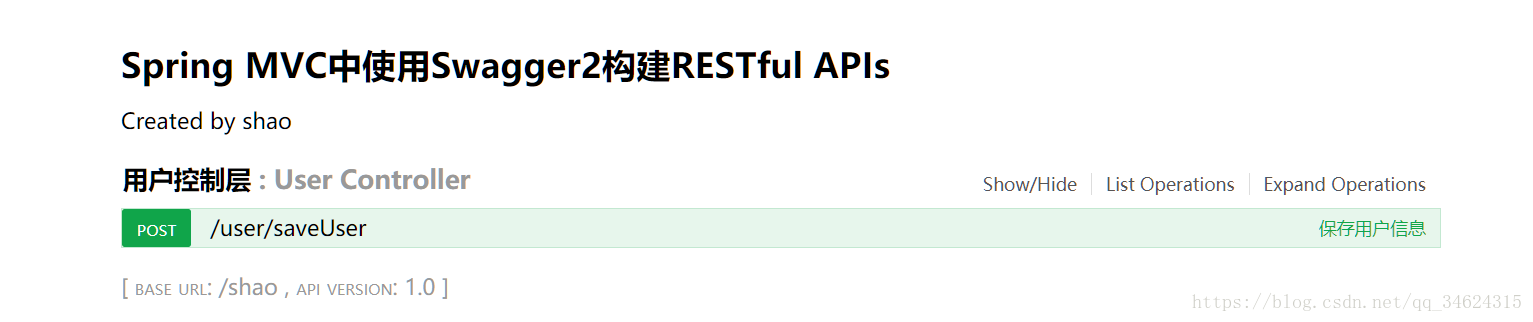
五、启动项目
地址:自己的项目地址+swagger-ui.html
示例:http://localhost:8080/shao/swagger-ui.html
欢迎关注我的微信公众号,会同步更新python、java、算法等相关内容!!!

本文来自互联网用户投稿,文章观点仅代表作者本人,不代表本站立场,不承担相关法律责任。如若转载,请注明出处。 如若内容造成侵权/违法违规/事实不符,请点击【内容举报】进行投诉反馈!