xlwt的实际应用
实习期间的需求
读取文件写成xls格式的表格,里面包含sheet1和sheet2页,sheet1页用于计算和读取sheet2页原有的数据,最后生成csv格式
遇到的问题和解决方法
1.for循环的冗杂;
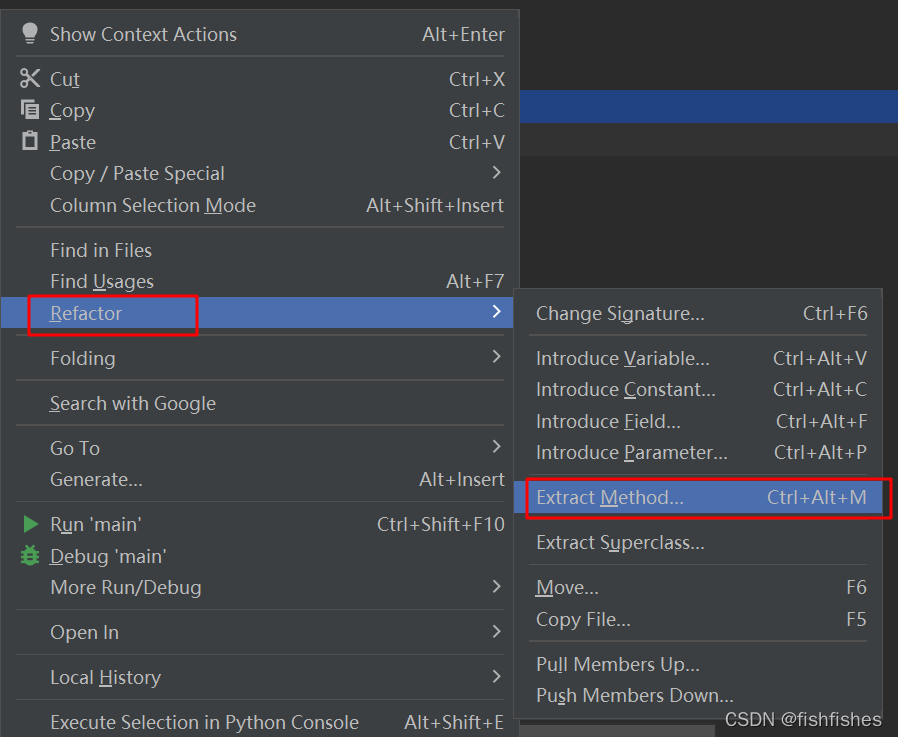
2.重复代码——使用函数封装 快捷键
3.时间格式的转换 —— 在此很是感谢我的同事,方法是他帮忙解决的
4.转成csv格式
import pandas as pddata = pd.read_excel('xxxx.xls', 'sheet1')
# print(type(data['Time'][0]))  结果是datetime.time类型可以使用time.strftime
# 此处进行格式的修改
data['Time'] = data['Time'].apply(lambda x: x.strftime("%H:%M:%S.%f")[:-3])
# index=False设定不要序号展示
data.to_csv('xxx.csv', encoding='utf-8', index=False)
from decimal import Decimalimport xlrd
import xlwt# 写入sheet1页的数据
def write_sheet1():heads = ["", "Year", "Month", "Day", "Hour", "Minute", "Second", "Elevation", "Azimuth", "Distance", "K","Delta(D)", "Delta(K)", "I=(K-1)*51.4GHz", "J=(K-1)*20.2GHz", "I+J", "Delta(I)", "Delta(J)", "Delta(I+J)","", "Time", "Delay(ns)", "Power(dBm)", "Doppler(Hz)"]# 生成sheet1的表头for h in range(len(heads)):worksheet1.write(0, h, heads[h])# 写入sheet2页的数据
def write_sheet2(filepath):file_contents = open(filepath, "r")# 将所有内容取到datas = file_contents.readlines()# 计算行数i = 1for data in datas:# 删除空格data = data.split()for j in range(len(data)):# 计算列数# 直接在此处将同样的数据写入到sheet1页worksheet1.write(i, j, data[j])worksheet2.write(i, j, data[j])i = i + 1# 计算sheet1页
def calculation():subtraction(9, 11, Decimal)subtraction(10, 12, Decimal)cal_IJ(51.4, 13)cal_IJ(20.2, 14)addition(13, 14)subtraction(13, 16, Decimal)subtraction(14, 17, Decimal)addition(16, 17)cal_T()cal_Time()cal_Delay()cal_Power()cal_Doppler()def subtraction(number, column, type):sheet_1 = read_sheet1(filepath)Delta_dki_col_nums = delete_header(number, sheet_1)col_nums = list(map(type, Delta_dki_col_nums))for i in range(0, len(col_nums) - 1):worksheet1.write(i + 2, column, Decimal(col_nums[i + 1]) - Decimal(col_nums[i]))workbook.save(filepath+".xls")def addition(column1, column2):sheet_1 = read_sheet1(filepath)column1_datas = delete_header(column1, sheet_1)column2_datas = delete_header(column2, sheet_1)if column1 == 16:del (column1_datas[0])del (column2_datas[0])column1_data = list(map(Decimal, column1_datas))column2_data = list(map(Decimal, column2_datas))for n in range(0, len(column1_data)):res1 = Decimal(column1_data[n]) + Decimal(column2_data[n])worksheet1.write(n + 2, 18, res1)else:column1_data = list(map(Decimal, column1_datas))column2_data = list(map(Decimal, column2_datas))for n in range(0, len(column1_data)):res2 = Decimal(column1_data[n]) + Decimal(column2_data[n])worksheet1.write(n + 1, 15, res2)workbook.save(filepath+".xls")def delete_header(column1, sheet_1):column1_datas = sheet_1.col_values(column1)del (column1_datas[0])return column1_datasdef cal_IJ(number, column):sheet_1 = read_sheet1(filepath)K = delete_header(10, sheet_1)K_nums = list(map(Decimal, K))for k in range(0, len(K_nums)):formula = round(Decimal(K_nums[k]-1)*Decimal(number)*Decimal(1000000000))worksheet1.write(k+1, column, formula)workbook.save(filepath+".xls")def cal_Delay():sheet_1 = read_sheet1(filepath)J = delete_header(9, sheet_1)J_nums = list(map(Decimal, J))for j in range(0, len(J_nums)):formula = round(Decimal(J_nums[j] * 2) / Decimal(0.3))worksheet1.write(j + 1, 21, formula)workbook.save(filepath+".xls")def cal_T():sheet_1 = read_sheet1(filepath)D = delete_header(3, sheet_1)E = delete_header(4, sheet_1)F = delete_header(5, sheet_1)G = delete_header(6, sheet_1)D_nums = list(map(Decimal, D))E_nums = list(map(Decimal, E))F_nums = list(map(Decimal, F))G_nums = list(map(Decimal, G))for d in range(0, len(D_nums)):d_handle = Decimal(D_nums[d] - D_nums[0]) * Decimal(86400)e_handle = Decimal(E_nums[d] - E_nums[0]) * Decimal(3600)f_handle = Decimal(F_nums[d] - F_nums[0]) * Decimal(60)g_handle = Decimal(G_nums[d] - G_nums[0])worksheet1.write(d+1, 19, Decimal(d_handle+e_handle+f_handle+g_handle))workbook.save(filepath+".xls")def cal_Time():style = xlwt.easyxf(num_format_str="HH:MM:SS.000")sheet_1 = read_sheet1(filepath)time_datas = delete_header(19, sheet_1)time_data = list(map(Decimal, time_datas))for td in range(0, len(time_data)):td_handles = Decimal(time_data[td]) / Decimal(86400)worksheet1.write(td+1, 20, td_handles, style)workbook.save(filepath+".xls")def cal_Power():sheet_1 = read_sheet1(filepath)benchmark = delete_header(1, sheet_1)benchmark_data = list(map(Decimal, benchmark))for b in range(0, len(benchmark_data)):worksheet1.write(b + 1, 22, -35)workbook.save(filepath+".xls")def cal_Doppler():sheet_1 = read_sheet1(filepath)Doppler_datas = delete_header(15, sheet_1)Doppler_data = list(map(Decimal, Doppler_datas))for d in range(0, len(Doppler_data)):worksheet1.write(d + 1, 23, Doppler_data[d])workbook.save(filepath+".xls")def read_sheet1(filepath):work_book = xlrd.open_workbook(filepath+'.xls')sheet_1 = work_book.sheet_by_index(0)return sheet_1def excel_copy(filepath):style = xlwt.easyxf(num_format_str="HH:MM:SS.000")wb = xlrd.open_workbook(filepath+".xls")sheet1 = wb.sheet_by_index(0)# 组装文件名year = sheet1.col_values(1)[1]month = sheet1.col_values(2)[1]day = sheet1.col_values(3)[1]exact_date = year + month + dayfilename = filepath + exact_date# 获取单元格数据Time = sheet1.col_values(20)Delay = sheet1.col_values(21)Power = sheet1.col_values(22)Doppler = sheet1.col_values(23)# 创建写入文件workbook = xlwt.Workbook()# 创建写入sheet页worksheet = workbook.add_sheet("sheet1", cell_overwrite_ok=True)# 写入excelfor t in range(0, len(Time)):worksheet.write(t, 0, Time[t], style)worksheet.write(t, 1, Delay[t])worksheet.write(t, 2, Power[t])worksheet.write(t, 3, Doppler[t])workbook.save(filename+".xls")if __name__ == '__main__':filepath = "Sat0_STATION_out_doppler_gw"# 创建一个工作簿workbook = xlwt.Workbook()# 创建sheet页worksheet1 = workbook.add_sheet("sheet1", cell_overwrite_ok=True)worksheet2 = workbook.add_sheet("sheet2", cell_overwrite_ok=True)write_sheet1()write_sheet2(filepath=filepath)workbook.save(filepath+".xls")read_sheet1(filepath)calculation()excel_copy(filepath)本文来自互联网用户投稿,文章观点仅代表作者本人,不代表本站立场,不承担相关法律责任。如若转载,请注明出处。 如若内容造成侵权/违法违规/事实不符,请点击【内容举报】进行投诉反馈!