Qt 之 Qt/Qt Lite 自编译详解(VS/MinGW/...)
- 2018/3/24 目前QT更新到了5.10.1。文章增加了对该版本的说明。
- 2020/9/5 目前QT更新到了5.15.0。文章更新了部分内容
写在前面
现在,网上关于 Qt 编译的文章数不胜数。写这篇文章仅仅是对于自我学习的一个记录。主要是对实际学习中遇到的一些棘手问题做个备忘录。
编译工具使用 VS2017 和 MinGW5.3.0 为例,来进行说明。
qconfig-gui
如果使用的是 Qt 的商业版,会提供一个叫做 Qt Configuration Tool 的 GUI 工具。我们可以使用它更方便的来生成 Configure 参数。省去了我们自己摸索 configure 参数的烦恼。如下图:
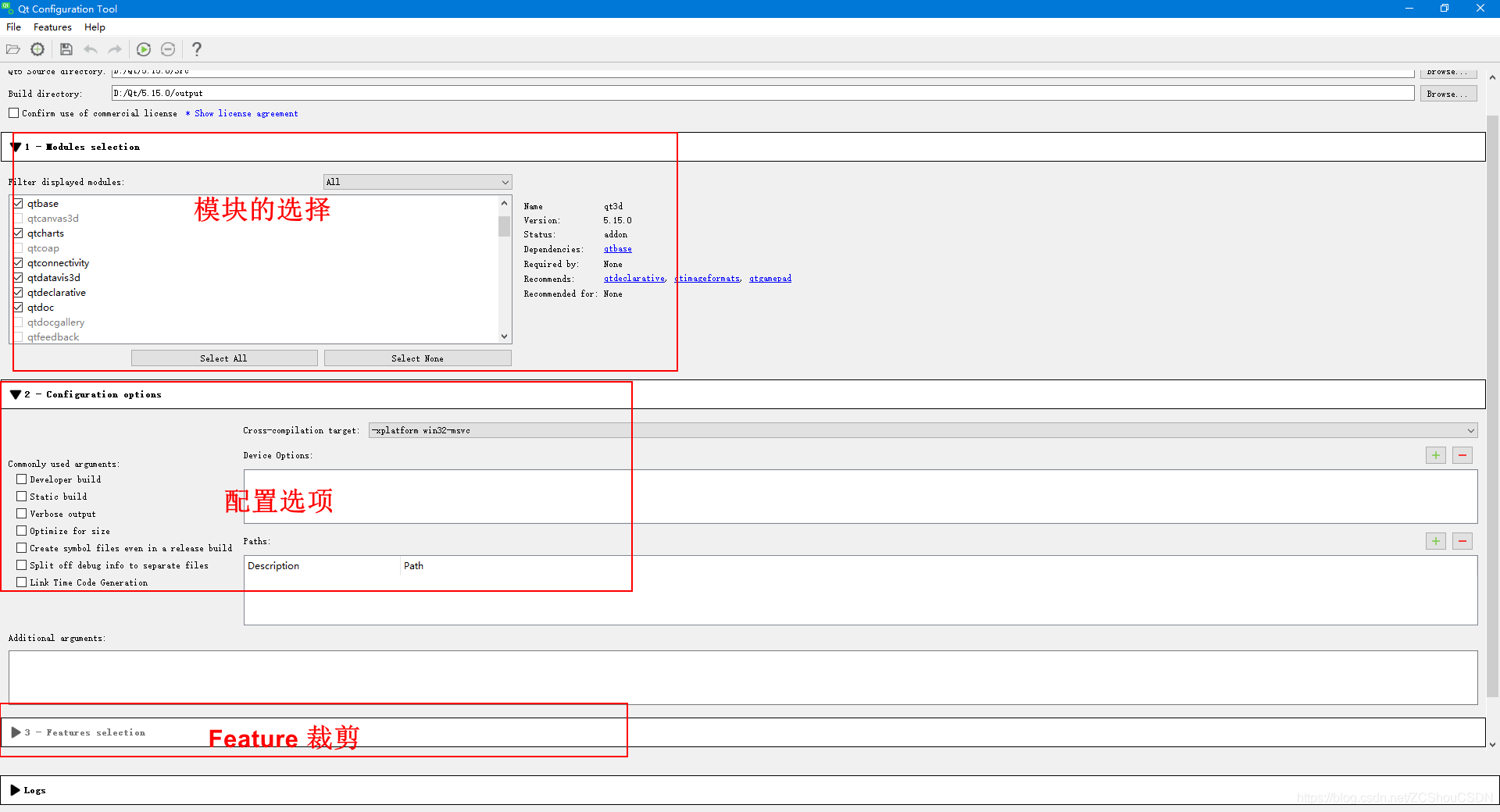
我们选择好配置之后,点击 工具里的 Run Configure 就会自动执行 Configure。需要注意的是,Feature 需要执行操作之后才会显示(处理了 qtbase 之后)。 如果使用的是开源版,就只能按照后文一点点自己摸索了!
Qt Configure
Qt 的配置系统可以说相当复杂。看完源码中的各种配置文件,自杀的心都有了。。。
在Qt的众多配置选项中,有些是固定针对特定平台的;有些是自动检测的; 对于以上两种,一般不需要太关心。需要关注的配置选项中,个人感觉需要重点关注的可以分为以下三大类种:
- 基本配置选项
- Qt 组件配置选项(Qt Modules、Qt Features等)
- Third-Party Libraries配置参数
当编译目录和源码目录不一样时,称为 影子编译(shadow build) 。(Qt Creator 默认是使用影子编译来编译工程的)。Qt 源码的编译也可以使用影子编译,方法就是新建一个目录,然后 cd 到该目录中运行 configure。影子编译在处理一份源码对应多种编译结果时尤为方便。
mkdir ~/qt-build
cd ~/qt-build
~/qt-source/configure -prefix /opt/Qt5.6		/* 在新建的目录中执行编译,则编译产生的文件就会放在新目录,不会对源码目录有影响 */
- 可以通过
configure --help或者configure -h查看完整的configure配置参数- 具体可参看http://doc.qt.io/qt-5/configure-options.html
基本配置选项
基本配置选项主要就是Build options 和 Build environment。这两部分给出了我们要如何编译 Qt 源码。主要的参数项目(部分)如下:
Build options:-opensource .......... Build the Open-Source Edition of Qt-commercial .......... Build the Commercial Edition of Qt-confirm-license ..... Automatically acknowledge the license-release ............. Build Qt with debugging turned off [yes]-debug ............... Build Qt with debugging turned on [no]-debug-and-release ... Build two versions of Qt, with and withoutdebugging turned on [yes] (Apple and Windows only)-optimize-debug ...... Enable debug-friendly optimizations in debug builds[auto] (Not supported with MSVC)-optimize-size ....... Optimize release builds for size instead of speed [no]-optimized-tools ..... Build optimized host tools even in debug build [no]-force-debug-info .... Create symbol files for release builds [no]-separate-debug-info . Split off debug information to separate files [no]-strip ............... Strip release binaries of unneeded symbols [yes]-force-asserts ....... Enable Q_ASSERT even in release builds [no]-developer-build ..... Compile and link Qt for developing Qt itself(exports for auto-tests, extra checks, etc.) [no]-shared .............. Build shared Qt libraries [yes] (no for UIKit)-static .............. Build static Qt libraries [no] (yes for UIKit)-framework ........... Build Qt framework bundles [yes] (Apple only)-platform ... Select host mkspec [detected]-xplatform .. Select target mkspec when cross-compiling [PLATFORM]-device ....... Cross-compile for device -device-option ... Add option for the device mkspecBuild environment:-sysroot ....... Set as the target sysroot-gcc-sysroot ......... With -sysroot, pass --sysroot to the compiler [yes]-pkg-config .......... Use pkg-config [auto] (Unix only)-D .......... Pass additional preprocessor define-I .......... Pass additional include path-L .......... Pass additional library path-F .......... Pass additional framework path (Apple only)-sdk ........... Build Qt using Apple provided SDK . The argumentshould be one of the available SDKs as listed by'xcodebuild -showsdks'.Note that the argument applies only to Qt librariesand applications built using the target mkspec - nothost tools such as qmake, moc, rcc, etc.-android-sdk path .... Set Android SDK root path [$ANDROID_SDK_ROOT]
Qt 组件配置选项
该部分主要就是 Qt Modules 配置参数、Qt Features 配置参数 、Qt Parts 等等。其中,Qt Features 即从 Qt 忘了几开始,官方出的 Qt Lite配置系统 针对的部分。
Qt Modules
关于Qt各模块的详细说明,感兴趣的可以去http://doc.qt.io/qt-5/qtmodules.html查看。针对这一部分,Qt Configure中通常可以使用以下命令进行裁剪:configure -skip moudule
查看 Qt 源码不难发现,基本每个模块就对应了 Qt 源码根目录下的一个文件夹,所为 skip 某个模块,就是跳过对应的某个目录。 例如:Qt的 qtconnectivity 模块及对应了 Qt 源码目录的 qtconnectivity 文件夹。查看该文件夹中可发现,其中有 bluetooth 和 nfc。这也就表明了,如果不编译该模块,这就没有蓝牙和NFC。
注意:
- 好多模块是有相互依赖关系的,去掉模块时,需要自行处理该问题。
- 去掉对应模块后,其Qt Features中,对应的特性也将被去掉。且不能在命令中显示配置了。例如去掉了Qt3d模块,则在Features中,的no-features 不能使用。
Qt Features
上面说了,在Qt源码根目录下,每个文件夹都是Qt的一个模块,其中就有个qtbase的文件夹,看名字就知道这是Qt的基本组成部分,该目录下,也有一些可以精简的Qt 模块。其实之前也是可以精简该部分中的某些子项目的,只是通过几个参数而已,现在,官方给出了新的配置系统,即为:Qt Lite Project。
关于这部分,主要就是 Qt Lite 配置系统 。开始,我还以为Qt Lite是一个精简的Qt版本 或者说一个可以精简Qt的工具。最早官方也没有专门的文档对这部分进行说明,后续才出了些文档。看了好多文档后,终于有了个大体的了解。针对这一部分,Qt Configure中通常可以使用以下命令进行裁剪:
configure -feature-<feature> 或 -no-feature-<feature>
在最新的Qt5.9.1源码中,qtbase/src/corelib/global/qfeatures.txt一不存在了,至少我没找到。但是现在,可以通过以下命令,直接查看列表:configure --list-features。如下图为部分列表
在Qt5.10.0源码中,执行命令configure --list-features会报错!
- 关于Qt Lite,有位网友给出了很详细的说明,传送门在此。
- 各种Features存在依赖关系,过度去除会导致编译错误,提示找不到依赖模块
- 目前有多达190项Features
Qt Parts
在Qt的配置选项中,有几个参数是针对于Qt Parts List的。但是,具体这个Parts列表中都有啥我也没有搞清楚。
Third-Party Libraries
Qt源码中包含了一些第三方库,如果想使用Qt自带的第三方库,可用通过-qt配置;不需要使用对应模块时,使用-no+模块名;如果想使用系统中的第三方库,可用通过-system配置。下表中列出一些第三方库及其配置选项:
| Library Name | Bundled in Qt | Installed in System |
|---|---|---|
| zlib | -qt-zlib | -system-zlib |
| libjpeg | -qt-libjpeg | -system-libjpeg |
| libpng | -qt-libpng | -system-libpng |
| xcb | -qt-xcb | -system-xcb |
| xkbcommon | -qt-xkbcommon | -system-xkbcommon |
| freetype | -qt-freetype | -system-freetype |
| PCRE | -qt-pcre | -system-pcre |
| HarfBuzz-NG | -qt-harfbuzz | -system-harfbuzz |
针对这部分,可以使用一下命令:./configure -no-zlib -qt-libjpeg -qt-libpng -system-xcb
Qt5.9.1静态编译选项
以下命令参数进行了大量裁剪,可根据自己的需要修改。例如以下裁剪后,导致编译出来的程序不能正确处理Qss中,color:white;这样的属性,必须使用color:grb(255,255,255)这样。因为裁剪掉了colornames这个特性。
MSVC2017 编译:
configure.bat -static -release -platform win32-msvc -no-opengl -prefix "F:\Qt5.9.1_MSVC2017_x86_Static" -opensource -confirm-license -make libs -nomake tools -nomake examples -nomake tests -skip qt3d -skip qtandroidextras -skip qtcanvas3d -skip qtconnectivity -skip qtdatavis3d -skip qtdeclarative -skip qtdoc -skip qtgamepad -skip qtcharts -skip qtgraphicaleffects -skip qtimageformats -skip qtlocation -skip qtmacextras -skip qtmultimedia -skip qtnetworkauth -skip qtpurchasing -skip qtquickcontrols -skip qtquickcontrols2 -skip qtscript -skip qtscxml -skip qtsensors -skip qtserialbus -skip qtspeech -skip qtsvg -skip qttools -skip qttranslations -skip qtvirtualkeyboard -skip qtwayland -skip qtwebchannel -skip qtwebengine -skip qtwebsockets -skip qtwebview -skip qtwinextras -skip qtx11extras -skip qtxmlpatterns -no-feature-texthtmlparser -no-feature-textodfwriter -no-feature-concurrent -no-feature-effects -no-feature-sharedmemory -no-feature-systemsemaphore -no-feature-im -no-feature-dom -no-feature-filesystemwatcher -no-feature-graphicsview -no-feature-graphicseffect -no-feature-sizegrip -no-feature-printpreviewwidget -no-feature-keysequenceedit -no-feature-colordialog -no-feature-fontdialog -no-feature-printpreviewdialog -no-feature-progressdialog -no-feature-inputdialog -no-feature-errormessage -no-feature-wizard -no-feature-datawidgetmapper -no-feature-colornames -no-feature-cups -no-feature-paint_debug -no-feature-codecs -no-feature-big_codecs -no-feature-iconv -no-feature-ftp -no-feature-networkproxy -no-feature-socks5 -no-feature-networkdiskcache -no-feature-bearermanagement -no-feature-completer -no-feature-fscompleter -no-feature-mimetype -no-feature-undocommand -no-feature-undostack -no-feature-undogroup -no-feature-undoview -no-feature-statemachine -no-feature-gestures -no-feature-dbus
采用 MinGW 编译:
configure.bat -static -release -platform win32-g++ -no-opengl -prefix "F:\Qt5.9.1_MinGW5.3.0_x86_Static" -opensource -confirm-license -make libs -nomake tools -nomake examples -nomake tests -skip qt3d -skip qtandroidextras -skip qtcanvas3d -skip qtconnectivity -skip qtdatavis3d -skip qtdeclarative -skip qtdoc -skip qtgamepad -skip qtcharts -skip qtgraphicaleffects -skip qtimageformats -skip qtlocation -skip qtmacextras -skip qtmultimedia -skip qtnetworkauth -skip qtpurchasing -skip qtquickcontrols -skip qtquickcontrols2 -skip qtscript -skip qtscxml -skip qtsensors -skip qtserialbus -skip qtspeech -skip qtsvg -skip qttools -skip qttranslations -skip qtvirtualkeyboard -skip qtwayland -skip qtwebchannel -skip qtwebengine -skip qtwebsockets -skip qtwebview -skip qtwinextras -skip qtx11extras -skip qtxmlpatterns -no-feature-texthtmlparser -no-feature-textodfwriter -no-feature-concurrent -no-feature-effects -no-feature-sharedmemory -no-feature-systemsemaphore -no-feature-im -no-feature-dom -no-feature-filesystemwatcher -no-feature-graphicsview -no-feature-graphicseffect -no-feature-sizegrip -no-feature-printpreviewwidget -no-feature-keysequenceedit -no-feature-colordialog -no-feature-fontdialog -no-feature-printpreviewdialog -no-feature-progressdialog -no-feature-inputdialog -no-feature-errormessage -no-feature-wizard -no-feature-datawidgetmapper -no-feature-colornames -no-feature-cups -no-feature-paint_debug -no-feature-codecs -no-feature-big_codecs -no-feature-iconv -no-feature-ftp -no-feature-networkproxy -no-feature-socks5 -no-feature-networkdiskcache -no-feature-bearermanagement -no-feature-completer -no-feature-fscompleter -no-feature-mimetype -no-feature-undocommand -no-feature-undostack -no-feature-undogroup -no-feature-undoview -no-feature-statemachine -no-feature-gestures -no-feature-dbus
Qt5.9.4 静态编译选项
在编译 Qt5.9.4 时,发现以上这些参数在编译是通不过的!例如:
-no-feature-ftp会导致\qtbase\src\network\access\qnetworkaccessfilebackend.cpp(243): error C2027: use of undefined type 'QDateTime'
和\qtbase\include\qtcore\../../src/corelib/io/qfileinfo.h(53): note: see declaration of 'QDateTime'-no-feature-completer会导致\qtbase\src\widgets\util\qcompleter.h(50): error C2338: Required feature completer for file e:\code\qt_src\src5.10.1\qtbase\src\widgets\util\qcompleter.h not available.
经过多次尝试,最终发现的的编译选项如下:
MSVC2017编译:
.\..\src\configure.bat -static -release -platform win32-msvc -no-opengl -prefix "D:\Qt\Qt5.9.4\5.9.4\Qt5.9.4_MSVC2017_x86_Static" -opensource -confirm-license -make libs -nomake tools -nomake examples -nomake tests -skip qt3d -skip qtandroidextras -skip qtcanvas3d -skip qtconnectivity -skip qtdatavis3d -skip qtdeclarative -skip qtdoc -skip qtgamepad -skip qtcharts -skip qtgraphicaleffects -skip qtimageformats -skip qtlocation -skip qtmacextras -skip qtmultimedia -skip qtnetworkauth -skip qtpurchasing -skip qtquickcontrols -skip qtquickcontrols2 -skip qtscript -skip qtscxml -skip qtsensors -skip qtserialbus -skip qtspeech -skip qtsvg -skip qttools -skip qttranslations -skip qtvirtualkeyboard -skip qtwayland -skip qtwebchannel -skip qtwebengine -skip qtwebsockets -skip qtwebview -skip qtwinextras -skip qtx11extras -skip qtxmlpatterns -no-feature-texthtmlparser -no-feature-textodfwriter -no-feature-concurrent -no-feature-effects -no-feature-sharedmemory -no-feature-systemsemaphore -no-feature-im -no-feature-dom -no-feature-filesystemwatcher -no-feature-graphicsview -no-feature-graphicseffect -no-feature-sizegrip -no-feature-printpreviewwidget -no-feature-keysequenceedit -no-feature-colordialog -no-feature-fontdialog -no-feature-printpreviewdialog -no-feature-progressdialog -no-feature-errormessage -no-feature-wizard -no-feature-datawidgetmapper -no-feature-cups -no-feature-paint_debug -no-feature-codecs -no-feature-big_codecs -no-feature-iconv -no-feature-networkproxy -no-feature-socks5 -no-feature-networkdiskcache -no-feature-bearermanagement -no-feature-mimetype -no-feature-undocommand -no-feature-undostack -no-feature-undogroup -no-feature-undoview -no-feature-statemachine -no-feature-gestures -no-feature-dbus -no-feature-sessionmanager -no-feature-topleveldomain -no-feature-sha3-fast -no-feature-imageformat_ppm -no-feature-imageformat_xbm -no-feature-highdpiscaling -no-feature-freetype -no-feature-appstore-compliant -no-feature-process -no-feature-lcdnumber
Qt5.10.1静态编译选项
其编译选项与 Qt5.9.4 是一样的。原先好多参数取消后会导致错误!
Qt5.15.0静态编译选项
其编译选项与 Qt5.9.4 是一样的。原先好多参数取消后会导致错误!
Qt5兼容XP方法
主要针对在使用VS编译时。默认情况下,最新的VS编译器没有开启对于xp的支持。
在编译Qt源码时,修改qtbase\mkspecs\common\msvc-desktop.conf中的如下部分:
QMAKE_LFLAGS_WINDOWS = /SUBSYSTEM:WINDOWS,5.01,即可使编译出来的Qt支持xp。
如果没有以上编译源码,也可以在写程序时,在pro文件中加一句:QMAKE_LFLAGS_WINDOWS = /SUBSYSTEM:WINDOWS,5.01
Qt5静态编译后使用错误
正常编译完成,添加到Qt Creator后,可能会提示如下错误:Qt version is not properly installed,please run make install
原因是qmake.exe是在Qt编译安装时生成的,里面内嵌了Qt相关的一些路径。移动路径后与原来不同,则Qt库就不能正常使用。也就是说,如果不更改编译时指定的的安装路径是没问题。
解决方法很简单,可以直接patch一下qmake.exe。还有个更简单的方法:在qmake.exe同一文件夹下,创建一个qt.conf文件。qt.conf的内容如下:
[paths]
Prefix = ..
Qt5 VS编译乱码
使用MSVC编译Qt程序或者用Qt Creator打开VS的源码文件时,中文显示为乱码。这主要是由于文件编码导致的。
关于这部分可以看:
http://zcshou.blog.163.com/blog/static/23843807120176273845167/
本文来自互联网用户投稿,文章观点仅代表作者本人,不代表本站立场,不承担相关法律责任。如若转载,请注明出处。 如若内容造成侵权/违法违规/事实不符,请点击【内容举报】进行投诉反馈!