pgadmin4中的备份与恢复
一,postgresql 数据的备份与恢复
(一)数据库备份与恢复
1,备份
windows环境
1> dump 逻辑备份
1,用管理员身份打开power shell
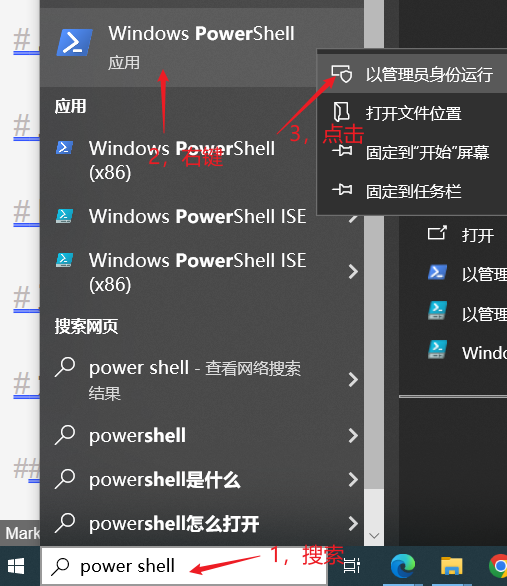
2,切换到本机 postgresql 安装目录下的 bin 目录:
PS C:\Users\DFL> cd D:\DFL\SOFTWARES\postgresql14\bin
PS D:\DFL\SOFTWARES\postgresql14\bin>
3,执行 dump ,将 test 数据库备份到桌面文件 appdb.bak :
PS D:\DFL\SOFTWARES\postgresql14\bin> .\pg_dump -h localhost -p 5432 -U postgres  -d test > C:\Users\DFL\Desktop\appdb.bak
口令:
2> COPY 逻辑备份
Linux(ubuntu)环境
(二)数据表备份与恢复
二,pgadmin4
(一)备份
1,备份表
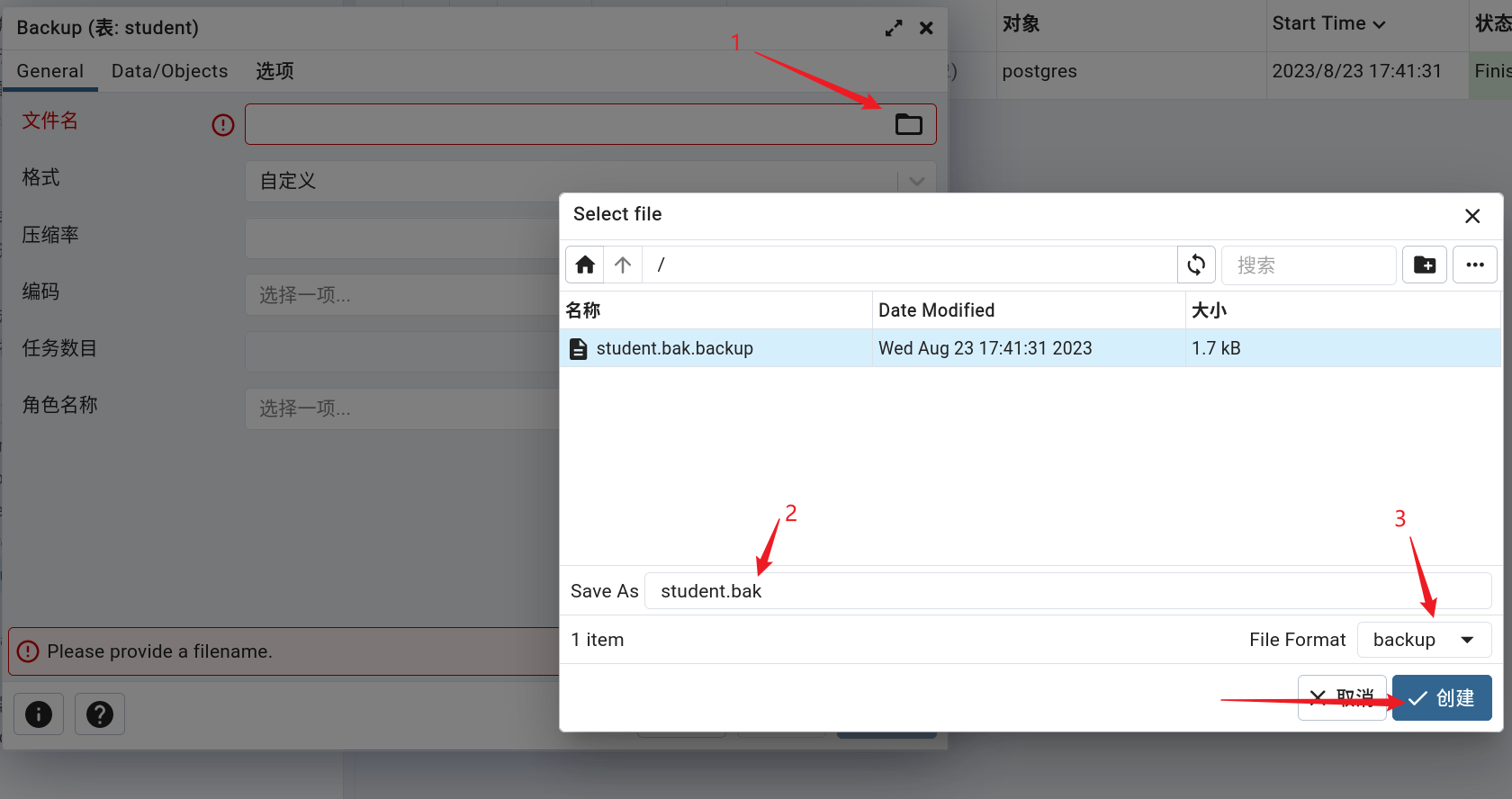
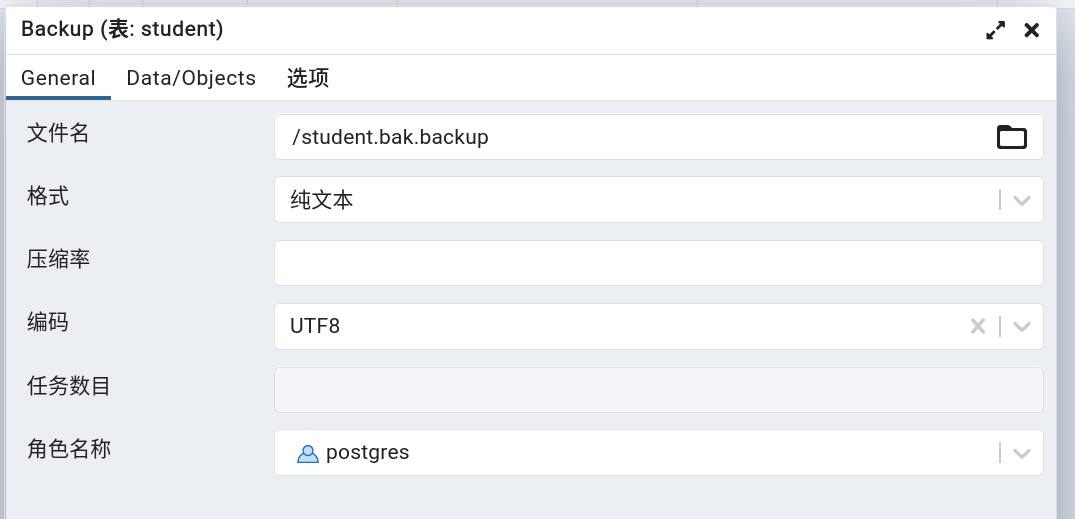
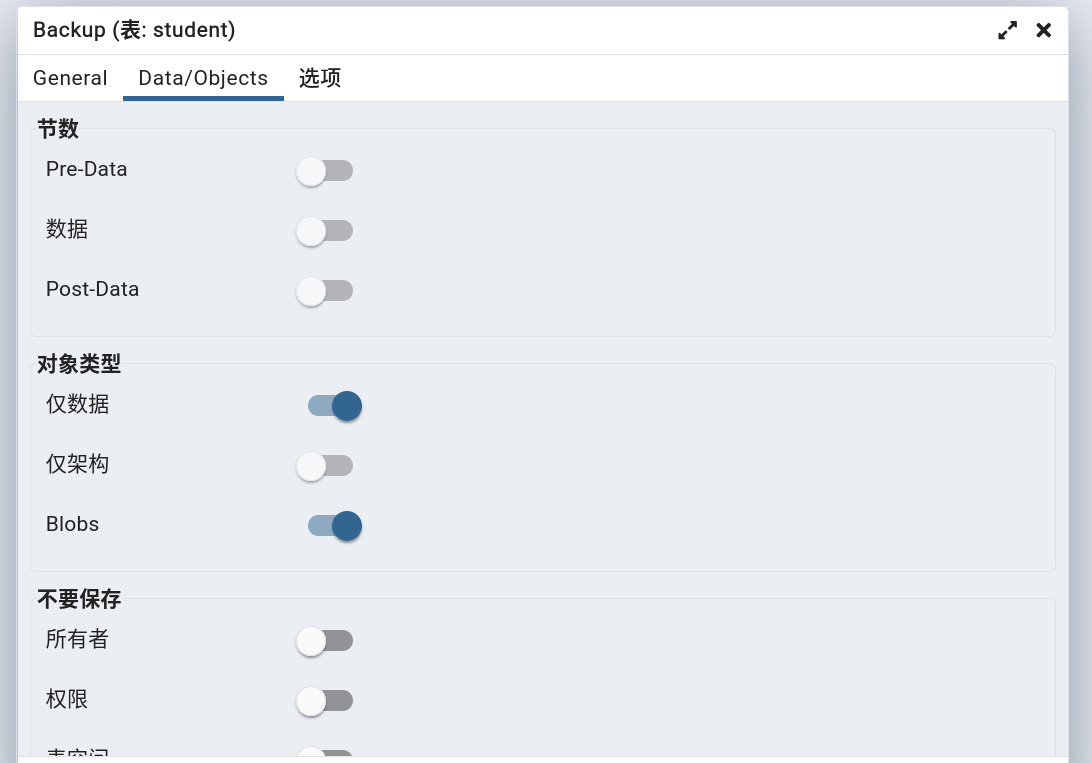
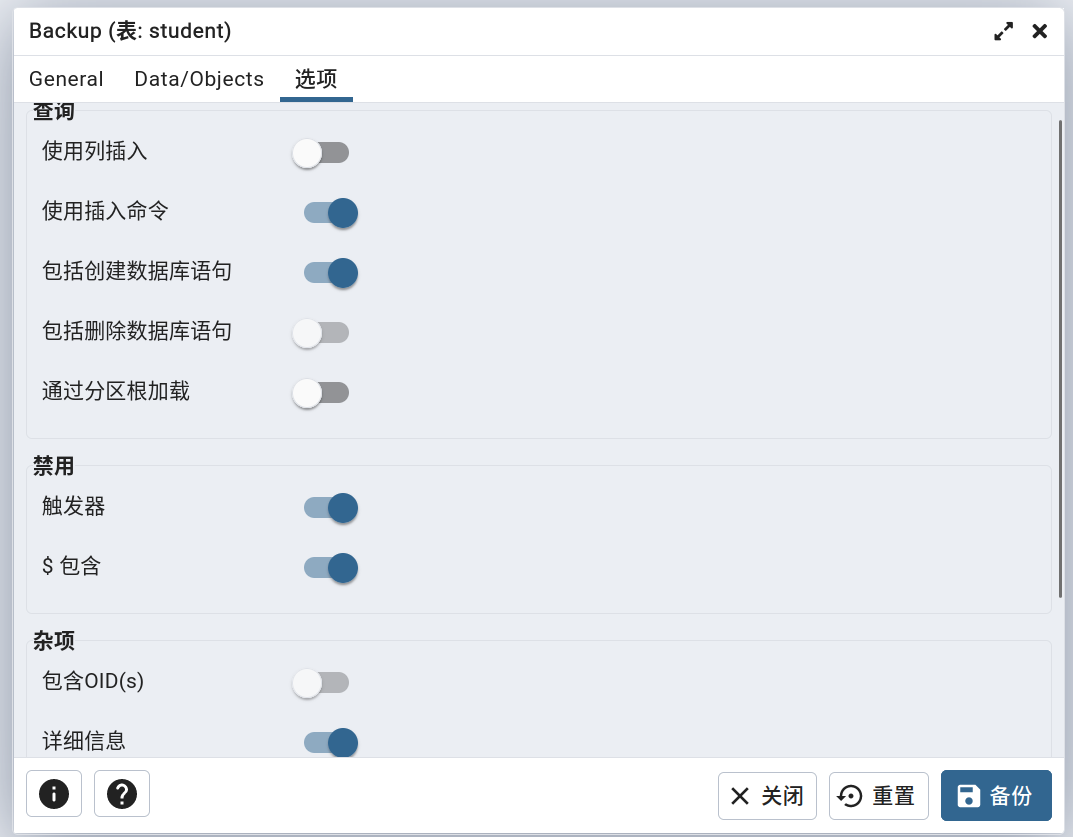
2,备份详情:
请求参数:
gid1
sid=1
data={'file': '/student.bak.backup', 'format': 'plain', 'id': None, 'blobs': True, 'verbose': True, 'encoding': 'UTF8', 'role': 'postgres', 'only_data': True, 'use_insert_commands': True, 'include_create_database': True, 'disable_trigger': True, 'disable_quoting': True, 'database': 'postgres', 'tables': [['public', 'student']]}
pgadmin4数据备份源码:
web/pgadmin/tools/backup/__init__.py:
@blueprint.route('/job/' , methods=['POST'], endpoint='create_server_job'
)
@blueprint.route('/job//object' , methods=['POST'], endpoint='create_object_job'
)
@login_required
def create_backup_objects_job(sid):"""Args:sid: Server IDCreates a new job for backup task(Backup Database(s)/Schema(s)/Table(s))Returns:None"""# 获取请求data = json.loads(request.data, encoding='utf-8')backup_obj_type = data.get('type', 'objects')try:# 获取文件路径backup_file = filename_with_file_manager_path(data['file'], (data.get('format', '') != 'directory'))except Exception as e:return bad_request(errormsg=str(e))# 获取服务器信息server = get_server(sid)if server is None:return make_json_response(success=0,errormsg=_("Could not find the specified server."))# To fetch MetaData for the serverfrom pgadmin.utils.driver import get_driverdriver = get_driver(PG_DEFAULT_DRIVER)manager = driver.connection_manager(server.id)conn = manager.connection()connected = conn.connected()if not connected:return make_json_response(success=0,errormsg=_("Please connect to the server first."))# 获取备份工具,这里是 pg_dumputility = manager.utility('backup') if backup_obj_type == 'objects' \else manager.utility('backup_server')ret_val = does_utility_exist(utility)if ret_val:return make_json_response(success=0,errormsg=ret_val)# 准备填充 dump 命令的参数# ['--file', '/var/lib/pgadmin/storage/dangfulin2333_163.com/student.bak.backup', '--host', '127.0.0.1', '--port', '5432', '--username', 'postgres', '--no-password', '--verbose', '--role', 'postgres', '--format=p', '--data-only', '--disable-triggers', '--create', '--inserts', '--disable-dollar-quoting', '--encoding', 'UTF8', '--table', 'public.student']args = _get_args_params_values(data, conn, backup_obj_type, backup_file, server, manager)# 这里将参数中的所有双引号转义,因为双引号在shell命令行中具有特殊含义,它们在没有双引号的情况下运行。添加额外的引号以保存我们的双引号。escaped_args = [escape_dquotes_process_arg(arg) for arg in args]try:# 用 utf-8 编码文件名bfile = data['file'].encode('utf-8') \if hasattr(data['file'], 'encode') else data['file']# 区分不同的备份类型if backup_obj_type == 'objects': # 备份数据对象(数据库、模式、表)数据args.append(data['database'])escaped_args.append(data['database'])p = BatchProcess(desc=BackupMessage(BACKUP.OBJECT, server.id, bfile,*args,database=data['database']),cmd=utility, args=escaped_args)else: # 备份服务器数据p = BatchProcess(desc=BackupMessage(BACKUP.SERVER if backup_obj_type != 'globals'else BACKUP.GLOBALS,server.id, bfile,*args),cmd=utility, args=escaped_args)manager.export_password_env(p.id)# Check for connection timeout and if it is greater than 0 then# set the environment variable PGCONNECT_TIMEOUT.if manager.connect_timeout > 0:env = dict()env['PGCONNECT_TIMEOUT'] = str(manager.connect_timeout)p.set_env_variables(server, env=env)else:p.set_env_variables(server)# 创建子进程,执行 pg_dump 命令p.start()jid = p.idexcept Exception as e:current_app.logger.exception(e)return make_json_response(status=410,success=0,errormsg=str(e))# Return responsereturn make_json_response(data={'job_id': jid, 'desc': p.desc.message, 'Success': 1})
右下角显示进程任务执行信息:
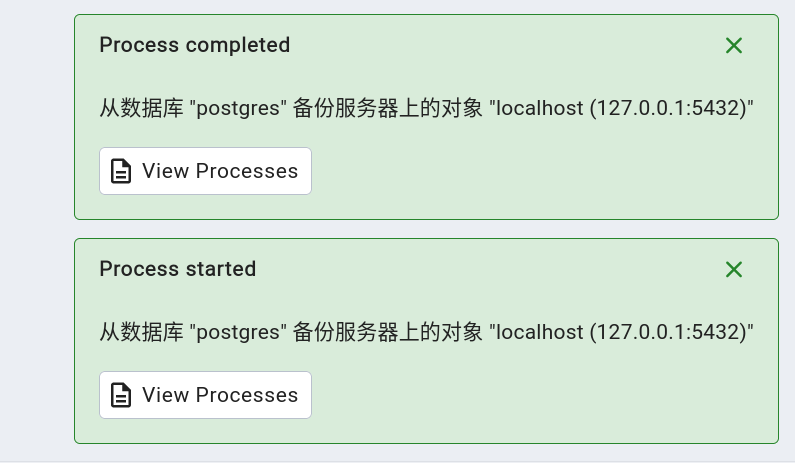
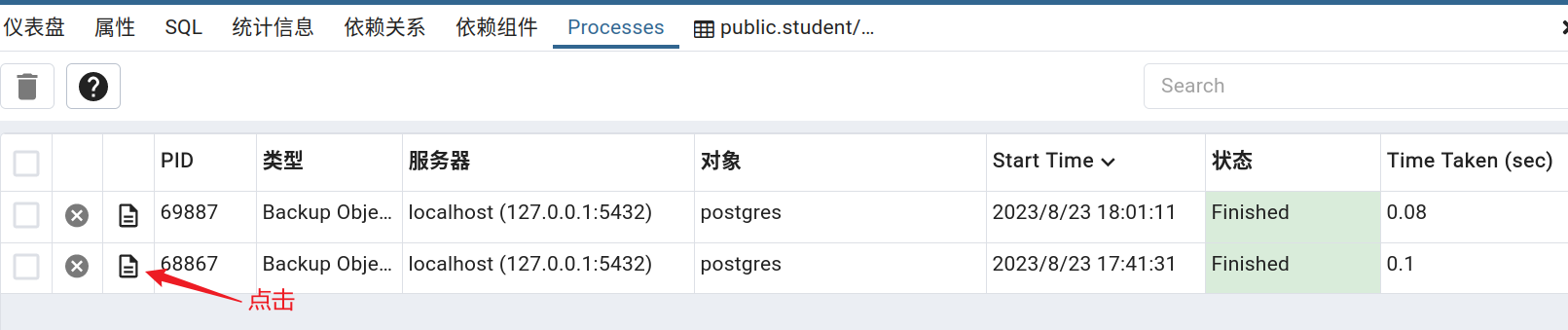
查看进程任务: 查看备份任务执行情况:
查看任务务行详情:
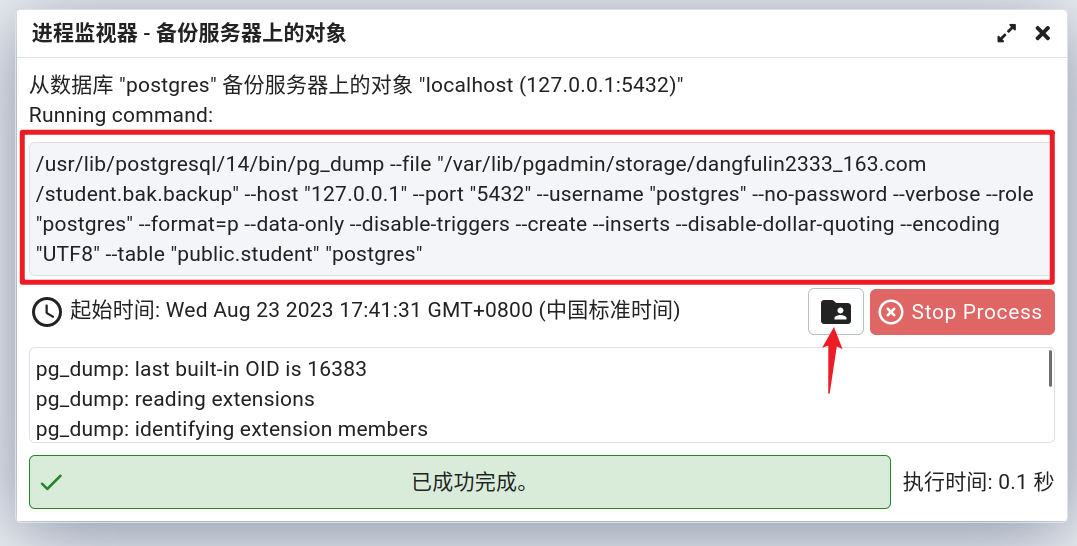 - 红框中就是备份数据表时执行的 dump 命令。
下载备份文件:
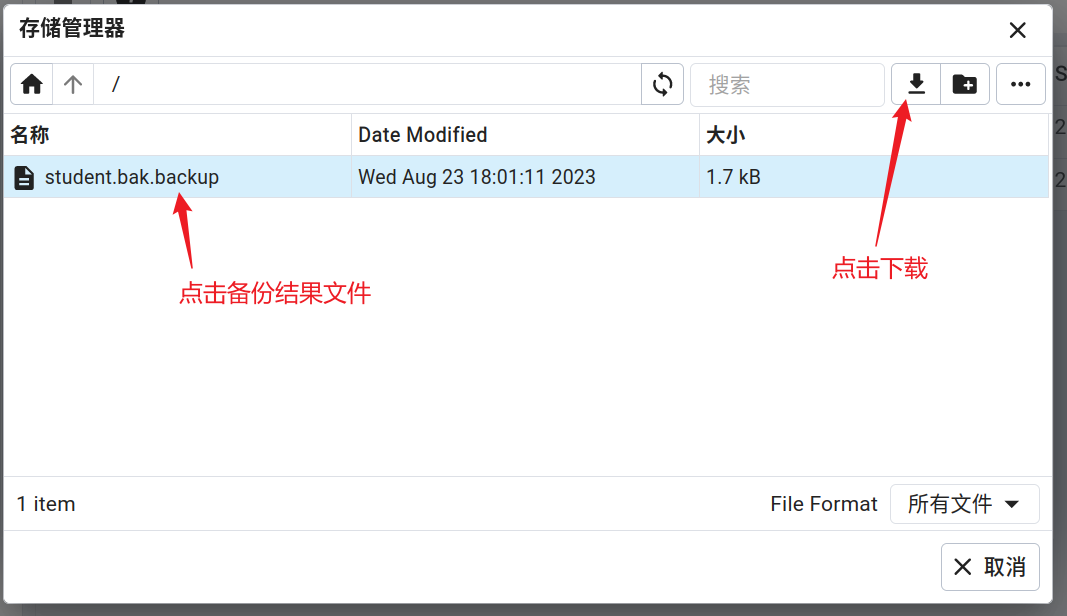
3,备份文件:
--
-- PostgreSQL database dump
---- Dumped from database version 14.9 (Ubuntu 14.9-0ubuntu0.22.04.1)
-- Dumped by pg_dump version 14.9 (Ubuntu 14.9-0ubuntu0.22.04.1)-- Started on 2023-08-23 18:01:11 CSTSET statement_timeout = 0;
SET lock_timeout = 0;
SET idle_in_transaction_session_timeout = 0;
SET client_encoding = 'UTF8';
SET standard_conforming_strings = on;
SELECT pg_catalog.set_config('search_path', '', false);
SET check_function_bodies = false;
SET xmloption = content;
SET client_min_messages = warning;
SET row_security = off;--
-- TOC entry 3640 (class 1262 OID 13799)
-- Name: postgres; Type: DATABASE; Schema: -; Owner: postgres
--CREATE DATABASE postgres WITH TEMPLATE = template0 ENCODING = 'UTF8' LOCALE = 'zh_CN.UTF-8';ALTER DATABASE postgres OWNER TO postgres;\connect postgresSET statement_timeout = 0;
SET lock_timeout = 0;
SET idle_in_transaction_session_timeout = 0;
SET client_encoding = 'UTF8';
SET standard_conforming_strings = on;
SELECT pg_catalog.set_config('search_path', '', false);
SET check_function_bodies = false;
SET xmloption = content;
SET client_min_messages = warning;
SET row_security = off;--
-- TOC entry 3634 (class 0 OID 24580)
-- Dependencies: 213
-- Data for Name: student; Type: TABLE DATA; Schema: public; Owner: postgres
--SET SESSION AUTHORIZATION DEFAULT;ALTER TABLE public.student DISABLE TRIGGER ALL;INSERT INTO public.student VALUES (1, 1, 'tname1');
INSERT INTO public.student VALUES (2, 1, 'tname1');
INSERT INTO public.student VALUES (3, 2, 'tname2');
INSERT INTO public.student VALUES (4, 3, 'tname3');
INSERT INTO public.student VALUES (5, 3, 'tname3');ALTER TABLE public.student ENABLE TRIGGER ALL;-- Completed on 2023-08-23 18:01:11 CST--
-- PostgreSQL database dump complete
--
2,备份架构
1,对话框
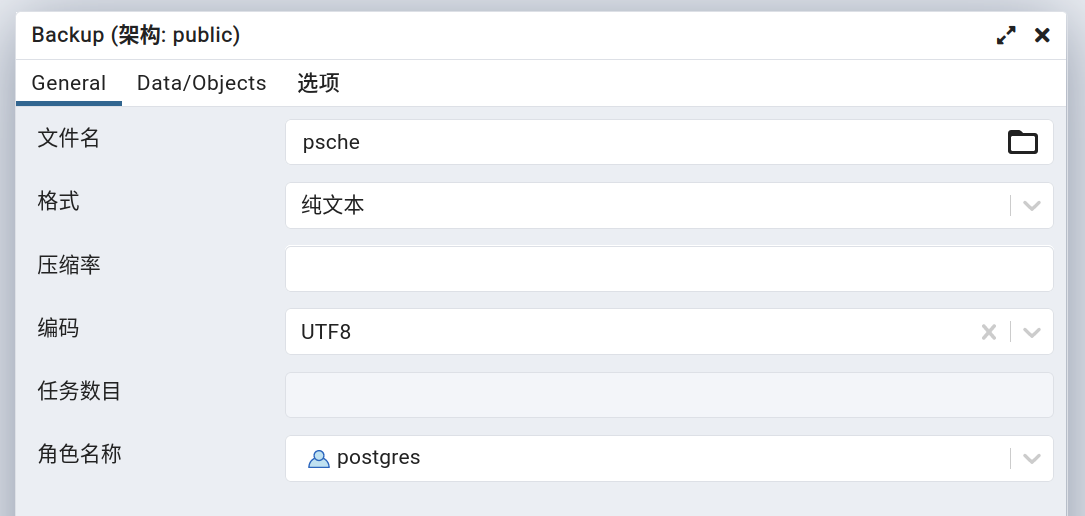
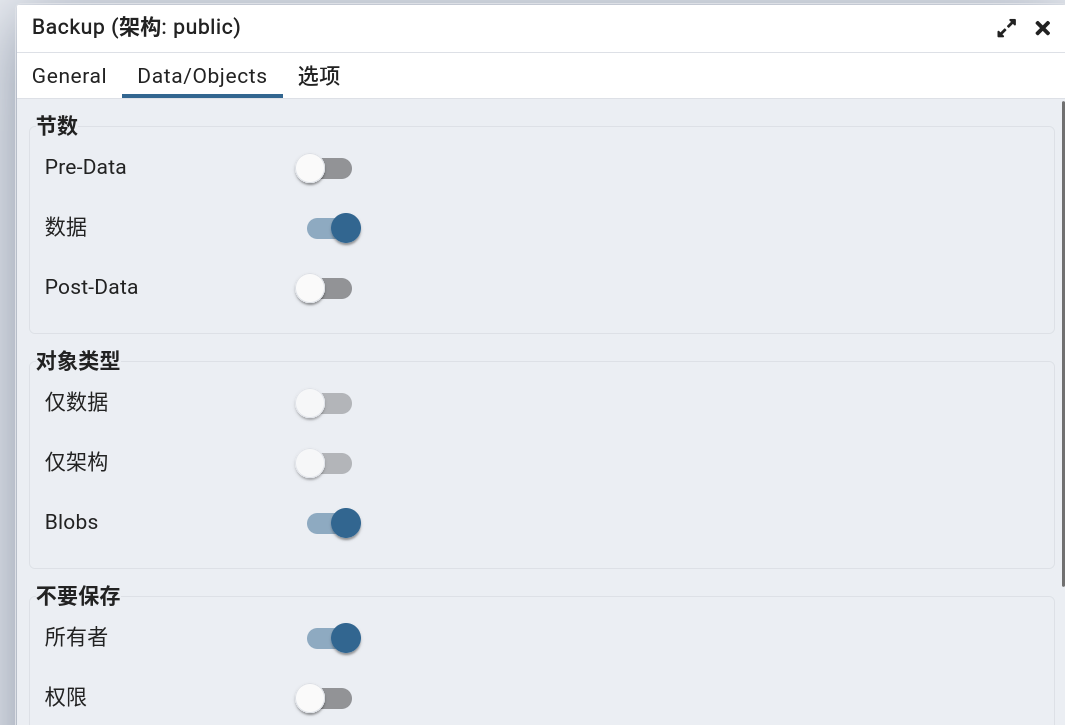
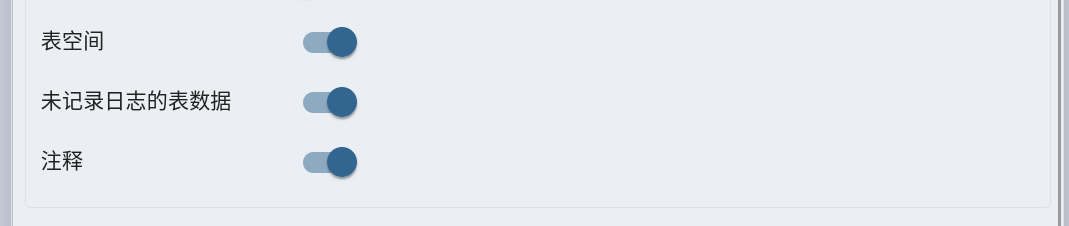

 2,备份信息:
@blueprint.route('/job/' , methods=['POST'], endpoint='create_server_job'
)
@blueprint.route('/job//object' , methods=['POST'], endpoint='create_object_job'
)
@login_required
def create_backup_objects_job(sid):"""Args:sid: Server IDCreates a new job for backup task(Backup Database(s)/Schema(s)/Table(s))Returns:None"""# 获取请求# {'file': 'psche', 'format': 'plain', 'id': None, 'blobs': True, 'verbose': True, 'encoding': 'UTF8', 'role': 'postgres', 'data': True, 'dns_owner': True, 'dns_tablespace': True, 'dns_unlogged_tbl_data': True, 'no_comments': True, 'use_insert_commands': True, 'include_create_database': True, 'include_drop_database': True, 'database': 'postgres', 'schemas': ['public']}data = json.loads(request.data, encoding='utf-8')# 'objects'backup_obj_type = data.get('type', 'objects')try:# 获取文件路径# '/var/lib/pgadmin/storage/dangfulin2333_163.com/psche'backup_file = filename_with_file_manager_path(data['file'], (data.get('format', '') != 'directory'))except Exception as e:return bad_request(errormsg=str(e))# 获取服务器信息# 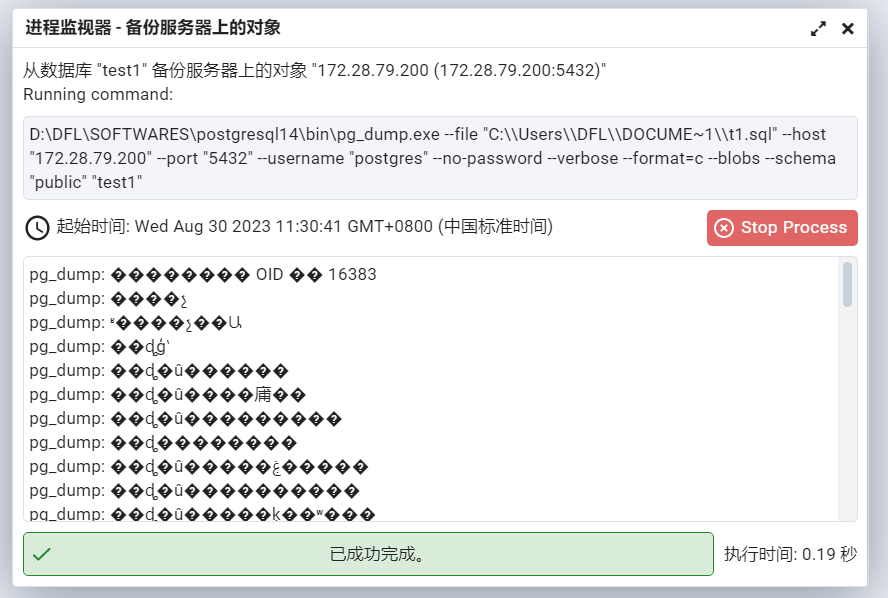
3,备份文件:
--
-- PostgreSQL database dump
---- Dumped from database version 14.9 (Ubuntu 14.9-0ubuntu0.22.04.1)
-- Dumped by pg_dump version 14.9 (Ubuntu 14.9-0ubuntu0.22.04.1)-- Started on 2023-08-24 08:52:15 CSTSET statement_timeout = 0;
SET lock_timeout = 0;
SET idle_in_transaction_session_timeout = 0;
SET client_encoding = 'UTF8';
SET standard_conforming_strings = on;
SELECT pg_catalog.set_config('search_path', '', false);
SET check_function_bodies = false;
SET xmloption = content;
SET client_min_messages = warning;
SET row_security = off;DROP DATABASE postgres;
--
-- TOC entry 3671 (class 1262 OID 13799)
-- Name: postgres; Type: DATABASE; Schema: -; Owner: -
--CREATE DATABASE postgres WITH TEMPLATE = template0 ENCODING = 'UTF8' LOCALE = 'zh_CN.UTF-8';\connect postgresSET statement_timeout = 0;
SET lock_timeout = 0;
SET idle_in_transaction_session_timeout = 0;
SET client_encoding = 'UTF8';
SET standard_conforming_strings = on;
SELECT pg_catalog.set_config('search_path', '', false);
SET check_function_bodies = false;
SET xmloption = content;
SET client_min_messages = warning;
SET row_security = off;--
-- TOC entry 3662 (class 0 OID 24629)
-- Dependencies: 216
-- Data for Name: circles; Type: TABLE DATA; Schema: public; Owner: -
----
-- TOC entry 3664 (class 0 OID 25273)
-- Dependencies: 218
-- Data for Name: company6; Type: TABLE DATA; Schema: public; Owner: -
----
-- TOC entry 3665 (class 0 OID 25280)
-- Dependencies: 219
-- Data for Name: department1; Type: TABLE DATA; Schema: public; Owner: -
----
-- TOC entry 3661 (class 0 OID 24611)
-- Dependencies: 215
-- Data for Name: orders; Type: TABLE DATA; Schema: public; Owner: -
----
-- TOC entry 3660 (class 0 OID 24580)
-- Dependencies: 213
-- Data for Name: student; Type: TABLE DATA; Schema: public; Owner: -
--INSERT INTO public.student VALUES (1, 1, 'tname1');
INSERT INTO public.student VALUES (2, 1, 'tname1');
INSERT INTO public.student VALUES (3, 2, 'tname2');
INSERT INTO public.student VALUES (4, 3, 'tname3');
INSERT INTO public.student VALUES (5, 3, 'tname3');--
-- TOC entry 3663 (class 0 OID 25264)
-- Dependencies: 217
-- Data for Name: t2; Type: TABLE DATA; Schema: public; Owner: -
----
-- TOC entry 3659 (class 0 OID 24577)
-- Dependencies: 212
-- Data for Name: teacher; Type: TABLE DATA; Schema: public; Owner: -
--INSERT INTO public.teacher VALUES (1, 'sname1');
INSERT INTO public.teacher VALUES (2, 'sname2');
INSERT INTO public.teacher VALUES (3, 'sname3');-- Completed on 2023-08-24 08:52:15 CST--
-- PostgreSQL database dump complete
--
3,备份数据库
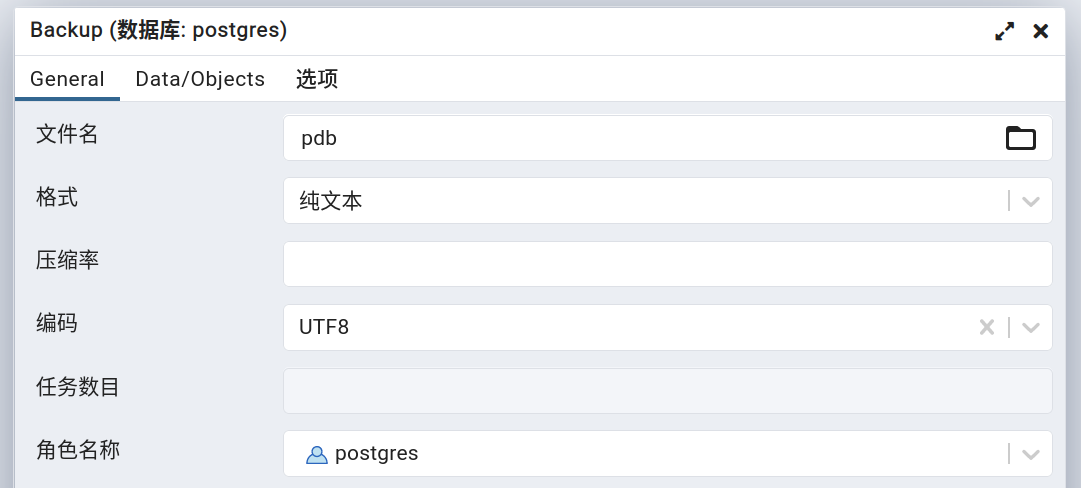
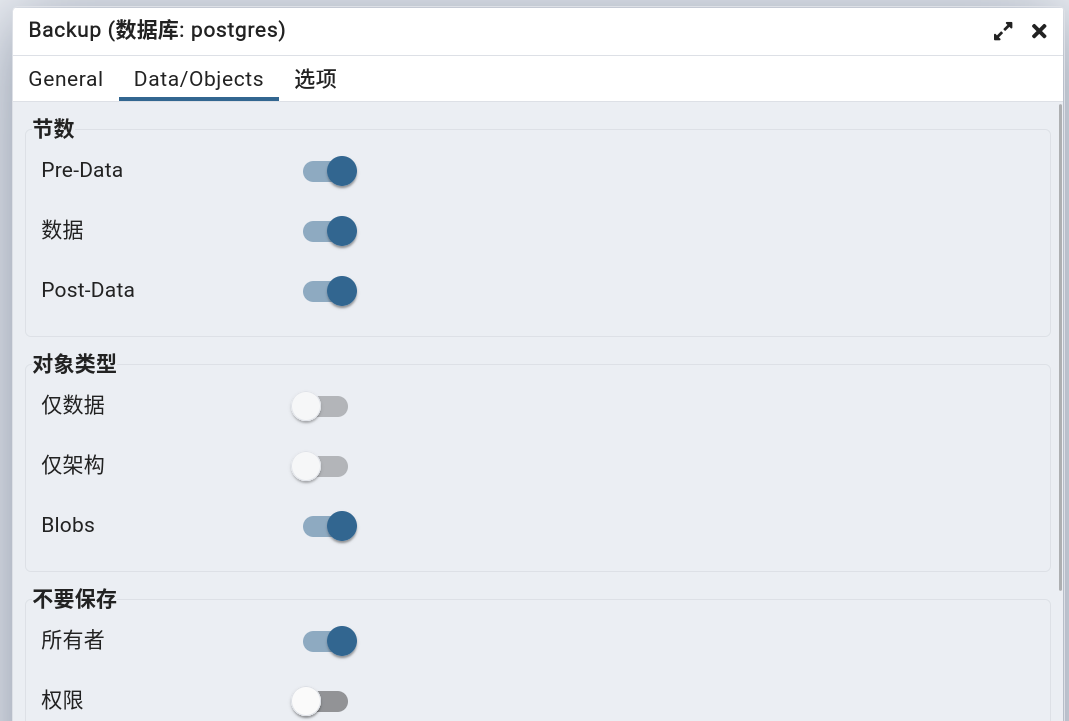
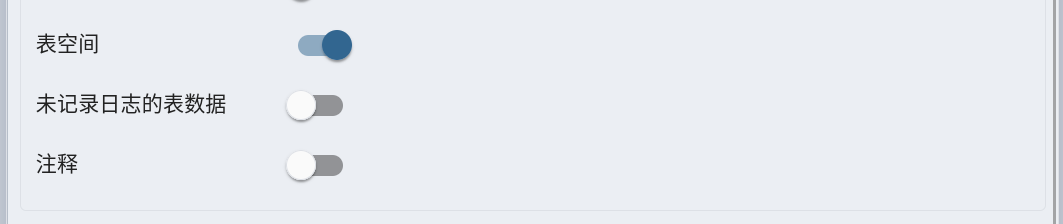
1,对话框:
 2,备份信息:
@blueprint.route('/job/' , methods=['POST'], endpoint='create_server_job'
)
@blueprint.route('/job//object' , methods=['POST'], endpoint='create_object_job'
)
@login_required
def create_backup_objects_job(sid):"""Args:sid: Server IDCreates a new job for backup task(Backup Database(s)/Schema(s)/Table(s))Returns:None"""# 获取请求# {'file': 'pdb', 'format': 'plain', 'id': None, 'blobs': True, 'verbose': True, 'encoding': 'UTF8', 'role': 'postgres', 'pre_data': True, 'data': True, 'post_data': True, 'dns_owner': True, 'dns_tablespace': True, 'use_insert_commands': True, 'include_create_database': True, 'include_drop_database': True, 'database': 'postgres'}data = json.loads(request.data, encoding='utf-8')# 'objects'backup_obj_type = data.get('type', 'objects')try:# 获取文件路径# '/var/lib/pgadmin/storage/dangfulin2333_163.com/pdb'backup_file = filename_with_file_manager_path(data['file'], (data.get('format', '') != 'directory'))except Exception as e:return bad_request(errormsg=str(e))# 获取服务器信息# 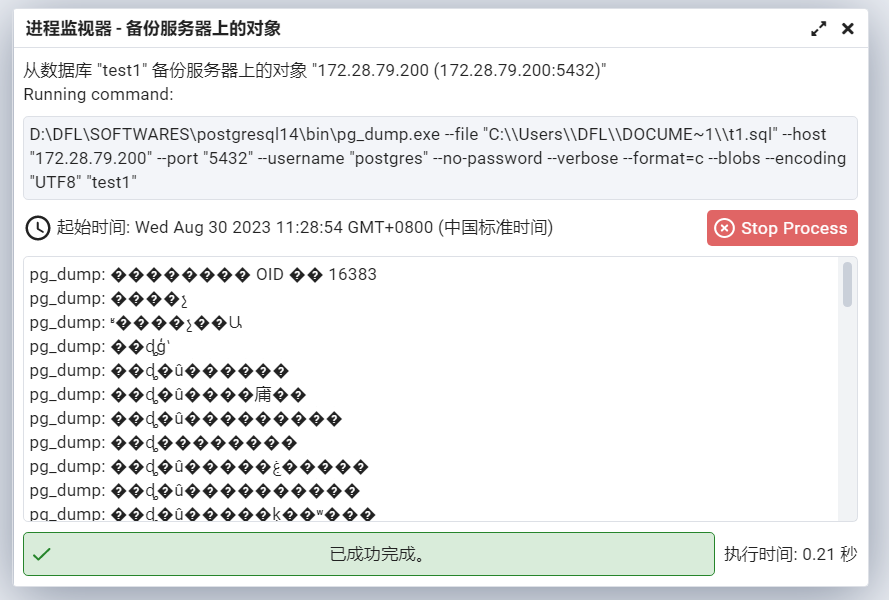
3,备份文件:
--
-- PostgreSQL database dump
---- Dumped from database version 14.9 (Ubuntu 14.9-0ubuntu0.22.04.1)
-- Dumped by pg_dump version 14.9 (Ubuntu 14.9-0ubuntu0.22.04.1)-- Started on 2023-08-24 09:06:19 CSTSET statement_timeout = 0;
SET lock_timeout = 0;
SET idle_in_transaction_session_timeout = 0;
SET client_encoding = 'UTF8';
SET standard_conforming_strings = on;
SELECT pg_catalog.set_config('search_path', '', false);
SET check_function_bodies = false;
SET xmloption = content;
SET client_min_messages = warning;
SET row_security = off;DROP DATABASE postgres;
--
-- TOC entry 3671 (class 1262 OID 13799)
-- Name: postgres; Type: DATABASE; Schema: -; Owner: -
--CREATE DATABASE postgres WITH TEMPLATE = template0 ENCODING = 'UTF8' LOCALE = 'zh_CN.UTF-8';\connect postgresSET statement_timeout = 0;
SET lock_timeout = 0;
SET idle_in_transaction_session_timeout = 0;
SET client_encoding = 'UTF8';
SET standard_conforming_strings = on;
SELECT pg_catalog.set_config('search_path', '', false);
SET check_function_bodies = false;
SET xmloption = content;
SET client_min_messages = warning;
SET row_security = off;--
-- TOC entry 3672 (class 0 OID 0)
-- Dependencies: 3671
-- Name: DATABASE postgres; Type: COMMENT; Schema: -; Owner: -
--COMMENT ON DATABASE postgres IS 'default administrative connection database';--
-- TOC entry 3 (class 3079 OID 24634)
-- Name: btree_gist; Type: EXTENSION; Schema: -; Owner: -
--CREATE EXTENSION IF NOT EXISTS btree_gist WITH SCHEMA public;--
-- TOC entry 3673 (class 0 OID 0)
-- Dependencies: 3
-- Name: EXTENSION btree_gist; Type: COMMENT; Schema: -; Owner: -
--COMMENT ON EXTENSION btree_gist IS 'support for indexing common datatypes in GiST';--
-- TOC entry 2 (class 3079 OID 16394)
-- Name: postgres_fdw; Type: EXTENSION; Schema: -; Owner: -
--CREATE EXTENSION IF NOT EXISTS postgres_fdw WITH SCHEMA public;--
-- TOC entry 3674 (class 0 OID 0)
-- Dependencies: 2
-- Name: EXTENSION postgres_fdw; Type: COMMENT; Schema: -; Owner: -
--COMMENT ON EXTENSION postgres_fdw IS 'foreign-data wrapper for remote PostgreSQL servers';--
-- TOC entry 225 (class 1255 OID 24616)
-- Name: update_order_status(); Type: FUNCTION; Schema: public; Owner: -
--CREATE FUNCTION public.update_order_status() RETURNS triggerLANGUAGE plpgsqlAS $$
BEGINIF NEW.total_amount > 1000 THENNEW.status := '已审核';ELSENEW.status := '待审核';END IF;RETURN NEW;
END;
$$;--
-- TOC entry 2321 (class 2328 OID 16403)
-- Name: test1; Type: FOREIGN DATA WRAPPER; Schema: -; Owner: -
--CREATE FOREIGN DATA WRAPPER test1 HANDLER public.postgres_fdw_handler VALIDATOR public.postgres_fdw_validator;--
-- TOC entry 2322 (class 1417 OID 16401)
-- Name: server1; Type: SERVER; Schema: -; Owner: -
--CREATE SERVER server1 FOREIGN DATA WRAPPER postgres_fdw OPTIONS (dbname 'test',host '172.28.79.200',port '5432'
);--
-- TOC entry 3675 (class 0 OID 0)
-- Name: USER MAPPING postgres SERVER server1; Type: USER MAPPING; Schema: -; Owner: -
--CREATE USER MAPPING FOR postgres SERVER server1 OPTIONS (password 'postgres',"user" 'postgres'
);SET default_table_access_method = heap;--
-- TOC entry 216 (class 1259 OID 24629)
-- Name: circles; Type: TABLE; Schema: public; Owner: -
--CREATE TABLE public.circles (c circle
);--
-- TOC entry 218 (class 1259 OID 25273)
-- Name: company6; Type: TABLE; Schema: public; Owner: -
--CREATE TABLE public.company6 (id integer NOT NULL,name text NOT NULL,age integer NOT NULL,address character(50),salary real
);--
-- TOC entry 219 (class 1259 OID 25280)
-- Name: department1; Type: TABLE; Schema: public; Owner: -
--CREATE TABLE public.department1 (id integer NOT NULL,dept character(50) NOT NULL,emp_id integer NOT NULL
);--
-- TOC entry 211 (class 1259 OID 16405)
-- Name: ft1; Type: FOREIGN TABLE; Schema: public; Owner: -
--CREATE FOREIGN TABLE public.ft1 (port integer
)
SERVER server1;--
-- TOC entry 215 (class 1259 OID 24611)
-- Name: orders; Type: TABLE; Schema: public; Owner: -
--CREATE TABLE public.orders (id integer NOT NULL,order_date date,total_amount numeric(10,2),status character varying(20)
);--
-- TOC entry 213 (class 1259 OID 24580)
-- Name: student; Type: TABLE; Schema: public; Owner: -
--CREATE TABLE public.student (sid integer NOT NULL,teacher_id integer DEFAULT 0 NOT NULL,tname character varying(100)
);--
-- TOC entry 212 (class 1259 OID 24577)
-- Name: teacher; Type: TABLE; Schema: public; Owner: -
--CREATE TABLE public.teacher (id integer NOT NULL,sname character varying(100)
);--
-- TOC entry 214 (class 1259 OID 24584)
-- Name: student_view; Type: VIEW; Schema: public; Owner: -
--CREATE VIEW public.student_view ASSELECT student.sid,student.teacher_id,student.tname,teacher.id,teacher.snameFROM (public.studentLEFT JOIN public.teacher ON ((student.teacher_id = teacher.id)));--
-- TOC entry 217 (class 1259 OID 25264)
-- Name: t2; Type: TABLE; Schema: public; Owner: -
--CREATE TABLE public.t2 (c1 integer,c2 text
);--
-- TOC entry 3662 (class 0 OID 24629)
-- Dependencies: 216
-- Data for Name: circles; Type: TABLE DATA; Schema: public; Owner: -
----
-- TOC entry 3664 (class 0 OID 25273)
-- Dependencies: 218
-- Data for Name: company6; Type: TABLE DATA; Schema: public; Owner: -
----
-- TOC entry 3665 (class 0 OID 25280)
-- Dependencies: 219
-- Data for Name: department1; Type: TABLE DATA; Schema: public; Owner: -
----
-- TOC entry 3661 (class 0 OID 24611)
-- Dependencies: 215
-- Data for Name: orders; Type: TABLE DATA; Schema: public; Owner: -
----
-- TOC entry 3660 (class 0 OID 24580)
-- Dependencies: 213
-- Data for Name: student; Type: TABLE DATA; Schema: public; Owner: -
--INSERT INTO public.student VALUES (1, 1, 'tname1');
INSERT INTO public.student VALUES (2, 1, 'tname1');
INSERT INTO public.student VALUES (3, 2, 'tname2');
INSERT INTO public.student VALUES (4, 3, 'tname3');
INSERT INTO public.student VALUES (5, 3, 'tname3');--
-- TOC entry 3663 (class 0 OID 25264)
-- Dependencies: 217
-- Data for Name: t2; Type: TABLE DATA; Schema: public; Owner: -
----
-- TOC entry 3659 (class 0 OID 24577)
-- Dependencies: 212
-- Data for Name: teacher; Type: TABLE DATA; Schema: public; Owner: -
--INSERT INTO public.teacher VALUES (1, 'sname1');
INSERT INTO public.teacher VALUES (2, 'sname2');
INSERT INTO public.teacher VALUES (3, 'sname3');--
-- TOC entry 3513 (class 2606 OID 24633)
-- Name: circles circles_c_excl; Type: CONSTRAINT; Schema: public; Owner: -
--ALTER TABLE ONLY public.circlesADD CONSTRAINT circles_c_excl EXCLUDE USING gist (c WITH &&);--
-- TOC entry 3515 (class 2606 OID 25279)
-- Name: company6 company6_pkey; Type: CONSTRAINT; Schema: public; Owner: -
--ALTER TABLE ONLY public.company6ADD CONSTRAINT company6_pkey PRIMARY KEY (id);--
-- TOC entry 3517 (class 2606 OID 25284)
-- Name: department1 department1_pkey; Type: CONSTRAINT; Schema: public; Owner: -
--ALTER TABLE ONLY public.department1ADD CONSTRAINT department1_pkey PRIMARY KEY (id);--
-- TOC entry 3511 (class 2606 OID 24615)
-- Name: orders orders_pkey; Type: CONSTRAINT; Schema: public; Owner: -
--ALTER TABLE ONLY public.ordersADD CONSTRAINT orders_pkey PRIMARY KEY (id);--
-- TOC entry 3508 (class 2606 OID 25272)
-- Name: student student_ck; Type: CHECK CONSTRAINT; Schema: public; Owner: -
--ALTER TABLE public.studentADD CONSTRAINT student_ck CHECK ((sid > 0)) NOT VALID;--
-- TOC entry 3676 (class 0 OID 0)
-- Dependencies: 3508
-- Name: CONSTRAINT student_ck ON student; Type: COMMENT; Schema: public; Owner: -
--COMMENT ON CONSTRAINT student_ck ON public.student IS '检查约束';--
-- TOC entry 3518 (class 1259 OID 25290)
-- Name: fki_C; Type: INDEX; Schema: public; Owner: -
--CREATE INDEX "fki_C" ON public.department1 USING btree (emp_id);--
-- TOC entry 3509 (class 1259 OID 24604)
-- Name: index_test; Type: INDEX; Schema: public; Owner: -
--CREATE INDEX index_test ON public.student USING btree (tname COLLATE "C" bpchar_pattern_ops);--
-- TOC entry 3677 (class 0 OID 0)
-- Dependencies: 3509
-- Name: INDEX index_test; Type: COMMENT; Schema: public; Owner: -
--COMMENT ON INDEX public.index_test IS '测试';-- Completed on 2023-08-24 09:06:20 CST--
-- PostgreSQL database dump complete
--
4,备份服务器
1,对话框
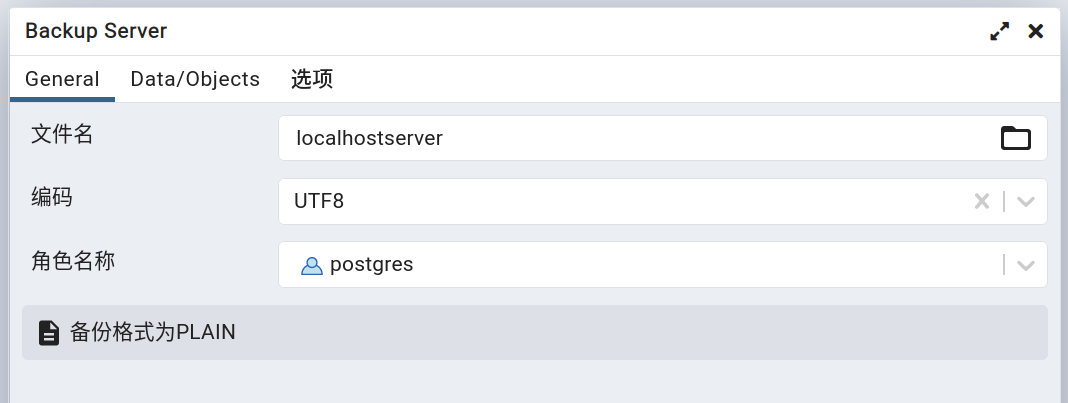
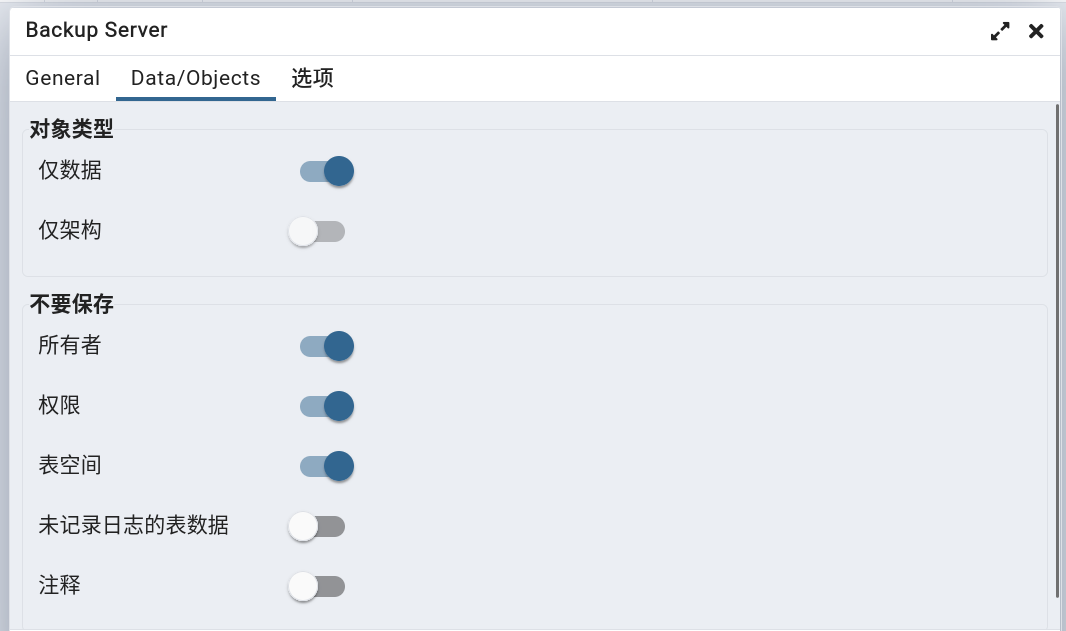
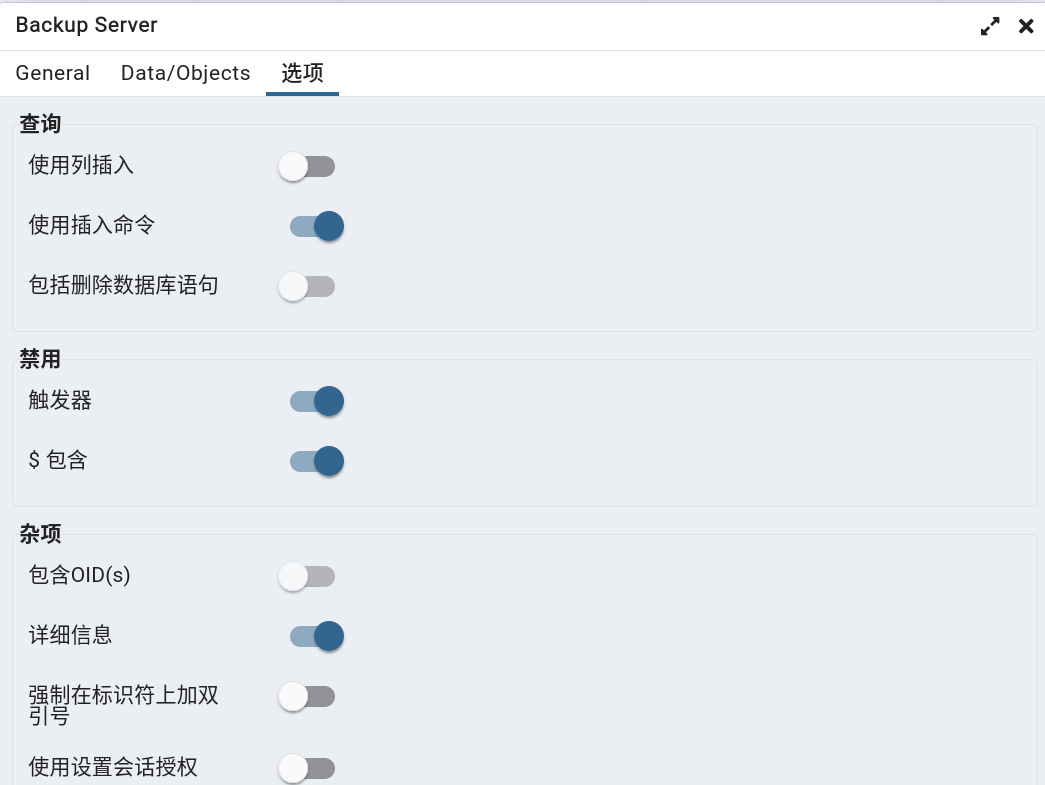
2,备份信息
@blueprint.route('/job/' , methods=['POST'], endpoint='create_server_job'
)
@blueprint.route('/job//object' , methods=['POST'], endpoint='create_object_job'
)
@login_required
def create_backup_objects_job(sid):"""Args:sid: Server IDCreates a new job for backup task(Backup Database(s)/Schema(s)/Table(s))Returns:None"""# 获取请求# {'file': 'localhostserver', 'format': 'plain', 'id': None, 'blobs': False, 'verbose': True, 'encoding': 'UTF8', 'role': 'postgres', 'only_data': True, 'dns_owner': True, 'dns_privilege': True, 'dns_tablespace': True, 'use_insert_commands': True, 'disable_trigger': True, 'disable_quoting': True, 'type': 'server'}data = json.loads(request.data, encoding='utf-8')# 'server'backup_obj_type = data.get('type', 'objects')try:# 获取文件路径# '/var/lib/pgadmin/storage/dangfulin2333_163.com/localhostserver'backup_file = filename_with_file_manager_path(data['file'], (data.get('format', '') != 'directory'))except Exception as e:return bad_request(errormsg=str(e))# 获取服务器信息# 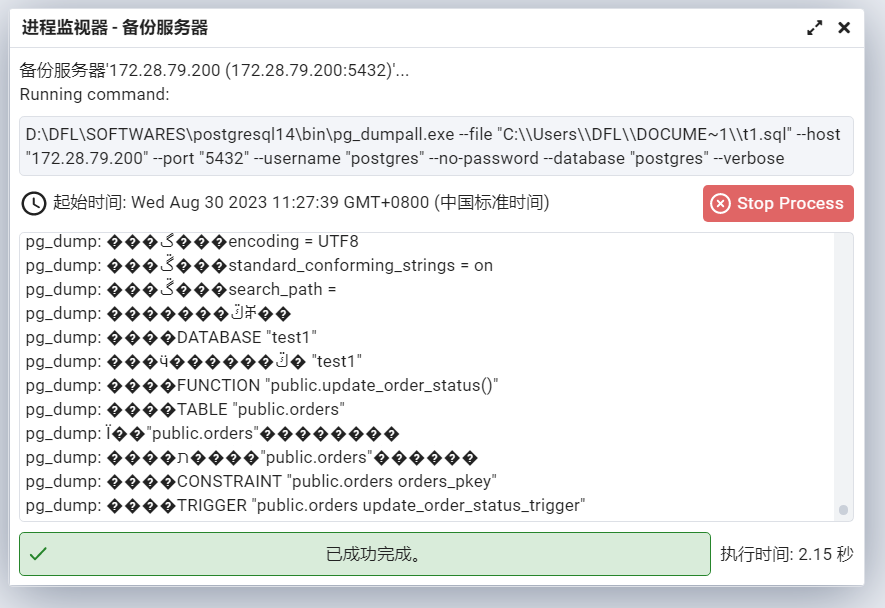
- 与备份表、schema、database 时使用 dump 不同的是,备份 server 时使用 dumpall
3,备份文件
--
-- PostgreSQL database cluster dump
---- Started on 2023-08-24 09:15:36 CSTSET default_transaction_read_only = off;SET client_encoding = 'UTF8';
SET standard_conforming_strings = on;--
-- Databases
----
-- Database "template1" dump
--\connect template1--
-- PostgreSQL database dump
---- Dumped from database version 14.9 (Ubuntu 14.9-0ubuntu0.22.04.1)
-- Dumped by pg_dump version 14.9 (Ubuntu 14.9-0ubuntu0.22.04.1)-- Started on 2023-08-24 09:15:36 CSTSET statement_timeout = 0;
SET lock_timeout = 0;
SET idle_in_transaction_session_timeout = 0;
SET client_encoding = 'UTF8';
SET standard_conforming_strings = on;
SELECT pg_catalog.set_config('search_path', '', false);
SET check_function_bodies = false;
SET xmloption = content;
SET client_min_messages = warning;
SET row_security = off;-- Completed on 2023-08-24 09:15:36 CST--
-- PostgreSQL database dump complete
----
-- Database "postgres" dump
--\connect postgres--
-- PostgreSQL database dump
---- Dumped from database version 14.9 (Ubuntu 14.9-0ubuntu0.22.04.1)
-- Dumped by pg_dump version 14.9 (Ubuntu 14.9-0ubuntu0.22.04.1)-- Started on 2023-08-24 09:15:36 CSTSET statement_timeout = 0;
SET lock_timeout = 0;
SET idle_in_transaction_session_timeout = 0;
SET client_encoding = 'UTF8';
SET standard_conforming_strings = on;
SELECT pg_catalog.set_config('search_path', '', false);
SET check_function_bodies = false;
SET xmloption = content;
SET client_min_messages = warning;
SET row_security = off;--
-- TOC entry 3660 (class 0 OID 24629)
-- Dependencies: 216
-- Data for Name: circles; Type: TABLE DATA; Schema: public; Owner: -
--SET SESSION AUTHORIZATION DEFAULT;ALTER TABLE public.circles DISABLE TRIGGER ALL;ALTER TABLE public.circles ENABLE TRIGGER ALL;--
-- TOC entry 3662 (class 0 OID 25273)
-- Dependencies: 218
-- Data for Name: company6; Type: TABLE DATA; Schema: public; Owner: -
--ALTER TABLE public.company6 DISABLE TRIGGER ALL;ALTER TABLE public.company6 ENABLE TRIGGER ALL;--
-- TOC entry 3663 (class 0 OID 25280)
-- Dependencies: 219
-- Data for Name: department1; Type: TABLE DATA; Schema: public; Owner: -
--ALTER TABLE public.department1 DISABLE TRIGGER ALL;ALTER TABLE public.department1 ENABLE TRIGGER ALL;--
-- TOC entry 3659 (class 0 OID 24611)
-- Dependencies: 215
-- Data for Name: orders; Type: TABLE DATA; Schema: public; Owner: -
--ALTER TABLE public.orders DISABLE TRIGGER ALL;ALTER TABLE public.orders ENABLE TRIGGER ALL;--
-- TOC entry 3658 (class 0 OID 24580)
-- Dependencies: 213
-- Data for Name: student; Type: TABLE DATA; Schema: public; Owner: -
--ALTER TABLE public.student DISABLE TRIGGER ALL;INSERT INTO public.student VALUES (1, 1, 'tname1');
INSERT INTO public.student VALUES (2, 1, 'tname1');
INSERT INTO public.student VALUES (3, 2, 'tname2');
INSERT INTO public.student VALUES (4, 3, 'tname3');
INSERT INTO public.student VALUES (5, 3, 'tname3');ALTER TABLE public.student ENABLE TRIGGER ALL;--
-- TOC entry 3661 (class 0 OID 25264)
-- Dependencies: 217
-- Data for Name: t2; Type: TABLE DATA; Schema: public; Owner: -
--ALTER TABLE public.t2 DISABLE TRIGGER ALL;ALTER TABLE public.t2 ENABLE TRIGGER ALL;--
-- TOC entry 3657 (class 0 OID 24577)
-- Dependencies: 212
-- Data for Name: teacher; Type: TABLE DATA; Schema: public; Owner: -
--ALTER TABLE public.teacher DISABLE TRIGGER ALL;INSERT INTO public.teacher VALUES (1, 'sname1');
INSERT INTO public.teacher VALUES (2, 'sname2');
INSERT INTO public.teacher VALUES (3, 'sname3');ALTER TABLE public.teacher ENABLE TRIGGER ALL;-- Completed on 2023-08-24 09:15:36 CST--
-- PostgreSQL database dump complete
---- Completed on 2023-08-24 09:15:36 CST--
-- PostgreSQL database cluster dump complete
--
5,pgadmin4备份对话框表单数据与 pg_dump 命令参数对应关系
# 请求参数示例
['--file', '/var/lib/pgadmin/storage/dangfulin2333_163.com/student.bak.backup', '--host', '127.0.0.1', '--port', '5432', '--username', 'postgres', '--no-password', '--verbose', '--role', 'postgres', '--format=p', '--data-only', '--disable-triggers', '--create', '--inserts', '--disable-dollar-quoting', '--encoding', 'UTF8', '--table', 'public.student']# 备份数据表
D:\DFL\SOFTWARES\postgresql14\bin\pg_dump.exe --file "C:\\Users\\DFL\\Desktop\\order.sql" --host "172.28.79.200" --port "5432" --username "postgres" --no-password --verbose --role "postgres" --format=c --blobs --section=data --encoding "UTF8" --table "public.orders" "test"
# 备份schema
D:\DFL\SOFTWARES\postgresql14\bin\pg_dump.exe --file "C:\\Users\\DFL\\DOCUME~1\\t1.sql" --host "172.28.79.200" --port "5432" --username "postgres" --no-password --verbose --format=c --blobs --schema "public" "test1"
# 备份数据库
D:\DFL\SOFTWARES\postgresql14\bin\pg_dump.exe --file "C:\\Users\\DFL\\DOCUME~1\\t1.sql" --host "172.28.79.200" --port "5432" --username "postgres" --no-password --verbose --format=c --blobs --encoding "UTF8" "test1"
# 备份服务器
D:\DFL\SOFTWARES\postgresql14\bin\pg_dumpall.exe --file "C:\\Users\\DFL\\DOCUME~1\\t1.sql" --host "172.28.79.200" --port "5432" --username "postgres" --no-password --database "postgres" --verbose
| 表单项目 | 参数 | 参数使用实例 | 备注 |
|---|---|---|---|
| 文件名 | –file | –file ‘/var/lib/pgadmin/storage/dangfulin2333_163.com/student.backup’ | |
| 格式 | –format | –format=p | 格式项:p——纯文本 c——自定义 d——目录 t——Tar |
| 压缩率 | -Z | –Z 7 | 压缩率数量级整数范围:[0,9]。 |
| 编码 | –encoding | –encoding “UTF8” | |
| 任务数目 | –jobs | –jobs “3” | 仅 --format=d 时可输入 |
| 角色名称 | –role | –role “postgres” | |
| 节数 -Pre-Data | –section=pre-data | –section=pre-data | 与“对象-仅数据”和“对象-仅架构”互斥 |
| 节数 -数据 | –section=data | –section=data | 与“对象-仅数据”和“对象-仅架构”互斥 |
| 节数 -Post-Data | –section=post-data | –section=post-data | 与“对象-仅数据”和“对象-仅架构”互斥 |
| 对象-仅数据 | –data-only | –data-only | 与下一项互斥 |
| 对象-仅架构 | –schema-only | –schema-only | 与上一项互斥 |
| 对象-Blobs | –blobs | –blobs | 默认开启 |
| 不要保存-所有者 | –no-owner | –no-owner | |
| 不要保存-权限 | –no-privileges | –no-privileges | |
| 不要保存-未记录日志的表数据 | –no-unlogged-table-data | –no-unlogged-table-data | |
| 不要保存-表空间 | –no-tablespaces | –no-tablespaces | |
| 不要保存-注释 | –no-comments | –no-comments | |
| 查询-使用列插入 | –column-inserts | –column-inserts | |
| 查询-使用插入命令 | –insert | –insert | |
| 查询-包括创建数据库语句 | –create | –create | |
| 查询-包括删除数据库语句 | –clean | –clean | |
| 查询-通过分区根加载 | –load-via-partition-root | –load-via-partition-root | |
| 禁用-触发器 | –disable-triggers | –disable-triggers | 当开启“对象-仅数据”时可选 |
| 禁用-$包含 | –disable-dollar-quoting | –disable-dollar-quoting | |
| 杂项-包含OID(s) | |||
| 杂项-详细信息 | –verbose | –verbose | |
| 杂项-强制在标识符号上加双引号 | –quote-all-identifiers | –quote-all-identifiers | |
| 杂项-使用设置会话授权 | -use-set-session-authorization | -use-set-session-authorization |
pg_dump
pg_dumpall
(二)恢复
1,恢复表
准备之前备份好的 .sql 格式的数据文件。
- 如果是 .backup 文件,则在恢复是会报错 “pg_restore: error: input file appears to be a text format dump. Please use psql.”。
清空目标数据表数据:
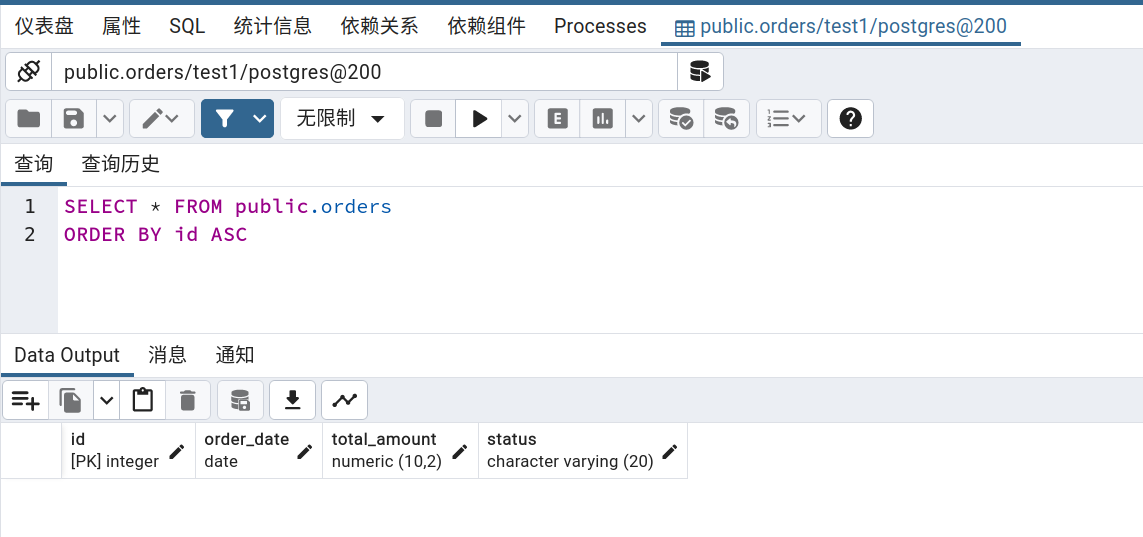 - 如果不清空数据,则会报错 “pg_restore: implied data-only restore
pg_restore: processing data for table “public.orders”
pg_restore: while PROCESSING TOC:
pg_restore: from TOC entry 3305; 0 89224 TABLE DATA orders postgres
pg_restore: error: could not execute query: ERROR: duplicate key value violates unique constraint “orders_pkey”
DETAIL: Key (id)=(1) already exists.
Command was: INSERT INTO public.orders (id, order_date, total_amount, status) VALUES (1, ‘2022-01-01’, 1500.00, ‘已审核’);
”
1,打开恢复功能的对话框:
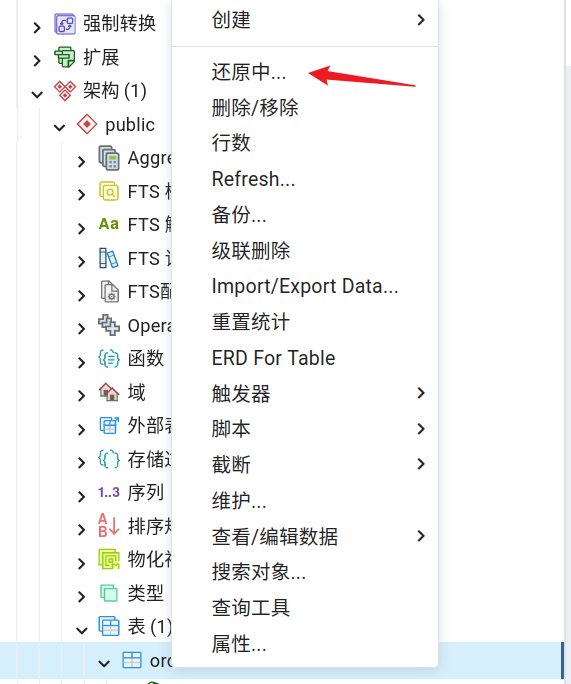
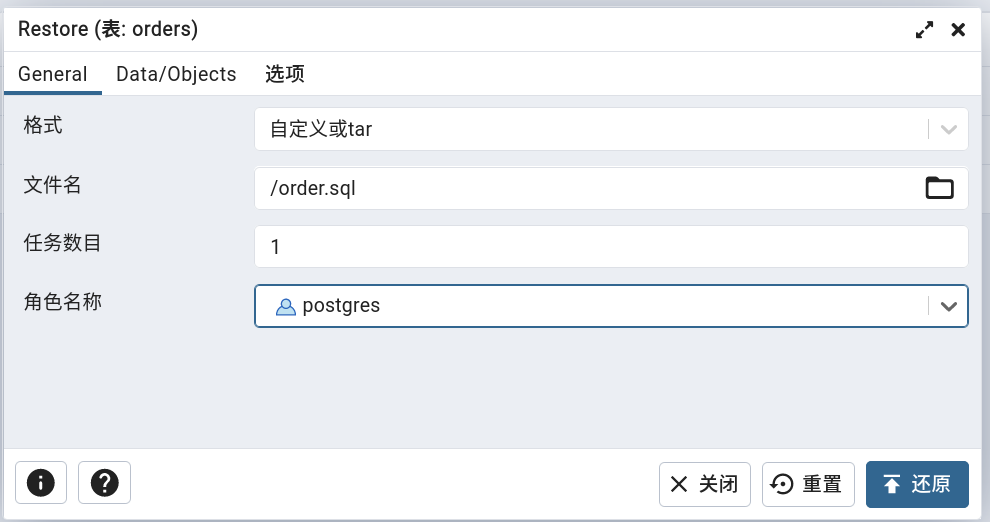
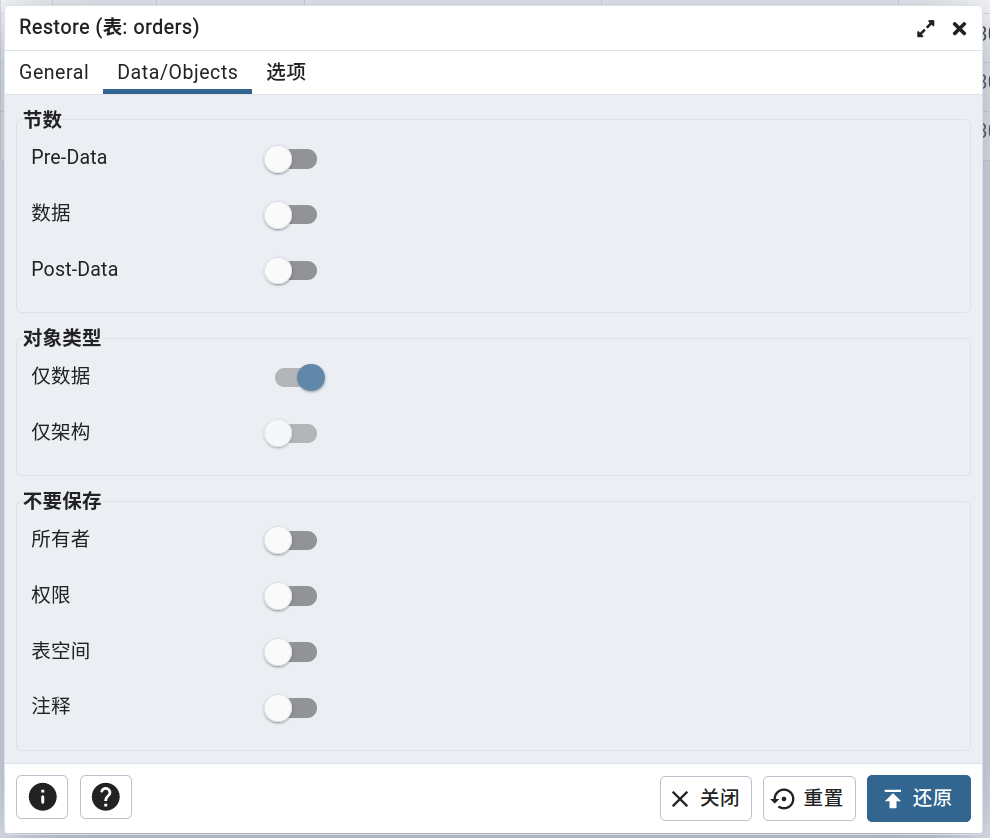
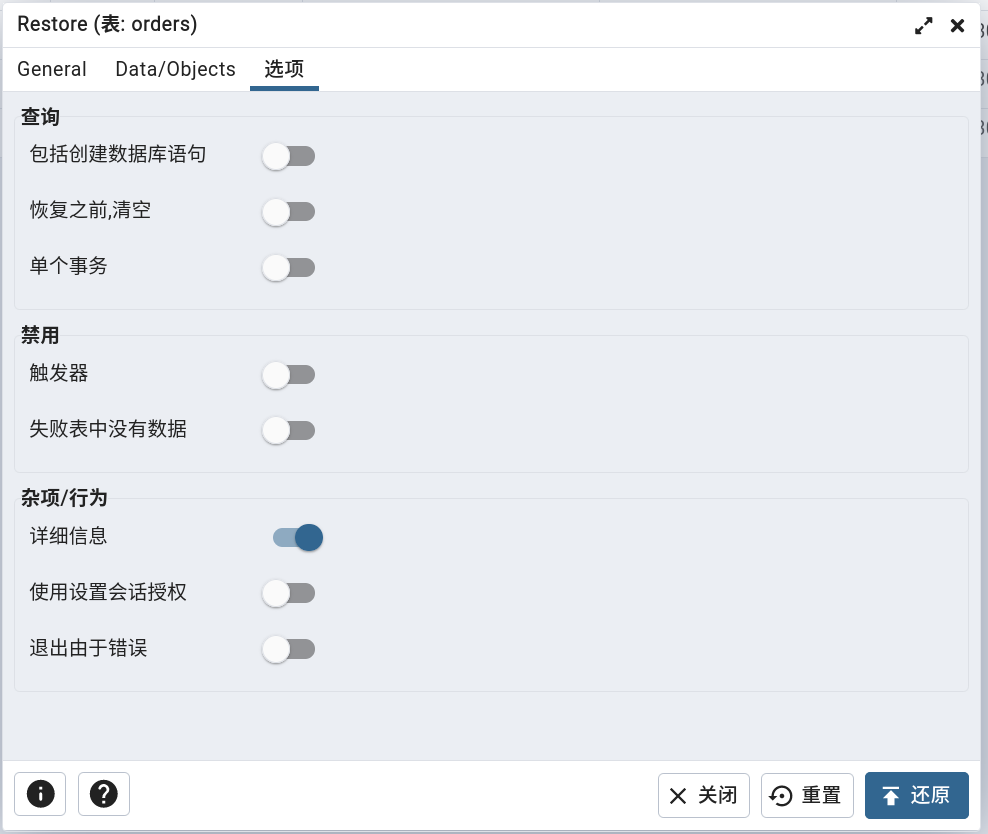 - 注意不能同时开启 “仅数据” 和 “恢复之前清空”,否则会因为 “pg_restore: error: options -c/–clean and -a/–data-only cannot be used together” 报错导致任务执行失败。
2,请求参数:
data={'blobs': True, 'custom': False, 'database': 'test1', 'file': '/order.sql', 'format': 'custom', 'no_of_jobs': '1', 'only_data': True, 'role': 'postgres', 'save_btn_icon': 'upload', 'schemas': ['public'], 'tables': ['orders'], 'verbose': True}
3,pgadmin4数据恢复源码:
@blueprint.route('/job/' , methods=['POST'], endpoint='create_job')
@login_required
def create_restore_job(sid):"""Args:sid: Server IDCreates a new job for restore taskReturns:None"""# 获取请求数据# is_error=False# errmsg=''# data={'blobs': True, 'custom': False, 'database': 'test1', 'file': '/order.sql', 'format': 'custom', 'no_of_jobs': '1', 'only_data': True, 'role': 'postgres', 'save_btn_icon': 'upload', 'schemas': ['public'], 'tables': ['orders'], 'verbose': True}# _file='/var/lib/pgadmin/storage/dangfulin2333_163.com/order.sql'is_error, errmsg, data, _file = _get_create_req_data()if is_error:return errmsg# 获取服务器对象并尝试连接is_error, errmsg, driver, manager, conn, \connected, server = _connect_server(sid)if is_error:return errmsg# 检查是否存在恢复实用程序 pg_restoreutility = manager.utility('restore')ret_val = does_utility_exist(utility)if ret_val:return make_json_response(success=0,errormsg=ret_val)# 设置参数# ['--host', '172.28.79.200', '--port', '5432', '--username', 'postgres', '--no-password', '--role', 'postgres', '--dbname', 'test1', '--data-only', '--jobs', '1', '--verbose', '--schema', 'public', '--table', 'orders', '/var/lib/pgadmin/storage/dangfulin2333_163.com/order.sql']args = _set_args_param_values(data, manager, server, driver, conn, _file)try:# 创建批处理进程p = BatchProcess(desc=RestoreMessage(server.id,data['file'].encode('utf-8') if hasattr(data['file'], 'encode') else data['file'],*args,database=data['database']),cmd=utility, args=args)# 设置环境变量manager.export_password_env(p.id)# Check for connection timeout and if it is greater than 0 then# set the environment variable PGCONNECT_TIMEOUT.if manager.connect_timeout > 0:env = dict()env['PGCONNECT_TIMEOUT'] = str(manager.connect_timeout)p.set_env_variables(server, env=env)else:p.set_env_variables(server)# 启动进程p.start()# 获取作业IDjid = p.idexcept Exception as e:current_app.logger.exception(e)return make_json_response(status=410,success=0,errormsg=str(e))# Return responsereturn make_json_response(data={'job_id': jid, 'desc': p.desc.message, 'Success': 1})
查看恢复任务执行情况:
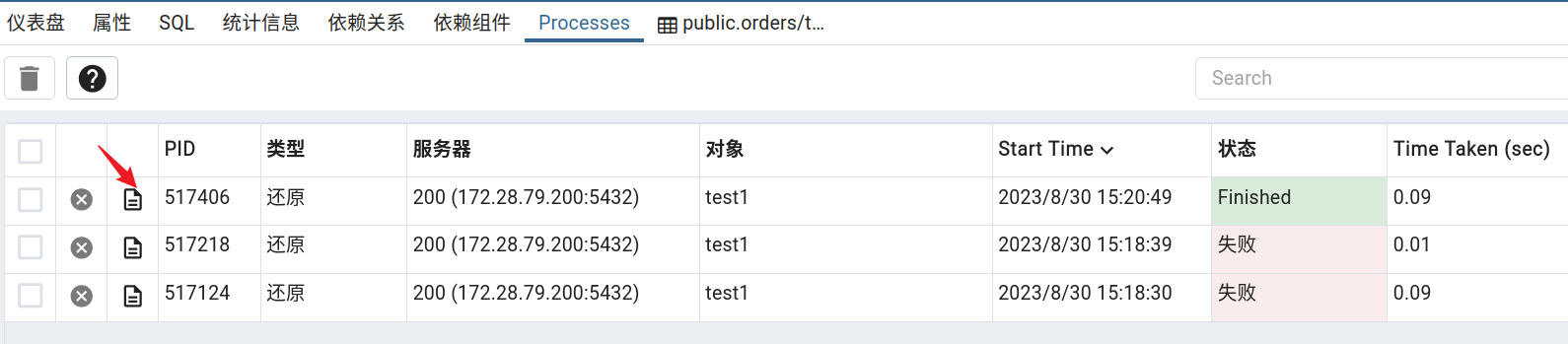
查看恢复任务执行详情:
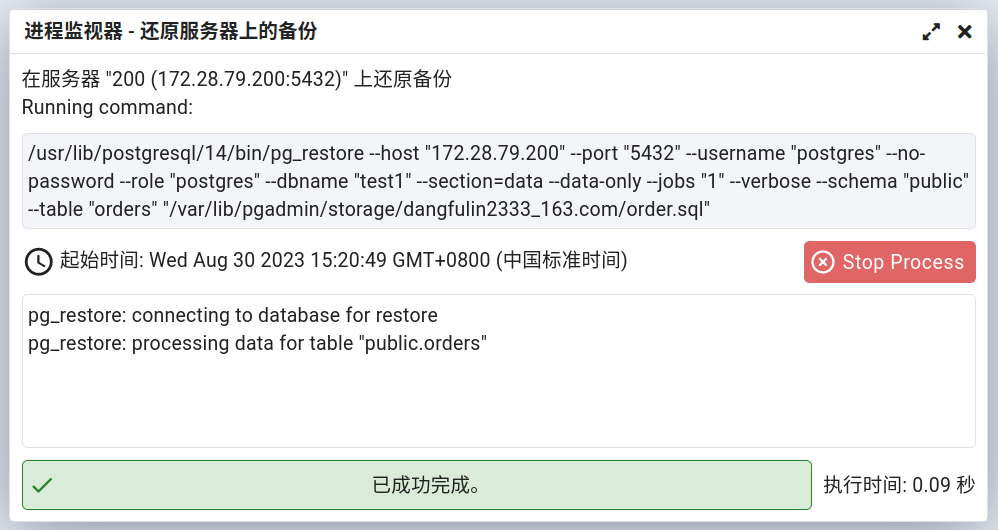
/usr/lib/postgresql/14/bin/pg_restore --host "172.28.79.200" --port "5432" --username "postgres" --no-password --role "postgres" --dbname "test1" --data-only --jobs "1" --verbose --schema "public" --table "orders" "/var/lib/pgadmin/storage/dangfulin2333_163.com/order.sql"
/usr/lib/postgresql/14/bin/pg_restore --host "172.28.79.200" --port "5432" --username "postgres" --no-password --role "postgres" --dbname "test1" --section=data --jobs "1" --verbose "/var/lib/pgadmin/storage/dangfulin2333_163.com/test1db.sql"
2,恢复架构
略
3,恢复数据库
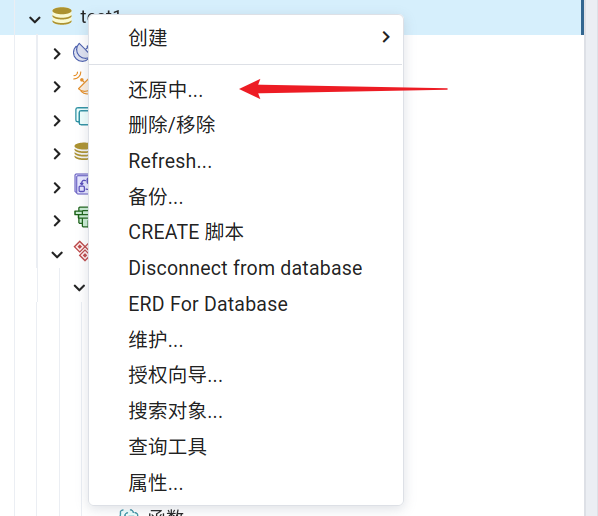
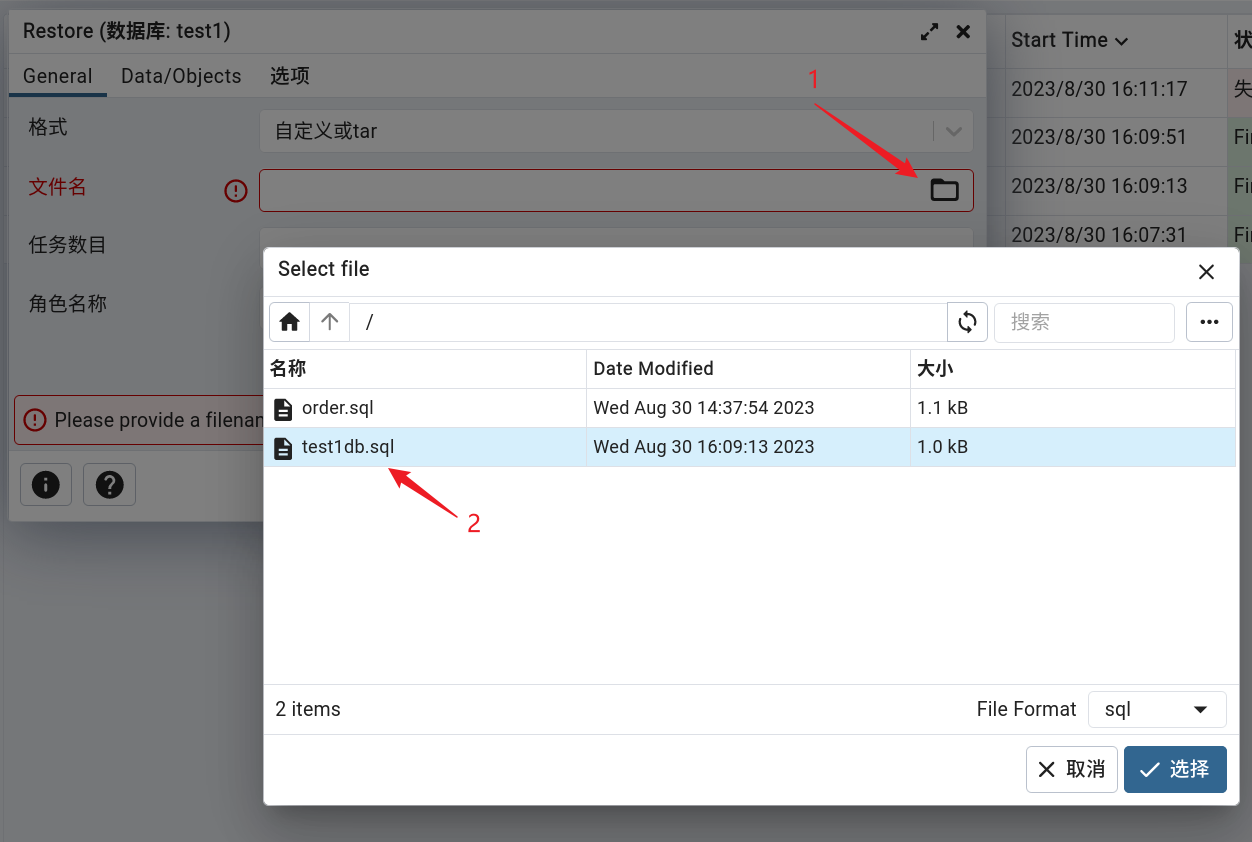
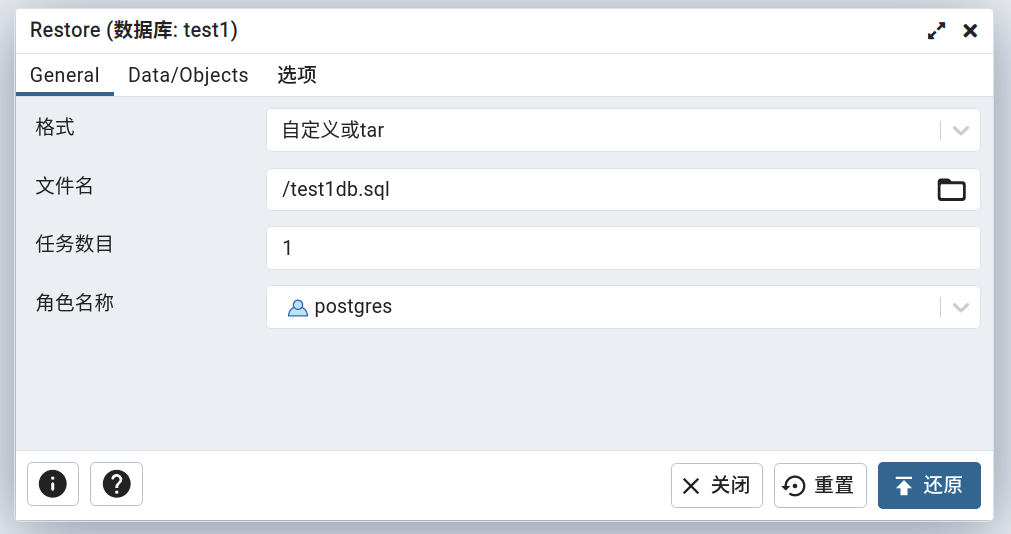
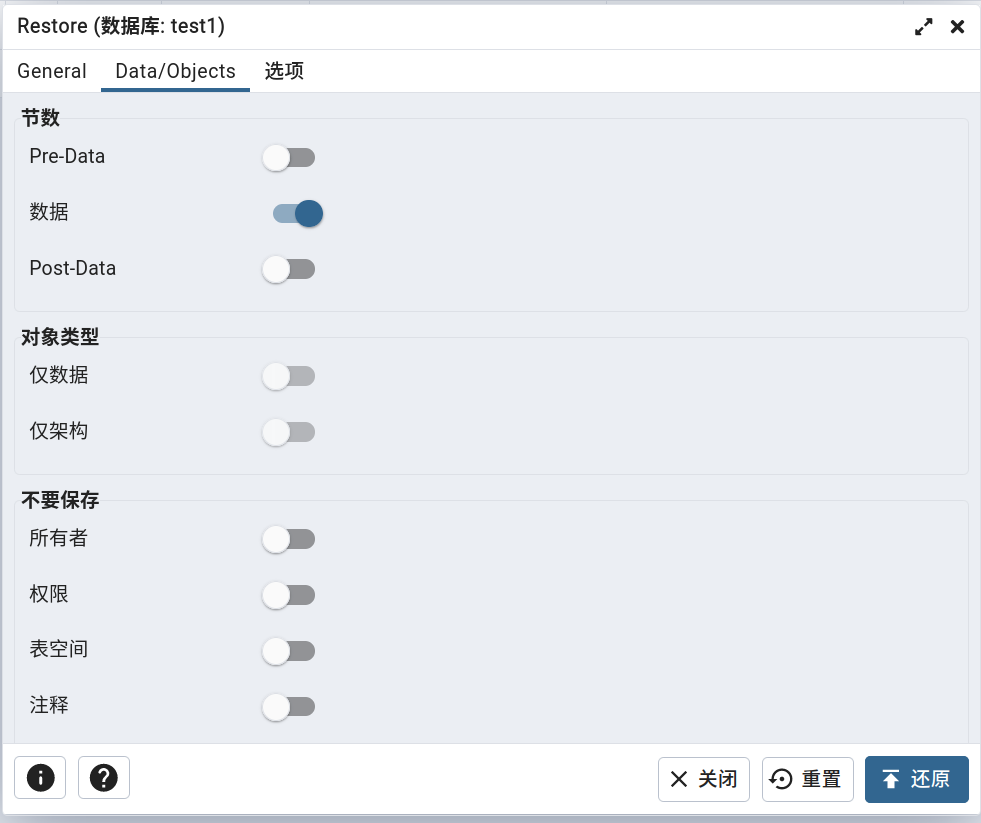
1,打开对话框:
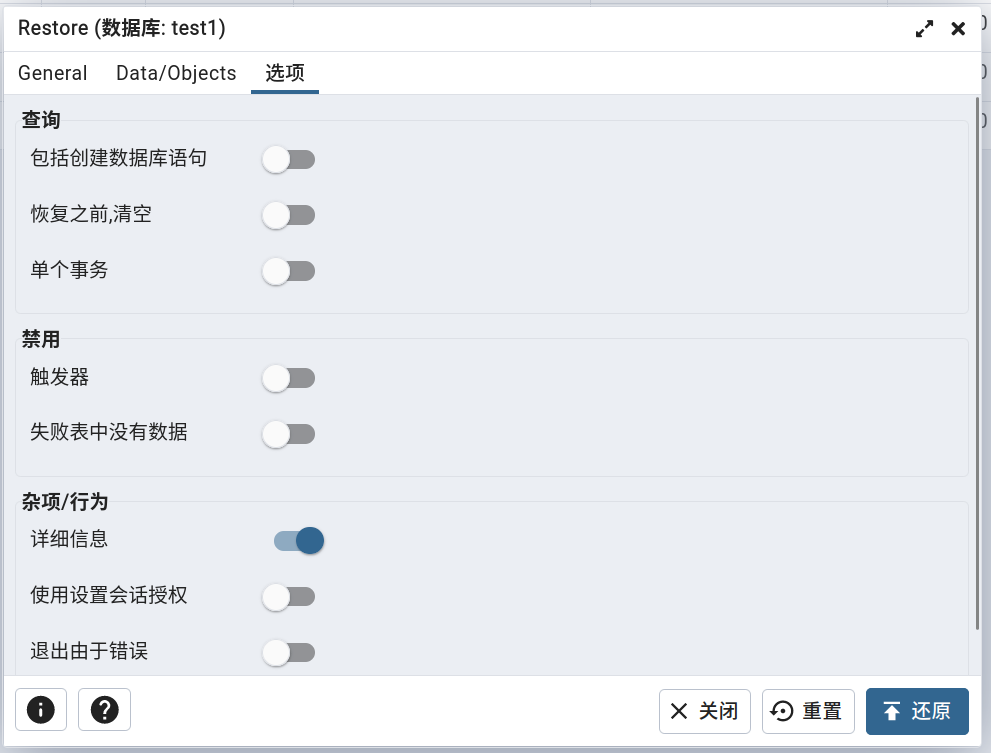
2,请求参数:
data={'blobs': True, 'custom': False, 'data': True, 'database': 'test1', 'file': '/test1db.sql', 'format': 'custom', 'no_of_jobs': '1', 'role': 'postgres', 'save_btn_icon': 'upload', 'verbose': True}
3,pgadmin4数据恢复源码:
@blueprint.route('/job/' , methods=['POST'], endpoint='create_job')
@login_required
def create_restore_job(sid):"""Args:sid: Server IDCreates a new job for restore taskReturns:None"""# 获取请求数据# is_error=False# errmsg=''# data={'blobs': True, 'custom': False, 'data': True, 'database': 'test1', 'file': '/test1db.sql', 'format': 'custom', 'no_of_jobs': '1', 'role': 'postgres', 'save_btn_icon': 'upload', 'verbose': True}# _file='/var/lib/pgadmin/storage/dangfulin2333_163.com/test1db.sql'is_error, errmsg, data, _file = _get_create_req_data()if is_error:return errmsg# 获取服务器对象并尝试连接is_error, errmsg, driver, manager, conn, \connected, server = _connect_server(sid)if is_error:return errmsg# 检查是否存在恢复实用程序 pg_restore# '/usr/lib/postgresql/14/bin/pg_restore'utility = manager.utility('restore')ret_val = does_utility_exist(utility)if ret_val:return make_json_response(success=0,errormsg=ret_val)# 设置参数# ['--host', '172.28.79.200', '--port', '5432', '--username', 'postgres', '--no-password', '--role', 'postgres', '--dbname', 'test1', '--section=data', '--jobs', '1', '--verbose', '/var/lib/pgadmin/storage/dangfulin2333_163.com/test1db.sql']args = _set_args_param_values(data, manager, server, driver, conn, _file)try:# 创建批处理进程p = BatchProcess(desc=RestoreMessage(server.id,data['file'].encode('utf-8') if hasattr(data['file'], 'encode') else data['file'],*args,database=data['database']),cmd=utility, args=args)# 设置环境变量manager.export_password_env(p.id)# Check for connection timeout and if it is greater than 0 then# set the environment variable PGCONNECT_TIMEOUT.if manager.connect_timeout > 0:env = dict()env['PGCONNECT_TIMEOUT'] = str(manager.connect_timeout)p.set_env_variables(server, env=env)else:p.set_env_variables(server)# 启动进程p.start()# 获取作业IDjid = p.idexcept Exception as e:current_app.logger.exception(e)return make_json_response(status=410,success=0,errormsg=str(e))# Return responsereturn make_json_response(data={'job_id': jid, 'desc': p.desc.message, 'Success': 1})
任务执行情况:
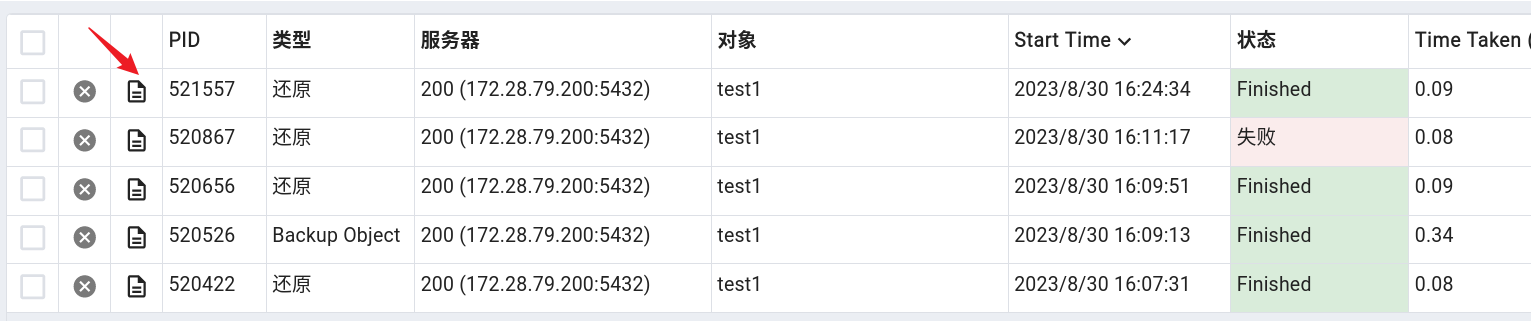 任务执行详情:
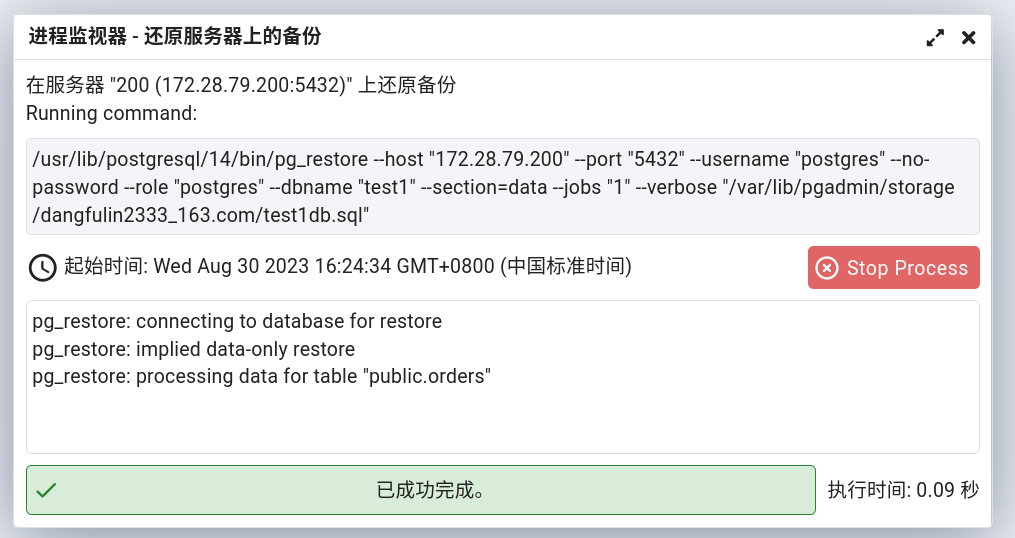
/usr/lib/postgresql/14/bin/pg_restore --host "172.28.79.200" --port "5432" --username "postgres" --no-password --role "postgres" --dbname "test1" --section=data --jobs "1" --verbose "/var/lib/pgadmin/storage/dangfulin2333_163.com/test1db.sql"
4,恢复服务器
略
5,pgadmin4恢复对话框表单数据与 pg_restore 命令参数对应关系
# 恢复数据表
D:\DFL\SOFTWARES\postgresql14\bin\pg_restore.exe --host "172.28.79.200" --port "5432" --username "postgres" --no-password --role "postgres" --dbname "test1" --data-only --create --clean --single-transaction --no-data-for-failed-tables --use-set-session-authorization --exit-on-error --jobs "1" --verbose --schema "public" --table "orders" "C:\\Users\\DFL\\DOCUME~1\\t1.sql"
| 表单项目 | 参数 | 参数使用实例 | 备注 |
|---|---|---|---|
| 文件名 | “C:\Users\DFL\DOCUME~1\t1.sql” | ||
| 格式 | –format | –format=p | 格式项: c——自定义 d——目录 t——Tar |
| 任务数目 | –jobs | –jobs “3” | |
| 角色名称 | –role | –role “postgres” | |
| 节数 -Pre-Data | –section=pre-data | –section=pre-data | 与“对象-仅数据”和“对象-仅架构”互斥 |
| 节数 -数据 | –section=data | –section=data | 与“对象-仅数据”和“对象-仅架构”互斥 |
| 节数 -Post-Data | –section=post-data | –section=post-data | 与“对象-仅数据”和“对象-仅架构”互斥 |
| 对象-仅数据 | –data-only | –data-only | 与下一项互斥 |
| 对象-仅架构 | –schema-only | –schema-only | 与上一项互斥 |
| 对象-Blobs | –blobs | –blobs | 默认开启 |
| 不要保存-所有者 | –no-owner | –no-owner | |
| 不要保存-权限 | –no-privileges | –no-privileges | |
| 不要保存-未记录日志的表数据 | –no-unlogged-table-data | –no-unlogged-table-data | |
| 不要保存-表空间 | –no-tablespaces | –no-tablespaces | |
| 不要保存-注释 | –no-comments | –no-comments | |
| 查询-包括创建数据库语句 | –create | –create | |
| 查询-恢复之前清空 | –clean | –clean | |
| 查询-单个事务 | –single-transaction | –single-transaction | |
| 禁用-触发器 | –disable-triggers | –disable-triggers | 当开启“对象-仅数据”时可选 |
| 禁用-失败表中没有数据 | –no-data-for-failed-tables | –no-data-for-failed-tables | |
| 杂项-详细信息 | –verbose | –verbose | |
| 杂项-使用设置会话授权 | -use-set-session-authorization | -use-set-session-authorization | |
| 杂项-碰到错误时退出 | –exit-on-error | –exit-on-error |
pg_restore
《PostgreSQL 开发指南》第 08 篇 备份与恢复
本文来自互联网用户投稿,文章观点仅代表作者本人,不代表本站立场,不承担相关法律责任。如若转载,请注明出处。 如若内容造成侵权/违法违规/事实不符,请点击【内容举报】进行投诉反馈!