imessages群发,苹果imessages短信,苹果imessages推信,完美实现 - 升级版
一、安装黑苹果系统:
/*我们都知道imessage群发脚本只是代替人工手动操作而已,重点核心在于如何拥有一个廉价的苹果系统能使用,安装的苹果系统能像正品的苹果电脑系统一样可以直接激活imessage、FaceTime、APP Store等应用,可以正常使用苹果系统下的各类应用。 */
1、在Windows系统的电脑上安装黑苹果总结为以下几种方式:
(1)AMD或英特尔架构的真机电脑上通过U盘安装黑苹果(单台电脑 Windows,Mac Os多系统共存)
(2)Widonws下通过镜像恢复软件安装黑苹果(单台电脑 Windows,Mac Os多系统共存)
(3)Widonws系统上的虚拟机安装黑苹果(需要根据CPU、主板、显卡等硬件制作对应的EFI启动文件来安装)
2.黑苹果注入三码,避免封号,解锁iCloud、 FaceTime、iMessage
(1)三码主要影响以下苹果服务和功能:FaceTime、iMessage、iCloud
三码指的是机型序列号(SerialNumber),主板序列号(BoardSerialNumber),通用唯一识别码(UUID) 生成的序列号首先在EveryMac(https://everymac.com/ultimate-mac-lookup/)验证是否符合编码规则。然后还需要到苹果官网(https://checkcoverage.apple.com/?locale=zh_CN)验证序列号的“无效性”,如果EveryMac显示有效,而苹果官网显示无效,同时满足这两个条件,这个序列号就是黑苹果可以使用的。为什么?因为这个序列号并不是不存在(符合编码规则),苹果说无效可能意味着它还未注册,反之,如果苹果官网显示出了正确的查询结果,那么这个序列号属于已注册的白苹果,强烈建议不要使用,大概率会导致AppleID被拉黑。
(2)什么是苹果三码?
苹果的生态是一套完整的闭环,每一个苹果硬件产品都有独一无二的序列号、主板序列号和 UUID,它们都有和机型ID对应的编码规则,这点是非常确定的,所以三码不能胡乱套用,换句话说,不论是本地电脑U盘安装苹果系统、镜像恢复安装苹果系统、Vmware安装苹果系统,你所安装的苹果系统都必须和你当前电脑的机型、CPU架构、主板、显卡等硬件配套,并且与机型 ID 匹配。否则你将无法使用App id激活iMessage、FaceTime、App Store等应用 或 App id登录iMessage应用后提示鉴定错误、激活后闪退、激活imessage后无法发送、发送几封后无法送达等等问题。
(3)解决一些苹果服务(iCloud/App Store/FaceTime/iMessage/随航)不能正常使用方面的坑
1)im群发是不是风控了,无法发送了?
2)安装的怎么发送几封就无法发送了?
3)安装苹果系统的怎么无法登陆app id,使用app id激活imessage就提示鉴定失败?
4)安装苹果系统的怎么发送几封后就全部显示发送失败?
5)安装苹果系统的怎么无法修改三码或五码?
鉴于以上问题,笔者给出肯定的答案,一直是可以发的,鉴于出现以上问题,分析得出:
1)你所安装的黑苹果系统与你的电脑硬件(主板、CPU、显卡等硬件)不符。
2)你的电脑硬件配置上所安装的黑苹果系统与真Mac机型ID不符
3)你所安装的黑苹果系统是否支持NVRAM?
系统是否支持NVRAM,取决于主板。NVRAM在黑苹果中有及其重要的作用,第一,是用于重启后保存与蓝牙、屏幕亮度、系统音量、iMessage、FaceTime等相关参数;第二,Clover和OpenCore需要NVRAM支持才能支持系统启动磁盘设置(例如Bootcamp功能);第三,用于支持NVIDIA Web Driver Manager等相关功能。配置功能完善的NVRAM,会让你的黑苹果系统完善,较白苹果来讲上述功能几乎没有区别。总之一句话,NVRAM 对于苹果服务能否正常工作至关重要。
二、iMessage群发
注意:文中包含的代码、软件、系统、图样等是作为技术研究,请勿作为非法用途,因违反相关规定的,一切后果自负,与作者无关。
1.自动群发是脚本控制iMessage客户端全自动发送(最新版可参考前辈文章: https://www.cnblogs.com/bf66168/)
示例代码:(群发脚本只是代替人工而已,核心在于根据不同电脑的CPU,主板,显卡等硬件制作的和硬件相匹配的MacOS系统、配套工具、串码工具、群发脚本、才能够实现防封ID,无限制,新老ID都可激活使用imessages,FaceTime,有意者可联系.)
set successCount to 0
set errorCount to 0tell application "Messages"with timeout of 8 * 3600 secondsset phoneFilePath to my current_folder_path() & "phoneNumber.txt"set phoneData to read phoneFilePathset phoneEntries to paragraphs of phoneDataset phone_nums to count phoneEntriesrepeat with i from 1 to count phoneEntries-- *******************************************-- 将要发送的短信文本内容-- *******************************************set msgText to (my AppendFace("hello,")) & my AppendFace("下午好啊") &  my AppendFace("张三")set phone to (phoneEntries's item i)'s textset targetService to (1st service whose service type = iMessage)set theBuddy to buddy phone of targetServiceset num to the length of phone-- 如果需要发送AppleID账号设为true 否则设为falseset isEmail to trueif ((num = 11 and (my isSendPhone(phone)) = false) or isEmail) thentry--发送文字内容消息send msgText to theBuddy-- 发送图片内容消息set imageFilePath to my current_folder_path() & "imessages.jpg"send file (POSIX file imageFilePath as string) to theBuddyset logText to phone & " *** " & "1" & " *** " & date string of (current date) & " " & time string of (current date) & " *** " & "发送成功
"---延时一秒,不然取不到已发送的状态--delay (random number from 3 to 5)delay 1--删除多余的消息(*set chatNum to (get count of chat)if (chatNum >50)  thenmy deleteMsg(chatNum)end if*)my WriteLog(logText)my WritePhone(phone)set successCount to successCount + 1 -- 记录成功数on error errorMessage number errorNumberset logText to phone & " *** " & "0" & " *** " & date string of (current date) & " " & time string of (current date) & " *** " & "发送失败
"my WriteLog(logText)log "捕获的异常:" & errorMessage & "异常的编号:" & errorNumberset errorCount to errorCount + 1 -- 记录失败数end tryend ifend repeatset titleStr to "数据总数:" & phone_nums & "个  " & "发送成功:" & successCount & "个 " & "发送失败:" & errorCount & "个"set btns to {"知道了"}display dialog titleStr buttons btns default button 1 --默认选择第1个按钮(按return时就会让弹出框消失)get the button returned of the result -- 弹出框end timeout
end tell# 删除信息
on deleteMsg(maxNum)tell application "Messages" to activatetell application "System Events"tell process "Messages"tell window 1repeat's maxNum times --需要删除的数量delay 0.5click row 1 of table 1 of scroll area 1 of splitter group 1delay 0.2click menu item "删除对话…" of menu "文件" of menu bar item "文件" of menu bar 1 of application process "Messages" of application "System Events"delay 0.2tryclick buttons "删除" of sheet 1end tryend repeatend tellend tellend tell
end deleteMsg-- 拼接表情
on AppendFace(msgText)set face to my RandomFace()set content to face & msgText & "
"
end AppendFace-- 随机表情
on RandomFace()-- 表情数组set faceList to {"🐟", "🦐", "🦀️", "😊", "😂", "😄", "🎆", "🎉", "🍺", "💐", "🌹", "🦈", "🐲", "🐢", "🐳", "🐬", "🐚", "💰", "🎁"}set face to item (random number from 1 to count faceList) of faceListreturn face
end RandomFace-- 判断是否已经发送过该手机号
--     the_phone(手机号码)
on isSendPhone(the_phone)set num to the length of the_phoneif (num = 11) thenset fileName to date string of (current date)set logFilePath to my current_folder_path() & "send/" & fileName & ".txt"set this_file to (POSIX file logFilePath as string)set this_story to the_phone & "
"tryset fp to open for access this_fileset myText to read fpif (myText does not contain the_phone) thenreturn falseelsereturn trueend ifon errorreturn falseend tryend if
end isSendPhone-- 记录有效手机号
--     the_phone(手机号)
on WritePhone(the_phone)set num to the length of the_phoneif (num = 11) thenset fileName to date string of (current date)set logFilePath to my current_folder_path() & "send/" & fileName & ".txt"set this_file to (POSIX file logFilePath as string)set this_story to the_phone & "
"tryset fp to open for access this_fileset myText to read fpif (myText does not contain the_phone) thenmy write_to_file(this_story, this_file, true, true)end ifon errormy write_to_file(this_story, this_file, true, true)end tryend if
end WritePhone-- 日志写入
--     the_text(日志内容)
on WriteLog(the_text)set fileName to date string of (current date)set logFilePath to my current_folder_path() & "log/" & fileName & ".txt"set this_file to (POSIX file logFilePath as string)my write_to_file(the_text, this_file, true, false)
end WriteLog-- 写入文件
--    this_data(文本内容,string)
--    target_file(文件路径,string)
--    append_data(是否拼接,boolean)
--    append_end(是否从后面拼接,boolean)
on write_to_file(this_data, target_file, append_data, append_end)tryset the target_file to the target_file as textset the open_target_file to ¬open for access file target_file with write permissionif append_data is false thenset eof of the open_target_file to 0write this_data to the open_target_file starting at eofelse if append_end is false then-- 1、读取原来内容;-- 2、清空文件,写入新内容;-- 3、在新内容后面拼接原始内容tryset fp to open for access target_fileset myText to read fpset eof of the open_target_file to 0write this_data to the open_target_file starting at eofwrite myText to the open_target_file starting at eofon errorwrite this_data to the open_target_file starting at eofend tryelsewrite this_data to the open_target_file starting at eofend ifclose access the open_target_filereturn target_fileon errortryclose access file target_fileend tryreturn falseend try
end write_to_file-- 获取当前文件的父文件夹路径
on current_folder_path()set UnixPath to POSIX path of ((path to me as text) & "::")return UnixPath
end current_folder_path
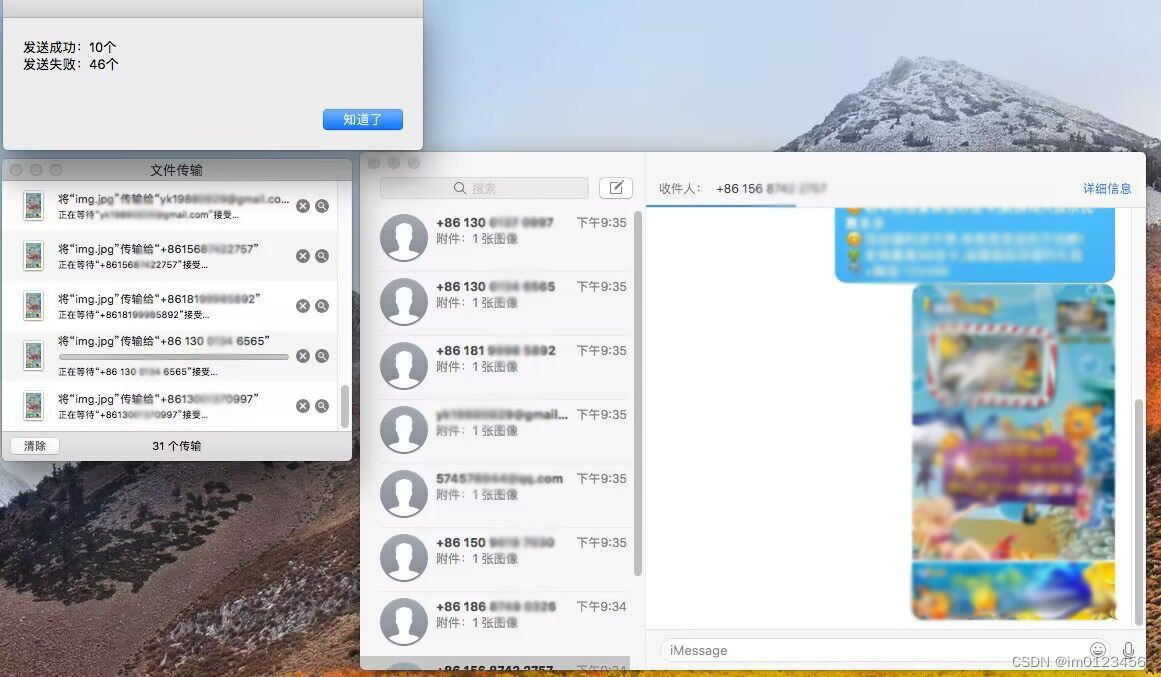
2.单台电脑部署多个Mac os苹果系统同时群发:根据上面的代码自行更改更加强大的全自动发送脚本,改良后如下:(发送的三种模式:1.纯文字内容,2.纯图片内容,3.文字+图片内容组合)
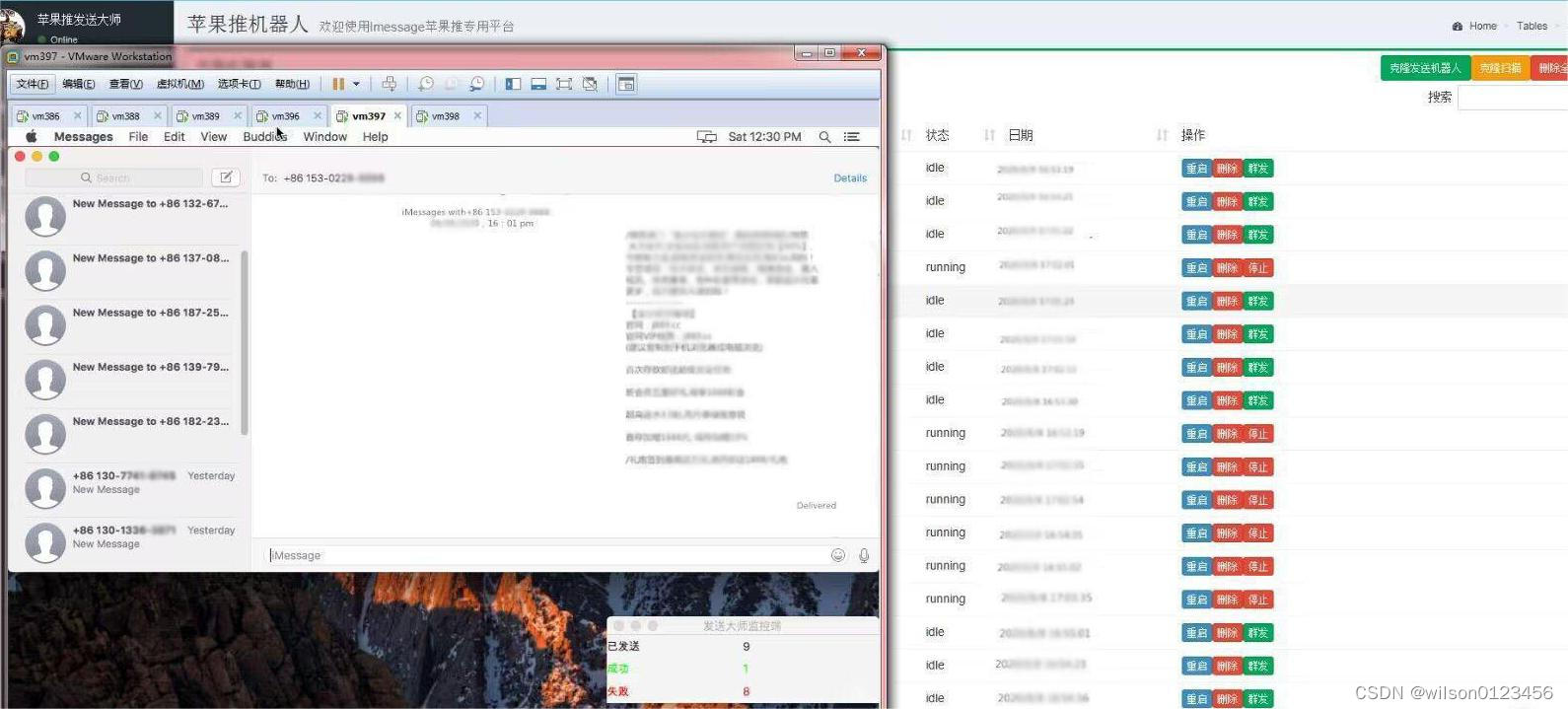
3.群控系统全自动控制多个mac os系统,让所有苹果系统一键执行全自动更换ID、设备串码、启动群发、停止群发等操作:(发送的三种模式:1.纯文字内容,2.纯图片内容,3.文字+图片内容组合)
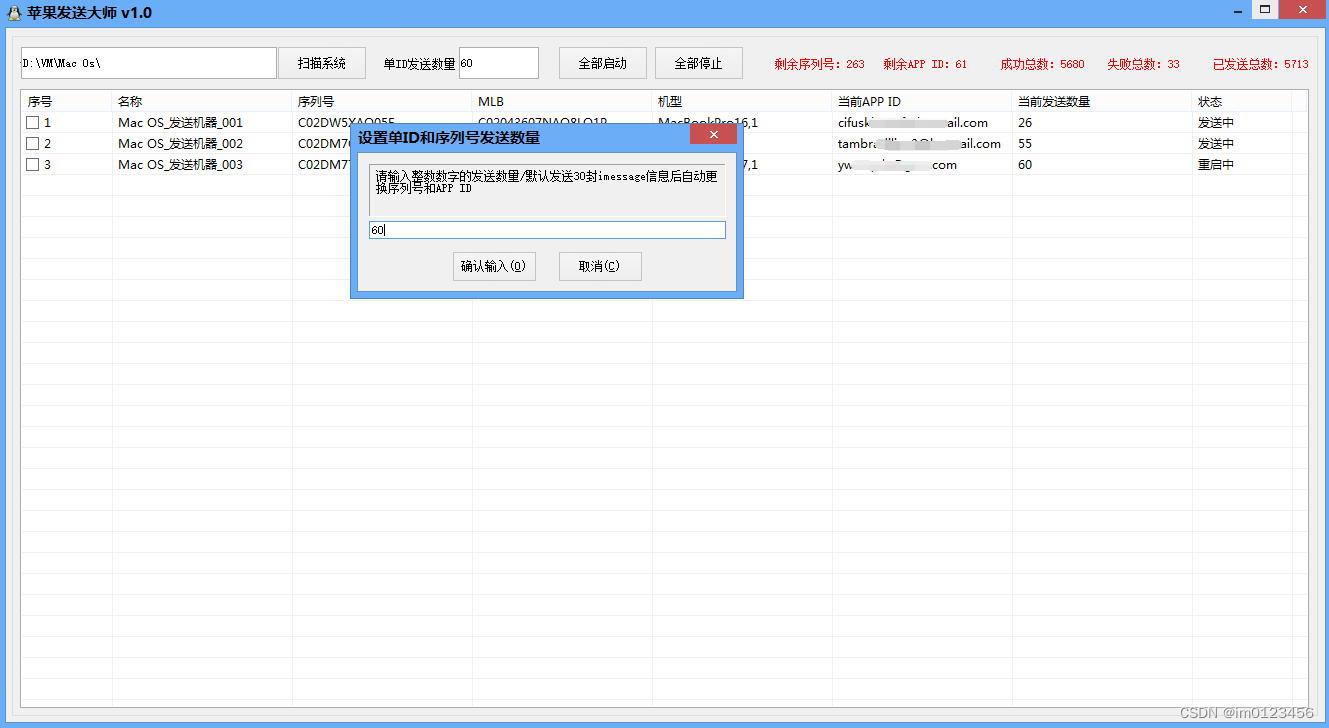
4.电脑端新款升级版群控软件(自动扫描部署的所有Mac OS系统,自动给全部或指定系统更换序列号、更换app id、更换后自动启动发送)
三、电脑上安装的黑苹果系统(Mac os)imessages群发信息注意事项:
1.黑苹果Mac Os系统注入三码或五码,App Store iMessages 和FaceTime 可用
/* 如果登陆app store过程一直在转圈的情况,或imessages一直无法激活的原因是:app store 会检查机器的smbios 信息,如果不是 mac 机器,就不让登录。*/
(1) Clover configurator 或OpenCore制作引导EFI文件后。正确的注入三码或五码。(黑苹果正确的注入了三码或五码,三码或五码不能胡乱套用,必须和机型ID匹配,还要与你的主板,显卡等硬件信息匹配.)
(2)记录良好的 Apple ID:App Store 和 iMessage 没有黑历史;账号注册及使用时间越长越好;账号下绑定了多个苹果设备并且有 App Store 的消费记录就更好了。有了这种 Apple ID,三码问题和各类苹果服务不能用的情况基本不会在你这里出现。
2.黑苹果系统洗白苹果后全自动群发方案(Imessages数据检测脚本,全自动群发imessages脚本)
(1)苹果手机自动群发imessages、单电脑群控全部手机群发,部署方案可参考博文:https://www.cnblogs.com/bf66168/
(2)对于苹果系统发送多少被限制,被风控,ID被冻,设备串码(序列号,设备串码等)被apple拉黑;无法发送及送达,通过指定的工具正确的将三码或五码注入到系统来解封ID被封或无法发送等问题
(3)电脑端Mac Os群发Imessages,全自动检测数据脚本,全自动群发脚本,PC端全套无限群发imessages系统,新老ID皆可激活使用imessages,有意可联系全套远程安装部署。
本文来自互联网用户投稿,文章观点仅代表作者本人,不代表本站立场,不承担相关法律责任。如若转载,请注明出处。 如若内容造成侵权/违法违规/事实不符,请点击【内容举报】进行投诉反馈!