Unity解决:GIS(GPS的经纬度坐标)定位系统坐标转unity坐标(世界坐标)
目录
一、前言
二、功能实现
三、测试
四、备注
如果要实现该效果的demo,请联系作者
一、前言
最近项目中用到了第三方的定位系统,有的是使用GPS定位、有的是使用UWB定位。第三方的定位系统把他们的定位信息通过网络发送给Unity,在Unity内实时显示人/设备的移动。因为第三方可能不是同一家厂商,他们的定位坐标系跟Unity也不一致,为了能够灵活的接入第三方定位系统,做了下面的工具。(目前使用的范围只限于二维平面坐标)
二、功能实现
要实现坐标系统的转换,我们需要知道的前提是两个坐标系的比例、旋转角度、坐标原点的偏移。计算上述三个参数、我们需要知道至少两个点分别在两个坐标系中的坐标,在Unity中的坐标我们可以直接使用transform.position就可以了,在非Unity坐标系中位置我们需要跟厂商要同样点在他们坐标系中的位置。
using UnityEngine;
public class CoordinateAnchor : MonoBehaviour
{/// /// 在非unity坐标系中的x轴坐标值/// public double AssociativeX;/// /// 在非unity坐标系中的y轴坐标值/// public double AssociativeY;
}
using UnityEngine;
///
/// 平面坐标坐标系转换工具,把非unity的坐标转换成unity的世界坐标
/// 适用于非unity坐标系的转换包括(位移、旋转、缩放(x与y轴等比例))
/// 经纬度转换也可以,只是精度不高(高纬度地区与低纬度地区 1纬度代表距离不一样)
///
public class CoordinateConversionManager : MonoBehaviour
{private CoordinateAnchor point0;private CoordinateAnchor point1;private Vector3 point0InUnity;private Vector3 point1InUnity;private double scale;//两个坐标系的缩放比()private float angle;//非unity坐标系的旋转角度(度)private float xTran;//非unity坐标系x轴相对位移private float yTran;//非unity坐标系y轴相对位移private void Reset(){if (this.transform.childCount > 0) return;//创建控制点for (var i = 0; i < 2; i++){var obj = new GameObject("point_" + i);obj.AddComponent();obj.transform.parent = this.transform;}}private void Start(){var child0 = this.transform.GetChild(0);if (child0 != null){point0 = child0.GetComponent();point0InUnity = child0.transform.position;}var child1 = this.transform.GetChild(1);if (child1 != null){point1 = child1.GetComponent();point1InUnity = child1.transform.position;}Vector2 v0 = new Vector2(point0InUnity.x - point1InUnity.x, point0InUnity.z - point1InUnity.z);Vector2 v1 = new Vector2((float)(point0.AssociativeX - point1.AssociativeX), (float)(point0.AssociativeY - point1.AssociativeY));//计算比例关系scale = v0.magnitude / v1.magnitude;//计算旋转关系angle = Vector2.SignedAngle(v1, v0);//计算位移关系xTran = GetOffset((float)point0.AssociativeX, (float)point0.AssociativeY).x - point0InUnity.x;yTran = GetOffset((float)point0.AssociativeX, (float)point0.AssociativeY).z - point0InUnity.z;}/// /// 计算两个坐标系的偏移(非unity坐标系原点在unity世界坐标系中的位置)/// /// /// /// /// 获取其他坐标系坐标点在unity坐标系中的坐标/// /// /// /// 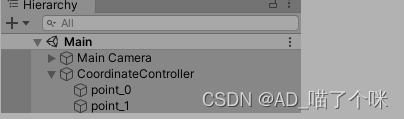
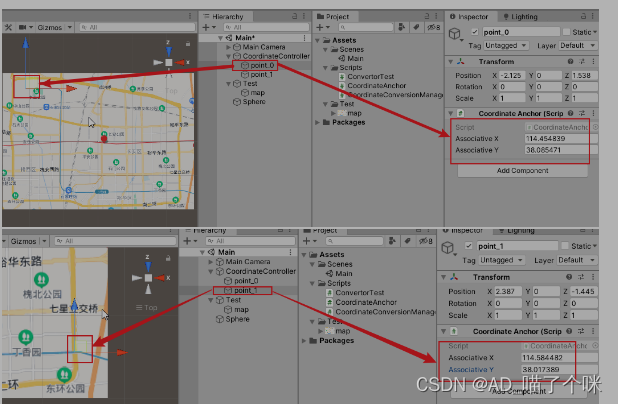
在unity的hierarchy窗口中创建一个空物体,添加上我们的CoordinateConversionManager 脚本,它会自动生成两个带有CoordinateAnchor组件的子物体。我们在这两个子物体上配置好第三方给的坐标,然后再把这个子物体移动到对应位置即可。
三、测试
这套方案可以转换经纬度,但是因为纬度与经度不一样,纬度越高1纬度代表的距离越短。但是为了测试,我这次还是以经纬度为例。首先我们先从百度地图上截取一张图片放入Unity,并把它的格式设为UI,然后添加到场景中。
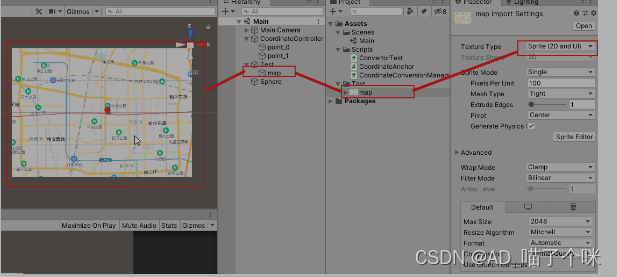
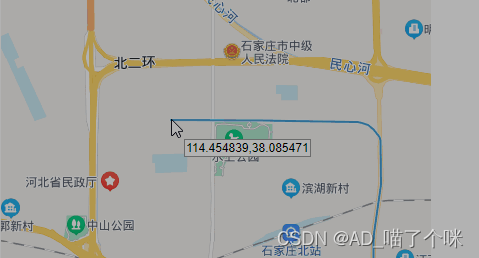
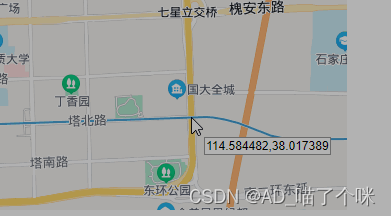
接下来我们配置coordinateController下面的两个锚点。打开百度地图的拾取坐标系统界面(网页地址),在这个网页中找两个对角线方向容易识别的点,这里我选择的是左上方地铁的起始位置和右下方地铁和东二环的交汇位置,然后分别记录他们的经纬度再填入锚点中。
然后再在场景中添加一个sphere,在它上面新建一个脚本。
using UnityEngine;
public class ConvertorTest : MonoBehaviour
{public CoordinateConversionManager convertor;public float x;public float y;private void Update(){transform.localPosition = convertor.GetUnityPosition(x, y);}
}
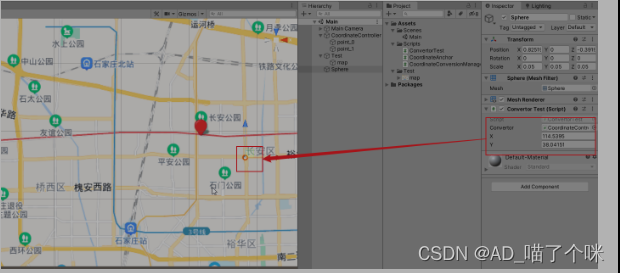
填入一个测试用的经纬度,然后运行Unity,小球就会移动到你输入的经纬度位置,可以看出小球大致在我们输入的经纬度位置。
四、备注
目前这个工具只能做平面二维坐标系统的转换、并且两个坐标系的x轴与y轴的比例都是相同的才行。如果要实现不同比例的换算我们还需要知道更多的位置点对应关系才能解出。
还有一个使用限制条件,第三方的坐标轴也需要是左手坐标系(目前已经完成2维GIS坐标转unity3维坐标)。
如果要实现该效果的demo,请联系作者
本文来自互联网用户投稿,文章观点仅代表作者本人,不代表本站立场,不承担相关法律责任。如若转载,请注明出处。 如若内容造成侵权/违法违规/事实不符,请点击【内容举报】进行投诉反馈!